Qiling Partition Master vs. DiskGenius: Differences and Which Is Better
What Is Qiling Partition Master?
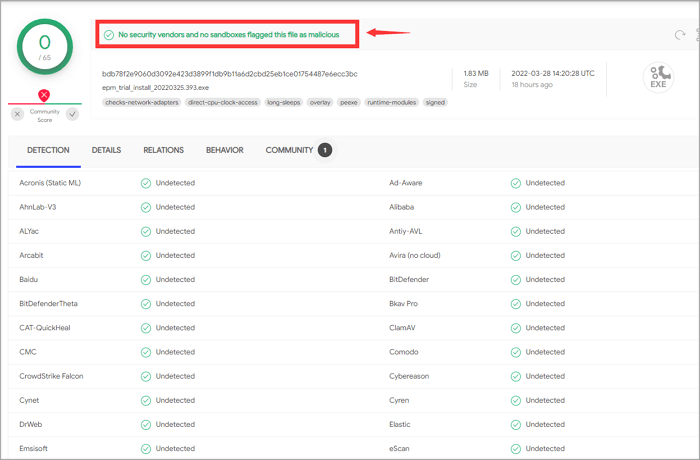
Qiling Partition Master is a professional disk manager that allows users to partition their hard drive and free up disk space by taking partition functions to the extreme. Despite recent rumors, the software is safe to use, as the Qiling team has tested it and confirmed that it does not contain malware, according to various malware detection programs.
What Does Qiling Partition Master Do?
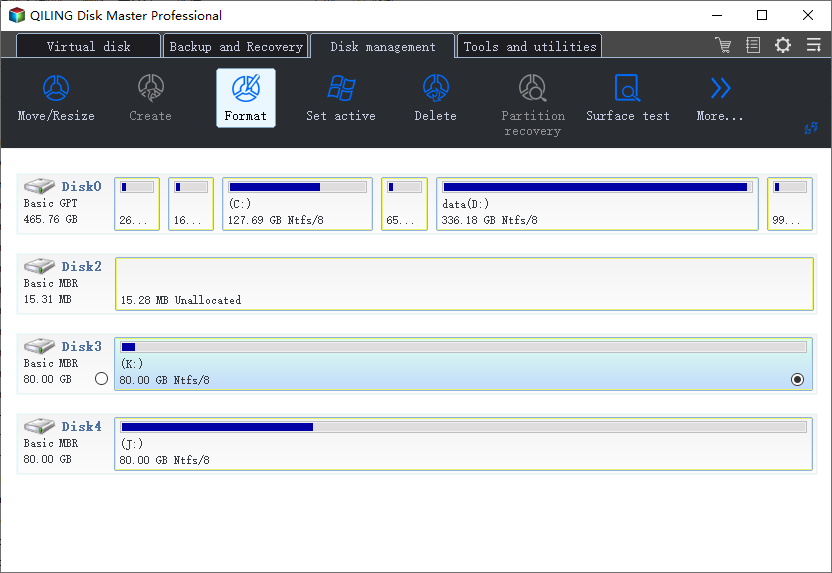
Basic Disk Management allows for various operations on disks, including resizing, cloning, creating, formatting, deleting, extending, shrinking partitions, and migrating an operating system from a Hard Disk Drive (HDD) to a Solid State Drive (S.S.D.).
Convert Disk Without Data Loss:
- Change file system from FAT32 to NTFS.
- Convert MBR to G.P.T. for Windows 11.
- Convert dynamic to basic Disk.
- Convert primary to logical partition.
Download button:
Install size: 1.83MB.
Downloading size: 67.60 MB
What Is DiskGenius?
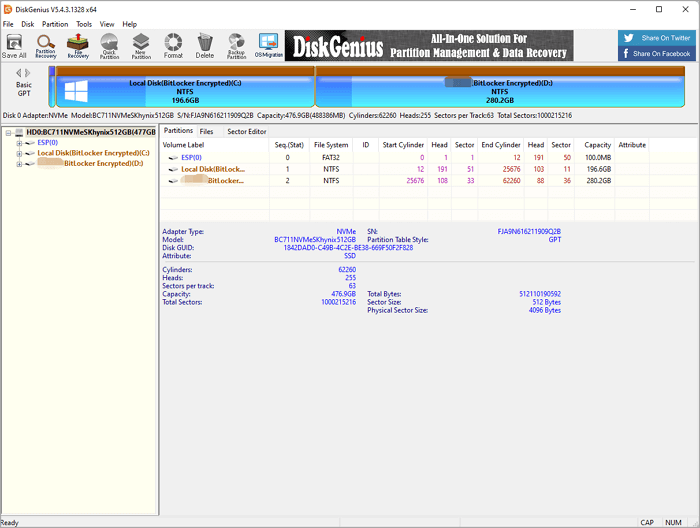
DiskGenius is all-Aioseo is a comprehensive software that offers a range of disk solutions, including data recovery, partition management, backup and restore, and more, making it a go-to tool for users who need to tackle multiple disk-related tasks in one place.
How Good Is DiskGenius?
This software comes with four stunning modes:
Data Recovery:This software can recover data in various situations, such as formatting, unexpected deletion, RAW drive, OS crash, and more, and its data recovery function helps to retrieve data quickly in cases of partition loss, virus attacks, unreadable disks, and human errors.
Partition Management:This partition manager supports Windows PCs and servers, allowing you to resize, create, format, hide, and clone partitions, as well as manage disk space with disk/partition conversion and cloning capabilities.
System and Data Backup:DiskGenius supports system and partition protection by creating an image backup, safeguarding your system and data against any potential threats.
Disk Utilities:A toolkit with various features is available, including tools to repair bad sectors, wipe a hard drive, permanently delete files, and view S.M.A.R.T. information, among others.
DiskGenius is a comprehensive program that fully manages and optimizes hard drives and partitions, serving as a one-stop solution for all disk-related needs.
Download page: https://diskgenius.com/download.php
Download size: 67.0 MB
The Comparison of Disk Management Functions
Both software unveiled powerful partition features, so the "VS" point will follow the differences in disk management. The comparison will focus on which tool performs better in managing and organizing disk space.
1. Manage Disk
|
Features |
Qiling Partition Master |
DiskGenius |
|---|---|---|
|
Full Disk Adjustment |
√ |
× |
|
Delete All Partitions |
√ |
√ |
|
Clone Disk |
√ |
√ |
|
Erase/Wipe Hard Drive |
√ |
√ |
|
Clear Reserved Sectors |
× |
√ |
|
Rebuild MBR |
√ |
√ |
|
Initialize MBR/GPT |
√ |
× |
|
Convert to MBR/GPT |
√ |
√ |
|
Repair RAID-5 |
√ |
× |
|
Convert to Dynamic Disk |
√ |
× |
|
Convert to Basic Disk |
√ |
√ |
|
Change MBR Signature |
× |
√ |
|
Change Disk to GUID |
× |
√ |
2. Manage Partitions
|
Features |
Qiling Partition Master |
DiskGenius |
|---|---|---|
|
Create Partition |
√ |
√ |
|
Create ESP (EFI system partition) |
× |
√ |
|
Resize/Move Partition |
√ |
√ |
|
Clone Partition |
√ |
√ |
|
Split Partition |
√ |
√ |
|
Allocate Space from Partition |
√ |
× |
|
Merge Adjacent/Non-adjacent Partition |
√ |
× |
|
Delete Partition |
√ |
√ |
|
Format Partition |
√ |
√ |
|
Change Cluster Size |
√ |
× |
|
Erase Partition |
√ |
× |
|
Erase Free Space |
× |
√ |
|
Hide/Unhide Partition |
√ |
√ |
3. Partition Converter
|
Features |
Qiling Partition Master |
DiskGenius |
|---|---|---|
|
Convert to Basic Partition |
√ |
√ |
|
Convert to Logical Partition |
√ |
√ |
|
Set to Active Partition |
√ |
√ |
|
Set to Inactive Partition |
× |
√ |
|
Convert to NTFS/FAT32 Partition |
√ |
× |
4. Disk Repair and Other Test
|
Features |
Qiling Partition Master |
DiskGenius |
|---|---|---|
|
View S.M.A.R.T Information |
× |
√ |
|
Surface Test |
√ |
× |
|
Repair Disk Bad Sectors |
× |
√ |
|
Reset Bad Sector Records |
× |
√ |
|
Trim Optimization |
× |
√ |
|
4K Alignment |
√ |
× |
|
Eject Removable Hard Disk |
× |
√ |
|
Change Device State |
× |
√ |
|
Convert Boot Mode |
× |
√ |
|
Disk Properties |
√ |
√ |
5. Other Partition Check Functions
|
Features |
Qiling Partition Master |
DiskGenius |
|---|---|---|
|
Change Drive Letter |
√ |
√ |
|
Check File System |
√ |
× |
|
Change Volume Serial Number |
× |
√ |
|
Partition Surface Test |
√ |
× |
|
View Partition Properties |
√ |
√ |
6. Advanced Features
|
Features |
Qiling Partition Master |
DiskGenius |
|---|---|---|
|
Create WinPE Bootable Disk |
√ |
√ |
|
Partition Recovery |
√ |
√ |
|
Migrate OS |
√ |
√ |
|
Backup and Restore Partition Table |
× |
√ |
|
1 Click Partition |
√ |
√ |
|
Support Bitlocker Partition |
√ |
√ |
|
Recover Lost Files |
× |
√ |
|
Smart Partition Adjustment |
√ |
× |
|
New Disk Wizard |
√ |
× |
7. Manage Dynamic Disk
|
Features |
Qiling Partition Master |
DiskGenius |
|---|---|---|
|
Create Volume |
√ |
× |
|
Delete Volume |
√ |
× |
|
Format Volume |
√ |
√ |
|
Resize & Adjust Volume Size |
√ |
× |
|
Split Volume |
× |
√ |
|
Clone Volume |
√ |
√ |
|
Check Volume File |
√ |
√ |
|
Change Volume Label |
√ |
√ |
|
Modify Volume Letter |
√ |
× |
8. Virtual Disk
|
Features |
Qiling Partition Master |
DiskGenius |
|---|---|---|
|
Create New Virtual Disk File |
× |
√ |
|
Open Virtual Disk File |
× |
√ |
|
Construct Virtual RAID |
× |
√ |
|
Back Up Partition to Image File |
× |
√ |
|
Restore Partition from Image File |
× |
√ |
Price - Which Plan Is Suitable for You
DiskGenius contains three editions - Free, Standard, and Professional.
Edition page: https://diskgenius.com/editions.php
For average users who only need basic partition management, the free edition is sufficient. However, if you require advanced features like cloning, OS migration, or copying disks/partitions, you should consider the standard or professional version.
| Plan |
DiskGenius Standard |
DiskGenius Professional |
|---|---|---|
|
Buy Now |
$69.90 |
$99.90 |
Purchase Plan of Qiling Partition Master
The free edition of Qiling is suitable for essential partition management on Windows 11, 10, 8, 7, Vista, XP, but if you need features like cloning, partition recovery, or OS migration, the pro version is recommended. For enterprise users, contact Qiling's support team at support@idiskhome.com.
| Plan |
Qiling Partition Master Pro |
Qiling Partition Master Enterprise |
|---|---|---|
|
Choose Your Plan |
$19.95/Monthly $49.95/Yearly $69.95/Lifetime |
Server: $159/1 - Year $199/2 - Year $259/Lifetime Technician: $599/1 - Year $699/2 - Year $799/Lifetime |
Service Technology
| Category |
Qiling Support Team |
DiskGenius Support Team |
|---|---|---|
|
|
Email Support: support@idiskhome.com Contact Support: https://www.idiskhome.com/main/contact_us.shtml |
Product Support: support@idiskhome.com |
|
Support Document |
Self-reliance support: https://www.idiskhome.com/main/support.shtml |
https://diskgenius.com/support.php |
Which Software to Choose?
To save money on buying a pro version, select Qiling Partition Master.
- Both software, accessible using the basic partition management, are workable. You can download the free version of either one you like.
- Entirely disk converter - Choose Qiling Partition Master.
- To manage virtual Disk - Pick DiskGenius.
- To repair disk sectors - DiskGenius is better.
- To manage your disk space effectively, you can download Qiling Partition Master, which allows for intelligent disk management, such as adjusting the C drive with just one click and extending space from a secondary disk.
Related Articles
- How to Fix Extend Volume Greyed Out in Windows 11?
- 3 Ways to Fix Convert to Dynamic Disk Greyed Out
- 2023 Qiling Partition Master Crack + Serial Key Free Download [New]
- Format to FAT32 for USB or External Hard Drive in Windows 10
- How to Install Windows 11/10 on External Hard Drive [2 Ways]
- Fix 'Can't Format USB Flash Drive' Error on Windows 11/10 [Complete Guide]
- 3 Ways to Combine or Merge Partitions in Windows Server 2022/2019/2016
- How to Download Partition Assistant for Server with License Key to Manage Disks [2022 New]
Products
Articles & Tutorials
- Data Recovery
- Data Backup
- File Recovery
- File Backup
- System Backup and Restore
- Disk and Partition Clone
- Technical articles
- Mobile articles
- Disk Master Help
- Windows Data Recovery Tutorials
- Windows Secure Delete Tutorials
- Windows Partition Management Tutorials
- Windows File Backup and Restore Tutorials
- Windows System Backup and Restore Tutorials
- Windows Disk Backup and Restore Tutorials
- Windows Clone Tutorials