Resize EFI System Partition When Windows 11 Update Fails
The EFI System Partition, also called ESP, stores boot files used by UEFI-based Windows PCs. If this partition is too small or nearly full, a Windows 11 update may fail, sometimes with an error such as 0x800f0922.
Because the EFI partition is part of the boot process, do not delete or format it. A safer plan is to back up first, then extend or clean the partition carefully.
Why the EFI System Partition Matters
Windows uses the EFI partition to load boot managers and update boot-related files. During a feature or security update, Windows may need extra space in this partition. If there is not enough room, the update can stop before it finishes.
Before Resizing the EFI Partition
- Create a system backup first.
- Check whether the disk uses GPT and UEFI boot.
- Do not assign random drive letters to the EFI partition unless you know why.
- Keep the computer plugged in during partition changes.
Resize EFI Partition with Qiling Partition Manager
Qiling Partition Manager can help resize partitions with a visual interface. It is easier than command-line tools when you need to move space from a nearby partition to the EFI System Partition.
Step 1. Open Qiling Partition Manager and locate the GPT system disk that contains Windows 11. The EFI System Partition is usually a small FAT32 partition marked as EFI, System, or ESP.
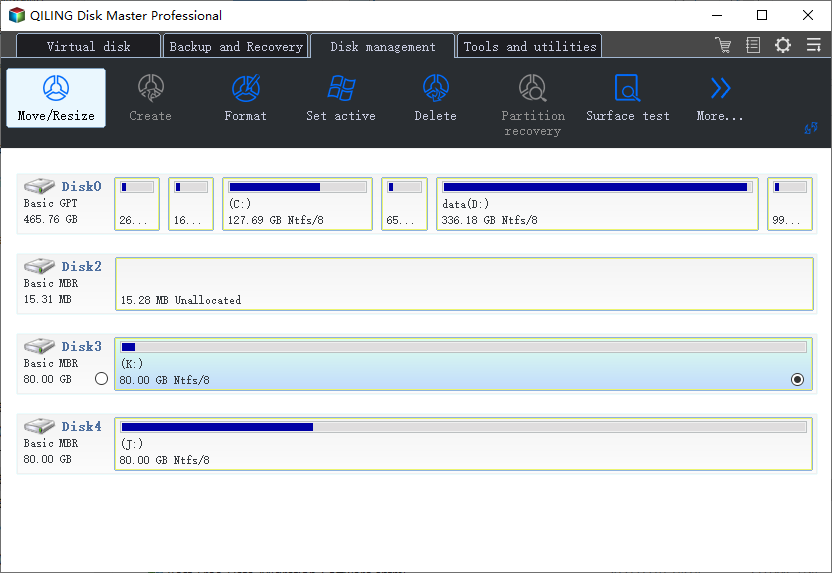
Step 2. Check the partition next to the EFI partition. To extend the EFI partition, you usually need unallocated space directly beside it. If there is no adjacent unallocated space, resize or move the nearby partition first.
Step 3. Choose the nearby partition, reduce its size slightly, and move it if needed so the unallocated space sits next to the EFI System Partition.
Step 4. Choose the EFI System Partition and extend it into the adjacent unallocated space. Keep its file system as FAT32, and do not format, delete, or convert this partition.
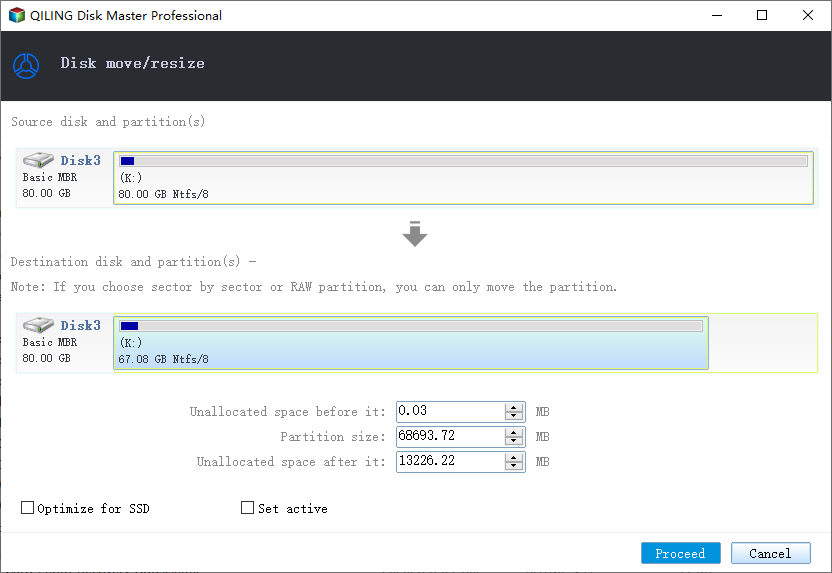
Step 5. Review the pending operations in the preview list. If the order is correct, click Proceed and keep the computer powered on. Restart the PC if the software asks for it.
Step 6. After Windows starts again, run Windows Update once more. If the update still fails, check free space on C drive and review other update errors before changing the EFI partition again.
What If You Cannot Extend It?
If the EFI partition cannot be expanded because of disk layout limits, clean unnecessary boot entries only if you understand them, or create a full backup and ask a technician to handle the boot partition. For general partition work, see free disk partition software for Windows.
Conclusion
An EFI partition space problem is fixable, but it should be handled carefully. Back up the system, avoid formatting the partition, and use a reliable partition manager when you need to resize it.
Related Articles
- Backup Before Windows 11 25H2 Update
- Windows 11 Update Not Enough Space
- 7 Best Free Disk Partition Software Tools for Windows
Products
Articles & Tutorials
- Data Recovery
- Data Backup
- File Recovery
- File Backup
- System Backup and Restore
- Disk and Partition Clone
- Technical articles
- Mobile articles
- Disk Master Help
- Windows Data Recovery Tutorials
- Windows Secure Delete Tutorials
- Windows Partition Management Tutorials
- Windows File Backup and Restore Tutorials
- Windows System Backup and Restore Tutorials
- Windows Disk Backup and Restore Tutorials
- Windows Clone Tutorials