What Is 4k Hard Drive
| Workable Solutions | Step-by-step Troubleshooting |
|---|---|
| How Do I Know if My HDD is 4K | Step 1: Click the Start button from Taskbar and open Run...Full steps |
| How to Manage Your Advanced 4K Device | "Resize/Move" enables you to adjust space of a selected disk partition...Full steps |
What Is 4K Hard Drive (HDD/SSD)
To understand what a 4K Hard Drive is, you first need to know about hard drive storage sectors. A sector is the smallest unit of data storage on a hard drive, and it's typically 512 bytes in size.
Hard Drive Storage Sectors
A hard drive stores data on one of its many allocated sectors, which are distinct from the storage space. There are multiple sectors on a hard drive, each serving as a separate unit for storing information.
Each hard drive sector stores a fixed amount of data, essentially serving as a container for your digital device's information. In essence, every single piece of data is stored on these sectors, making them the building blocks of your device's digital storage.
4K Hard Drives
Hard drive manufacturers are now using a 4096-byte sector space, also known as 4K or 4KB sectors, instead of the traditional 512-byte sector space.
The new 4K hard drives have higher storage density and are more reliable, but the decision to use them comes with some trade-offs.
Do You Need to Transite to 4K Hard Drive?
4K hard drives are gaining popularity due to their improved storage capacity, but they also have some drawbacks, including the use of 4K sectors instead of the traditional 512-byte sectors, which can lead to compatibility issues and increased complexity in data management.
Advantages
1. Hard Disk Space Usage
The actual usage data is stored in the hard drive sectors, but they have gaps between them, which increases with higher storage space on a traditional 512-byte hard drive.
4K hard drives reduce the gaps between sectors, allowing for more efficient use of hard drive space and improving overall performance.
2. Format Efficiency
4K hard drives are more efficient than traditional 512-byte drives, eliminating redundant data headers between sectors, and providing better performance when sectors have less redundant data.
3. Error Correction
4K hard drives have more error correction sectors, which helps correct issues with the hard drive's sectors, making them more reliable than 512-byte hard drives.
Disadvantages
1. Compatibility Issues
The 512-4K hard drives are newer and lack support, while traditional byte hard drives are older and widely supported.
Most operating systems will have compatibility issues with your 4K hard drive, and there will also be problems with your system's architecture to support them.
2. Unsupported Scenarios
4K hard drives may not be supported by all operating systems or system architectures, leading to potential issues, even if the underlying hardware is compatible. This can result in application-level failures, where certain applications fail to function properly with a 4K hard drive.
How Do I Know if My HDD is 4K?
To check if your system currently has a 4K HDD or not, you can check the specifications of your hard drive. This provides a better idea about your hard drive.
1 step to know if you are using 4K HDD
Steps for Windows Vista and Windows 7 Operating System
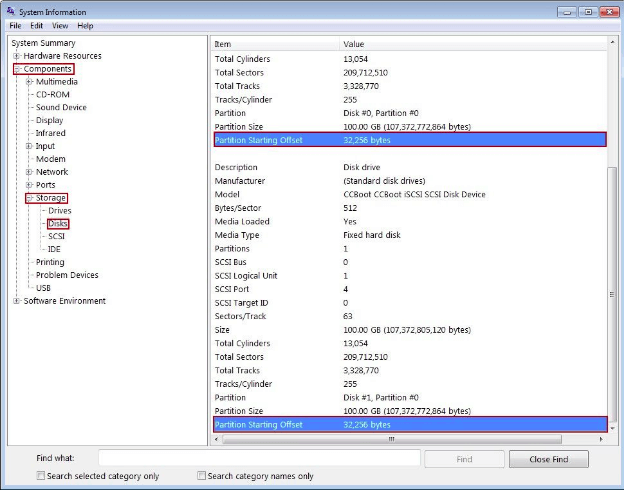
Step 1: Click the Start button from Taskbar and open Run. In the Run window pop-up, input "msinfo32" and hit the Enter key.
Step 2: Once the System Information window is visible, move to Components > Storage > Disks.
Step 3: Read the Partition Starting Offset value and see if it is disabled by 4096.
If the Partition Starting Offset value is disabled by 4096, it means your hard drive is 4K.
Steps for other Windows Operating Systems
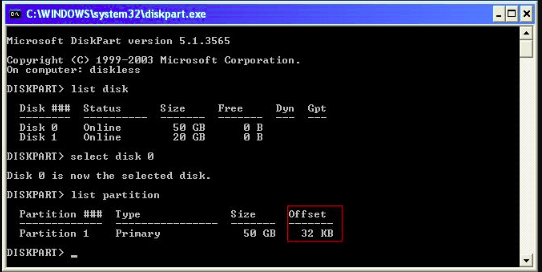
Step 1: Open the CMD.
Step 2: Type the diskpart and hit enter.
Step 3: Enter list disk and hit enter again.
Step 4: Enter select disk 0 and then enter list partition.
If the offset alignment is divisible by 4096, then your HDD is 4k.
How to Manage Your Advanced 4K Device? Professional Software Is Here!
The management of advanced 4K devices has become more complex due to the advancements in hard drive technology, but you can still manage them using professional third-party software, such as Qiling Partition Master.
Qiling Partition Master is a user-friendly software that allows you to manage 4K hard drives with ease, offering features such as creating, formatting, and more.
Why Qiling Partition Master
● Disk Cloning and Upgrade: This software allows users to clone and upgrade their 4K hard drives without losing any data, making it a convenient and safe solution for managing storage needs.
● Windows Migration: You can also migrate your Windows from any hard drive to your 4K hard drive with a simple one-click process.
● Partition Management: Using Qiling Partition Master, all your worries about partition management are addressed, as it allows you to easily manage and extend partitions on your 4K hard drive.
Some of its features make it a standout software for partition management, and users can download and install it by visiting its official website.
Once you have the software, you can follow these steps to manage your 4K hard drives for better performance: you can use the software to monitor and manage your hard drives, ensuring they are running smoothly and efficiently, and also use it to optimize and maintain your system for optimal performance.
The "Resize/Move" feature allows you to adjust the size of a selected disk partition as needed, enabling you to shrink a volume, extend another one, or create unallocated space for specific use.
The "Clone" feature is used to create an exact copy of a hard disk or partition, including its layout and content, allowing for identical backups or replacements.
The "Delete" option is used to remove an unwanted disk partition, converting it into unallocated space.
Formatting a drive partition can alter the file system, fix corruption issues, and sometimes remove viruses and malware, making it a useful tool in various situations.
The "Allocate space" feature is helpful when one drive partition has too much free space, while the other partition is running low, allowing you to redistribute space from the full partition to the one that needs it.
The "Migrate OS" feature allows users to transfer their Windows installation from one drive to another without having to reinstall Windows, making it a convenient option for upgrading or replacing a hard drive.
Qiling Partition Master customers are increasingly converting between GPT and MBR, as well as between NTFS and FAT32, and Basic to Dynamic, taking advantage of the benefits of these conversions. In addition to these benefits, the software offers many other functional and practical features to explore.
Conclusion
Hard drive technologies are shifting towards the 4K format, which is different from the traditional 512-byte format in terms of storage sector division.
4K hard drives offer efficient storage, faster performance, and reliability, but may cause compatibility issues with operating systems and system architecture.
You can easily check if your HDD is 4K by following the simple commands on this page, and if needed, manage your 4K hard drives with Qiling Partition Master software.
Qiling Partition Master is a user-friendly tool that allows you to create, format, and manage partitions on your 4K hard drive with reliability and security.
Related Articles
- How to Transfer Windows Server 2022/2019/2016 to HDD/SSD
- [Server Helper] Convert NTFS to FAT32 in Server 2008/2012/2016/2022 without Data Loss
- How to Remove Hard Drive from Computer [Full Guide]
- How to Unpartition a Hard Drive on Windows 11/10/8.1/8/7
- A Powerful PC Junk Cleaner for Windows 10 And 11
How to make the computer run faster? An excellent PC junk cleaner for Windows 10 can help you, which can remove all kinds of junk files to free up more space and improve computer performance. - How to Convert Boot Disk Between MBR and GPT Styles without Data Loss?
Learn how to convert a boot disk between MBR and GPT without data loss using Qiling Disk Master or Windows tools.
Products
Articles & Tutorials
- Data Recovery
- Data Backup
- File Recovery
- File Backup
- System Backup and Restore
- Disk and Partition Clone
- Technical articles
- Mobile articles
- Disk Master Help
- Windows Data Recovery Tutorials
- Windows Secure Delete Tutorials
- Windows Partition Management Tutorials
- Windows File Backup and Restore Tutorials
- Windows System Backup and Restore Tutorials
- Windows Disk Backup and Restore Tutorials
- Windows Clone Tutorials