BitLocker Decryption Stuck at 0x803100d6
Quick Navigation:
- What 0x803100d6 Actually Means
- Copy the Data Before You Resume
- Try a Clean Resume, Once
- Recover Files With Qiling Deep Data Recovery
- Frequently Asked Questions
Turning BitLocker off is a background conversion, and it can stop part way. When the resume command returns 0x803100d6, the volume is usually readable but the conversion engine has two conflicting states recorded for it. The files are still there, and the first job is to copy them rather than to force the conversion.
What 0x803100d6 Actually Means
The error indicates that the encryption engine cannot resume a conversion because the recorded state does not match the volume. Common triggers are a forced shutdown during the initial encryption, a firmware update in the middle of the conversion, or a second decryption attempt started from another tool.
The volume normally remains accessible in this state. Explorer may open it normally while the conversion is paused at a percentage, which is why users assume the drive is fine and postpone a backup.
Do not clear the TPM, and do not reinstall Windows, before you have copied the files. Both actions can remove the only working protector and turn a stalled conversion into an unreadable volume.
Copy the Data Before You Resume
Open the volume and copy the folders you cannot recreate to another disk. Use a normal copy rather than moving files, so the source stays complete until you are satisfied with the copy.
If the volume mounts but some folders are missing or unreadable, stop treating it as healthy. In that case the conversion interrupted the file system as well, and a scan is the next step rather than another resume attempt.
Record the exact percentage shown in the BitLocker panel and the error text. If you later contact support, those two details decide whether the fix is a resume or a repair.
Try a Clean Resume, Once
Close every program that has a handle on the volume, then open the BitLocker control panel and choose Resume. One attempt is reasonable. Repeating the same command in a loop is not: each failure leaves another conflicting entry behind.
The command line tool that ships with Windows can also resume protection, and it reports the same error code. That tool is part of the operating system, not a feature of this software, and it should only be used after the data is copied.
If the resume fails a second time, stop. At that point the practical route is to recover the files, decrypt or reformat the volume, and re-enable protection on a clean state.
Recover Files With Qiling Deep Data Recovery
Qiling Deep Data Recovery reads the volume while Windows can still present it, so it can retrieve files that disappeared when the conversion stalled. It cannot decrypt a volume that is locked, so unlock it first.
Step 1. Choose the Recovery Mode
Use Fast Scan when the volume still opens in Explorer. Choose Format Scan when it shows as RAW or reports that the parameter is incorrect.
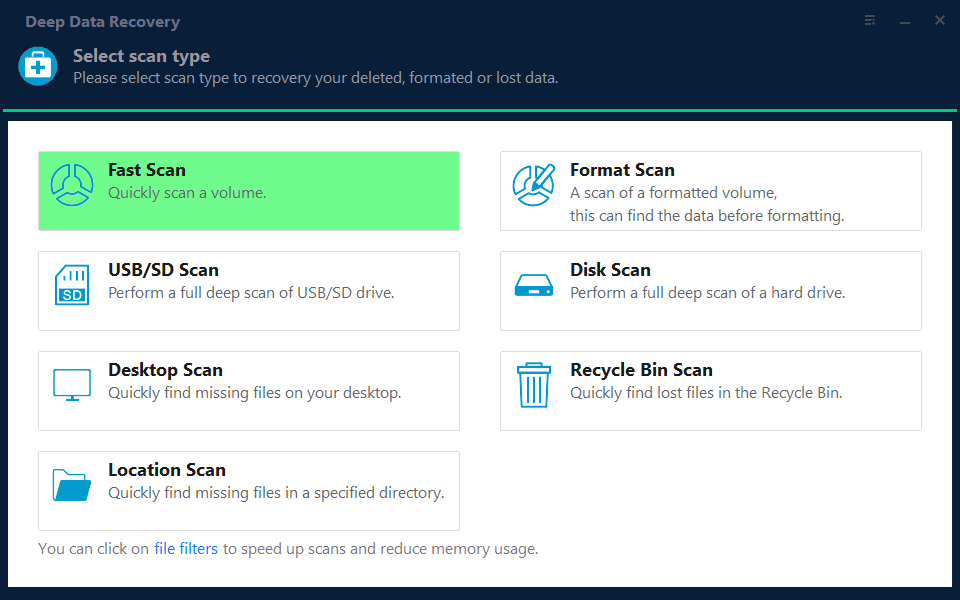
Step 2. Select the Volume
Pick the disk that holds the unlocked volume and compare its capacity with the properties dialog. Do not select the physical disk that hosts the system partition unless the files were there.
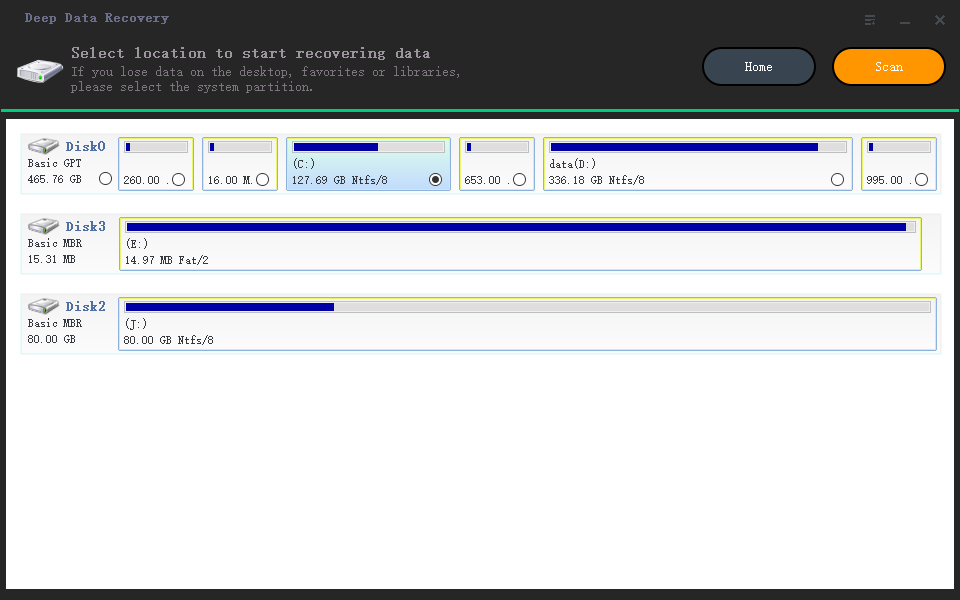
Step 3. Review the Results
Preview documents and photos before selecting them, and sort by date around the moment the conversion stopped. A file that previews correctly was read from intact data.
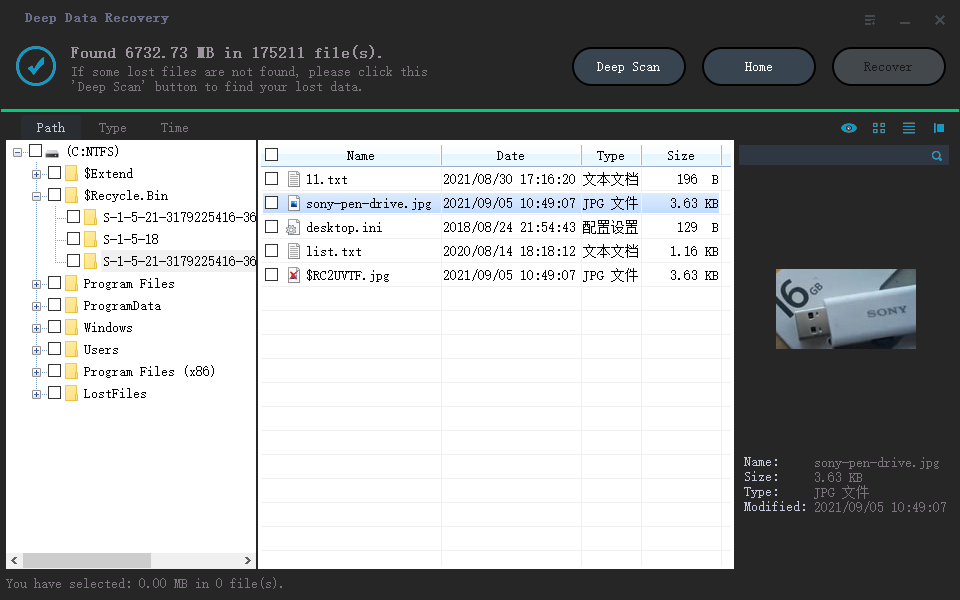
Step 4. Save to Another Disk
Write the results to a disk that is not protected by the same key. Keep that copy until protection has been rebuilt and the volume has passed a restart.
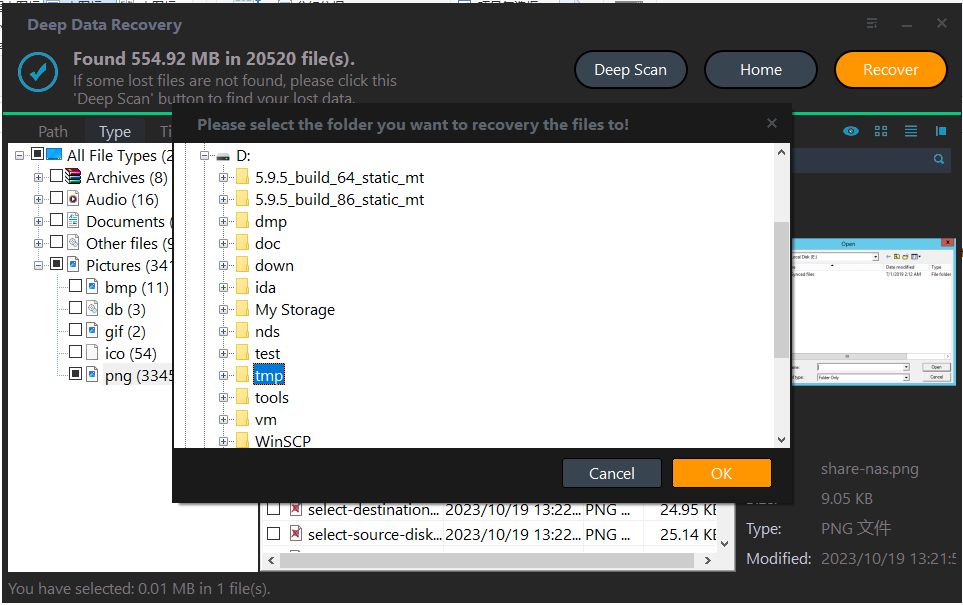
Frequently Asked Questions
Is the data still safe while decryption is paused?
The volume is usually readable and the files are intact. The risk is a second interrupted operation, which is why the copy comes first.
Can I cancel the decryption instead of resuming it?
Pausing and cancelling are not the same. The panel offers Pause, and a paused conversion can be resumed later; 0x803100d6 is what you see when the resume cannot be applied.
Does a firmware update cause this error?
It can. A firmware change alters the measured boot state, and the conversion engine can lose track of the recorded progress after the restart.
Will re-enabling BitLocker later work normally?
Yes, once the volume is clean. Turn protection back on after the recovery is finished and the disk has been checked.
For a volume that unlocks but appears as RAW after an update, see BitLocker RAW after a Windows 11 update.
Related Articles
- BitLocker RAW After a Windows 11 Update
- Unlock and Recover BitLocker To Go
- BitLocker Recovery Key After a Motherboard Swap
- BitLocker Auto-Unlock Fails After a BIOS Update
- Perform a RAW Drive Recovery
Products
Articles & Tutorials
- Data Recovery
- Data Backup
- File Recovery
- File Backup
- System Backup and Restore
- Disk and Partition Clone
- Technical articles
- Mobile articles
- Disk Master Help
- Windows Data Recovery Tutorials
- Windows Secure Delete Tutorials
- Windows Partition Management Tutorials
- Windows File Backup and Restore Tutorials
- Windows System Backup and Restore Tutorials
- Windows Disk Backup and Restore Tutorials
- Windows Clone Tutorials