Cannot Save Recovered Files Larger Than 4 GB: Check FAT32
Quick Navigation:
- Understand the Problem
- Check Before Another Recovery Attempt
- Recover With Qiling Deep Data Recovery
- Verify the Recovered Files
- Frequently Asked Questions
A recovery task can save small documents yet fail on a large video even when the destination appears almost empty. One common explanation is FAT32: its maximum individual file size is 4 GiB minus one byte, regardless of how much space remains on the disk.
Understand the Problem
A file-system limit is not a recovery limit. A 7 GB video cannot be stored as one file on FAT32 even if the USB stick has 50 GB free. The same recovered file may save correctly to a suitable NTFS or exFAT destination.
This check does not establish that the video is intact. A scanner can list an incomplete or incorrectly sized candidate. First use a destination capable of holding it, then validate playback and the expected content.
Check Before Another Recovery Attempt
Check 1. Inspect the destination file system
In File Explorer, right-click the destination, open Properties and read File system. Make sure you are inspecting the output disk, not the source. Note free space separately.
Check 2. Check the candidate's expected size
Compare the listed size with another copy or the original recording settings if available. A suspiciously huge result may be invalid metadata rather than a real large file.
Check 3. Choose an existing suitable destination
Use another healthy NTFS or exFAT volume that has enough free space. This avoids changing either the affected source or a destination with valuable files. No format operation is necessary if suitable storage is already available.
Check 4. Export again to a new folder
Retry the selected large file with the recovery program's destination chooser. Keep earlier partial output separate. Do not rename a partial file or split its name and assume the original video is now recovered.
Recover With Qiling Deep Data Recovery
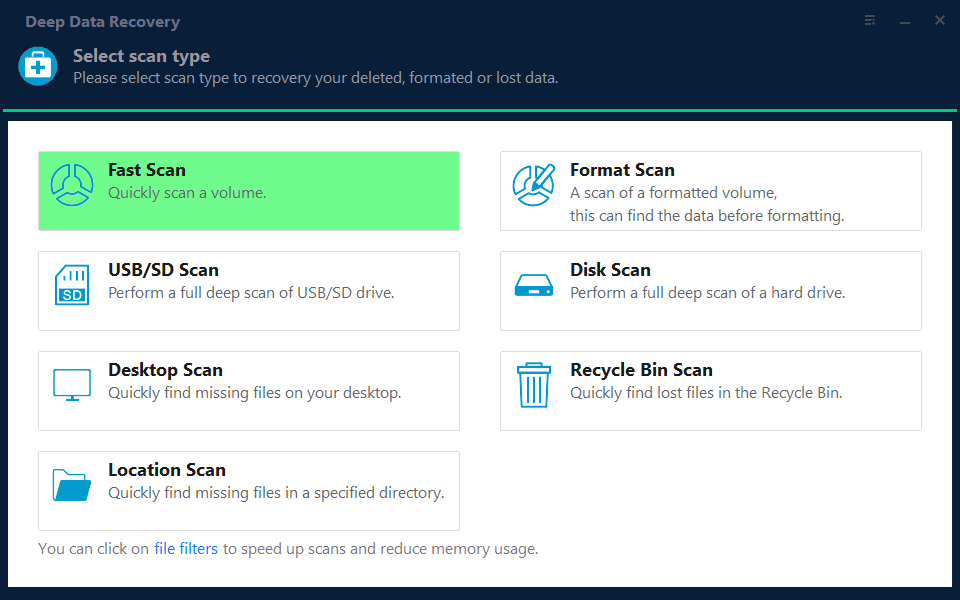
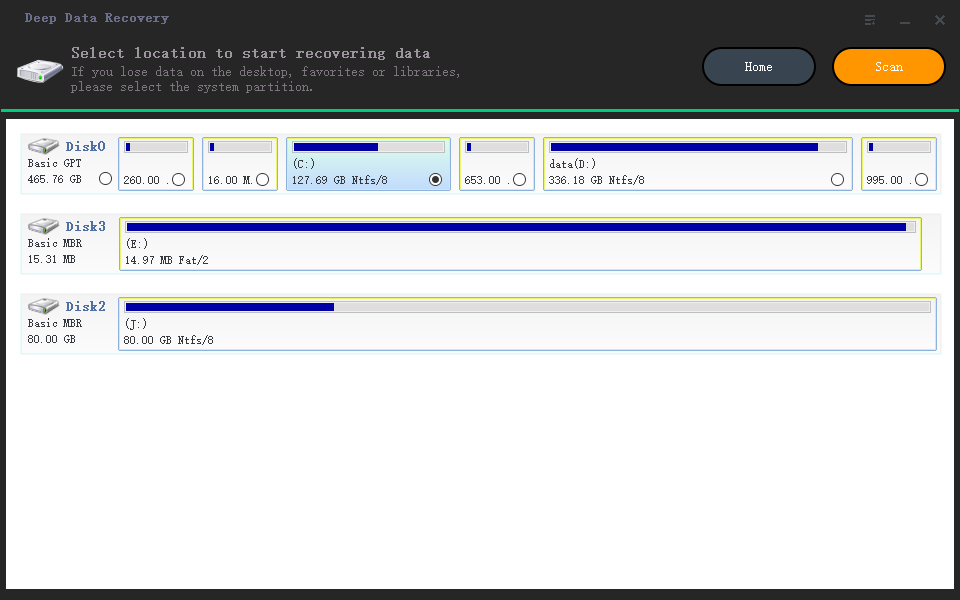
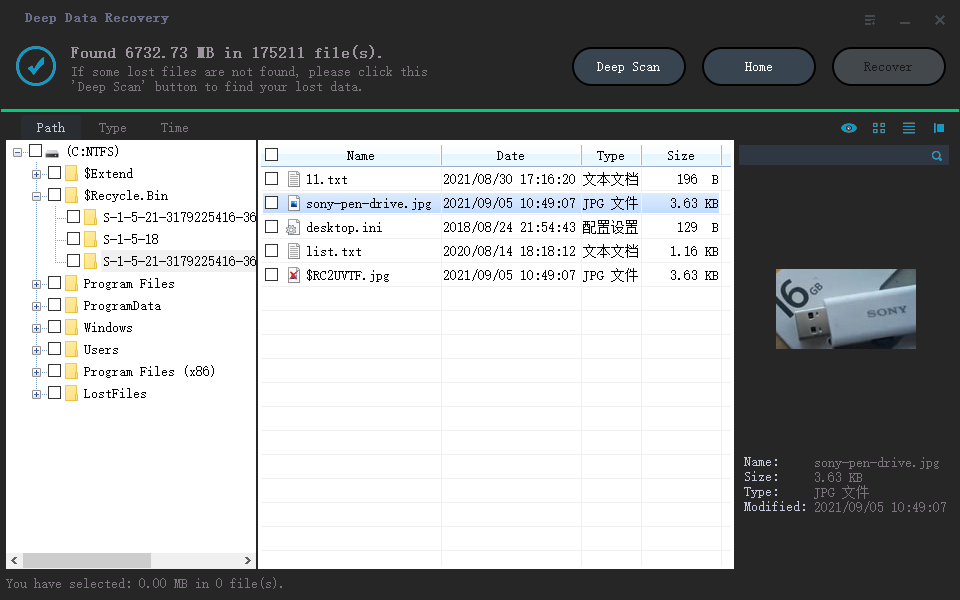
Qiling Deep Data Recovery offers a visual mode chooser, a source-location screen, file results with supported previews and a separate recovery destination dialog. Use this workflow only when Windows can read the source reliably. It does not bypass encryption or guarantee recovery of overwritten data.
The screenshots are examples from the product interface. Their drive letters, file counts and sample selections are not instructions to choose the same disks on your computer. The download is not a promise of unlimited free recovery; check the current edition and license terms.
Step 1. Prepare the Source and a Separate Destination
Stop routine use of the affected device. Check independent backups first, then connect a healthy destination with adequate free space. Download and install Qiling on healthy storage, not the volume holding the missing files. If the system disk is affected, consider another suitable computer or specialist assistance to limit background writes.
Step 2. Choose the Scan Mode for the Original Loss
Keep the scan mode tied to the loss event, not the output size. Fast Scan, Format Scan and USB/SD Scan locate candidates; destination compatibility is checked when saving them.
Step 3. Select the Original Source and Start the Scan
Select the original drive and click Scan only if a new scan is needed. A failed FAT32 export does not mean the source must be formatted or rescanned immediately.
Step 4. Inspect Results and Preview Suitable Candidates
Select the large candidate and inspect the available preview, size and path. Include any necessary sidecars or project dependencies, but do not treat a thumbnail as the full video.
Step 5. Recover to Healthy Independent Storage
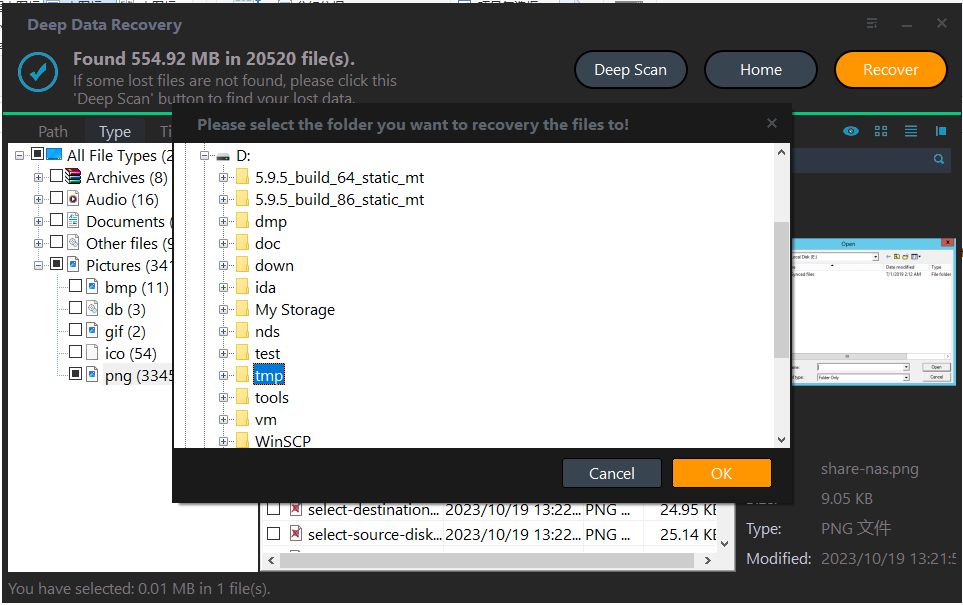
Click Recover, choose a new folder on a different physical NTFS or exFAT disk and confirm with OK. Ensure free space exceeds the intended batch size.
In the destination dialog, choose the intended folder and confirm with OK. Wait for the selected export to finish without disconnecting either device. If an error occurs, record it and keep any incomplete output separate rather than assuming the batch succeeded.
Verify the Recovered Files
Play the exported video at the beginning, middle and end. Check duration, audio and the specific scenes you need. A successful copy merely resolves the destination limitation.
For archives and virtual disks, use their normal validation tools on recovered copies. Do not mount or repair the sole recovered copy with write access.
Stop condition: Do not format the source or a destination containing the only copy of other data. Use a suitable existing disk instead.
Frequently Asked Questions
Is the limit exactly 4 billion bytes?
No. FAT32's individual-file limit is 4,294,967,295 bytes. Product labels and Windows displays may use different units.
Will a bigger FAT32 USB stick solve this?
No. The single-file limit remains even when the volume has more capacity.
Can Qiling split a recovered video automatically?
Do not assume an unsupported feature. Save the intact candidate to suitable storage first; any later editing should use a verified copy.
Technical References
Related Articles
- Data Recovery Destination Disk Full: Save Important Files First
Handle a full recovery destination without writing to the source. Plan capacity, recover in batches and verify saved files before continuing. - Recovered Video Only Plays a Few Seconds: What It Means
A recovered video may open yet be incomplete. Check duration, later scenes and alternate candidates before attempting repairs on a separate copy. - NTFS vs exFAT vs FAT32: Which Format to Choose (2026) - Qiling
Products
Articles & Tutorials
- Data Recovery
- Data Backup
- File Recovery
- File Backup
- System Backup and Restore
- Disk and Partition Clone
- Technical articles
- Mobile articles
- Disk Master Help
- Windows Data Recovery Tutorials
- Windows Secure Delete Tutorials
- Windows Partition Management Tutorials
- Windows File Backup and Restore Tutorials
- Windows System Backup and Restore Tutorials
- Windows Disk Backup and Restore Tutorials
- Windows Clone Tutorials