How to Delete Files on Flash Drive Permanently
Quick Navigation:
- Example #1. How to delete a selected file on a flash drive
- Example #2. How to delete files from flash drive by formatting it
- How to Permanently Delete Files from Flash Drive with QILING File Shredder
- Ensure that target files are permanently deleted
If you're looking for a way to permanently delete files from a flash drive, you're in a helpful guide. Deletion is a process that makes files invisible, but they can still be recovered using software like Deep Data Recovery. However, with QILING File Shredder, you can securely and permanently delete files from your flash drive.
When people talk about erasing data from storage media, they often confuse formatting with permanent deletion. True data erasure involves overwriting data with patterns of 1s and 0s. Formatting a drive typically does not perform overwriting, as doing so could reduce the storage media's lifespan. In short, formatting does not permanently delete files on a flash drive. It only deletes files on a flash drive, and with unformat flash drive software, they are recoverable. Here are two common examples of so-called permanent deletion on a flash drive.
Example #1. How to delete a selected file on a flash drive
- 1. Click on the Start button at the bottom left of the screen
- 2. Click on "Computer" in the right side column of the menu
- 3. Double-click on the flash drive in the center of the window. It will be listed under hard disk drives or devices with removable storage.
- 4. Hold the Ctrl key and click each file that needs to be deleted.
- 5. Right-click on the selected files and click the Delete option.
- 6. Confirm by clicking Yes to delete the files.
When deleting files from a flash drive, it's essential to understand that the deletion process may not be permanent. The files may still be recoverable using specialized software or techniques.
Example #2. How to delete files from flash drive by formatting it
Using Disk Management, you can format a flash drive to delete its files. Follow these steps:
- Press Windows + R simultaneously and press Enter to open Disk Management.
- Locate the USB flash drive partition, right-click it, and select the Format option.
- Choose the proper file system for the drive and click OK.
- After formatting, the USB flash drive will be cleared and all saved data will be removed.
These are the common steps for deleting files from a thumb drive, right? However, if you use Deep Data Recovery software to scan the flash drive, you will likely find that the files still exist on it. And of course, you can recover them. If you really want to permanently delete files from a USB stick, you need QILING File Shredder. This tool provides secure and easy data erasure and can also help you permanently wipe your disk without any chance of recovery. By using this tool, you can permanently destroy the data on the flash drive and leave no chance of recovery, without affecting the device's service life.
How to Permanently Delete Files from Flash Drive with QILING File Shredder
QILING File Shredder provides secure and easy data erasure and can help you permanently wipe your disk without any chance of recovery. By using this tool, you can permanently destroy the data on the flash drive and leave no chance of recovery, without affecting the device's service life. The tool features a simple user interface with built-in wizards, making it easy for anyone to navigate and delete files successfully. The main features of the tool include:
Your Safe & Computer Flash Drive Permanently Delete File Tool
- Supports permanent file destruction on hard drive, SSD, external disk, USB flash drive, SD card and more.
- This tool is developed for people who want to permanently delete folders and files on hard drives. By relying on advanced technology, it works like a shredder or destroying agent that destroys files and makes them unrecoverable.
Here are the steps that will guide you to completely and permanently delete files from a hard drive with QILING File Shredder. First, download it to your system. Double-click the .exe file to install it easily. It is compatible with Windows 10/7/8/XP/Vista.
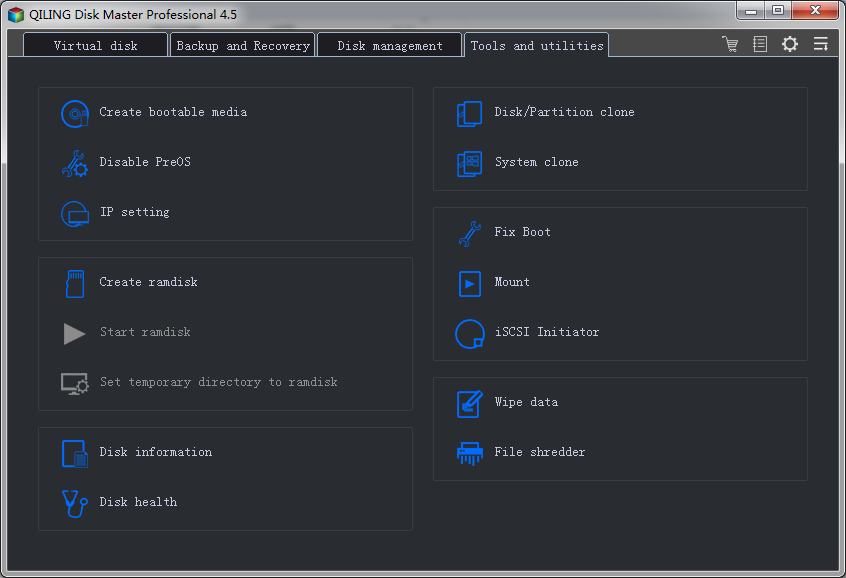
1. In the window, click the "Tools and utilities" tab, and then click "File shredder" to select the folders or files you need to permanently delete in the hard drive.
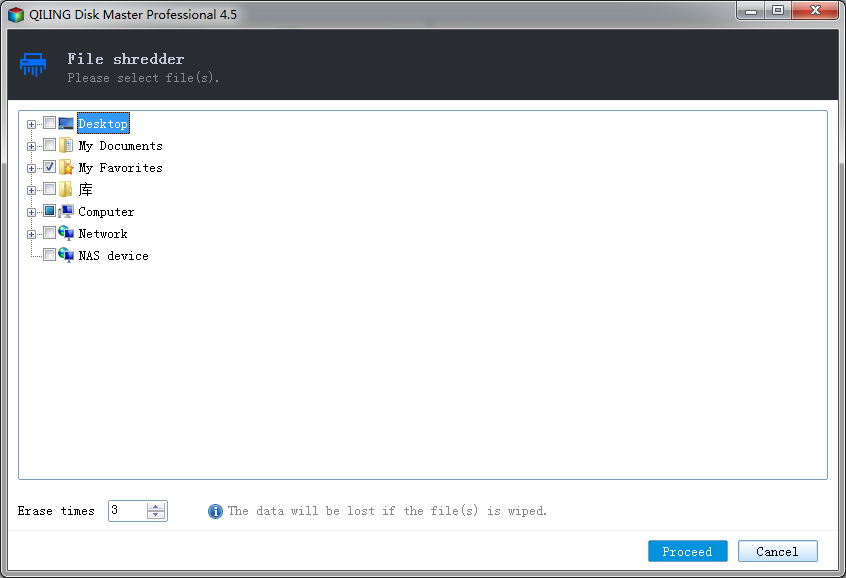
2. Navigate to the file or directory on the hard drive to select a folder or files to be removed. You will need to set the number of times to overwrite the files. Usually, it is 3 times, but you can set it accordingly. After selection, click "Proceed" to delete the files permanently on your hard disk.
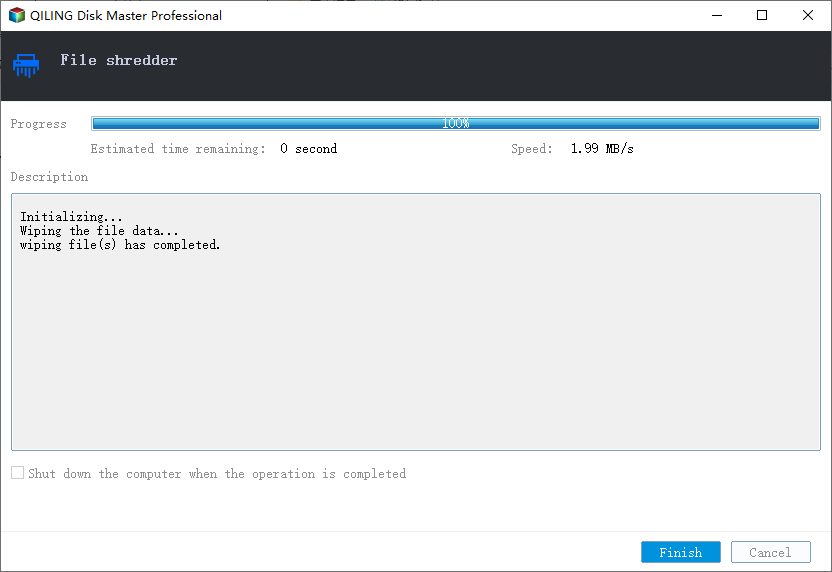
It will take a few seconds to complete the procedure. You will see the message "All files would be deleted." To ensure there is no recovery possible, you can try recovering the files to verify.
Ensure that target files are permanently deleted
When using QILING File Shredder, it is essential to understand that the tool permanently deletes files, making them unrecoverable. The shredded files cannot be restored, even by professional data recovery software.
Deleting files using the shortcut Shift + Delete may not be enough to permanently erase them. The files can still be recovered from the storage device, making it essential to take additional steps to ensure complete deletion.
Related Articles
- 3 Ways for How to Wipe a USB Drive Clean in Windows 10
- How to Permanently Delete Videos from Laptop/PC without Recovery
- What Is Wifi Card and How to Use It? [Everything You Need to Know]
Learn all about the Wi-Fi card in detail. What is a Wi-Fi card? Go through the key advantages of a Wi-Fi card and the detailed process of using a Wi-Fi card. - What Is a Windows Key? [All You Need to Know]
The Microsoft Natural keyboard first introduced the Windows logo key in 1994. People also call it Windows-, Win-, Start-, Logo-, Flag-, or Super-Key. This key started to appear on all PC keyboards. - How Do I Know What Version of Windows I Have on My Computer
Every Windows version allows you to check for its current version even if you've upgraded from the initial version. This article reveals multiple ways to check which Windows version you have through the Start Button, Settings, and the Command Prompt. - [Solved] IDM File Has Been Moved
Internet Download Manager says The file has been moved when you download a large file. How to solve this? Read this article to know the solutions, and restore the moved files from IDM with ease.
Products
Articles & Tutorials
- Data Recovery
- Data Backup
- File Recovery
- File Backup
- System Backup and Restore
- Disk and Partition Clone
- Technical articles
- Mobile articles
- Disk Master Help
- Windows Data Recovery Tutorials
- Windows Secure Delete Tutorials
- Windows Partition Management Tutorials
- Windows File Backup and Restore Tutorials
- Windows System Backup and Restore Tutorials
- Windows Disk Backup and Restore Tutorials
- Windows Clone Tutorials