How to Deleted All Data from Laptop Permanently
Quick Navigation:
- Part 1. How to Permanently Deleted Data from Laptop by Reset Laptop to Factory Settings
- How to delete files from laptop permanently in Windows 10
- How to permanently delete data from laptop in Windows 7
- Part 2. How to Deleted Files from Laptop Permanently without Recovery
- Step 1. Install the software and select files to delete on laptop
- Step 2. Permanently delete data from laptop
- Part 3. How to Make Sure Files on Laptop Are Deleted Permanently
Deleting files from your laptop can be a straightforward process, but making sure they're gone for good can be a bit more complicated. Here's a step-by-step guide to help you permanently delete files from your laptop using QILING File Shredder.
There are several reasons why you might want to delete all data from your laptop permanently. Here are some of the most common reasons:
- You need to sell your laptop.
- It's the laptop from your office and you have used it to work for a long time. Now you need to leave or not use the laptop anymore.
- You're gonna have it repaired in a shop. To keep your privacy, you have to backup all the important files and delete files in laptop permanently.
- It's your personal laptop. You're gonna donate it or ditch it for a new one. In this case, it's better to delete all data from laptop permanently.
No matter what kind of reason mentioned above, it is really a great decision to delete files from laptops permanently. It means you really care about your privacy. My suggestion is that you need to back up the important files before learning how to delete all data from a laptop permanently. Once you do it, you cannot recover the permanently deleted files at all.
Part 1. How to Permanently Delete Data from Laptop by Reset Laptop to Factory Settings
The easiest way to delete files from a laptop permanently is to factory reset your laptop. After that, you can see it comes back to its original state. All the settings, files, and applications on the laptop are removed. Here are the simple steps for how to delete all data from a laptop permanently by resetting the laptop to factory settings.
How to delete files from laptop permanently in Windows 10
- 1. Click the Start key at the bottom left > click the gear icon Settings.
- 2. Click Update & Security > Recovery > Get Started.
- 3. In the pop-up, click "Remove everything".
How to permanently delete data from laptop in Windows 7
- 1. Press and hold the F8 key.
- 2. In the "Advanced Boot Options", choose Repair Your Computer and press Enter.
- 3. Select a keyboard language and click Next. Log in with your administrative account.
- 4. In the System Recovery Options, choose System Restore or Startup Repair. Follow the built-in wizard to finish the whole process.
If you've accidentally deleted files from your laptop, you may think that they are gone forever. However, with the right tools and techniques, you can recover some or all of the deleted files.
Part 2. How to Delete Files from Laptop Permanently without Recovery
If you're looking to delete files from a laptop permanently, you'll want to use a professional data eraser or file shredder. This will ensure that the deleted files are unrecoverable, providing you with peace of mind.
Your Computer Laptop/PC Permanently Delete File Software
- Qiling File Shredder is a professional tool designed to permanently delete files, folders, or even entire hard drives on a laptop. This software is ideal for users who want to securely erase sensitive information and prevent it from being recovered.
- To delete files on a laptop with 100% accuracy, you can use a professional tool like Qiling File Shredder. This software is designed to permanently delete files, folders, or even entire hard drives, and it can delete files from the recycle bin as well.
- Support almost all the widely used file types. It can permanently delete videos, photos, documents and more from laptop or PC.
Download QILING File Shredder to delete all data from your laptop permanently.
Step 1. Install the software and select files to delete on laptop
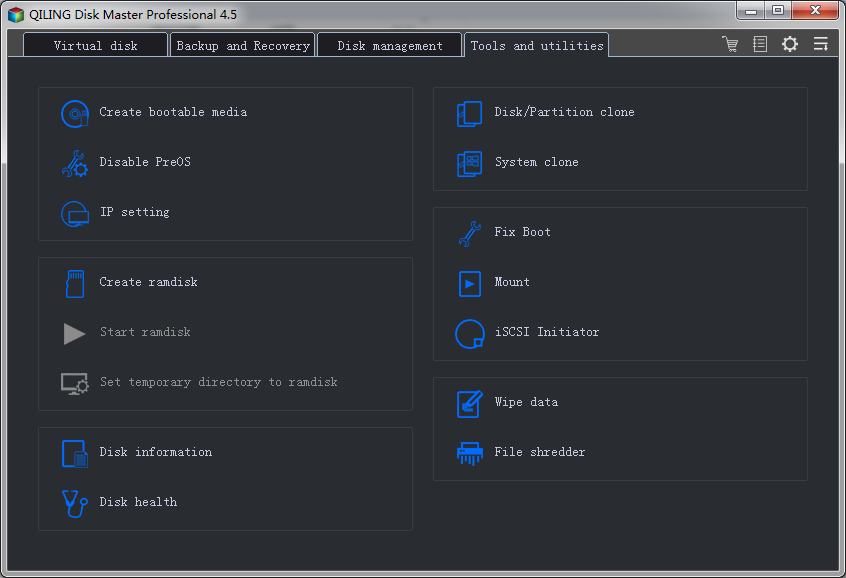
Install the software on your computer. It is fully compatible with all Windows PCs. After that, launch the software. From the first window, click the "Tools and utilities" tab, then click "File shredder" to select a specific folder, partition, or drive to delete files or data on the laptop.
Step 2. Permanently delete data from laptop
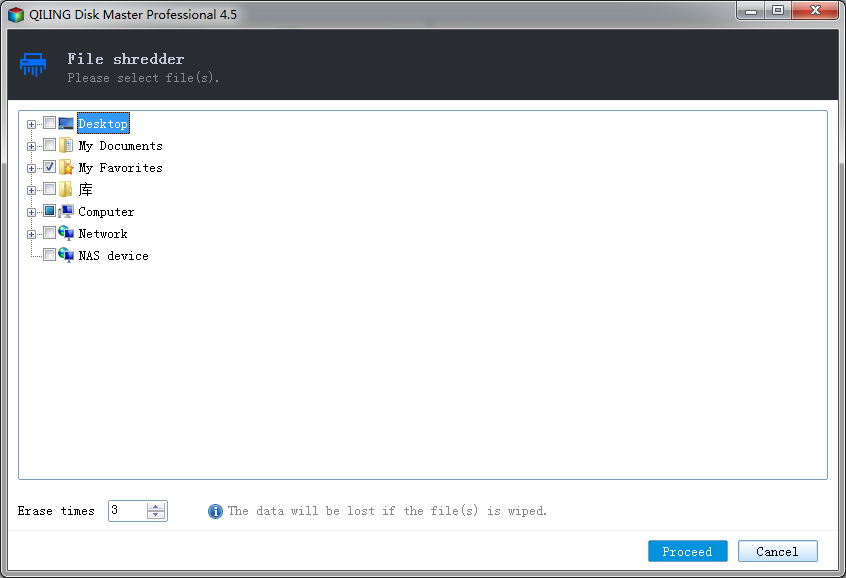
After you select files, folders, or hard drives, click "Proceed" to delete the files permanently in a laptop.
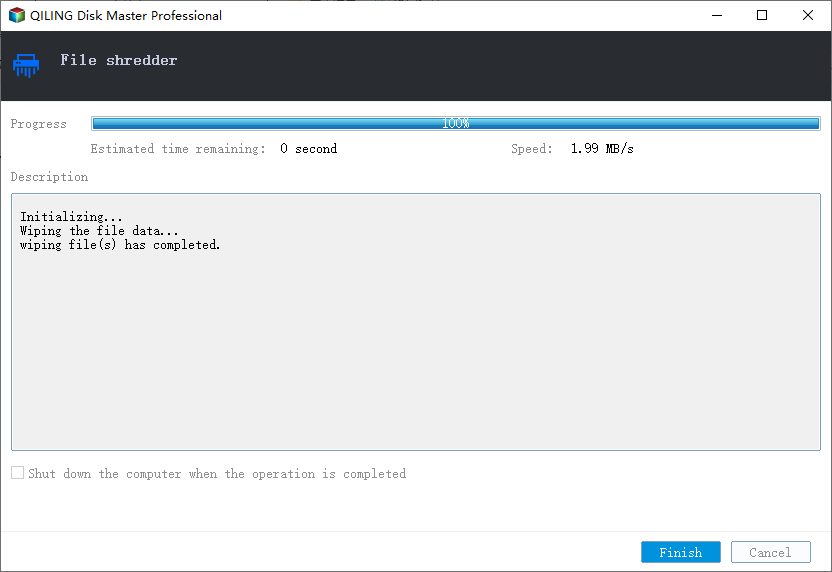
Wait for it to finish the whole process.
Part 3. How to Make Sure Files on Laptop Are Deleted Permanently
It's easy to learn how to delete all data from a laptop permanently, right? After deleting files from your laptop, you can try Deep Data Recovery to scan the laptop. Generally, if you used QILING File Shredder to delete files on the laptop, then the recovery software cannot find the deleted files at all since advanced technologies are used to delete files permanently. If you have tried other methods, the recovery software may still find the deleted files.
If you want to delete all data from a laptop permanently, I still suggest you try QILING File Shredder. It is a professional yet easy-to-use tool for destroying and cleaning data permanently on your laptop.
Related Articles
- Top 10 File Deleter to Permanently Deleted Files in Windows 10
- How to Permanently Delete Files from SSD
- How to Permanently Remove Sensitive Data from a Computer
- What Is MIMO? Multiple-Input Multiple-Output Explained
MIMO is one of the key technologies used in wireless communication today. That's why this article will help you understand what MIMO is and how it works. And it'll also briefly explain its sub-version called MU-MIMO. - What Is RTOS? Real-Time Operating System Explained
RTOS or real-time operating system is used in many different types of computers and machinery. In this article, we'll define its basics, benefits and key features. - What Is SMTP? Everything You Need to Know about Simple Mail Transfer Protocol
SMTP is one of the key protocls in emailing systems today. So, what exactly is it and how does it work? This article will help you answer these questions and explore the key traits of SMTP. - Reliable Ways to Fix i saved a word document and can't find it Issue
Have you encountered the frustrating issue of being unable to find a Word document you saved? This situation often occurs when you forget where the files are stored, documents aren't saved correctly, or Word files get lost or deleted.
Products
Articles & Tutorials
- Data Recovery
- Data Backup
- File Recovery
- File Backup
- System Backup and Restore
- Disk and Partition Clone
- Technical articles
- Mobile articles
- Disk Master Help
- Windows Data Recovery Tutorials
- Windows Secure Delete Tutorials
- Windows Partition Management Tutorials
- Windows File Backup and Restore Tutorials
- Windows System Backup and Restore Tutorials
- Windows Disk Backup and Restore Tutorials
- Windows Clone Tutorials