Recover Data From a Single RAID Member Disk
Quick Navigation:
- What One Member Disk Still Holds
- Identify the Array Before Touching the Disk
- Choose the Route That Fits the RAID Level
- Scan the Member Disk with Qiling Deep Data Recovery
- Frequently Asked Questions
An array that loses a disk is not necessarily a lost volume. What can be recovered from the surviving member depends on the RAID level and on how many disks are still present: a mirror member holds a complete copy, a stripe member holds only every other block, and a parity member can rebuild the others only when its partners are available.
What One Member Disk Still Holds
A RAID 1 mirror writes identical data to every member, so a single surviving disk is a complete copy and can be read like an ordinary disk once it is detached from the controller.
A RAID 0 stripe alternates blocks across the members. One disk therefore holds only part of every file, and files smaller than the stripe size may be missing entirely while larger ones are recoverable in fragments.
A RAID 5 set mixes data and parity. With all but one disk present, the missing blocks can be calculated; with only one disk left, that disk still holds its own share of the data, and files that happened to land whole on it can be recovered.
Identify the Array Before Touching the Disk
Record the controller model, the RAID level, the stripe size, the member order, and the data offset. Those values are what lets a tool put the pieces back in the right sequence, and they are easier to find while the controller still lists the array.
Do not let the controller initialise the array. An initialise on a degraded set writes fresh parity and destroys the remaining usable blocks, and it is offered by some controllers as the automatic response to a disk that reappears.
Label each disk with its slot number before you remove it. Once two drives of the same model sit on a desk, the order is the only thing that cannot be guessed later.
Choose the Route That Fits the RAID Level
For a mirror, connect the disk to a normal SATA port and read it directly. The volume is intact, and only the file system needs checking.
For a stripe, connect the single disk and scan it for file signatures. Expect a lower recovery rate and fragmented results, because the file system metadata is spread across the missing members.
For RAID 5, the best route is to recover the other members first and rebuild the array in software. If only one disk survived, scan it and accept that the result is partial.
Scan the Member Disk with Qiling Deep Data Recovery
Qiling Deep Data Recovery can scan a member disk as a standalone device. On a mirror that scan is a normal recovery; on a stripe it is a signature based search that finds whatever complete files remain on that disk.
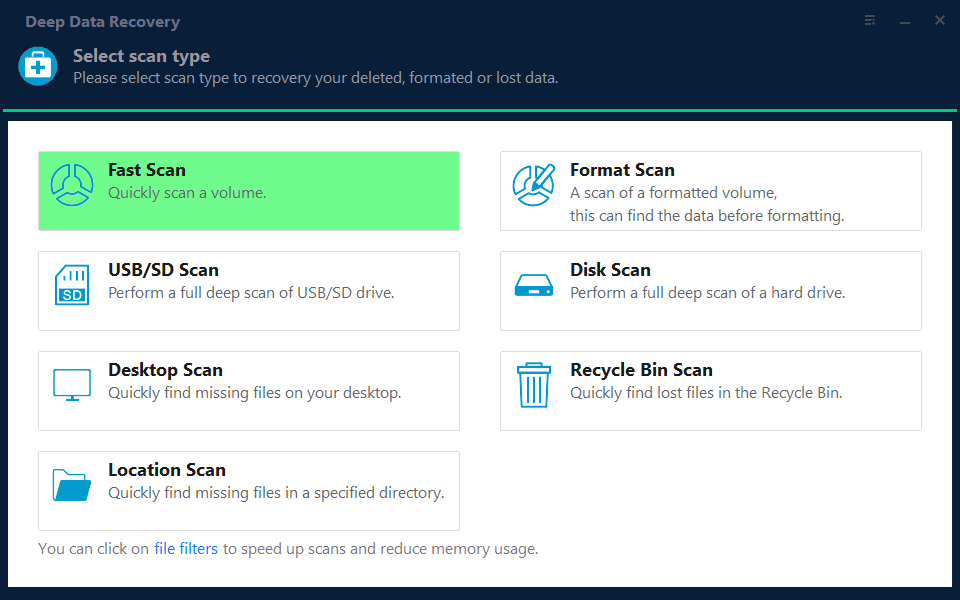
Step 1. Choose the Recovery Mode
Use Fast Scan when the member disk carries a readable partition from a mirror. Use Format Scan for a stripe member whose partition table lives on another disk.
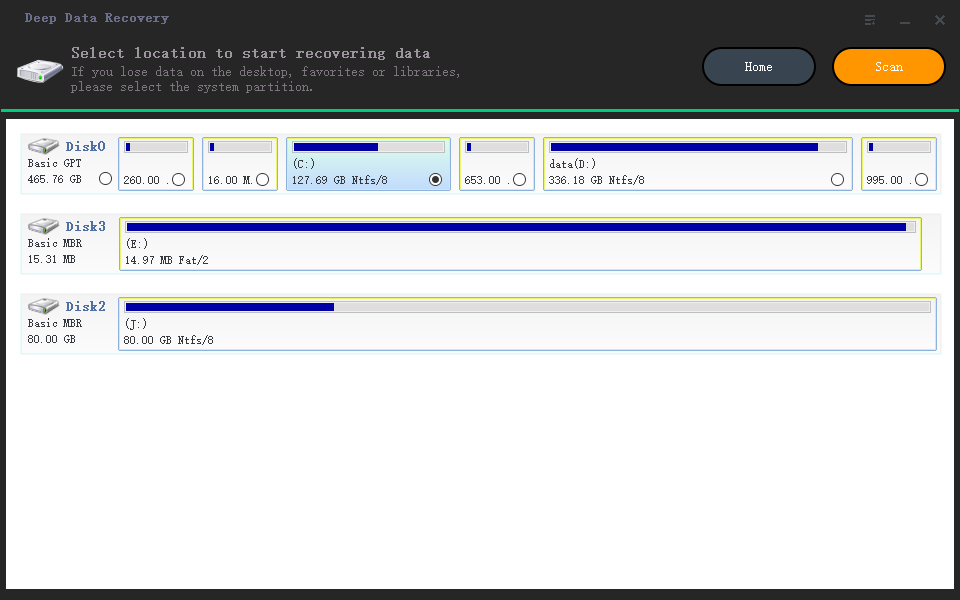
Step 2. Select the Member Disk
Select the disk by capacity and serial number. Never include a disk that is still part of a live array, because the controller may write to it during the scan.
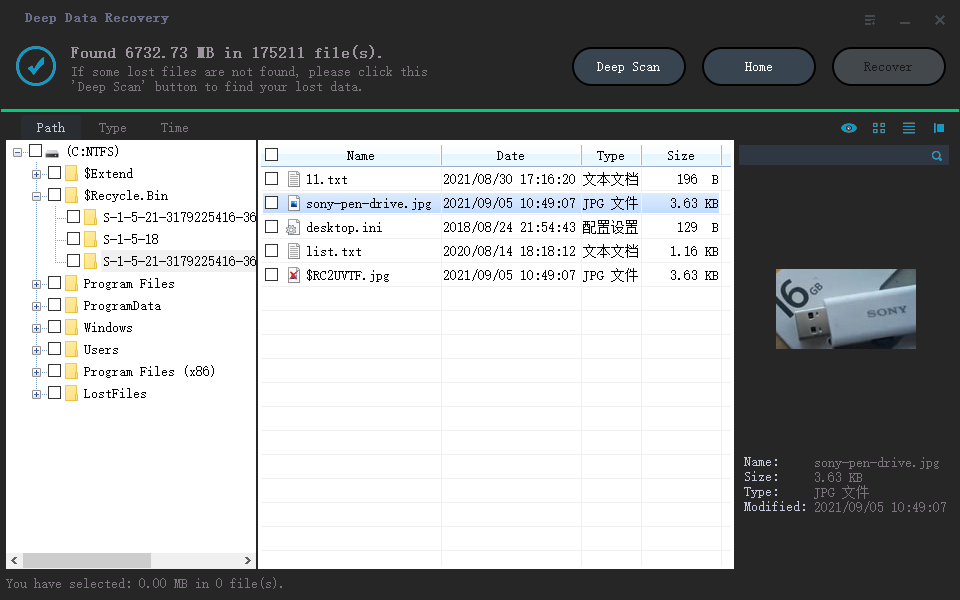
Step 3. Review What Was Found
Preview files before selecting them and expect gaps. Files that preview correctly were stored whole on this disk; those that fail likely span a missing member.
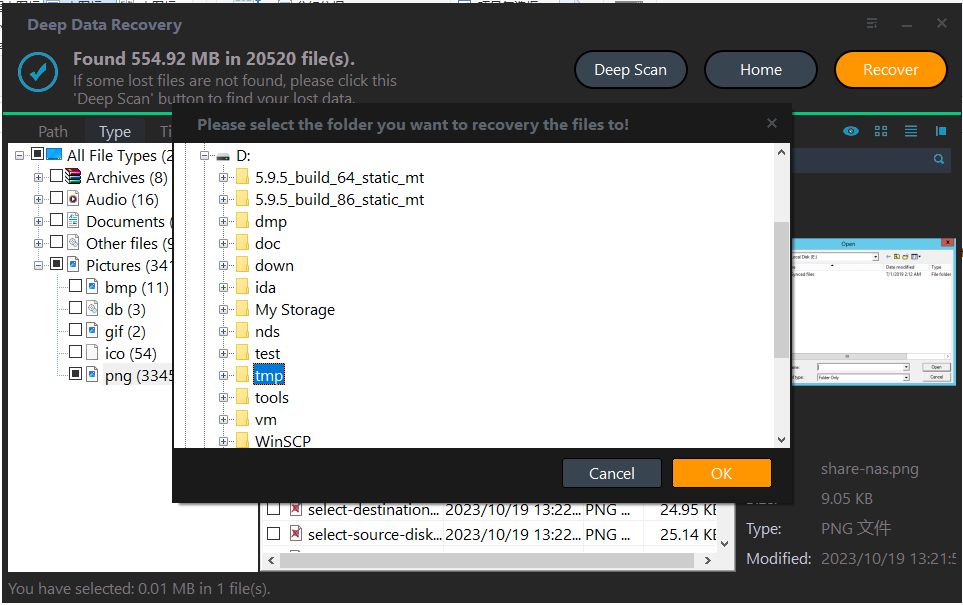
Step 4. Save to a Separate Disk
Write the results to a disk that is not part of the failed set. Keep that copy until the array has been rebuilt or the data has been migrated elsewhere.
Frequently Asked Questions
Can one disk from a RAID 0 give me everything back?
No. Half the blocks, or more, live on the other members. Recovery from a single stripe member is always partial.
Should I rebuild the array with a blank disk?
Not until the data is copied. A rebuild writes across every member, including the one that still holds usable blocks.
Does the stripe size matter for recovery?
It decides which files were stored whole on a single member. A larger stripe size makes more small files recoverable from one disk.
Can hardware RAID metadata be read by software?
The data can be read, but the layout has to be described to the tool. That is why the stripe size and member order should be recorded while the controller is still working.
For the related case of a pool rather than an array, see recovering files from a Storage Spaces volume.
Related Articles
- Recover Deleted Files From a Storage Spaces Volume
- Perform a RAW Drive Recovery
- Recover Data From a Laptop That Will Not Boot
- Copy the Recovery Partition to a New Hard Drive
- Recover Files After a Failed Disk Clone
Products
Articles & Tutorials
- Data Recovery
- Data Backup
- File Recovery
- File Backup
- System Backup and Restore
- Disk and Partition Clone
- Technical articles
- Mobile articles
- Disk Master Help
- Windows Data Recovery Tutorials
- Windows Secure Delete Tutorials
- Windows Partition Management Tutorials
- Windows File Backup and Restore Tutorials
- Windows System Backup and Restore Tutorials
- Windows Disk Backup and Restore Tutorials
- Windows Clone Tutorials