Recover Files After a Reinstall With BitLocker
Quick Navigation:
- What a Reinstall Actually Changes
- Unlock the Volume Before Anything Else
- Decrypt or Copy Before You Repair
- Recover Missing Files with Qiling Deep Data Recovery
- Frequently Asked Questions
A clean installation replaces the operating system partition and leaves the other volumes alone. A BitLocker protected data volume therefore still holds its files, but the protector that unlocked it automatically belonged to the old system, so the new installation cannot open it. The drive is intact and locked, not empty.
What a Reinstall Actually Changes
The installation writes a new system partition and a new boot configuration. Other partitions on the disk keep their file systems and their content, and the old user profile is gone only because it lived on the system partition.
For a BitLocker volume, the important loss is the automatic unlock protector. That protector was tied to the previous TPM state and to the previous boot files, so the new installation has no way to use it even though the volume key still exists.
This is why the new system reports an encrypted drive and asks for a password or a recovery key. Entering that key does not decrypt the whole volume; it simply unlocks it so that files can be read and copied.
Unlock the Volume Before Anything Else
Open the BitLocker settings page or File Explorer and choose to unlock the drive. Enter the 48-digit recovery key, which is stored in the Microsoft account of the user who enabled protection, in a work account directory, or in a saved text file.
Match the key ID shown on the unlock prompt with the ID listed beside the key. A key that belongs to another volume will be rejected, and trying several keys wastes time when the IDs can be compared first.
Change the protector after unlocking: add a new one for the current system, then back up the new key. Without that step, the next change to the boot files will lock the volume again.
Decrypt or Copy Before You Repair
Choose one path and stay on it. Turning BitLocker off decrypts the whole volume and makes later recovery simpler, but it takes time and stresses a disk whose history is unknown. Leaving protection on and copying the files out is faster when the volume already mounts.
Do not run a repair on an encrypted volume that still has problems. A repair that writes to a volume you cannot fully read can make the damage permanent, and every repair tool assumes it can see the file system.
If the volume unlocks but reports errors, copy the files first. Repair is the last step, not the first.
Recover Missing Files with Qiling Deep Data Recovery
If the volume unlocks but folders are empty or a profile was recreated, Qiling Deep Data Recovery can scan the unlocked volume for files that the new system no longer lists. It reads the decrypted view, so the key has to be entered before it runs.
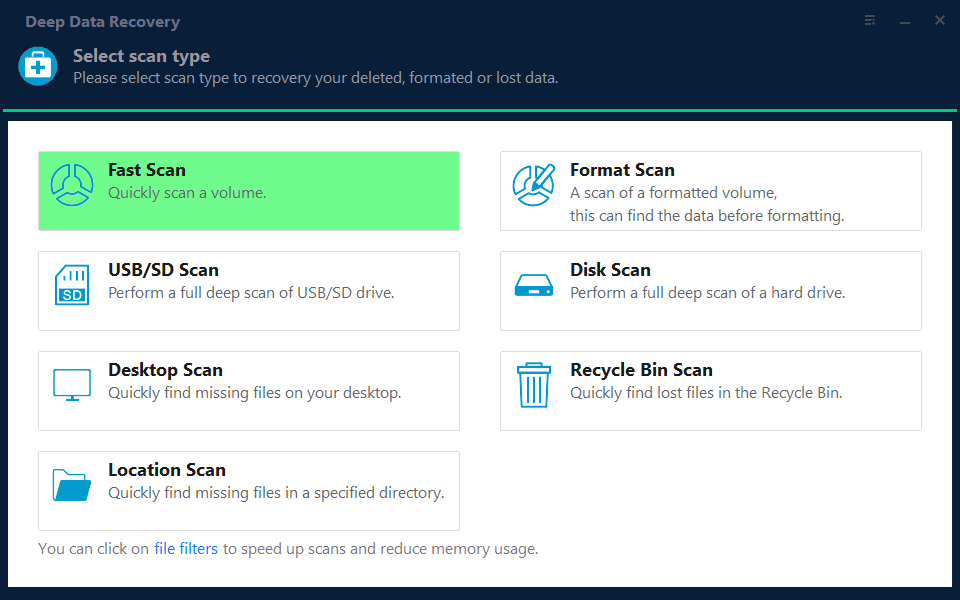
Step 1. Choose the Recovery Mode
Use Fast Scan when the volume mounts with missing files. Choose Format Scan if the volume was reformatted during the installation.
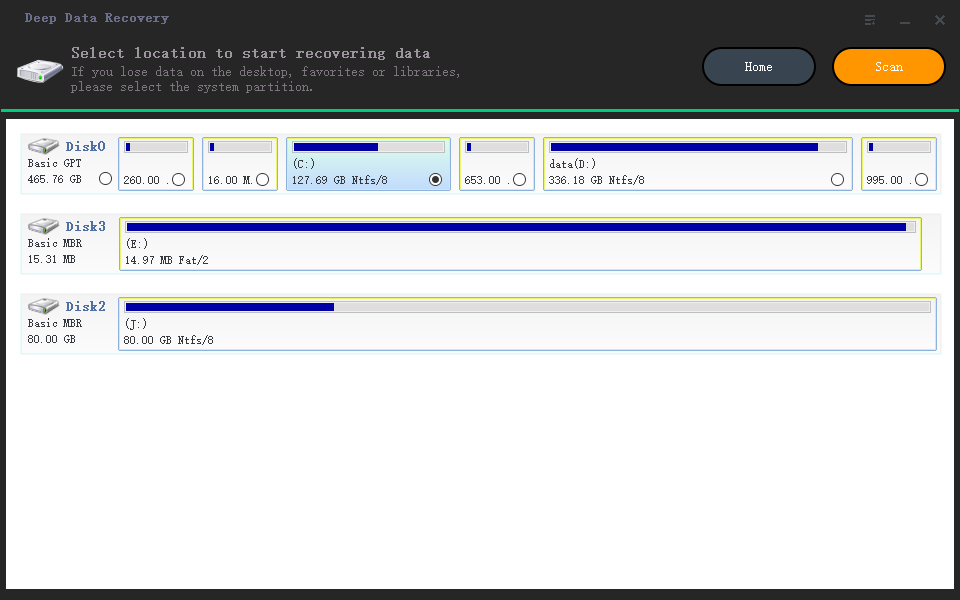
Step 2. Select the Data Volume
Select the disk that holds the unlocked volume and confirm its capacity. The system disk is the wrong target unless the files were on it before the reinstall.
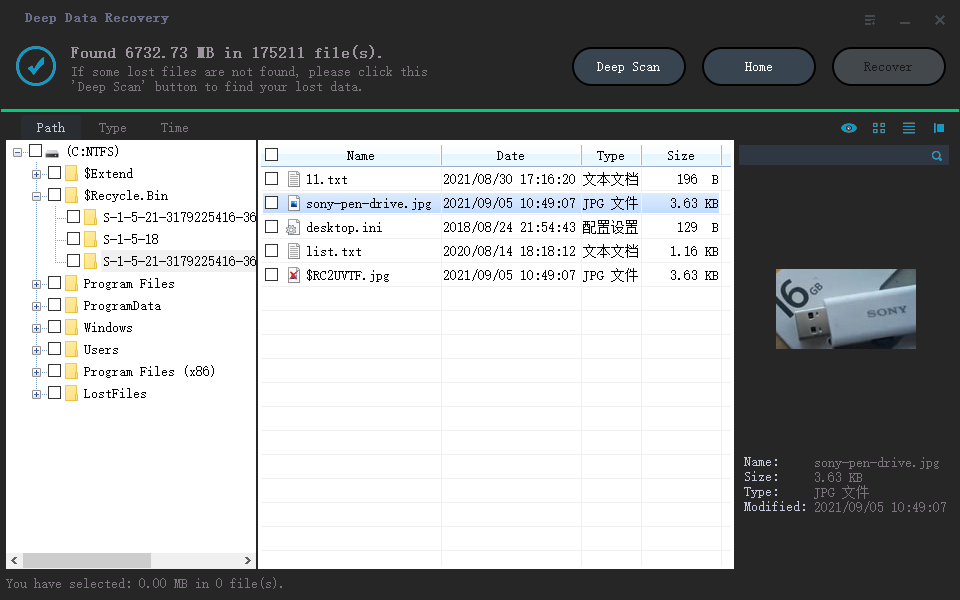
Step 3. Review the Results
Look for the old user name in folder view and preview a few files. A correct preview proves that the content was read from intact clusters.
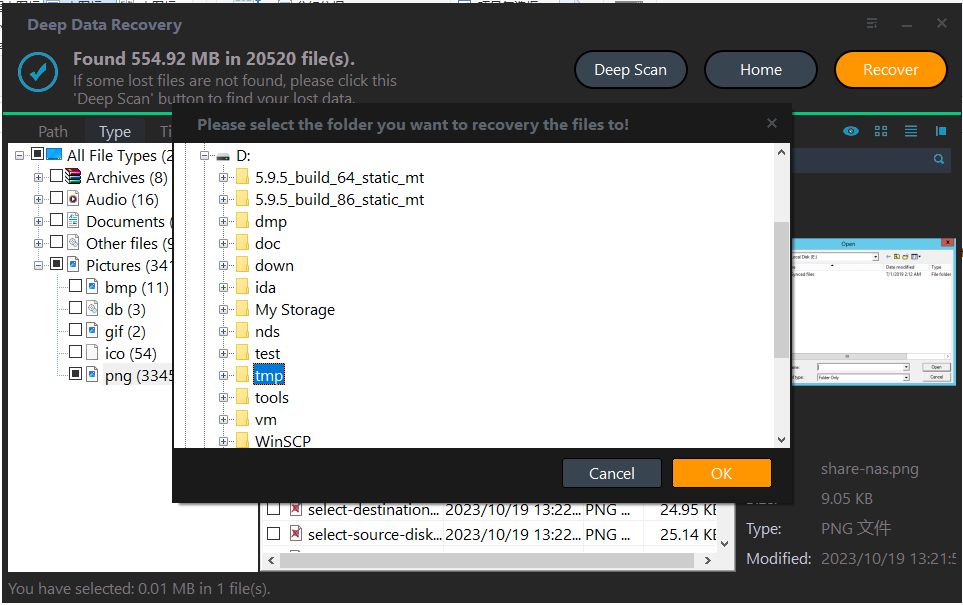
Step 4. Save to the New System Disk
Write the files to the new system disk or an external drive, then decide whether to keep the old volume or reuse it.
Frequently Asked Questions
Does a clean install format every partition?
No, only the partitions you select. A data volume you left untouched keeps its content, and a BitLocker volume stays encrypted until it is unlocked.
Can I skip the key and recover the files anyway?
No. Without the key the volume cannot be decrypted by any recovery tool. A clean installation and a fresh backup are the realistic options.
Should I turn BitLocker off after unlocking?
It depends. Decryption makes future recovery simpler, but it exposes the data if the machine is stolen. Copy the files first, then decide.
Why does the volume unlock but show less data than before?
The old profile folder probably still exists under a different path. Search the whole volume for the account name before you conclude that files are gone.
For the unlock prompt that appears after a hardware change, see BitLocker recovery after a motherboard swap.
Related Articles
- BitLocker Recovery Key After a Motherboard Swap
- BitLocker RAW After a Windows 11 Update
- Reset This PC Keep My Files: Missing Files
- Back Up Programs Before Reinstalling Windows
- Perform a RAW Drive Recovery
Products
Articles & Tutorials
- Data Recovery
- Data Backup
- File Recovery
- File Backup
- System Backup and Restore
- Disk and Partition Clone
- Technical articles
- Mobile articles
- Disk Master Help
- Windows Data Recovery Tutorials
- Windows Secure Delete Tutorials
- Windows Partition Management Tutorials
- Windows File Backup and Restore Tutorials
- Windows System Backup and Restore Tutorials
- Windows Disk Backup and Restore Tutorials
- Windows Clone Tutorials