Recovered Files Have the Wrong Date: Check Content First
Quick Navigation:
- Understand the Problem
- Check Before Another Recovery Attempt
- Recover With Qiling Deep Data Recovery
- Verify the Recovered Files
- Frequently Asked Questions
A file dated today may contain an older document that was recovered successfully. A file with the expected date may still be incomplete. Recovery timestamps are useful for organization, but they are not a reliable stand-alone test of file integrity.
Understand the Problem
Windows exposes several dates, including creation and modification times. Copying or exporting a recovered file can assign new destination metadata. If the original directory record was damaged, the scanner may also lack an authoritative old date.
Photo capture time and a document's internal revision information are different from the file-system date. Time zones and file-system behavior can also affect what Explorer displays. A consistent hour offset is not the same issue as a missing year or an obviously invalid date.
Check Before Another Recovery Attempt
Check 1. Identify which date is wrong
In File Explorer, compare Date created and Date modified on a recovered copy. For a photo, inspect available capture metadata separately. Record the column you are using before deciding the scan found the wrong period.
Check 2. Search without a narrow date restriction
If the scan results are incomplete, clear date filters and inspect file type and size instead. A file whose original timestamp was lost can be excluded by an otherwise reasonable date range.
Check 3. Compare internal content
Open a document and look for expected edits or revision identifiers. For a photo, inspect the full image and available capture information. Missing internal metadata does not by itself prove the image pixels are lost.
Check 4. Organize copies without rewriting evidence
Use destination folders and an external inventory to group verified files. Avoid bulk timestamp changes until the usable content is backed up. For legal or audit needs, preserve the original media and seek a qualified forensic process.
Recover With Qiling Deep Data Recovery
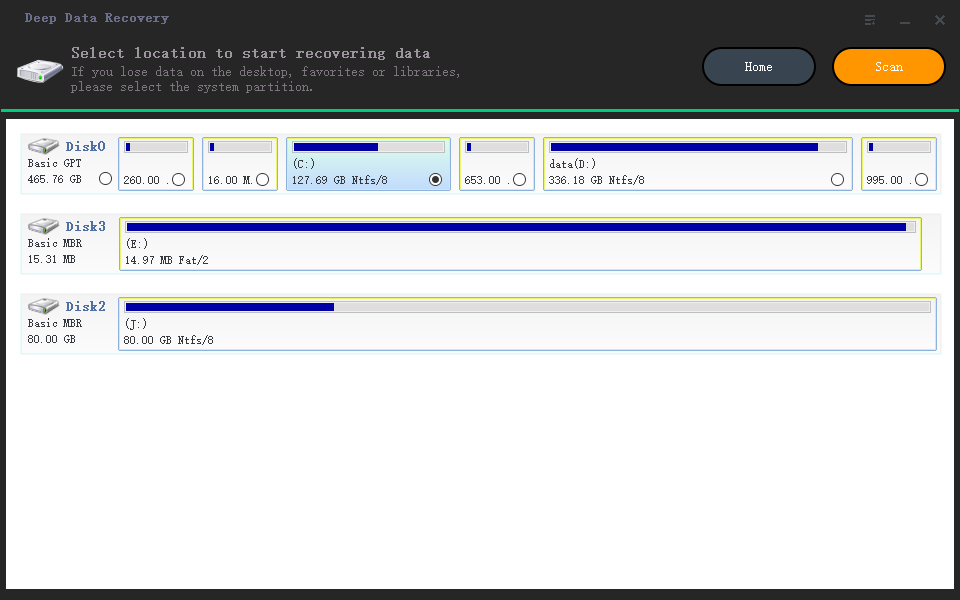
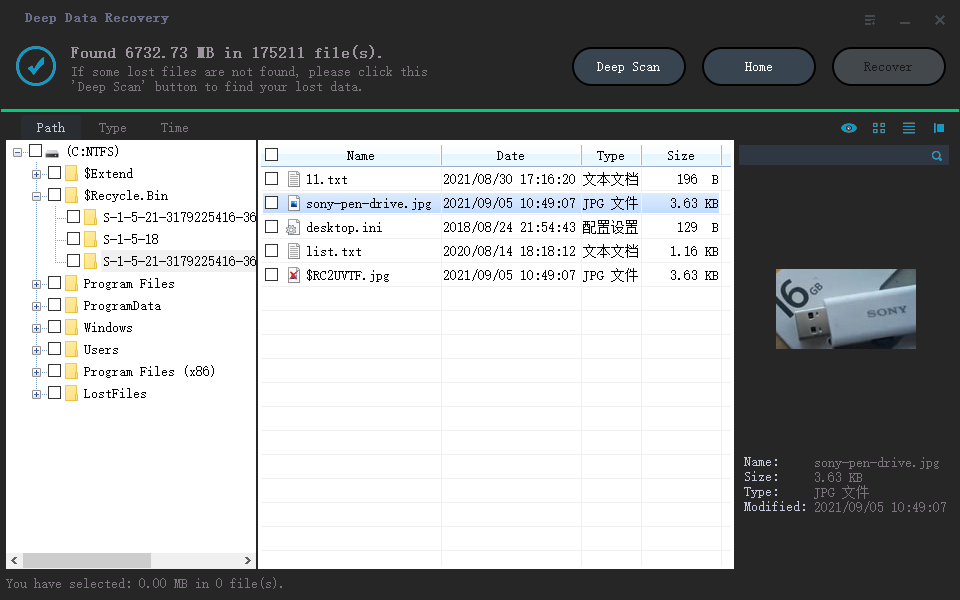
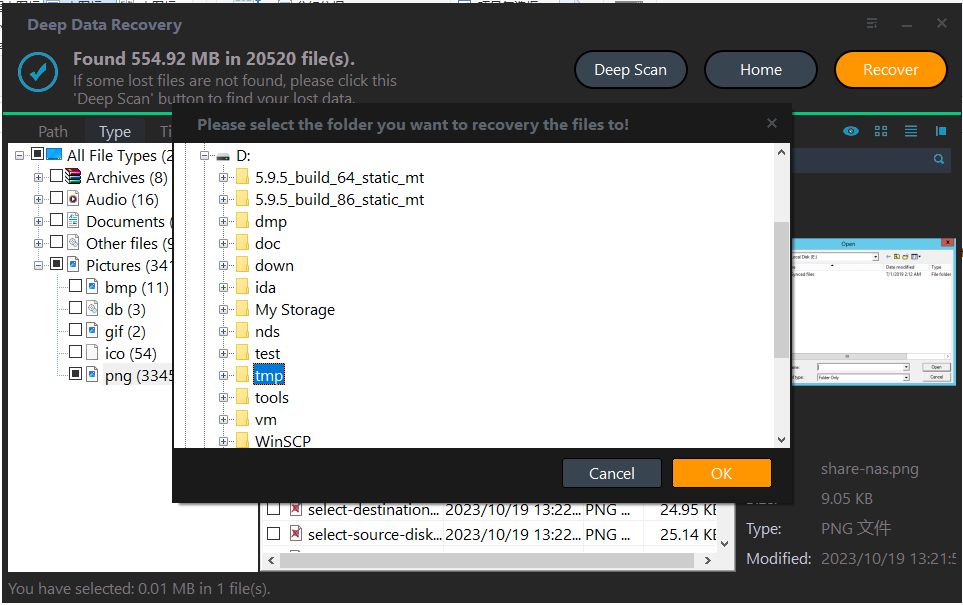
Qiling Deep Data Recovery offers a visual mode chooser, a source-location screen, file results with supported previews and a separate recovery destination dialog. Use this workflow only when Windows can read the source reliably. It does not bypass encryption or guarantee recovery of overwritten data.
The screenshots are examples from the product interface. Their drive letters, file counts and sample selections are not instructions to choose the same disks on your computer. The download is not a promise of unlimited free recovery; check the current edition and license terms.
Step 1. Prepare the Source and a Separate Destination
Stop routine use of the affected device. Check independent backups first, then connect a healthy destination with adequate free space. Download and install Qiling on healthy storage, not the volume holding the missing files. If the system disk is affected, consider another suitable computer or specialist assistance to limit background writes.
Step 2. Choose the Scan Mode for the Original Loss
Use the recovery mode that matches deletion or formatting. Do not choose a scan solely because it returns dates that look more familiar.
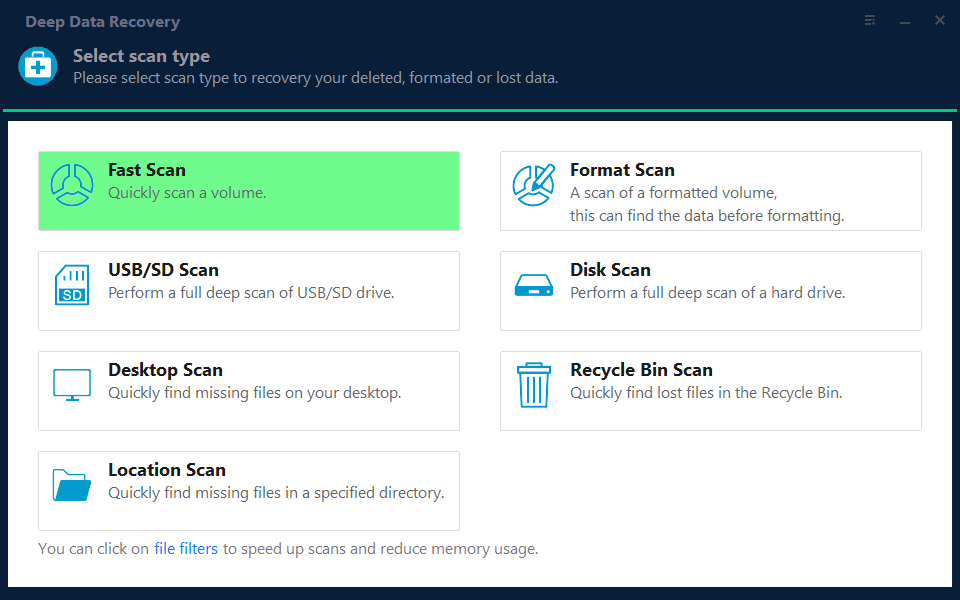
Step 3. Select the Original Source and Start the Scan
Select the original disk and click Scan. Remember that the date of the scan and the date a destination file is created are not necessarily the original edit date.
Step 4. Inspect Results and Preview Suitable Candidates
Inspect candidates by type and size as well as date. Clear a restrictive Time view selection when it hides plausible results.
Step 5. Recover to Healthy Independent Storage
Recover to a new folder on another physical disk. Keep candidates from different scans separate so you can compare their metadata and contents without overwriting them.
In the destination dialog, choose the intended folder and confirm with OK. Wait for the selected export to finish without disconnecting either device. If an error occurs, record it and keep any incomplete output separate rather than assuming the batch succeeded.
Verify the Recovered Files
Verify the meaningful content first, then document any metadata that was not retained. A useful recovered file and a forensically complete restoration are different outcomes.
Keep a copy of the unmodified recovery output before organizing or renaming the files. This preserves a reference if later sorting turns out to be wrong.
Stop condition: Do not change source-disk timestamps or run cleanup while recovery is in progress. Timestamp editing does not repair damaged file content.
Frequently Asked Questions
Does today's creation date mean the recovered file is new?
No. It can reflect creation of the destination copy rather than the date the original content was written.
Can I recover a photo if its capture date is missing?
Possibly. Pixel data can remain even when some metadata is lost. Inspect the full-resolution recovered image.
Should I filter only by the date I deleted the file?
Usually not. Deletion time, modification time and capture time are different. Start with a wider search when dates are uncertain.
Technical References
Related Articles
- Duplicate Files in Data Recovery Results: Which Copy to Keep
Compare duplicate recovery candidates by content, resolution and hashes. Keep originals safe and avoid deleting useful versions before verification. - Cannot Preview Files in Data Recovery Software: Next Steps
A missing preview does not always mean a file is lost. Check file type, size and a recovered sample before judging Qiling recovery results. - Data Recovery Software with Original File Names – Qiling
Products
Articles & Tutorials
- Data Recovery
- Data Backup
- File Recovery
- File Backup
- System Backup and Restore
- Disk and Partition Clone
- Technical articles
- Mobile articles
- Disk Master Help
- Windows Data Recovery Tutorials
- Windows Secure Delete Tutorials
- Windows Partition Management Tutorials
- Windows File Backup and Restore Tutorials
- Windows System Backup and Restore Tutorials
- Windows Disk Backup and Restore Tutorials
- Windows Clone Tutorials