Data Recovery Software with Original File Names [Full Guide]
How to Restore Lost Data with Original File Names
To select a data recovery software that can restore lost data with original file names, look for software that specifically supports recovering files from RAW USB drives and preserving original file names. It is essential to avoid writing new data to the affected drive to prevent overwriting the lost data.
If your USB drive has become RAW and you can't access the files, try using a recovery software like Recuva or Deep Data Recovery to scan the drive and retrieve your files. You can also try using a command prompt to run a disk check and see if that resolves the issue. If the drive is physically damaged, you may need to use a data recovery service or replace the drive. If the drive is just corrupted, try formatting it and then copying the files back onto it. If none of these solutions work, you may need to contact the manufacturer for further assistance.
Losing multiple files can be a frustrating experience, but using reliable data recovery software can help. This type of software is designed to restore files with their original names, making it easier to locate and retrieve the lost files. By utilizing such software, you can efficiently recover multiple files at once, saving you time and effort in the process.
To find a reliable software and get rid of the issue, consider the following steps: Research and compare different software options, read reviews and ratings from trusted sources, check for security certifications and compliance, and ensure the software is regularly updated and maintained. Additionally, look for software with a good reputation, transparent pricing, and responsive customer support. You can also seek recommendations from colleagues, friends, or online communities to find a software that suits your needs.
Two Factors - Determining If the File Name Can Be Restored
Some data recovery software may not be able to restore lost data with the original file name, and the likelihood of recovering the lost file name depends on two main factors.
1. The loss of file elements - Directory Info or Data Content
The image shows that a lost file consists of two parts: Directory Info, which contains file details such as name, timestamp, and size, and Data Content, which holds the actual file data. The Directory Info part stores the file's metadata.
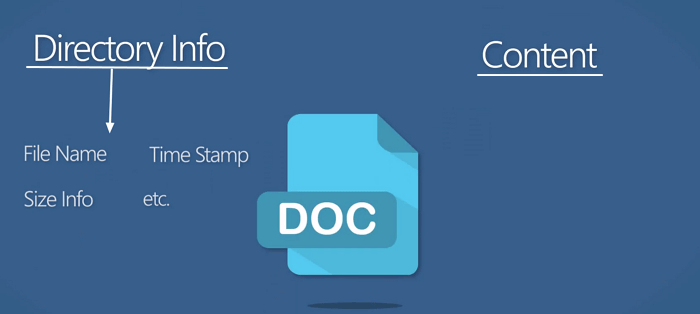
- When both Directory Info and Content are safe, you can directly restore lost files with the original file names, making the recovery process much simpler and more efficient.
- If both parts of a damaged file are damaged, it will not be possible to recover the file.
- If the Directory Info part gets lost or corrupted, the lost data can be restored. Recovered files will be renamed with a sequential number, such as File001.doc, File002.xls, etc.
- If the content part of the file is damaged, the file will be recovered but cannot be opened.
2. Data loss causes
Regardless of whether it's the directory or content that's lost or damaged, the key to recovering the original names of lost files lies in understanding how they got deleted. If the entire partition or device was formatted, the chances of recovering the original file names are higher. In such cases, the cause of the deletion is often linked to the file system itself, making it easier to recover the original file names.
- Partition loss
- Device becomes RAW
- File deletion
- Device formatting
Solution: Download Qiling Data Recovery Software for Help
Worrying about recovering data with original file names is a thing of the past. With the help of efficient data recovery software like Deep Data Recovery, complex and troublesome cases are effortlessly resolved, and data is restored with original file names.
Complex data cases such as SSD data recovery or partition recovery on Windows 7 can be easily resolved with the help of this tool, saving time and energy by locating lost files with their original names.
Perform Data Recovery with Original File Names
Follow the steps below and start rescuing your data:
Step 1. Select file types and click "Fast Scan" to start.
Launch Deep Data Recovery and hover over the partition where you lost data. Select file types and click "Fast Scan" to start the recovery process.

Note: You can choose different search modes based on where and why the data was lost.
Step 2. Select a drive and start scanning
Insert the storage device you want to scan into your computer, and then click "Scan" to begin the scan process.

Step 3. Check and preview scanned files
To narrow down the scan results, use the file format filter on the left or upper right corner, and once you find the desired files, you can either click the "Preview" button or double-click a file to preview its content.

Step 4. Recover lost data to a secure location
To recover lost data, select the file, check the box next to it, and click "Recover". It's recommended to save the recovered data in a secure location, avoiding the original disk where the data was lost.
If you've lost files due to a virus attack, system crash, or other reasons, Qiling Data Recovery can help you recover them. While losing the original file names can be frustrating, recovering the valuable files themselves is a more significant concern.
Related Articles
- Run Deep Data Recovery from WinPE Bootable Disk
- How to Recover Formatted Hard Drive Free
- HDD Unallocated Space Data Recovery
- How to Restore Master Database in SQL Server 2008/2012 with or Without Backup
An unexpected shutdown of SQL server or system error can cause SQL server database crash and master database file (MDF file) corruption. - Restore Missing Fonts After Windows 10 Creator Update
If you're experiencing missing fonts after the Windows 10 Creator update. This article provides a quick fix and reliable solutions to restore the installed fonts on your computer.
Products
Articles & Tutorials
- Data Recovery
- Data Backup
- File Recovery
- File Backup
- System Backup and Restore
- Disk and Partition Clone
- Technical articles
- Mobile articles
- Disk Master Help
- Windows Data Recovery Tutorials
- Windows Secure Delete Tutorials
- Windows Partition Management Tutorials
- Windows File Backup and Restore Tutorials
- Windows System Backup and Restore Tutorials
- Windows Disk Backup and Restore Tutorials
- Windows Clone Tutorials