Top 10 Best SD Card Repair Tool Download
If you're looking for the best SD card repair tool. We've compiled a list of top-notch options to help you repair your SD cards with ease and minimal hassle. This comprehensive guide will make it simple for you to find the perfect tool for the job, ensuring your SD cards are restored to their former glory without any issues.
To effectively repair an SD card, it's not enough to just find the solutions; it's also crucial to address the underlying causes to make the process more convenient. Here, we'll break down the different segments of SD card repair to help you achieve the best results without any issues.
What Causes SD Card Corruption
SD Card corruption occurs due to various reasons, including physical damage, improper ejection, power surges, and software issues, which prevent users from accessing the stored content.
Human Error: The SD card gets corrupted due to improper use, such as not being careful when connecting or removing it from a device, and not ejecting it while it's in use.
Virus and Malware: Viruses and malware can cause SD card corruption by spreading to connected devices and scrambling the card's content with a strong encryption algorithm, making it inaccessible.
Physical Damage: SD cards are prone to damage due to their thin plastic shells, which can chip and bend after only a few dozen insertions, making them susceptible to breakage from edges. Additionally, they can also be damaged by magnets and other electronic devices with strong electrostatic discharge.
Manufacturing Defects: Some leading brands offer high-end reliability in their products, but despite this, defects can still occur during packaging or manufacturing, preventing users from accessing the content.
Exceeded Lifespan: SD cards have a limited lifespan due to their reliance on electrons passing through a thin insulating silicon oxide barrier. Over time, these electrons get trapped, disrupting the flow of other electrons, and eventually causing the card to fail. This is because each write and erase cycle reduces the card's lifespan, as the electrons become stuck, leading to data corruption and ultimately, card failure.
Top 10 Best SD Card Repair Tools for Windows 10/Android
Corruption on an SD card can lead to permanent data loss if left untreated for a long time. Fortunately, there are effective tools available to help recover lost files. One of the best SD card repair tools can be used to restore lost files in various file formats, making it a handy solution for recovering data.
Before SD Card Repair - Recover Lost or Corrupted Data First
Before attempting to repair your SD card, it's essential to back up your data first to ensure its safety throughout the recovery process. While there are many data backup tools available, it's crucial to choose a reliable one to avoid compromising your privacy and safety. Deep Data Recovery is a popular and efficient option that can recover and backup your data without any issues, supporting various file formats and operating systems.
Here, We provide the full steps to recover deleted files or lost data from SD card using the Deep Data Recovery. First, download and install Deep Data Recovery software, then connect the SD card to the computer, launch the software and select the SD card, choose the file type you want to recover, scan the SD card, preview the recoverable files, select the files you want to recover and save them to a safe location.
Step 1. Select file types
Launch the Deep Data Recovery software, select the desired file types, and click "USB/SD Scan" to initiate the recovery process.

Note: You can choose different search modes based on where and why the data was lost.
Step 2. Select the SD card to scan
- Download and install Deep Data Recovery on your Windows PC.
- Use the proper way to connect your SanDisk/Lexar/Transcend SD card to the computer.
- Open Qiling SD card recovery software, select your SD card and click "Scan" to recover data.

Step 3. Check for scan results
- Wait for the scanning process to complete.
- To filter the search results, click on the "Filter" button and select one or multiple file types to display, such as Pictures, Word documents, Excel spreadsheets, PDFs, or Videos.
- Click "Preview" to check if they are the wanted files.

Step 4. Recover SD card data
- Choose desired files and click "Recover".
- When recovering data from a damaged SD card, it's recommended to save the recovered files to a different location, such as a computer or an external hard drive, instead of the original SD card. This helps prevent overwriting any remaining data on the SD card and ensures that the recovered files are safely stored in a separate location.
After completing the data backup and recovery process, you can proceed to explore the free SD card repair tools available for download, which can help you quickly recover your data.
- 1. Diskpart
- 2. Windows Disk Checking Tool
- 3. File Explorer
- 4. Windows Disk Management
- 5. Qiling Partition Master
- 6. Qiling CG
- 7. Clonezilla
- 8. Testdisk
- 9. PhotoRec
- 10. SanDisk Repair Tool
1. Diskpart
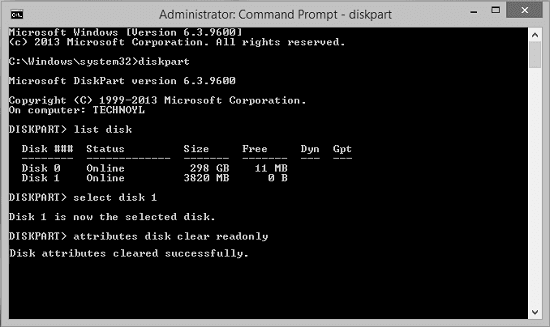
Diskpart is a leading and easy-to-use SD card repair tool that works effectively in all major operating systems, and is compatible with most memory cards and supports a wide range of file formats, with built-in data protection capabilities to prevent data loss.
Features:
- Provides support to different file formats
- Ensures quick and deep scan
- Works well on all major operating systems
- Preview of the recoverable items
- Offers perfect backup for the files
Compatibility:
- Supported systems: Windows
- File systems: NTFS, FAT32
2. Windows Disk Checking Tool
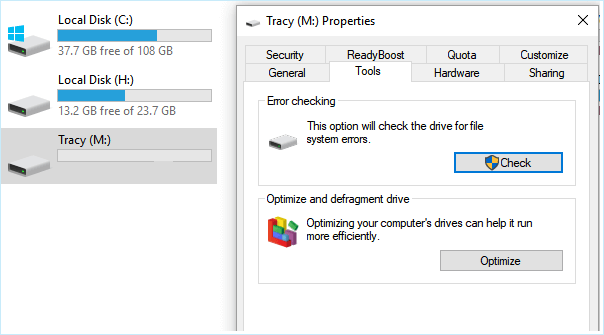
The SD card repair tool is a fantastic, free, and open-source utility that can recover an unlimited amount of data without causing any issues, using the Command prompt or terminal. Its user-friendly interface makes it easily accessible to anyone, eliminating hassle, and allowing for quick data recovery.
Features:
- It comes up as an open-source software application
- Ensures free access to the users
- Works well on a wide range of platforms
- Quite capable of repairing file system issues effectively
- Operates using a command prompt
Compatibility:
- Supported systems: Windows
- File systems: NTFS, FAT32
3. File Explorer
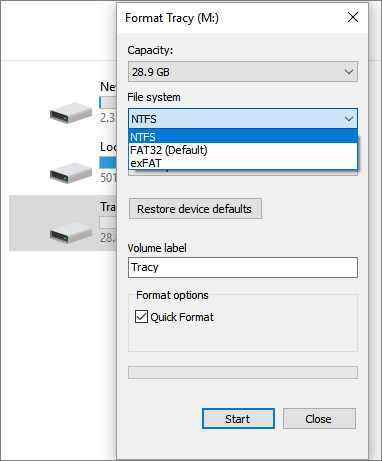
File Explorer is a powerful tool that not only repairs corrupted SD cards but also offers hidden settings that enhance its workflow. It provides speed to navigation in Explorer and is an excellent SD card repair tool.
Features:
- Provides the ability to rename an SD card effectively
- The format option can help you resolve some fundamental errors on the SD card.
- The quick format quickly prepares the SD
Compatibility:
- Supported systems: Windows
- File systems: NTFS, FAT32
4. Windows Disk Management
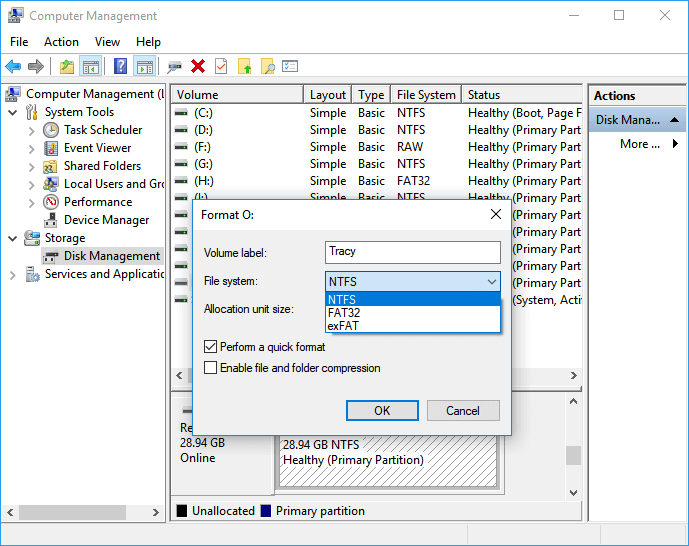
Windows disk management is a tool that helps manage disk-based hardware, including SD cards, effectively serving as a repair tool for them. It's an extension of the Microsoft Management Console, making it easier to manage disks like hard drives, optical drives, and flash drives, including CDs, DVDs, and SD cards recognized by Windows. It supports a wide range of file formats and works with most Windows versions.
Features:
- Extension of Microsoft Management Console
- Works excellent with all types of hard drives
- It goes well with different file formats
- Simple and easy to use
- Suitable to work with other versions of Windows
Compatibility:
- Supported systems: Windows
- File systems: NTFS, FAT32
5. Qiling Partition Master
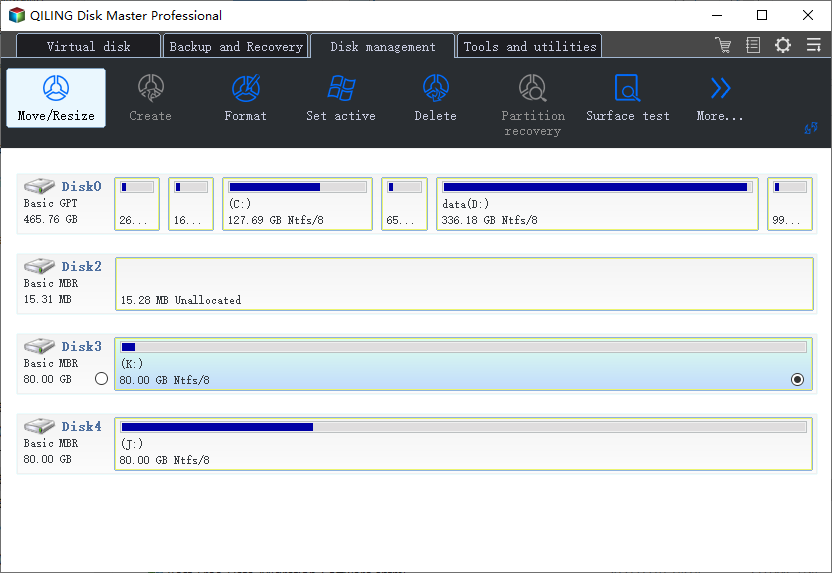
Qiling Partition Master is a tool designed to provide SD card repair capabilities, but it's also excellent for extending or managing partitions in Windows. It can easily clone and upgrade disks, ensuring data safety and preventing loss.
Features:
- Extending and managing partitions is quite convenient
- Ensure cloning and upgrading of disks to prevent data loss
- The software easily migrates the Windows operating system from an old SSD to a new one, and vice versa, making it a convenient tool for upgrading or replacing storage devices.
- Redistribute the space as per the disk flexibility
- Easy to use interface
Compatibility:
- Supported systems: Windows
- File systems: NTFS, FAT32
6. Qiling CG
Qiling CG scans the computer and SD card for junk files and unwanted software. Before repairing or cleaning storage, consult the data backup and drive cloning tutorials to protect important data.
Features:
- Removes junk files and unwanted software effectively
- Provides one-click deep scanning and optimization of the SD cards
- Clean, repair, and optimize the SD card in one click
- Locate and remove cloned files and help you in emptying the space
- Keeps the file registry defragmented and fixes registry errors smoothly
Compatibility:
- Supported systems: Windows
- File systems: NTFS, FAT32
7. Clonezilla
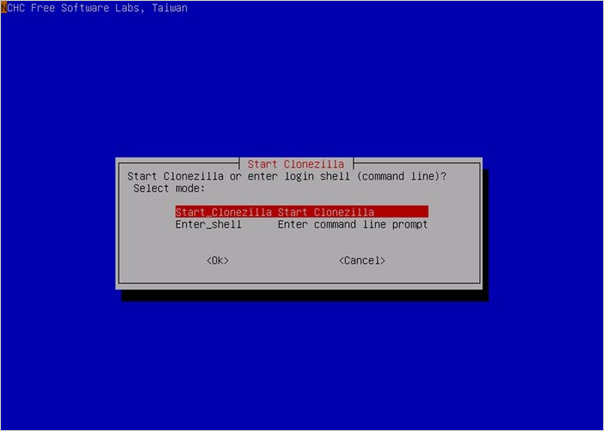
Clonezilla is a partition and disk imaging program that enables SD card deployment, backup, and recovery of bare metals. It supports single and multiple machine backup and restore, saving and restoring only used blocks on your hard disk and SD card.
Features:
- Provide absolute support to different file systems
- Features unattended mode
- Works efficiently on command prompt
- Can effectively restore the single image to multiple local devices
- It supports multicast and Bittorrent perfectly
Compatibility:
- Supported systems: Windows
- File systems: NTFS, FAT32
8. Testdisk
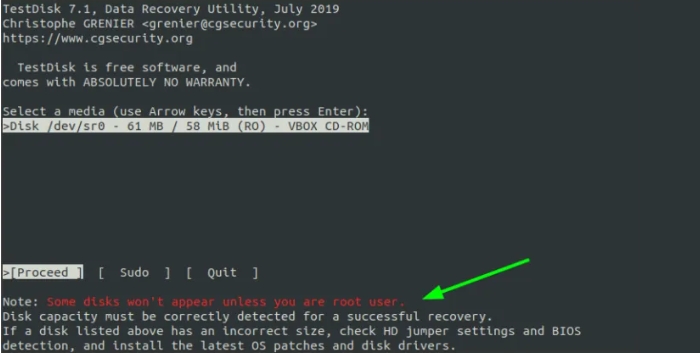
Qiling Partition Recovery is a robust and free data recovery tool that helps recover lost partitions, makes non-booting disks bootable, and repairs corrupted SD cards.
Features:
- Help in recovering deleted partitions
- Fix the FAT tables effectively
- Works well on a wide range of file formats
- Features both invoices and experts
- Collected detailed information about a non-booting drive
Compatibility:
- Supported systems: Dos, Windows, Linux, FreeBSD, NetBSD, OpenBSD, SunOS, and MacOS X
- File systems: NTFS, FAT32, FAT16, ext2/ext3/ext4, FAT
9. PhotoRec
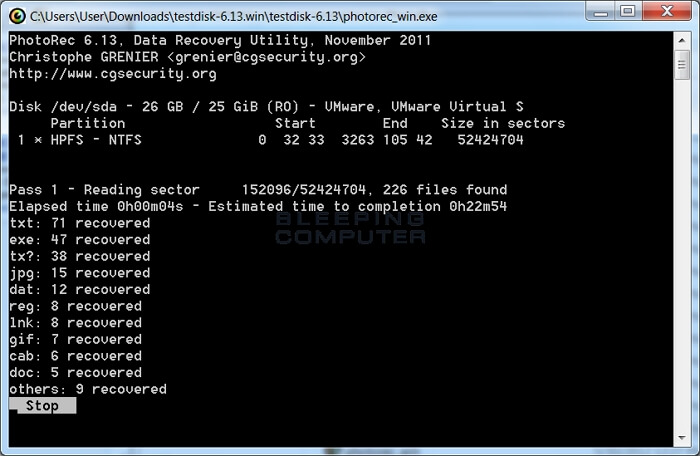
Photorec is an excellent data recovery software that perfectly recovers lost files. It works well on both hard drives and flash drives, and is a free, open-source multi-platform tool that provides absolute safety to your restored data, making it easy to access.
Features:
- Free and open-source data recovery software program
- recover the lost files, including files, documents, videos
- Can perfectly archive data from hard disks and flash drives
- Simple and powerful textural interface
- Provides support to a wide range of file formats
Compatibility:
- The software is supported on various systems, including DOS/Windows 9x, Windows 10/8.1/8/7/Vista/XP, Windows Server 2016/2012/2008/2003, as well as Linux, FreeBSD, and NetBSD.
- OpenBSD Sun Solaris Mac OS X
- File systems: FAT, NTFS, exFAT, ext2/ext3/ext4 filesystem, HFS+
10. SanDisk Repair Tool
This tool is the best data recovery solution that efficiently recovers lost and deleted files from various digital media, including a wide range of file formats. It is designed to work seamlessly on multiple operating systems, making it a versatile and effective tool for repairing and recovering different types of files, such as images, videos, documents, and music.
Features:
- Can effectively recover images, emails, documents, videos, and music
- Provides previews of the recoverable data
- User-friendly interface for making data recovery quite fun
- Secure media wiping
- Create a picture of a failing device
Compatibility:
- Supported systems: Windows, Mac
- File systems: NTFS, FAT 32, APFS
Top 5 Best SD Card Recovery Software Free Download Full Version
To repair an SD card, it's recommended to use a data repair software solution to help manage the data recovery process. Along with the best SD card repair tools, we provide leading SD card recovery software that can make the task much more convenient for users.
1. Deep Data Recovery software
The tool is a highly efficient data recovery solution used globally, capable of recovering lost files, documents, pictures, and images with complete data recovery in various scenarios, making it a straightforward and reliable option.
Features:
- Easily recover deleted and raw files
- Effectively recover the formatted files
- Provides flexible scanning mode
- Offers to preview of data before recovery
- Offers remote assistance for the users
2. Disk Drill
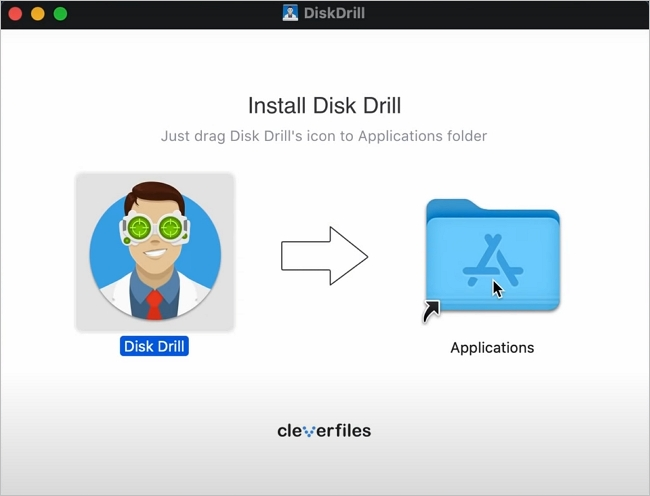
The data recovery tool is a free-to-use tool that can effectively recover deleted files from the memory card, restoring lost and deleted images, videos, audio files, and more. It offers easy integration and absolute security to the restored data.
Features:
- The tool scans the SD card thoroughly and recovers the files accurately and efficiently, making it a reliable option for users.
- Provides absolute recovery during accidental data deletion
- Keeps you safe from the virus or malware infection
- This software can thoroughly scan the files on the SD card and identify any corrupted or damaged files, allowing you to recover them effectively.
- It gives you a relief from the file system issues
3. RescuePRO
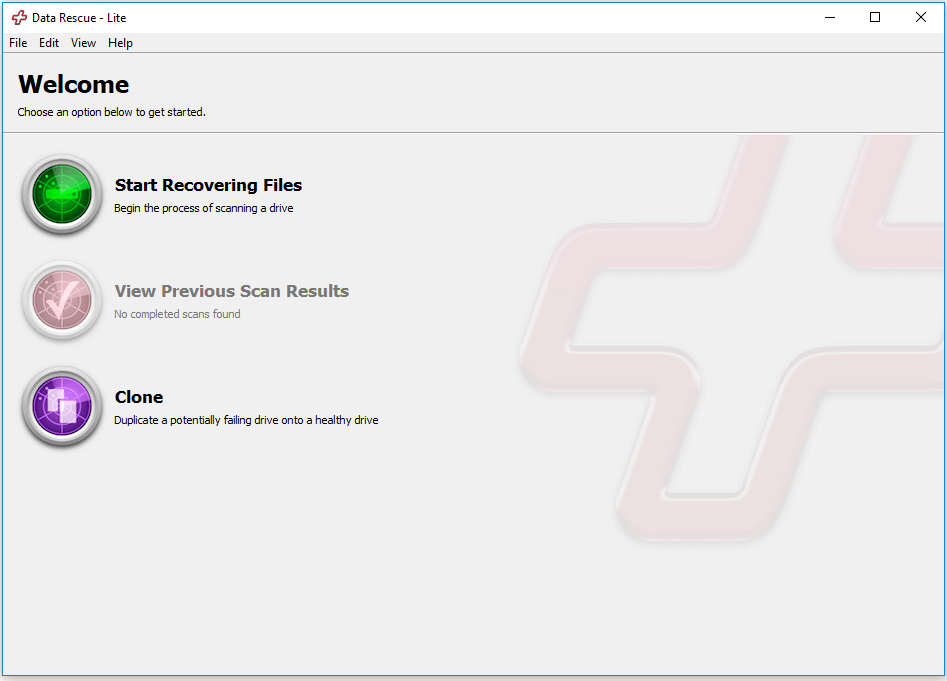
This tool is a complete solution for recovering SD cards without any issues, effectively recovering lost and deleted files from most digital media types, including music, videos, images, documents, and other files.
Features:
- Help in recovering a wide range of file formats
- Features innovative media recovery algorithms
- Provides previews of the recoverable data
- Includes MPEG audio and video
- Works effectively on different operating systems
4. Stellar Data Recovery
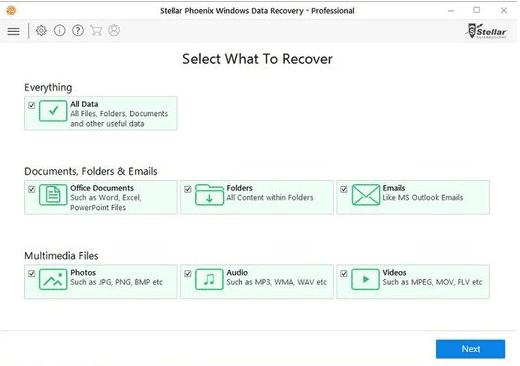
Stellar Data Recovery is an excellent SD card recovery tool that offers high-end data recovery without issues. It provides highly customized searches and deep scanning to quickly find related problems, and its vast file type library makes it convenient to use on different types of files.
Features:
- Provides highly customizable searches
- Ensured deep scanning
- Huge file type library to select from
- Provides exchange repair facilities
- Repairs the corrupt SD files with absolute precision and integrity
- Comes up with a complete SD card repair tool kit
5. R-Studio
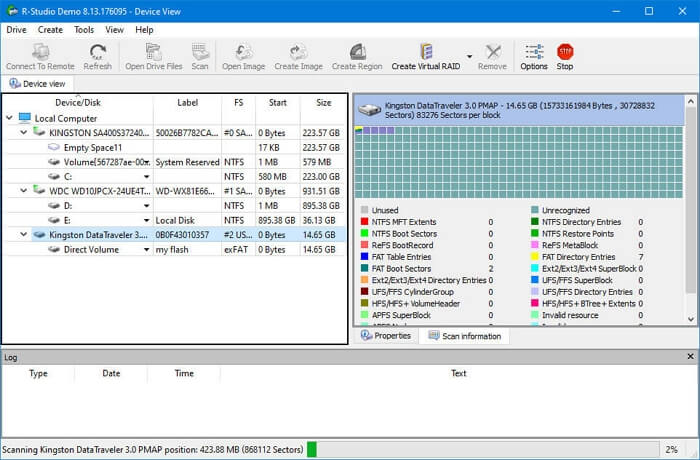
R-Studio is a comprehensive solution for robust and cost-effective disk recovery, offering a perfect tool for professionals with scalable and user-friendly interfaces. It seamlessly integrates with most operating systems and features advanced file recovery and disk repair technology options.
Features:
- Provides support to a wide range of file formats
- Features advanced raid reconstruction
- It supports most of the partition schemes
- Includes advanced recovery algorithms for absolute results
- Provides easy disk image creation
Avoid SD Card Corruption with These Tips
Accidents can happen anytime, making it essential to work on the reasons behind them to avoid data loss. To reduce the risk of SD card corruption and subsequent data loss, consider implementing some preventive measures. By doing so, you can minimize the risk of data loss and ensure that your important files and memories are safe.
- If you're transferring files to or from your SD card, don't remove the card until the transfer process is complete to avoid data loss or corruption.
- Please turn off your device or eject the SD card before removing it from the main port.
- Buy SD cards from the reputed brands only.
- When using an SD card on different devices, it's essential to format it each time to ensure compatibility and prevent data corruption. This process clears the card of any existing data and file systems, allowing it to be recognized and used by the new device without any issues.
- Keep your SD card away from heat and moisture to extend its lifespan.
- Make sure to check your SD card regularly for signs of data corruption, such as poor performance, read or write errors, and other issues that can arise when data is damaged or corrupted. This can help you catch and fix problems before they cause significant data loss.
- To avoid any potential issues, it's recommended to use the new SD card for all essential tasks, such as storing important documents, photos, and videos. This will ensure that your data is safe and easily accessible, even if the old SD card is not functioning properly.
- To ensure a smooth and successful SD card formatting process, please refrain from interrupting it until it is fully completed. This will prevent any potential data loss or corruption and guarantee that the formatting is done correctly.
Conclusion
The best SD card repair and recovery tools have made it no longer a daunting task to fix and retrieve data from SD cards. With a list of ten top SD card repair tools and five recovery tools, this guide provides a comprehensive overview of the best options available. Each tool is described in detail, highlighting its features and benefits, allowing users to quickly select the most suitable tool for their needs.
Related Articles
- Recover Lost Files with Qiling Portable Data Recovery Software
- How to Recover Deleted Photos from SD Card on Android Phone
- How to Recover Formatted Hard Drive/SD Card/USB Data Using CMD
- How to Fix Corrupted Video on Windows 10/Android/SD Card - 3 Ways
- Deep Data Recovery Stuck Or You Recieve Error Messages? Fixes Here!
To resolve Deep Data Recovery issues with Qiling, such as a deep scan getting stuck, taking too long to scan a disk, or getting stuck building a new directory, try restarting the application, checking for disk space and ensuring the disk is not full, or running the scan on a different disk. - Free Download Deep Data Recovery Torrent, Serial Key
Learn how to recover lost photos, documents, videos, and other files with Qiling data recovery software using safer recovery steps.
Products
Articles & Tutorials
- Data Recovery
- Data Backup
- File Recovery
- File Backup
- System Backup and Restore
- Disk and Partition Clone
- Technical articles
- Mobile articles
- Disk Master Help
- Windows Data Recovery Tutorials
- Windows Secure Delete Tutorials
- Windows Partition Management Tutorials
- Windows File Backup and Restore Tutorials
- Windows System Backup and Restore Tutorials
- Windows Disk Backup and Restore Tutorials
- Windows Clone Tutorials