Fixed: Flash Drive Shows Up as CD Drive
When your flash drive shows as a CD drive on your computer, relax. And we have fixes for you. Follow the provided methods below, you will make your flash drive recognized as a removable drive on a computer again:
| Workable Solutions | Step-by-step Troubleshooting |
|---|---|
| First. Recover Data | Connect flash drive to PC > Run Qiling recovery software > Scan and restore data...Full steps |
| Next. Reformat Flash Drive | Fix 1. Reformat flash drive in Disk Management...Full steps Fix 2. Format flash drive with free software...Full steps |
You downloaded files on your USB flash drive, but now it's being recognized as a CD/DVD ROM instead of a regular removable disk drive, causing issues with opening it on Windows 10.
Flash drive showing up as CD drive issue
We frequently use external storage disks, particularly removable ones like USB flash drives, which are compact, portable, and compatible with multiple OS-based computers. When you insert a USB flash drive into its USB port, the computer will typically detect and recognize it as a removable device, assigning it a drive letter in the process.
Sometimes, due to internal drive issues, Windows may incorrectly read a removable disk as an empty optical disk drive, resulting in an error message saying "There is no disk in the drive. Please insert a disk into drive X:" when trying to access it. If the drive contains important data, the first step is to recover the data, and then restore the drive to normal use.
First, recover data from inaccessible USB flash drive
To recover data from an inaccessible flash drive or external drive, use a reliable data recovery software like Deep Data Recovery, which has been serving the market for over 10 years and can retrieve all types of files from a connected storage drive, even if data was lost after formatting, re-formatting, or deletion.
Now download Qiling hard drive recovery software on your computer, and follow the video guide to export all important data on the flash drive that shows wrong disk attribute. It helps in the way of USB flash drive recovery, by scanning all existing and lost data on the drive. Three steps are enough.
Choose the USB flash drive -> Scan -> Preview and recover.
Second, repair the flash drive by reformatting it
To repair the USB flash drive detected as a CD-ROM, you can use either the built-in Windows tool Disk Management or the free downloadable Qiling Partition Master.
Option 1. Disk Management
Step 1. Press Windows + R keys to bring up the Run box, type diskmgmt.msc and hit Enter.
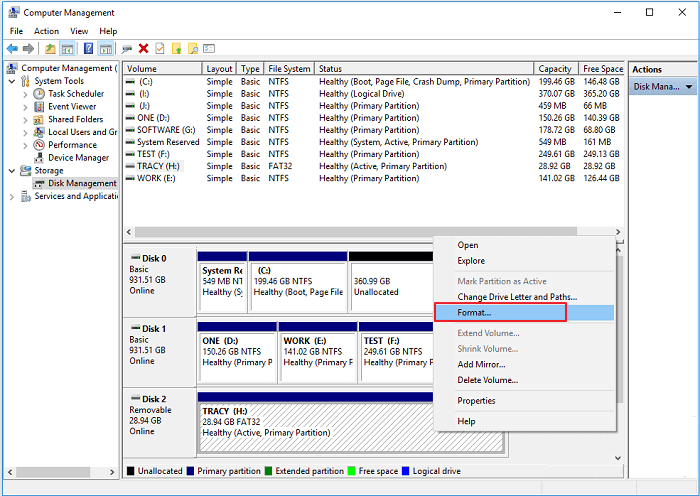
Step 2. In Windows Disk Management, you can check the current status of a flash drive. If the USB flash drive is not working properly, right-click on it and choose Format to resolve the issue.
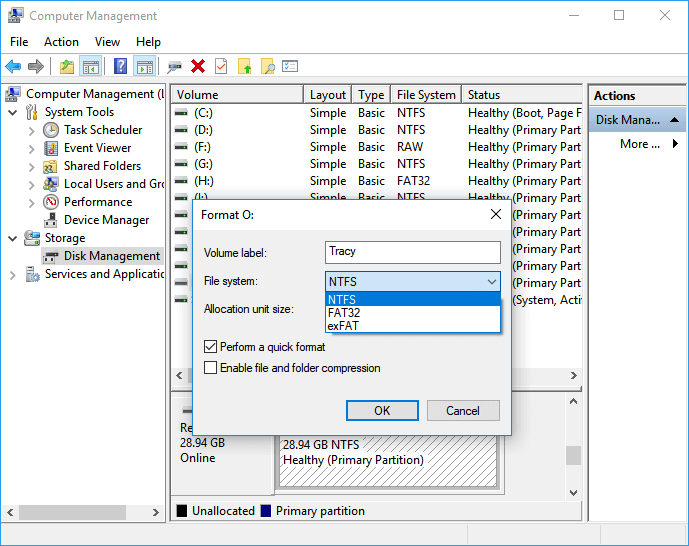
Step 3. Choose a file system like NTFS, FAT32 and click OK.
Option 2. Qiling Partition Master Free
You can download Qiling, a free partition manager, to easily format a corrupted SD card, USB flash drive, or pen drive. This tool can greatly help in fixing issues with these storage devices.
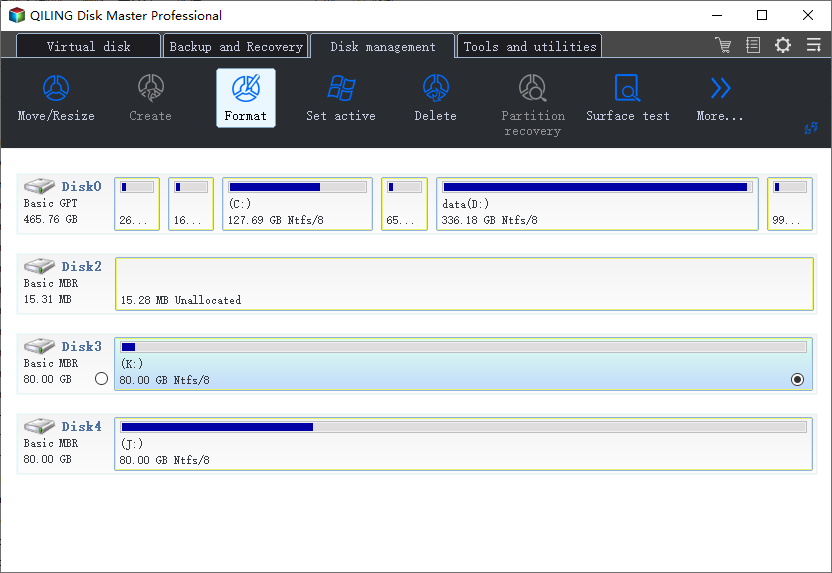
Step 1. Launch Qiling Partition Master, click the USB flash drive you want to format and choose the Format partition.
Step 2. A A mini window appears, allowing you to edit the partition label and select a file system, such as FAT/FAT32, NTFS, or EXT2/EXT3.
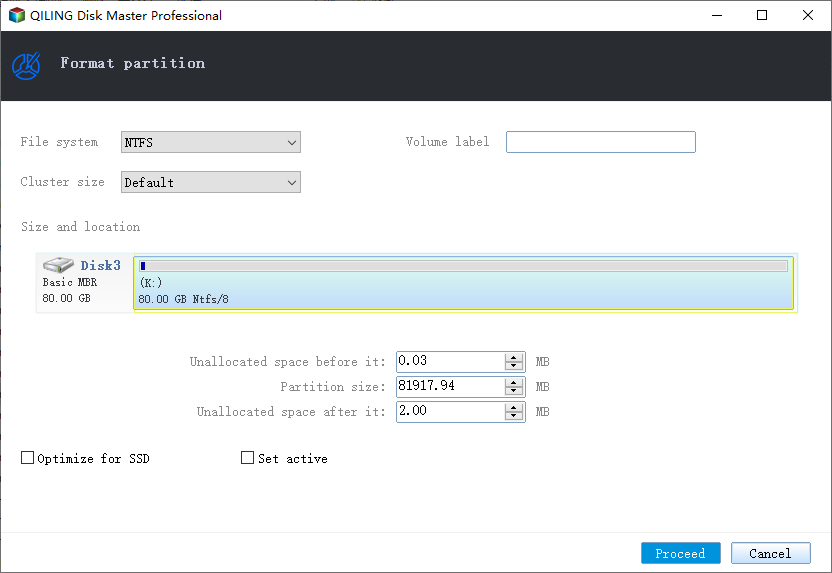
Step 3. Click "Proceed" to confirm to format the flash drive that shows up as CD/DVD Rom.
Related Articles
- Recover Data from Encrypted SD Card
- How to Fix Drive Is Not Accessible in Windows 10/8/7 [Real Fix]
- All Things You Should Know About RAID 1
- Fix An External Hard Drive That's Not Working/Responding/Showing Up
- Guide to Recover Deleted Files with System Restore in Windows 10, 11
You can recover deleted files with System Restore, and for further assistance, you can also use another data recovery tool to recover deleted files in Windows 10/11. - How to Recover Hidden Files in USB using CMD [Full Guide]
How to recover hidden files in USB using CMD? Here is a stepwise guide. Also, we shows you alternative ways to unhide files hidden by viruses and find lost USB data.
Products
Articles & Tutorials
- Data Recovery
- Data Backup
- File Recovery
- File Backup
- System Backup and Restore
- Disk and Partition Clone
- Technical articles
- Mobile articles
- Disk Master Help
- Windows Data Recovery Tutorials
- Windows Secure Delete Tutorials
- Windows Partition Management Tutorials
- Windows File Backup and Restore Tutorials
- Windows System Backup and Restore Tutorials
- Windows Disk Backup and Restore Tutorials
- Windows Clone Tutorials