6 Best Free Disk Drill Alternatives for Mac Data Recovery in 2022
This page answers frequently asked questions about Disk Drill and lists free alternative software for Mac users to recover deleted, formatted, and lost data from Mac computers and external storage devices.
Is Disk Drill Really Free? Any Disk Drill alternative?
"I accidentally deleted some files on my Macbook and attempted to use Disk Drill to retrieve them back. The free "basic" version lets me wait a full 8-9 hours to see the data is there, then it tells me I can't recover a single file without purchasing a serial key for the PRO version. Is Disk Drill really free? I'm a sophomore high-school student and I don't have the money to pay. So, is there any free Disk Drill alternative software that can help?"
Disk Drill Basic vs Disk Drill Pro
Disk Drill is advertised to recover deleted files on Mac and perform Mac data recovery in other data loss cases for free, but the Basic Free version only scans and lists lost files, with the Pro version offering additional features.
Information source: Disk Drill
| Comparison | Disk Drill Basic Free | Disk Drill Pro |
|---|---|---|
| Pros |
|
|
| Price | Free | $89.00 |
The table shows that Disk Drill Basic is primarily used for data protection and backup, but to recover data, you need to upgrade to the Pro version for $90. However, there is a free alternative to Disk Drill for restoring data on Mac.
6 Best Disk Drill Free Alternatives for Mac
Looking for a free alternative to Disk Drill to recover lost Mac data? Check out the list of 6 top picks and find the best one to get your data back immediately.
- Deep Data Recovery for Mac Free Edition
- PhotoRec
- Data Rescue for Mac
- TestDisk for Mac
- Exif Untrasher
- Cisdem Data Recovery
To recover lost files on Mac, consider using free data recovery software like Disk Drill, and explore its alternatives. Each option has its pros, which can be found by continuing to read.
#1. Deep Data Recovery for Mac Free Editon - Best Disk Drill Alternative
Finding a perfect free alternative to Disk Drill can be challenging, as many Mac data recovery software only allow previewing lost files for free, but require registration or a paid license code to recover the data.
Fortunately, Qiling's Data Recovery Wizard for Mac Free Edition is a free Mac data recovery software that allows you to recover various types of files and data from hard drives or other storage devices, such as memory cards, USB drives, and digital cameras, on a Mac for free.
Deep Data Recovery for Mac Free Edition is a software tool that allows users to recover lost data from Mac devices. It is a free version of the Deep Data Recovery software, offering limited features and capabilities compared to the full version.
| Specifications | Deep Data Recovery Free | |
|---|---|---|
| Supported System | macOS 10.15, 10.14, 10.13, 10.12, OS X 10.11, 10.10, 10.9. | |
| Supported File System | APFS, HFS+, HFS X, FAT (FAT16, FAT32), exFAT, NTFS | |
| Data Recovery Process | 3-Step Recovery: Select Location - Scan - Preview & Recover | |
| Free Data Recovery Capacity | 2GB | |
| If you need to restore large files (more than 2GB) without data recovery limitations, Deep Data Recovery for Mac is still your best choice. To save money, we can offer a special deal.30% discount on the serial key of Deep Data Recovery for Mac. | ||
Qiling recommend:
Deep Data Recovery allows you to recover over 200 types of lost Mac data due to deletion, formatting, virus attacks, and other issues in just 3 simple steps.
Mac users can recover lost files using Deep Data Recovery Free Edition, a software that supports all levels of users. This tutorial will guide you through the process step by step. Alternatively, Windows users can also utilize the Windows version of the software for help.
#2. PhotoRec
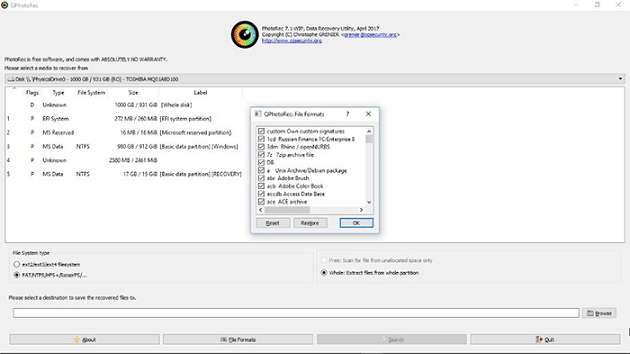
Unlike Disk Drill, PhotoRec is a free and open-source software that uses carving techniques to restore Mac data with a text-based interface. It can be applied to recover common files, especially photos, from internal and external storage devices on Mac OS X.
Qiling recommend:
- PhotoRec is a specialized tool for recovering lost photos, capable of retrieving files without compromising their quality. It's a useful option for photography enthusiasts and designers who have lost their precious images.
- PhotoRec will scan your device at the sector level, allowing it to locate and recover more lost files, giving you a better chance of recovering your data.
#3. Data Rescue for Mac
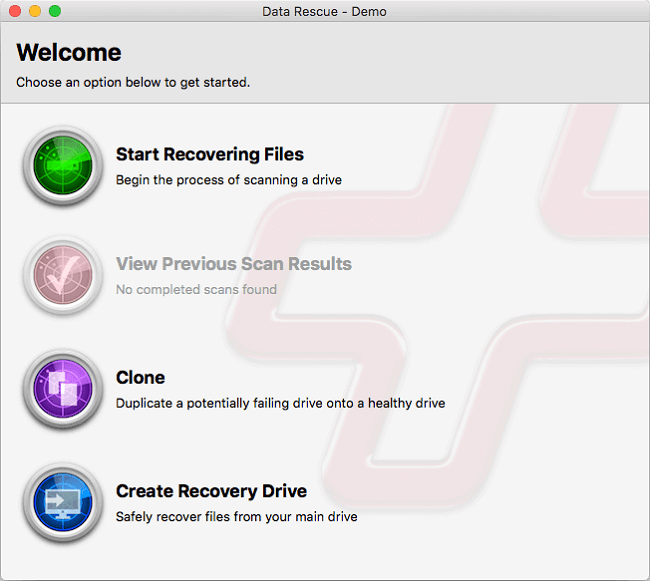
Data Rescue for Mac offers a free demo that allows users to scan and preview lost or deleted files on external or internal hard drives on Mac, compatible with macOS 10.10 and later.
The software effectively restricts access to photos, videos, and documents for both business and home users, providing a secure way to share content.
Qiling recommend:
- Data Rescue for Mac enables you to create a clone of your Mac's hard drive, allowing for rapid access to data through its Quick and Deep scan modes.
- Creating a recovery drive allows you to create a bootable disk that enables safe recovery of files from your main hard drive. This feature supports you in creating a backup disk to recover your important files in case of any data loss or system failure.
Notice: Data Rescue for Mac, like Disk Drill, only allows Mac users to preview recovered files in the free demo version. To actually restore lost files, users must upgrade to the full version. Unfortunately, the software is not compatible with macOS 10.15 when used in recovery mode.
#4. TestDisk
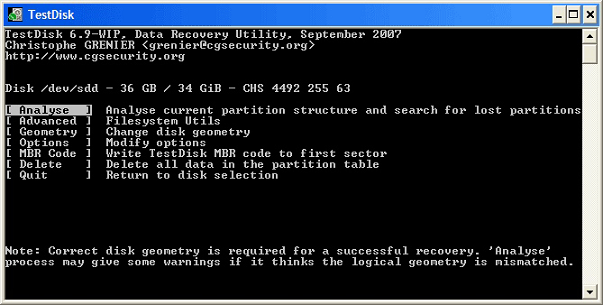
TestDisk, an open-source data recovery utility, is similar to PhotoRec. It allows Mac users to recover lost data from a Mac volume and repair an unbootable disk to make it functional again. The tool can also fix corrupted partition tables caused by software crashes, virus attacks, or mistaken formatting, among other issues.
Qiling recommend:
- TestDisk, a free and open-source partition recovery tool, can help rebuild and repair the corrupted partition table on a Mac, restoring lost or even disappeared partitions.
- When a Mac bootable drive fails to boot, you can fix the issue using TestDisk, making the disk bootable again.
#5. Exif Untrasher
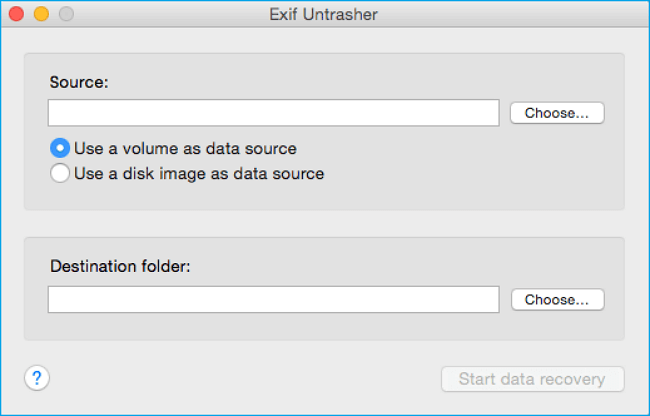
Unlike Disk Drill, Exif Untrasher is completely free and can efficiently retrieve deleted or lost files on Mac. It also works similarly to PhotoRec in recovering JPEG files from digital cameras, external hard drives, USB, SD, and other devices.
It's fully compatible with macOS 10.10 and later new macOS.
Qiling recommend:
- Exif Untrasher can recover JPEG format photos from any storage media and save them back to a Mac.
#6. Cisdem Data Recovery for Mac
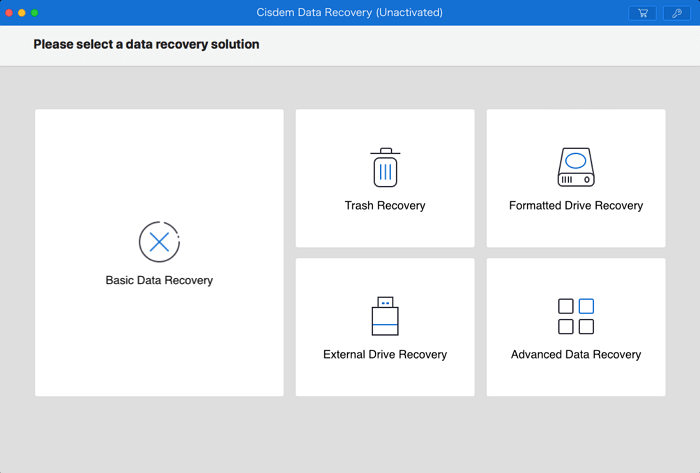
Cisdem Data Recovery for Mac offers a 5-mode recovery process, including Basic Mac Data Recovery, Trash Recovery, Formatted Drive Recovery, External Devices Recovery, and Advanced File Recovery, to help users recover lost files.
This software allows users to recover lost files, including photos, music, and documents, from their Mac or external storage devices through a 3-step process.
Cisdem Data Recovery for Mac offers a free trial version that allows users to scan and preview lost data, but a paid activation is required to execute the data recovery operation on Mac.
Qiling recommend:
- Cisdem Data Recovery for Mac offers full data recovery capabilities in 5 data recovery modes, allowing users to fully restore data from various data loss situations after activation.
Tutorial: 3-Step Mac Data Recovery using Disk Drill Free Alternative
If you need to recover deleted files, valuable data on Mac, or lost files on macOS and Mac OS X, download and install Deep Data Recovery for Mac Free Edition, a free alternative to Disk Drill, on your Mac.
Then follow the step-by-step tutorial below to learn how to recover your data in all data loss cases:
Step 1. Launch Deep Data Recovery, select the file types you want to recover, and click "Fast Scan" to begin the recovery process.

Note: You can choose different search modes based on where and why the data was lost.
Step 2. Select the disk location where you lost data and files, then click the "Scan" button.

Step 3. Deep Data Recovery for Mac will immediately scan your selected disk volume and display the scanning results on the left pane.

Step 4. In the scan results, select the files you want to recover and click the "Recover" button to retrieve them.
Conclusion & Disk Drill FAQs
If you're looking to recover Mac data and lost files, we've compiled a list of 6 free alternatives to Disk Drill that can help you retrieve your data from various data loss cases without incurring any costs.
For a 100% free and functional Mac data recovery software, Deep Data Recovery for Mac Free Edition is the top choice, offering a 2GB free data recovery capacity that exceeds all other similar utilities.
For free photo recovery, PhotoRec and Exif Untrasher are good options to consider.
If you're looking for a free alternative to Disk Drill, you may also have questions about Disk Drill. Check out the Disk Drill FAQs below to find answers to your concerns, such as what Disk Drill is, how it works, and what features it offers. Whether you're looking for a free data recovery tool or just want to learn more about Disk Drill, these FAQs should provide the information you need.
1. How do you use Disk Drill for free?
Disk Drill does not offer a free data recovery option for Mac users, unlike its Windows counterpart, and does not allow for undeleting files or recovering data from Mac or external storage devices.
You can use Disk Drill Basic for free on Mac to protect or back up data, but for actual data recovery, you'll need to upgrade to the pro version by purchasing a license.
If you need a 100% free data recovery utility for Mac, Deep Data Recovery for Mac Free Edition can help you recover lost files with ease, making it a reliable option for data recovery.
2. How to recover lost Mac data without Disk Drill?
If you've lost data on your Mac, there are three methods you can try to retrieve it without using Disk Drill:
You can recover deleted files from your Mac's Trash by performing a Mac Trash recovery.
Method 2. Restore lost data from Time Machine backup.
If you're unable to recover data with Disk Drill, consider using alternative free software like Deep Data Recovery for Mac to restore lost files. This method involves downloading and installing Deep Data Recovery, which can scan your Mac's hard drive for recoverable data. The software is user-friendly and can recover a wide range of file types, including documents, photos, and videos.
3. How do I recover files from my external hard drive for free on Mac?
If you've lost files on an external hard drive, you can try to recover them by restoring from a backup if you have one.
External hard drive data recovery on Mac can be achieved through various methods, including trash restoration, Time Machine or Cloud backup, utilizing Mac drive data recovery software, or seeking manual data recovery services. For a comprehensive guide on restoring files from an external hard drive, refer to the article "External Hard Drive Data Recovery on Mac" for assistance.
Related Articles
- Top 5 Best Mac Data Recovery Software in 2022
- Recover Lost Mac Data with iMac Data Recovery Utility
- Seagate Hard Drive Not Showing Up on Mac? Fix It!
- Follow 5 Effective Ways to Fix Mac Fusion Drive Not Showing Up
- How to Recover Deleted Audio Driver on Windows 7
If you've accidentally deleted the audio driver on your Windows 7 computer. You can recover the deleted audio driver efficiently by following some helpful tips. - How to Recover Files after Shutdown
Recovering files after a computer shutdown is a straightforward process. Simply install data recovery software, let it scan your computer for lost files, and then preview and recover the desired files.
Products
Articles & Tutorials
- Data Recovery
- Data Backup
- File Recovery
- File Backup
- System Backup and Restore
- Disk and Partition Clone
- Technical articles
- Mobile articles
- Disk Master Help
- Windows Data Recovery Tutorials
- Windows Secure Delete Tutorials
- Windows Partition Management Tutorials
- Windows File Backup and Restore Tutorials
- Windows System Backup and Restore Tutorials
- Windows Disk Backup and Restore Tutorials
- Windows Clone Tutorials