NTFS File Recovery Freeware | Free Undelete NTFS [Full Guide]
Can You Recover Deleted NTFS Files or Partition
NTFS is a proprietary file system for Windows that offers superior performance and self-healing capabilities. It supports advanced features such as file-level security, compression, and auditing, as well as large volume and RAID storage solutions. A significant new feature of NTFS is its ability to encrypt files and folders, providing robust protection for sensitive data. Despite its benefits, NTFS partitions and files can still be deleted due to user error, viruses, power outages, or other issues.
Accidental file deletion is a common problem, but fortunately, the "Recycle Bin" makes it easy to recover lost files with just one click. However, in many cases, data recovery from the Recycle Bin is not possible. Rather than panicking, being prepared with powerful NTFS file recovery freeware can give you a chance to restore your data.
Method 1 - Recover NTFS Files with Qiling File Recovery Freeware
Here, we recommend using Deep Data Recovery Free Edition to recover data from NTFS disks. This software is easy to complete to use, and is compatible with Windows 10/8/7/XP/Vista. You can download it directly on your PC to undelete NTFS files.
You don't need any special knowledge or experience to recover NTFS files. The process is fully automatic and safe, and can even restore files from a disk that's not accessible from Windows. It can help you recover months of work or gigabytes of valuable files, such as photos, letters, and other important documents.
Follow the next steps to see how to undelete NTFS files.
Step 1. Select file types and click "Fast Scan" to start
Launch Deep Data Recovery on your PC, select the file types you want to recover, and click "Fast Scan" to initiate the recovery process.

Note: You can choose different search modes based on where and why the data was lost.
Step 2. Select and scan the lost partition
To recover lost data, select "Lost Partition" and click "Scan" to search for all the lost data. If there are multiple lost partitions, you can identify them by their partition size, allowing you to target the specific data you need.
The Windows system doesn't support the Linux file system, so an Ext2 or Ext3 partition will be recognized as a lost partition with no drive letter. To recover data from an Ext2/Ext3 partition, follow these steps.

Step 3. Filter the scanned results
You can quickly filter scanned files by category, such as Pictures, Videos, Documents, Audio, and Others, or search for a specific file by name in the upper right search box.

Step 4. Preview and recover data from the lost partition
Before recovery, you can preview the files to ensure they're the data you need. Select all the required files and click "Recover" to restore them.
Consult with Qiling Data Recovery Experts for one-on-one manual recovery service, which includes a FREE diagnosis, followed by a range of services such as data recovery.
- Repairing a corrupted RAID structure, an unbootable Windows OS, or a corrupted virtual disk file (.vmdk, .vhd, .vhdx, etc.) requires specialized tools and expertise. In such cases, it's often necessary to use a combination of hardware and software solutions to recover or rebuild the affected system.
- Recover/repair lost partition and re-partitioned drive
- Unformat hard drive and repair raw drive (BitLocker encrypted drive)
- Fix disks that become GPT protected partitions
Method 2 - Recover Deleted NTFS Partition in Windows 10/8/7
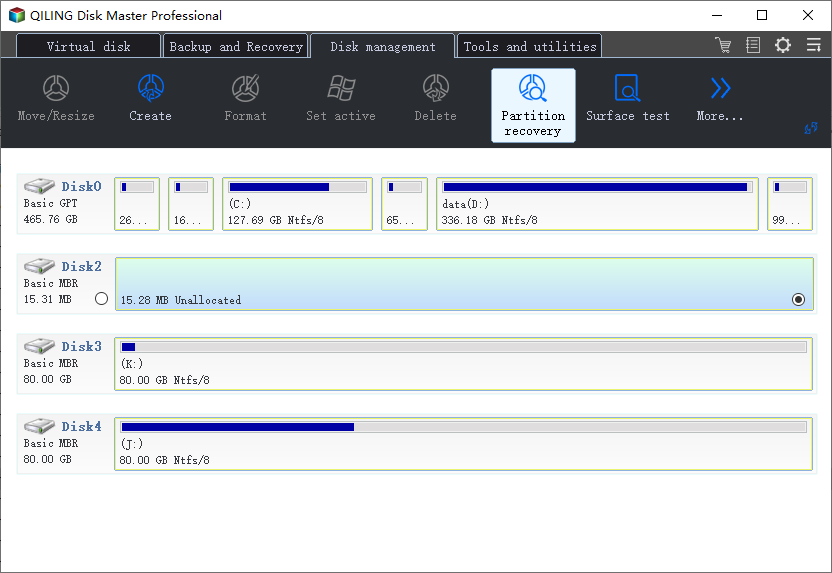
If you deleted the NTFS partition, the space where it was located will be marked as unallocated in Disk Management, and recovering the deleted partition should be the first step to take when it becomes unallocated space.
To recover a deleted partition in Windows 10 for free, you can use Qiling Partition Master, a free partition recovery software that supports all Windows operating systems, including XP, 7, 8, and 10, making it easy to recover deleted NTFS partitions.
Detailed Steps: How to Recover Deleted or Lost Partition.
Related Articles
- How to Recover Data from Micro SD Card
- Get Data Back for NTFS | Best NTFS Data Recovery Software to Get Data Back
- 9 Best Word Repair Tools for Windows 10
- Free PDF Recovery: Recover Deleted, Unsaved, and Corrupted PDF File
- Free Download Lenovo Data Recovery Software [for Laptop & Mobile]
You can find easy-Lenovo users can rely on powerful data recovery solutions for their computers and laptops, as well as mobile smartphones. Deep Data Recovery is a file recovery software that can recover all files immediately. - Lexar USB Flash Drive Format & Repair Tool Free Download
Formatting is an effective way to repair a malfunctioning Lexar flash drive. To do this, you can first use data recovery software to recover any files from the USB, and then apply the Lexar USB format tool, specifically Qiling Partition Master, to format the drive and get it working properly again.
Products
Articles & Tutorials
- Data Recovery
- Data Backup
- File Recovery
- File Backup
- System Backup and Restore
- Disk and Partition Clone
- Technical articles
- Mobile articles
- Disk Master Help
- Windows Data Recovery Tutorials
- Windows Secure Delete Tutorials
- Windows Partition Management Tutorials
- Windows File Backup and Restore Tutorials
- Windows System Backup and Restore Tutorials
- Windows Disk Backup and Restore Tutorials
- Windows Clone Tutorials