Look! 5 Methods to Fix PNG Files Not Opening in Windows 10/11
PNG files are widely used image file formats that can be found on SD cards, USB flash drives, and mobile devices. If a PNG file is not opening in Windows 10, you can follow specific steps to fix the issue.
5 Methods to Fix PNG Not Opening in Windows 10/11
If the .png file is not opening in Windows 10, try the following solutions: Check if the file is corrupted by opening it in a different image viewer or editor, such as Paint, IrfanView, or Adobe Photoshop. If it still does not open, try renaming the file to a different extension, such as .jpg or .bmp.
| Workable Solutions | Step-by-step Troubleshooting |
|---|---|
| 1. Repair the Windows Photo Viewer | Click "Settings" > choose Apps, then click Apps & features. Type Windows Photo Viewer...Full steps |
| 2. Use PNG File Repair Tool | Choose the correct drive which contains the corrupted photos, which can be a removable disk...Full steps |
| 3. Turn Off Photo Encryption | Right-click PNG and choose Properties on the menu. Then the Properties page pops up...Full steps |
| 4. Update Windows Photo Viewer | Click on Windows Start > Choose Settings icon > Click Update & Security...Full steps |
| 5. Convert to Another Format | It looks like your default app may not support the file format. In such a scenario, we recommend you...Full steps |
Basic Info about PNG File
PNG (Portable Network Graphics) is a raster graphics format that supports lossless data compression. It's widely used for web graphics, icons, and images.
What are PNG Files
PNG (Portable Network Graphics) is a file format designed to replace GIF and TIFF, suitable for use in Java programs, web pages, and more. It offers high picture compression ratios, resulting in smaller file sizes.
How to Open and Convert PNG Files
To open a file, you can simply click on the photo, and the most commonly used photo viewer is Windows Photo Viewer, IrfanView, or other similar apps. Alternatively, you can right-click on the photo and select "Open with" to choose a different viewer.
PNG file converter:
Paint app - To put your photo on the app, upload your photo and click File > Save as to choose PNG File format.
PicPick - To save the file as a PNG, simply drag it to the app and then go to File > Save as, selecting the PNG file format from the options.
Why PNG Files Not Open in Windows 10
- Your Windows Photo Viewer is out of date.
- Your Windows Photo Viewer needs to be repaired or reset.
- Your PNG file is corrupted.
- Your PNG file is encrypted.
- Your default photo viewer needs to be replaced.
If you encounter scenarios where your image won't launch, you can try the following methods to recover it. A Photo viewer can sometimes fail to launch your image, or your image might have been damaged. In such situations, we recommend trying different approaches to resolve the issue and get your image back.
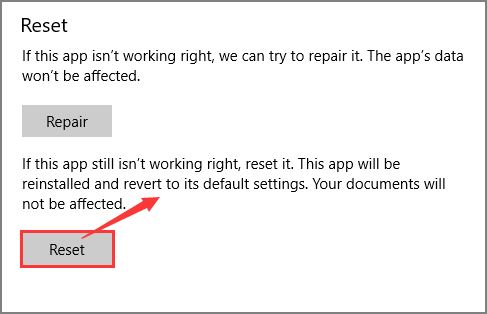
1. Repair/Reset Your Windows Photo Viewer
Your preferences will be reset.
- Click Settings.
- Choose Apps, then click Apps & features.
- Type Windows Photo Viewer in the search box.
- Click Windows Photo Viewer and click Advanced options.
- Move to Windows Photo Viewer Page, slide your mouse to the Reset part.
- Choose Repair.

- Or Windows Photo Viewer still doesn't work correctly. Click Reset.
2. Use PNG File Repair Tool to Repair Damaged PNG File
If you can't open a .png file using the default photo viewer, you can try using professional image recovery software like Deep Data Recovery for Free, which has a high recovery rate and simple steps.
PNG File Repair Tool
- Utilize specialized software to repair damaged files, including Word documents, Excel files, photos, and videos, by identifying and correcting errors, recovering lost data, and restoring file integrity, ensuring the files are usable and functional again.
- To recover files from a formatted hard drive, emptied recycle bin, memory card, flash drive, digital camera, and camcorders, you can use data recovery software. This software scans the device for recoverable files and allows you to preview and select the files you want to recover.
- Data recovery support is available for various situations, including sudden deletion, formatting, hard drive corruption, virus attacks, and system crashes. This assistance helps recover lost data under different circumstances, providing a solution for users who have experienced data loss due to unexpected events.
- Recover 2GB for FREE.
- Support numerous file types.
- Support Windows & Mac Version.
Join us and apply the quick steps outlined:
Step 1. Run Qiling data recovery software on your Windows PC. Select file types and click "Fast Scan" to start the recovery process.

Note: You can choose different search modes based on where and why the data was lost.
Step 2. Launch Qiling data recovery software, select a hard drive that contains broken photo files and click "Scan".

Step 3. To find and recover corrupted photos, click on the "Pictures" tab and look for files in various formats such as JPEG, JPG, PNG, and BMP, or use the search function by clicking "Search files or folders" in the top right corner.

Step 4. Double-click on a damaged picture to repair and preview the file, then click "Recover" to save the images to a different location.
Read also:
If you're experiencing issues opening a PDF file on your Windows or Mac computer, there are a few quick fixes you can try. Firstly, ensure that the PDF file is not corrupted by trying to open it on a different device or computer. If the issue persists, check if the PDF viewer you're using is up-to-date, as outdated software can cause compatibility problems.
If your PDF file won't open, there could be several reasons. To troubleshoot the issue, you can try checking the file for any corruption or damage, ensuring that the PDF viewer is up-to-date, and verifying that the file is not infected with malware. You can also try reinstalling the PDF viewer or using a different viewer to open the file. If the problem persists, you may need to seek further assistance or contact the creator of the PDF file for help.

3. Turn Off Photo Encryption
If your PNG image is encrypted, things might go more smoothly. If these methods don't work for you, it's possible that you need to adjust the file settings instead.
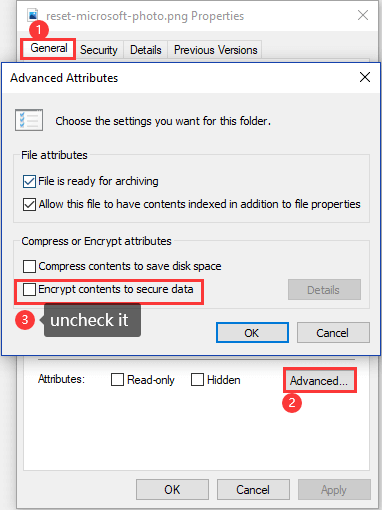
- Right-click PNG and choose Properties on the menu.
- Then the Properties page pops up.
- Click on the "General" tab, and then click on "Advanced..." at the bottom right corner of the window.
- Under the Compress or Encrypt attributes option, uncheck Encrypt contents to secure data.
4. Update your Windows Photo Viewer in Windows 11/10/8/7
- To access the Update & Security settings in Windows, follow these steps: Click on the Windows Start button, then select the Settings icon, and finally click on Update & Security.
- Click on Windows Update, and choose to Check for updates.
- Check the box next to Windows Photo and select Install Updates.
After the update is completed, try to open the PNG file. If it still doesn't work, restart your system.
5. Convert PNG to another format or Replace PNG Viewer
If your default app can't open PNG files, consider converting them to a different format using an online converter or switching to a photo viewer that supports PNG files.
While the 5 methods for opening a PNG file may not be suitable for everyone in different scenarios, the most reliable method is to run a free PNG repair tool, such as the ones listed above.
Which Method Do You Like? Try it!
In Windows 10, you can open PNG files using various methods outlined above. However, for a more reliable solution, you can use Qiling Data Recovery software, a robust data recovery tool that can help fix your PNG file and make it accessible again.
Related Articles
- How to Fix External Hard Drive Not Showing Up on Windows 10
- You Want to Perform SWF File Recovery? Got it
- [Official & Latest] Deep Data Recovery Key 2.6 and Qiling License Code
- Camtasia Recording Recovery | How to Retrieve Camtasia Projects/Videos
- Free Download Professional Data Recovery Software with Crack
This page offers a reliable alternative to data recovery software with a crack, allowing you to recover lost files safely and effectively without damaging your device. - [Solved] The Program Can't Start Because MSVCR110.dll Is Missing from Your Computer
If you're experiencing issues with a program due to missing MSVCR110.dll, try reinstalling the Microsoft Visual C++ Redistributable package, which includes the necessary DLL, or download and install the standalone MSVCR110.dll file from Microsoft's website.
Products
Articles & Tutorials
- Data Recovery
- Data Backup
- File Recovery
- File Backup
- System Backup and Restore
- Disk and Partition Clone
- Technical articles
- Mobile articles
- Disk Master Help
- Windows Data Recovery Tutorials
- Windows Secure Delete Tutorials
- Windows Partition Management Tutorials
- Windows File Backup and Restore Tutorials
- Windows System Backup and Restore Tutorials
- Windows Disk Backup and Restore Tutorials
- Windows Clone Tutorials