Hard Drive Recovery| Recover Files from a Hard Disk
Losing important data can be a frustrating experience, whether due to accidental deletion or hard drive failure. However, hard drive recovery is often possible, and files can be recovered with or without software, depending on the cause of the data loss.
4 Most Common Reasons for Hard Drive Data Loss
Here are the common reasons for hard drive data loss:
Hard Drive Formatting
Hard drive data can be lost through formatting, erasing all data on the drive, which can be difficult to recover from.
Accidental Deleting
Hard drive data can be lost through deletion, where a user mistakenly deletes a file or folder, but the data remains on the hard drive until it's overwritten, allowing recovery with special software.
Hard Drive Crash/Damage
A hard drive crash can render a computer's data inaccessible due to improper shutdown, bad sectors, or malware, but logical damage can be repaired with data recovery software, whereas physical damage requires a professional service.
Software Errors
Software errors can cause hard drive data loss due to corrupt firmware or deleted system files, but can be resolved by reinstalling the operating system or applications.
Hard Drive (HDD) Data Recovery Methods
Hard drive data loss can have serious consequences, but thankfully, recovery is often possible. Whether due to hardware failure or a simple mistake, files can be recovered from a hard drive with the help of specialized software. However, if the hard disk is damaged or crashed, it's best to choose a professional recovery service, who can quickly and safely recover your lost files.
Hard Drive (HDD) Data Recovery Service
A hard drive data recovery service is typically performed by experts who physically open the drive in a clean room environment to repair damage, offering the highest success rate but at a higher cost. This service is needed in cases where data cannot be recovered through DIY methods or software, such as physical damage, logical corruption, or deleted files.
- Repair corrupted RAID drive and recover data from NAS.
- Repair corrupted virtual disk file (.vmdk, .vhd, .vhdx, etc.).
- Unformat a hard drive that was formatted by mistake.
- Repair unbootable Windows operating system, including Windows 10/8/7.
- To fix a damaged RAW drive that needs to be reformatted, you can use a data recovery software like Deep Data Recovery. This software can scan the RAW drive, recover any recoverable data, and then allow you to format the drive.
- To recover or repair a lost partition and repartitioned drive, you can use a combination of software and manual steps. First, use a data recovery software like Deep Data Recovery or Deep Data Recovery to scan the drive and recover any accessible data.
A data recovery service helps salvage data from failed, damaged, or corrupted storage devices, such as hard drives. To recover data, the damaged drive is sent to a service where it is handled in a clean environment using specialized equipment. There are several reputable HDD recovery services available, including Ontrack, Secure Data Recovery, SALVAGEDATA, Stellar Data Recovery, and Qiling Manual Data Recovery, which can assist with hard drive data loss issues.
Hard Drive Recovery Software
Hard drive recovery software is a self-service solution that uses specialized software to scan and recover data from a hard drive, often at a lower cost than a data recovery service, but with a lower success rate. It's suitable for those with some technical knowledge.
- Retrieve lost files after deletion or emptying the recycle bin.
- Accidentally formatted a hard drive and caused data loss.
- The hard drive becomes "RAW" or some software error happens.
- Recover lost or deleted partitions easily with GPT partition recovery or MBR partition recovery software. These tools allow you to recover your lost partitions with simple steps, without requiring any technical expertise.
Hard Drive Recovery Software VS Hard Drive (HDD) Data Recovery Service
Hard drive data recovery service and hard drive recovery software are two popular data recovery methods, but they differ in their approach. A hard drive recovery service involves sending the damaged drive to a professional data recovery company, which then uses specialized equipment and expertise to retrieve the data. In contrast, hard drive recovery software is a DIY solution that allows users to recover data from a damaged drive using a software program. The choice between the two ultimately depends on the severity of the data loss and the user's level of technical expertise.
| Comparison | Hard Drive Recovery Software | Hard Drive Recovery Service |
|---|---|---|
| Hard Drive Recovery Cost | Cheap | Expensive |
| Recovery Guarantee | No | Yes |
| Executor | You | Experts |
| Process | Time-consuming | Easy |
| Supported Devices | Internal/External Hard Drive, SSD, USB, etc | Almost All |
| Supported Brands | Western Digital, Seagate, Sony, Toshiba, SanDisk, etc. | Almost All |
| Supported File Systems | FAT32, exFAT, NTFS, etc. | Almost All |
Hard drive data recovery services offer a reliable solution for recovering valuable data, but if you're on a tight budget or dealing with less critical data, hard drive recovery software could be a more affordable and viable option.
How to Recover Deleted Files from Hard Drive in Windows 10
If you're running Windows 10, you can try using the built-in File Recovery feature, which can scan your hard drive for deleted files and recover them. Alternatively, you can use a third-party recovery software like Deep Data Recovery, which can scan your hard drive and recover deleted files. You can also try using a data recovery service, which can send a technician to your location to recover your files.
Method 1. Recover HDD Data from Recycle Bin
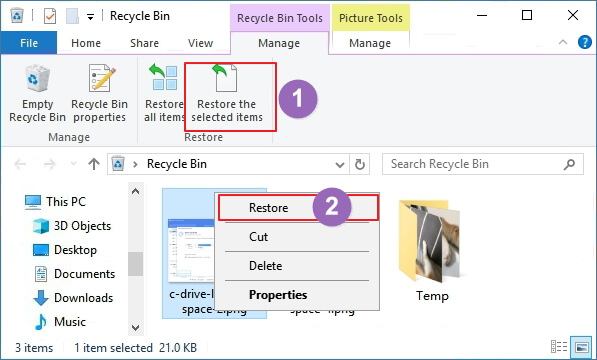
One of the first things to try is checking the Recycle Bin, as deleted files often go there in Windows 10. You can directly perform a Recycle Bin recovery to bring the removed files back.
Step 1. Double-click the Recycle Bin icon on the Desktop.
Step 2. To restore a deleted file or folder, you need to locate and select the item you want to recover. This can be done by navigating through your computer's file system, or by using a file recovery software if the item was deleted from a specific location or device.
Step 3. Right-click the selected item and choose "Restore".
Method 2. Recover HDD Data with Hard Drive Recovery Software
Another option is to use Qiling hard disk data recovery software is a standout tool among many data recovery options. It's particularly effective in recovering files that the built-in Windows tool can't, and its ease of use is a major advantage. With only 3 steps required to restore hard drive data, and support for over 1000 file types, Qiling is a reliable choice for those seeking to recover lost data.
Step 1. To recover lost data, select the hard drive where the data was lost and click "Scan".
Step 2. When the scan completes, use the "Filter" or "Search" function to find the lost files. This will allow you to quickly locate and recover the files you need.
Step 3. Select the desired HDD files, click "Recover", and save them to a secure location.

Method 3. Restore Hard Drive Files from a Backup
If the above methods don't work, you can try using the built-in File History tool or System Restore feature, which may have automatically backed up your files or restored your system to a previous point in time, potentially including a working copy of your lost files.
Full Guide
If you want to recover deleted files from a hard drive in Windows 10, follow this guide. Mac users should refer to the Mac hard drive recovery guide instead.
To Sum Up
For hard drive recovery, you can use various methods depending on your system. In Windows 11/10/8/7, check the Recycle Bin, use the File History feature, or run Qiling data recovery software. If you're using a Mac, turn to Time Machine or Mac hard drive recovery software to restore lost files.
Hard drive recovery is possible in both Windows 10 and macOS, and with the right tools, you can restore your hard drive to its original state, making it possible to repair corrupted hard drives with effective solutions.
Hard Drive Recovery FAQs
If you're struggling with your hard drive, don't worry - you're not alone. We've got answers to some of the most common questions about hard drive recovery, so keep reading for further help.
1. How can I recover my hard drive for free?
You can recover up to 2GB of data for free using Qiling, a free data recovery software.
- Download, install and launch Qiling hard drive recovery software.
- Select the disk or partition that contained the lost files.
- Click the "Scan" button to start scanning for lost files.
- Choose the deleted files you want and preview these files.
- To recover lost hard drive files, click the "Recover" button on the provided software. This will initiate the recovery process, allowing you to retrieve your files for free.
2. Can a file be recovered from a failed hard drive?
Files can be recovered from a failed hard drive using a reliable hard drive recovery program, such as Deep Data Recovery, if you can still boot into your system. If not, refer to recovering data from a dead hard drive.
3. How much does it cost to recover a hard drive?
The cost to recover data from a hard drive varies depending on the type of data being recovered, the extent of the damage, and the expertise of the recovery service provider. In general, the cost can range from a few hundred to several thousand dollars, with prices varying widely depending on the specific circumstances. Some providers may charge a flat fee for simple recoveries, while others may charge by the hour or by the amount of data recovered.
- The size of the lost data
- The data loss scenarios
- The time spent on the hard drive
4. How to repair corrupted or damaged hard drives on Windows 10/11?
When dealing with hard disk repair, your computer may behave erratically, and you may be unable to access your files. In some cases, you may even be unable to boot up your computer at all. Fortunately, you can repair a corrupted hard drive without formatting and data loss by using either a software-based solution or a hardware-based solution. These methods can help you recover your files and get your computer up and running again.
Note: If you haven't previously backed up your data, use data recovery software to retrieve it before proceeding.
1- Repair Hard Drive Using CMD
CHKDSK can scan to mark bad sectors and fix corrupted file system errors, preventing data loss. To run CHKDSK and fix damaged hard disks without formatting, follow these instructions:
- Click the Search box and type cmd.
- Right-To run the Command Prompt as an administrator, click on the "Start" button and type "cmd" in the search bar. Then, right-click on the "Command Prompt" result and select "Run as administrator" from the context menu.
- To run a check on your E drive with the Command Prompt, type `chkdsk E: /f /r /x` and press Enter, replacing E with the actual letter of your corrupt drive. This will initiate a thorough scan of the drive, attempting to repair any issues it finds. The `/f` option forces the check to run even if the drive is in use, the `/r` option scans for and attempts to repair any bad sectors, and the `/x` option forces the drive to dismount, preventing any file access while the check runs.
- Wait for the process to finish. Then, check if the hard drive works properly.
2 - Fix Corrupted Hard Drive with File Manager
Windows has its built-in tool to check and repair a corrupted hard drive, which can be accessed manually.
- Click This PC or My Computer.
- Select the damaged hard drive, right-click it, and choose "Properties".
- To check and correct errors on your hard drive, go to "Tools" and click "Check" under "Error-checking". This will initiate a process that scans and corrects any errors found on the hard drive.
5. How can I recover data from a hard drive that won't boot?
To recover data from a hard drive that won't boot:
- Create a bootable disk with Deep Data Recovery WinPE Edition.
- Boot from the bootable disk to open Deep Data Recovery.
- Recover files/data from a PC/laptop hard drive that won't boot.
6. How do you fix a hard drive failure?
To fix hard drive failure:
- Clean out the computer vents.
- Check the power and data cables.
- Check the BIOS...
Related Articles
- How to Recover Unsaved Excel Files (2022 Tips)
- Recycle Bin Windows 10 - Full Guide [with Pictures]
- Everything You Need to Know About Shortcut Virus
- File Repair| How to Repair Corrupted File (PST, PDF, Photo, etc.)
- How to Recover Deleted Screenshots on Windows 10/8/7
If you've lost your print screenshots on Windows 10/8/7 due to accidental deletion, storage device formatting, system corruption, or other issues, you can use Deep Data Recovery software to easily restore the deleted screenshots. - Inkscape Recovery: How to Recover Lost/Unsaved Inkscape Files
This is a complete guide for Inkscape crash recovery in Windows & Mac OS X. One, find Inkscape autosave location so you can recover lost Inkscape work closed without saving; or download an Inkscape recovery software to recover lost Inkscape files due to crash or other disasters.
Products
Articles & Tutorials
- Data Recovery
- Data Backup
- File Recovery
- File Backup
- System Backup and Restore
- Disk and Partition Clone
- Technical articles
- Mobile articles
- Disk Master Help
- Windows Data Recovery Tutorials
- Windows Secure Delete Tutorials
- Windows Partition Management Tutorials
- Windows File Backup and Restore Tutorials
- Windows System Backup and Restore Tutorials
- Windows Disk Backup and Restore Tutorials
- Windows Clone Tutorials