How to Recover Files Too Large for Recycle Bin
Quick Navigation:
- Folder is too big to recycle
- True user case
- Recover large deleted files
- Customize recycle bin settings
Error Message - This Folder Is Too Big to Recycle
The error "This folder is too big to recycle, do you want to permanently delete it?" occurs when Windows is unable to delete a large folder due to its size limitations in the Recycle Bin. This is because the Recycle Bin has a maximum size limit, and if the folder to be deleted exceeds this limit, Windows will prompt the user to permanently delete the folder instead. To resolve this issue, the user can either empty the Recycle Bin, reduce the size of the folder, or increase the Recycle Bin's size limit.
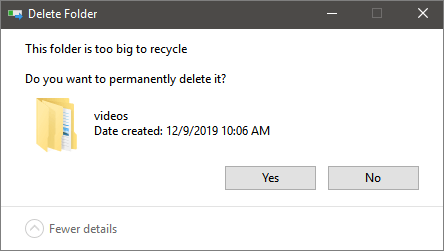
When you delete a file, it typically goes to the Recycle Bin or Trash, where it remains until you empty it or restore the file from there. If you've permanently deleted a file, it may be stored on the computer's hard drive until it's overwritten by new data. However, if you've deleted a file using a secure delete function, it may be completely erased from the hard drive. The exact location and fate of a permanently deleted file depend on the operating system and the deletion method used.
The Recycle Bin is not always effective in recovering deleted files, as items larger than its maximum size of 8998MB are deleted permanently, bypassing the Recycle Bin.
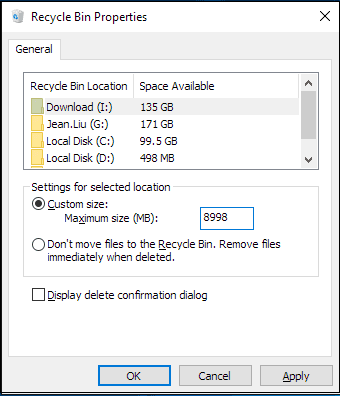
To address users' doubts, I plan to delve into the issue of files being too big for the Recycle Bin, discussing three key aspects in a detailed content.
- 1. In a real-world scenario, a user might encounter an issue where files are too large to be deleted using the Recycle Bin. This could happen when trying to delete a massive video file, a large database backup, or a huge collection of images.
- 2. How to restore large deleted files
- 3. How to customize Recycle Bin settings to solve this problem
Files Deleted Permanently Rather Than Go to the Recycle Bin
You deleted a large folder that bypassed the Recycle Bin, resulting in the loss of important 12GB+ Photoshop PSD files. Since these files are too large for the Recycle Bin, you'll need to explore alternative methods for recovery.
When you delete items that are too big for the Recycle Bin, they are deleted permanently, similar to using "Shift + Delete". However, the files themselves remain on the hard drive until they are overwritten, making them still recoverable with professional data recovery software. This means that even though the entry is removed, the files can still be recovered as long as they haven't been overwritten.
How to Recover Large Deleted Files
Ideally, stop using the device to avoid data overwritten, then apply a professional data recovery program to scan and recover deleted files. The sooner you do this, the better the chances of recovery will be. I recommend using Deep Data Recovery to save time and energy.
With the data recovery software - Deep Data Recovery, you can easily recover large files that bypassed the Recycle Bin and files lost in other situations in simple steps.
Step 1: Select file types that you want to recover

Note: You can choose different search modes based on where and why the data was lost.
Step 2.Select the desired file location and click the "Scan" button to proceed.

Step 3.After the process, select the "Deleted Files" and "Other Lost Files" folders in the left panel, and use the "Filter" feature or search bar to locate the deleted files.

Step 4.After recovering the files with the "Recover" button, save them with a new name to avoid overwriting the original files. This ensures the recovered files are safely stored and can be accessed separately from the original ones.
How to Customize Recycle Bin Settings
To avoid deleted files, whether large or small, bypassing the Recycle Bin, you can modify the Recycle Bin's properties.
Step 1.Right-click "Recycle Bin". Choose "Properties".
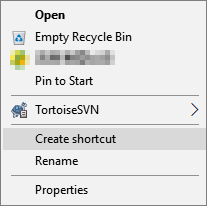
If you can't find a specific icon on your desktop, you can check the desktop icon settings by going to Settings > Personalization > Themes, and clicking the Desktop icon settings option under the "Related Settings" section. This will allow you to control and customize the icons displayed on your desktop.
Step 2.Select the "Custom size" option under the "Settings for selected location" section.
Specify the maximum hard drive space in megabytes that Recycle Bin can use on the particular partition, such as 51200 megabytes for a 500GB drive.
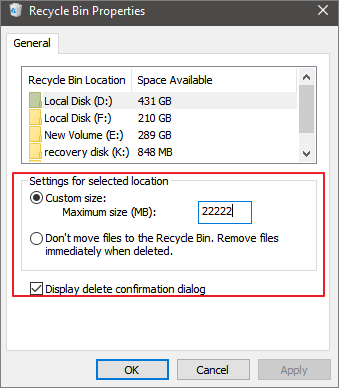
Step 3.Click the "Apply" button. Click the "OK" button.
Once you've completed the steps, the Recycle Bin will be able to keep more or fewer files from a particular location depending on your configuration, but removable drives like SD cards and USB flash drives are not supported, meaning deleted files on them will be erased permanently.
Conclusion
Deep Data Recovery is a trustworthy and versatile tool that can eliminate your worries when you lose a file. With it installed on your Windows computer, you can easily recover lost files and protect your data security, making it a simple but powerful tool to have.
- Recover deleted, formatted, or lost files.
- Restore various file types, including photos, videos, audio files, emails, and files created by Microsoft Office and Adobe software, among others.
- Data can be retrieved from various devices, including hard drives, memory cards, USB flash drives, digital cameras, mobile devices, and other storage media.
- Data recovery software can help retrieve lost information in various situations, including accidental deletion or formatting, OS crashes, partition loss, and more. These tools can scan and recover files, folders, and other data from various storage devices, including hard drives, solid-state drives, and memory cards.
At Deep Data Recovery, we're here to help you recover from data loss. Don't worry, our experts are always available to retrieve your lost files and get you back up and running in no time.
Related Articles
- How to Recover Files from USB Flash Drive with or Without Software
- How to Recover Formatted BitLocker Encrypted Hard Drive
- How to Recover Files After Factory Reset Laptop/PC [Solved]
- SD Card and Disk Video Recovery Free: Recover Deleted Videos from SD Card
- SD Card Recovery Software | How to Recover Data from Corrupted SD Card
Need to recover photos and videos from corrupted SD card? Here is the detailed guide for how to do corrupted SD card recovery with Deep Data Recovery. - How to Recover Data from Corrupted Windows 10
It is a disaster when your Windows 10 crashed with your data unsaved at all. This article tells you how to recover data from corrupted Windows 10.
Products
Articles & Tutorials
- Data Recovery
- Data Backup
- File Recovery
- File Backup
- System Backup and Restore
- Disk and Partition Clone
- Technical articles
- Mobile articles
- Disk Master Help
- Windows Data Recovery Tutorials
- Windows Secure Delete Tutorials
- Windows Partition Management Tutorials
- Windows File Backup and Restore Tutorials
- Windows System Backup and Restore Tutorials
- Windows Disk Backup and Restore Tutorials
- Windows Clone Tutorials