How to Recover Deleted or Lost PS4 Game Files from PS4 Hard Drive
| Workable Solutions | Step-by-step Troubleshooting |
|---|---|
| Fix 1. Recover from Cloud saves | Go to Settings > click Application Saved Data Management > click Saved Data in Online Storage...Full steps |
| Fix 2. Recover from re-downloading | Sign in PS4 and go to PlayStation Store > find lost games > redownload lost games...Full steps |
| Fix 3. Recover from PS4 hard drive | Connect the hard drive to your computer > choose the drive to scan > preview and recover...Full steps |
How to Restore Lost PS4 Game Saves?
Unfortunately, it's not possible to directly recover deleted game files from the PS4 hard drive. Once deleted, the files are permanently removed and cannot be restored. The PS4's storage system does not have a built-in recycle bin or trash can, and deleted files are not stored in a recoverable format. If you want to re-download your games, you can try to recall the games you had and re-download them from the PlayStation Store. You can also check your purchase history to see which games you've bought in the past. However, if you don't want to re-download games, you might consider setting up automatic backups of your PS4 data in the future to prevent such losses.
PS4 game lovers can lose game files due to accidental deletion, power outage, or hard drive formatting, but recovering lost files is possible without backups, saving time and effort by avoiding re-downloading and re-installing.
Method 1. Restore Deleted or Lost PS4 Hard Drive Games from Cloud Saves
If you've saved or uploaded beloved PS4 games into online cloud storage, you can restore deleted or lost PS4 hard drive games from Cloud Saves. To do this, follow the tutorial steps to find and restore your lost PS4 hard drive games.
- Go to "Settings" > click "Application Saved Data Management".
- To download the saved data from online storage to your system storage, go to the "Saved Data in Online Storage" tab and select the "Download to System Storage" option.
- Select the relative games that you saved in Online Storage, then click "Download".
- Wait for the downloading process to finish, then repeat the operation several times until all lost games are restored from Cloud saves.
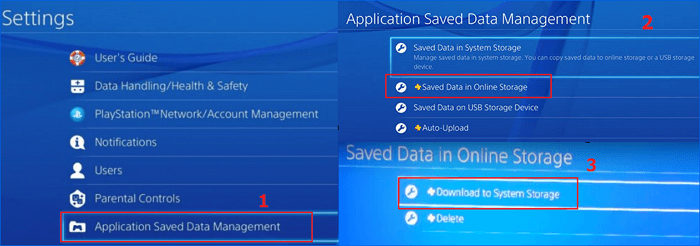
After using the steps above, you'll be able to recover deleted saved games on your PS4 hard drive and relive the fun of playing those games again.
Method 2. Recover Lost PS4 Games by Re-Downloading Them from Playstation Store
If you've lost PS4 games, you can re-download them from the PlayStation Store by logging into your PS4 game account with your username and password. Once you've purchased games from the store, you can redownload them again, allowing you to save them on your PS4 hard drive. To do this, simply log in to your account and follow the prompts to re-download the lost games.
- To sign in to your PS4 account, enter your username and password, then navigate to the "PlayStation Store" section.
- Find lost games which you lost on PS4 hard drive.
- To recover lost games on your PS4, you can try re-downloading them one by one to your local storage. This might help restore the games that were previously downloaded but are now missing.
- If you have PS4 game CDs, you can also restore lost games from the game CDs.
Method 3. Recover Deleted Games on PS4 from Hard Drive
To recover deleted game data on PS4, you can try using file recovery software, such as Qiling Data Recovery Wizard, which can help you find lost game installation packs, game captures, and game videos as long as the PS4 hard drive is not encrypted.
Qiling Data Recovery Software Free Download
Whether it's recovering deleted files or formatted recovery, this capable data recovery tool can easily retrieve lost saved game files on PS4 in just three simple steps. To get started, simply download the tool and follow the steps, with no payment required until it successfully recovers what you're looking for.
Things need to do at first:
- To prevent data loss or corruption on your PS4 hard drive, stop using it immediately if you've experienced any issues. This will help prevent further damage and potentially recoverable data from being overwritten.
- To connect your PS4 hard drive to your computer, you'll need to remove the hard drive from your PS4, then use an external enclosure or a SATA to USB converter cable to connect it to your computer.
- If you're experiencing issues with your external hard drive not showing up in the drive selection interface, try resolving the problem first.
Step 1. Launch Deep Data Recovery on your PC, select the desired file types, and click "Fast Scan" to initiate the recovery process.

Note: You can choose different search modes based on where and why the data was lost.
Step 2. Select the drive where you lose your data and click "Scan".

Step 3. When the scan completes, use the "Filter" or "Search" feature to locate the lost files. This will help narrow down the search and ensure that you find the files you need quickly and efficiently.

Step 4. Select all the files you want to recover, click "Recover", and then choose a secure location to save them.
After the process, you can run the restored PS4 game files, re-install lost games on the PS4 hard drive, and play games again.
Extra Tip: Format PS4 Hard Drive Before Re-installing Games
If your PS4 game hard drive gets corrupted or you need to upgrade, remember to reformat the drive before loading it into the PS4 console. To do this safely and easily, you can use free hard drive formatting software like Qiling Partition Master Free. Simply download the software, connect your PS4 hard drive to your PC, and use the software to format the whole game drive.
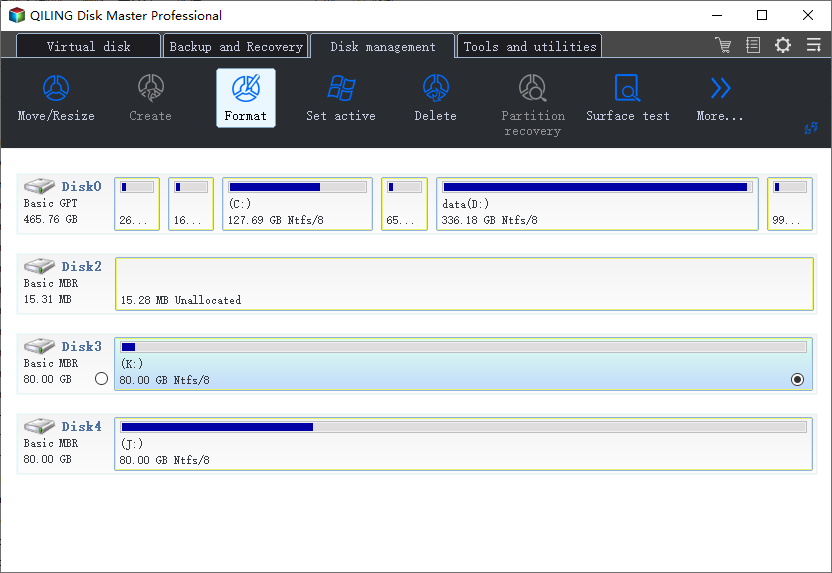
Step 1. To format a hard drive partition, run Qiling Partition Master, select the partition you want to format, and choose the "Format" option. This will erase all data on the selected partition.
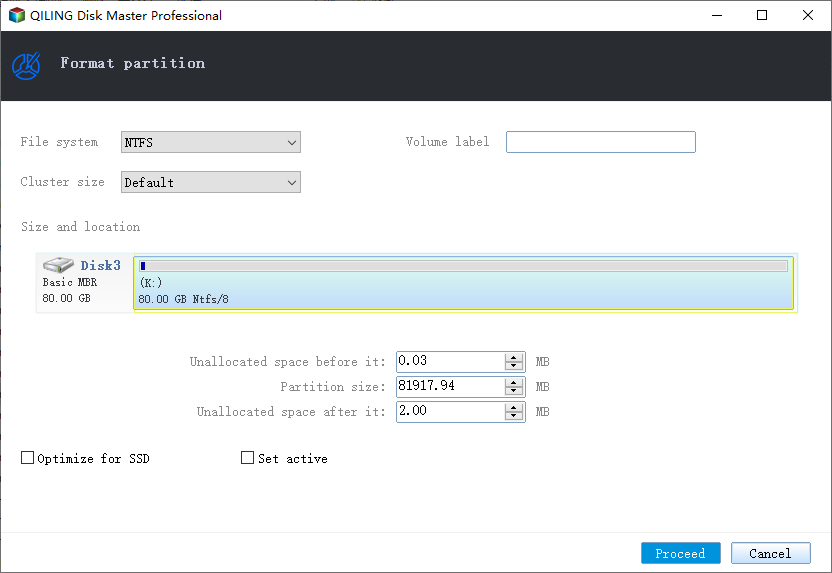
Step 2. Set the Partition label, File system, and Cluster size for the partition to be formatted in the new window, then click "Proceed".
Step 3. After clicking "OK" in the warning window, the process of formatting the partition on your hard drive will begin. This will erase all data on the partition, so make sure you have backed up any important files before proceeding.
After reinstalling the PS4, you can restore all your games and data from the external drive, allowing you to play them again.
Related Articles
- How to Fix You Don't Currently Have Permission to Access This Folder Issue
- 4 Ways to Show Hidden Files Using CMD, Control Panel and Software
- Google Drive Files Not Showing Up on PC/Phone/Mac [Fixed]
- How to Extract and Restore Specific/Individual Files from Windows 11/10/8/7 Backups
- How to Recover Deleted Photos from Transcend SD Card
To recover deleted photos from a Transcend SD card, follow a 3-step guide that works on both Mac and Windows PC. - How to Recover Deleted Photos/Pictures from Computer in Windows 10
You can restore deleted pictures, including permanently deleted photos, from Windows 10 by following a detailed guide. Additionally, you can download free Windows 10 photo recovery software to recover deleted photos from your computer.
Products
Articles & Tutorials
- Data Recovery
- Data Backup
- File Recovery
- File Backup
- System Backup and Restore
- Disk and Partition Clone
- Technical articles
- Mobile articles
- Disk Master Help
- Windows Data Recovery Tutorials
- Windows Secure Delete Tutorials
- Windows Partition Management Tutorials
- Windows File Backup and Restore Tutorials
- Windows System Backup and Restore Tutorials
- Windows Disk Backup and Restore Tutorials
- Windows Clone Tutorials