A Simple Way to Repair Adobe PDF Files |PDF Repair Full Guide
PDF, or Portable Document Format, is a versatile file format widely used for digital printing, e-book writing, and document presentation. However, when PDF documents become damaged, it can be difficult to try and open them. In such cases, it's essential to repair the corrupted PDF files as quickly as possible. Before attempting to repair the files, it's helpful to identify the reasons behind the damage.

What Are the Reasons Behind the PDF File Corruption
PDF display issues like "Failed to Load PDF Document" or "PDF document is damaged and cannot be repaired" can occur due to various reasons. Some of the main causes include the following factors.
1 - Device failure
A PDF file may become damaged if the storage device, such as a hard drive, USB flash drive, or SD card, fails or is not functioning properly, due to various reasons like overheating, electrical issues, or improper handling.
2 - Download issues
Inappropriate downloads can disrupt the file structure of a PDF document, leading to its inability to open or display properly. This is because the downloads can corrupt or overwrite the original file structure, rendering the PDF unusable. As a result, users may experience errors or be unable to access the content of the PDF file.
3 - Corruption during transfer
When transferring PDF files from one PC to another or moving them to an external hard drive, they may become corrupted due to various reasons, resulting in errors or unreadable content.
4 - PDF corruption due to incompatible program
PDF files can become corrupted if users create them using non-compatible programs instead of Adobe Acrobat.
Corresponding Solutions to Fix PDF Files Get Corrupted
Now that you have learned about the reasons, you can find the solutions accordingly. Check the table below to get quick solutions according to the reasons.
| Reasons | Solutions |
|---|---|
| Device failure |
|
| Download issues | Try to download the PDF files again |
| Corruption during transfer |
|
| Corruption due to incompatible program |
|
How to Repair Corrupted PDF Files Easily (on Windows PCs)
In addition to manual solutions, you can use a simpler method - repair PDF using Deep Data Recovery, which helps recover and repair corrupted Word, Excel, PDF, GIF files and more, performing a complete PDF file recovery and repair easily.
Deep Data Recovery
- Repair corrupted MP4/MOV file on Windows 10/8.1/8/7 and Mac with just three simple steps. You can fix your damaged video files using a reliable video repair software, which can recover the corrupted video and audio streams, and even salvage the original file structure and metadata, all without requiring any technical expertise.
- Repair corrupted GIF, PNG, JPEG/JPG images and Word, Excel documents with ease from any storage device.
- Data recovery services are available for various situations, including sudden deletion, formatting, hard drive corruption, virus attacks, and system crashes, to help retrieve lost data and minimize downtime.
Step 1. Launch Deep Data Recovery, select the file types you want to recover, and click "Fast Scan" to begin the recovery process.

Note: You can choose different search modes based on where and why the data was lost.
Step 2. This software allows you to fix damaged Word, Excel, PPT, and PDF files in the same steps, enabling you to scan and repair corrupted documents.

Step 3. Qiling data recovery and repair tool will scan for all lost and corrupted files, allowing you to find them by file type or search for a specific file name.

Step 4. Deep Data Recovery can automatically repair damaged documents, allowing you to preview and recover Word, Excel, and PDF files to a safe location after previewing them.
How Can I Repair Adobe PDF Files Online
If your network is in good condition, you can repair Adobe PDF files online. I've compared several free PDF repair tools and found that iLovePDF (https://www.ilovepdf.com/) stands out for its fast repair speed, high success rate, and simple operation steps, making it a great option to repair damaged PDF files for free.
Step 1. You can upload a file to iLovePDF by copying and pasting the file link into the website, or by dragging and dropping the file into the upload box. Once the file is uploaded, you can select the desired PDF editing tool from the menu, such as merging, splitting, or converting the file.
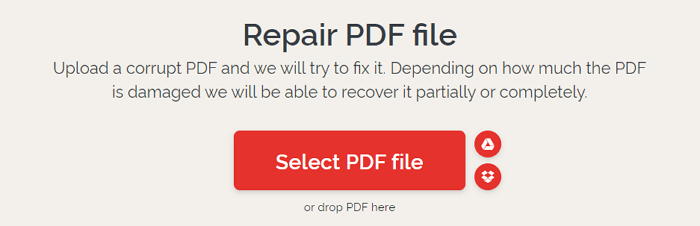
Step 2. Your damaged PDF files will be uploaded, please wait patiently during the process.

Step 3. When the uploading completes, iLovePDF repairs the PDF files automatically.

Step 4. To repair the PDF file, click "Download files" to get the repaired PDF, and then open it to see if it displays normally.

Conclusion
If your PDF file is corrupted, you can repair it online with iLovePDF if your network works well. If the file is lost or can't be opened after recovery, use Qiling data recovery software to recover and repair the PDF file with simple steps.
Related Articles
- NAS Data Recovery Software: Recover Data from NAS
- Instant Solutions to Fix Word/Excel Is Locked for Editing
- Unlimited Data Recovery Software Free Download Full Version [2022]
- WhatsApp Recovery and Backup on Windows 11/10/8/7 PC or Laptop
- How to Recover Deleted/Lost Files on ASUS Laptop
Here are the 3 efficient ways for ASUS laptop recovery if you don't know how to recover deleted files from ASUS laptop. You can free download ASUS data recovery software to recover files from ASUS computer now! - How to Recover Files after Shutdown
Recovering files after a computer shutdown is a straightforward process. Simply install data recovery software, let it scan your computer for lost files, and then preview and recover the desired files.
Products
Articles & Tutorials
- Data Recovery
- Data Backup
- File Recovery
- File Backup
- System Backup and Restore
- Disk and Partition Clone
- Technical articles
- Mobile articles
- Disk Master Help
- Windows Data Recovery Tutorials
- Windows Secure Delete Tutorials
- Windows Partition Management Tutorials
- Windows File Backup and Restore Tutorials
- Windows System Backup and Restore Tutorials
- Windows Disk Backup and Restore Tutorials
- Windows Clone Tutorials