How to Recover Deleted YouTube Videos with or Without Link
5 Ways to Recover Deleted YouTube Videos in 2025
Here are five effective ways to find deleted YouTube videos with or without link:
| Workable Solutions | Step-by-step Troubleshooting |
|---|---|
| Fix 1. Recover from archive.org | Recover deleted YouTube videos from archive.org (Way Back Machine): access YouTube email account...Full steps |
| Fix 2. Use data recovery software | Use Qiling data recovery software to undelete YouTube videos from your computer's hard drive...Full steps |
| Fix 3. Watch videos without link | A simple way to recover deleted YouTube videos without a URL is open Google.com and type...Full steps |
| Fix 4. Use YouTube support | You can send an email to the YouTube support team to restore lost or deleted YouTube videos...Full steps |
| Fix 5. Restore videos from a backup | If you have any backup, simply locate the videos from backup and upload them to YouTube channel...Full steps |
YouTube is the most popular video sharing and watching platform, allowing users to upload, download, or edit videos on various topics. However, accidental deletion from YouTube channels or local PCs can result in lost videos. Fortunately, there are effective methods to recover deleted YouTube videos, which can be found below.
Method 1. Recover Deleted YouTube Videos with Link
If you've accidentally lost or had YouTube videos deleted, you can use the Internet Archive Way Back Machine (archive.org) to download and watch them again using the URL.
Step 1. To retrieve lost or deleted YouTube videos, log into your registered email account associated with your YouTube account. You can then access relevant information about previously uploaded videos, including any that may have been lost or deleted.
Step 2. Find the video information to open the deleted YouTube video's URL. Surely, you can't watch it yet.
Step 3. Go to archive.org, paste the URL of the deleted YouTube videos in the WayBackMachine's search window, click on "Browse History".
Step 4. To find deleted YouTube videos, go to the YouTube video upload history, where you can search for videos based on the uploaded date, allowing you to locate deleted videos.
Step 5. After getting all the information about the deleted YouTube video, download, watch, or upload it again.

Method 2. Find Deleted YouTube Videos with Data Recovery Software
To recover deleted downloaded YouTube videos, you can use Deep Data Recovery, a top-notch video recovery software that can retrieve lost or deleted YouTube original files from your computer hard drive, camera SD card, or external hard drive, utilizing its many excellent features.
- You can recover deleted videos from various storage devices, including hard disk drives (HDD), solid-state drives (SSD), USB flash drives, pen drives, SD cards, camcorders, and digital cameras.
- Repair corrupted videos from various DJI drones, including Phantom, Mavic, Inspire, and Spark, as well as other devices like Canon and Sony cameras, with a tool that can recover and fix damaged video files.
- You can recover deleted videos on Mac running macOS 10.14 (Mojave) or earlier, as well as Windows 11/10/8/7, using a reliable data recovery software. This software can scan your device's storage for deleted video files and recover them, even if they've been emptied from the Trash. When choosing a recovery software, select one that supports your Mac's operating system and is compatible with your video file formats.
To recover deleted YouTube videos, download Qiling data recovery software, which can search for and recover the originally created videos. After using this software, you can watch and potentially re-upload the deleted videos to your YouTube channel.
Step 1. Run Deep Data Recovery. Choose file types and click "Fast Scan" to start the data recovery process.

Note: You can choose different search modes based on where and why the data was lost.
Step 2. Select the location or device where you lost/deleted videos. Click "Scan" to find the missing videos.

Step 3. After the scan, select "Videos" in the left panel, go to "Lost" or "All" to find the desired videos, select the found videos, and click "Preview".

Step 4. To restore video files, select the desired files, then click the "Recover" button to save them to a secure location.
Method 3. Watch Deleted YouTube Videos Without Link
If you can't find the video's URL, you can try searching for the video title on YouTube, and then click on the video that matches the title. You can also try searching for the video title on a search engine like Google, and then click on the YouTube link that appears in the search results.
Step 1. Open Google.com and type site:www.youtube.com + video's name.
Step 2. To recover lost YouTube videos, you can use a search engine to list all videos with similar titles. This allows you to browse through the results and potentially find the videos you're looking for.
Method 4. Contact Help Support to Get Back Deleted YouTube Video
If you're a YouTube creator with at least 10,000 views or in the YouTube Partner Program, you can contact the support team to restore lost or deleted videos. To do this, you can send an email to the support team, detailing the specific video(s) you'd like to recover. They'll guide you through the process to help you retrieve your lost or deleted YouTube videos.
Step 1. To get help with your YouTube channel, sign in to your account, scroll down to the bottom of the page, click on "Help", then select "Need more help?" and finally click on "Connect with the YouTube help community".

Step 2. Click on the arrow icon, as shown in the screenshot.
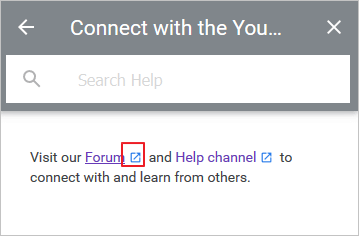
Step 3. To ask a question on the website, click the "Ask Now" option at the bottom of the page. In the "Ask the Community" section, type your question and follow the instructions provided.

Method 5. Recover Deleted YouTube Videos from a Backup, if Any
Recovering deleted YouTube videos is relatively simple if you have a backup of the videos on your computer or other external devices. However, this solution is not typically feasible for those searching for how to recover deleted YouTube videos, as they usually don't have a backup.
Having a backup of your computer, including all crucial files, is an excellent way to avoid unexpected data loss. If regular backups are challenging, consider using Windows schedule backup software to automatically back up your data.
To Sum Up
You can try various solutions to recover deleted YouTube videos, taking different measures depending on your situation. If you have the link, you can try to recover the video from the YouTube servers. If not, you can use data recovery software like Qiling to recover permanently deleted videos from local disks or other storage media. This way, you can attempt to recover your deleted YouTube videos, either with or without the link.
See More: How to Recover Deleted YouTube Videos on Android
To recover deleted YouTube videos on an Android phone, you can use an Android data recovery software like Qiling MobiSaver to restore permanently deleted videos from the internal memory or SD card.
To watch deleted YouTube videos, you'll need to root your phone first, which allows you to access and view content that's been removed from the platform.
Step 1. To connect your Android phone to the computer, install and run Qiling MobilSaver for Android.
Step 2. Scan Android phone to find deleted YouTube videos.
Step 3. Preview and recover deleted YouTube videos from Android phone.
Recover Deleted YouTube Videos FAQs
If you've accidentally deleted original video files from your channel, you can try to recover deleted YouTube videos. If you're still having trouble, refer to the following Q&A for potential solutions.
How to recover deleted video from my YouTube channel?
Step 1. Log in to your YouTube email or channel account and look for emails containing information about your previously uploaded videos.
Step 2. You can find the deleted YouTube video's URL by clicking on the video information, but you won't be able to play it using that URL.
How can I watch a deleted YouTube video with a URL?
Step 1. The deleted YouTube videos archive provides an easy way to access deleted videos.
Step 2. Go to Internet Archive and find a WayBack Machine there.
Step 3. To save a video from YouTube or other video sharing websites, enter the video's URL in the search field of the Wayback Machine and press Enter. This will allow you to save a copy of the video for future reference.
Step 4. I am not able to search for media. You can search for media using a search engine like Google.
How long does YouTube keep deleted videos?
YouTube deleted videos remain on the platform's servers for at least 2 months before being permanently removed.
Related Articles
- How to Open Numbers File in Excel
- How to Repair Damaged Outlook .pst Files
- How to Retrieve Deleted Skype Messages and Chat History
- How to Recover Permanently Deleted AOL Emails Older Than 7 Days
- 3 Steps for How to Recover Deleted Photos/Videos/Files from Acer Laptop
If you've accidentally deleted data from your Acer laptop, you can recover deleted photos, videos, and files by checking the recycle bin. Alternatively, you can use Deep Data Recovery Software to retrieve your lost data. - 2 Ways for How to Recover Files Deleted by Avast Antivirus
Avast deleting files without asking? You can recover deleted files from Avast free Antivirus software. If Avast has mistakenly deleted your files, follow this guide to learn how to recover them.
Products
Articles & Tutorials
- Data Recovery
- Data Backup
- File Recovery
- File Backup
- System Backup and Restore
- Disk and Partition Clone
- Technical articles
- Mobile articles
- Disk Master Help
- Windows Data Recovery Tutorials
- Windows Secure Delete Tutorials
- Windows Partition Management Tutorials
- Windows File Backup and Restore Tutorials
- Windows System Backup and Restore Tutorials
- Windows Disk Backup and Restore Tutorials
- Windows Clone Tutorials