Fix Saved Game Corrupted Error on Xbox 360
The "saved game corrupted" error is often inconsistent in its occurrence. If you're experiencing this issue, two advanced solutions are available to help you troubleshoot the problem.
| Workable Solutions | Step-by-step Troubleshooting |
|---|---|
| Fix 1. Delete corrupted game files | You can find and delete the corrupted game, then redownload it again to solve the problem. Select Settings-> System-> Storage. Select the storage location, and then press the A button...Full steps |
| Fix 2. Request an Xbox 360 repair | If the Xbox 360 repair doesn't work, you can try requesting a repair from Microsoft. To do this, copy and paste the device repair link into your internet browser and open it. This may be a viable solution to fix your Xbox 360.https://support.microsoft.com/en-us/devices...Full steps |
"I met saved game corrupted error on Xbox 360 last night while playing game videos. It happened all of a sudden.
"It seems like you're experiencing a saved game corruption issue across multiple games. The error suggests that the saved game files are damaged. Can you tell me more about the games you've played and the exact error messages you're seeing?"
How to recover Xbox 360 saved games
The "saved game corrupted" error often occurs when trying to play a saved game on the console. If logging out and logging in several times doesn't resolve the issue, further measures may be necessary to resolve the problem.
Xbox 360 users who experience corrupted game files will need to take extra steps to recover their game data, as the console itself does not have a direct recovery feature like the PS4. Further measures will be necessary to resolve this issue.
The Xbox support team offers two official solutions to resolve the error, which can be implemented to help get rid of it.
Solution 1. Delete corrupted game files in Xbox 360 console
To start the initial workaround, first determine whether the game is corrupted. Follow the steps below to resolve the corrupted game file issue on your Xbox 360.
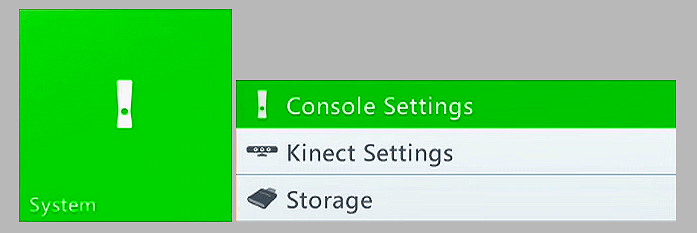
- Step 1: Select Settings-> System-> Storage.
-
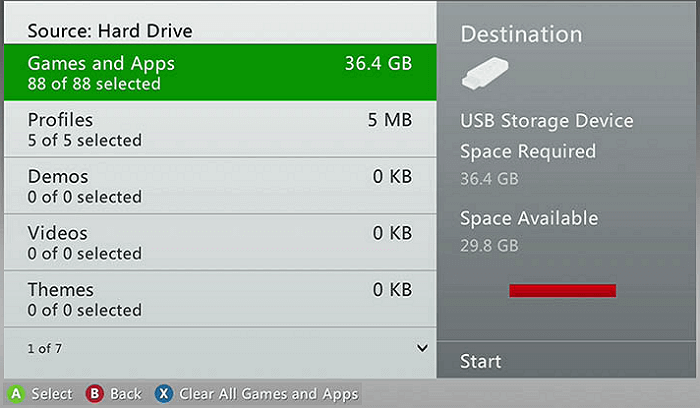
- Step 2: Select the storage location, and then press the A button.
- Step 3: Select Games and Apps, and then press the A button.
-
- Step 4: Select the game and then press the A button.
-
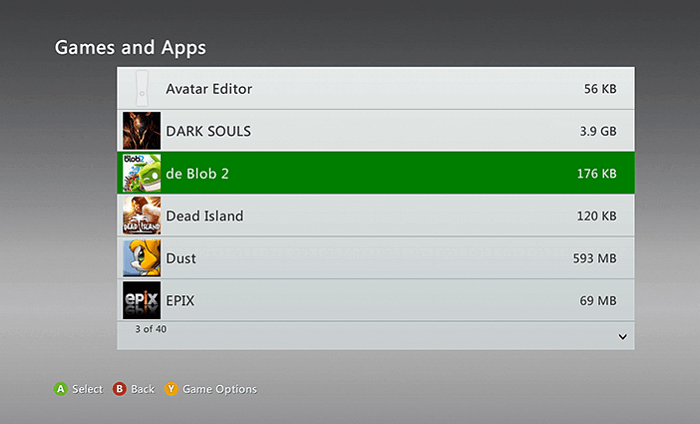
- Step 5: Select the saved game, and then press the A button.
- If you've found a yellow exclamation mark on a game file, it's likely that the file has become corrupted. This can happen for a variety of reasons, such as a problem with the game's installation or a glitch in the game's code. As a result, the game may not run properly or at all, and you may need to reinstall the game or seek further assistance to resolve the issue.
- Step 6: Select the corrupted game and choose "Delete".
-

After deleting the corrupted game, you can redownload it again. Alternatively, you can check if you have a cloud version of the game, which you can play from your Xbox 360 cloud.
Solution 2. Request an Xbox 360 repair from Microsoft
If you're unable to fix your Xbox 360 yourself, you can request a repair from Microsoft's professional repair center. They have the expertise to fix the issue and get your console up and running again.
- Step 1: The link to Microsoft's device repair support page is https://support.microsoft.com/en-us/devices, which can be opened in an internet browser to access repair information for various Microsoft devices.
-

- Step 2: Sign in as an Xbox 360 customer.
- You can register your Microsoft devices, view the devices you've already registered, and even create a repair order for any of your Microsoft devices.
1 paragraph
Bonus Tips: Recover Xbox 360 game recordings and screenshots
On an Xbox 360, game recordings and screenshots are typically stored in the Videos section of the hard drive, and remain intact even if the saved games become corrupted.
If you accidentally delete game videos and screenshots, you might not be able to recover them. However, if you saved them on an external storage device, you may still have a chance to recover them.
Qiling Data Recovery Wizard specializes in recovering data from various storage devices, including internal and external hard drives, USB flash drives, memory cards, and more. It can recover a wide range of file types, such as documents, music, video, and audio files.
You can remove the Xbox 360 external hard drive or USB and use free data recovery software to try to recover any lost data, such as game recordings or screenshots.
Step 1. Launch Deep Data Recovery, select the desired file types, and click "Fast Scan" to initiate the recovery process.

Note: You can choose different search modes based on where and why the data was lost.
Step 2. To recover deleted videos, select the location or device where you lost them, then click "Scan" to find the missing videos.

Step 3. After scanning, select "Videos" in the left panel, go to "Lost" or "All" to find the desired videos, and then click "Preview" to select the found videos.

Step 4. Select the video files you want to restore, then click "Recover" to save them to another secure location on your PC or external storage device.
Related Articles
- Free Download the USB Data Recovery Software Full Version
- [Solved] USB Drive Detected But not Accessible
- Recover Data from Dead External Hard Drive
- Repair and Format Corrupted Android SD Card Without Losing Data
- Where Do Photos/Pictures Go After Recently Deleted on Mac/Windows/Android Phone/iPhone
Don't know where do your photos go after recently deleted? Do you want to know where do your permanently deleted photos go? Read this article to know the answer from various angles. - Total Word File Recovery Solution to Recover A Word Document
If you've accidentally deleted a Word document or lost the file due to system errors, as there are ways to recover it quickly.
Products
Articles & Tutorials
- Data Recovery
- Data Backup
- File Recovery
- File Backup
- System Backup and Restore
- Disk and Partition Clone
- Technical articles
- Mobile articles
- Disk Master Help
- Windows Data Recovery Tutorials
- Windows Secure Delete Tutorials
- Windows Partition Management Tutorials
- Windows File Backup and Restore Tutorials
- Windows System Backup and Restore Tutorials
- Windows Disk Backup and Restore Tutorials
- Windows Clone Tutorials