How to Protect a Laptop When Traveling
Traveling with a laptop means your files go wherever you go, through hotels, airports, and cafes where you control very little. A single lost bag or borrowed room can put everything at risk.
This guide shows how to protect a laptop when traveling, using encryption, backups, and a few habits that take only minutes to set up.
PAGE CONTENT
- Why Travel Raises the Risk
- Encrypt Before You Leave
- Protect Your Files with Safe Disk on the Road
- Reduce What You Carry
- Habits That Keep Data Safe
- FAQs About Traveling with a Laptop
- Back Up Windows Before You Change Settings
Why Travel Raises the Risk
Away from home, the things you normally rely on to stay safe are weaker or missing.
- Theft is more likely. Laptops are stolen from rooms, cars, and waiting areas.
- Rooms are not private. Hotel staff and other guests can be near your device.
- Networks are shared. Public Wi-Fi can be watched or spoofed.
- Inspections happen. Border checks may open a device while you are present.
- Backups are far away. A lost laptop on the road is hard to replace at home.
None of these can be avoided completely, but each becomes far less serious when the data on the laptop is encrypted.
Encrypt Before You Leave
- Never travel with plain files. Encryption is the difference between a stolen disk and a stolen secret.
- Start at home. Set up encryption while you still have time and a stable connection.
- Protect the sensitive part. Move travel documents, contracts, and IDs into an encrypted container.
- Use a strong password. A long, unique passphrase is far harder to guess than a short code.
- Test it first. Reboot once and confirm you can unlock the container.
Sensitive work files deserve special care on the road. For a focused walk-through, see How to Encrypt a Work Laptop.
Protect Your Files with Safe Disk on the Road
Qiling Safe Disk keeps sensitive files inside one encrypted container, so a stolen laptop is useless without the password. Download and install it first.
Step 1. Open Qiling Safe Disk and review your list of containers.
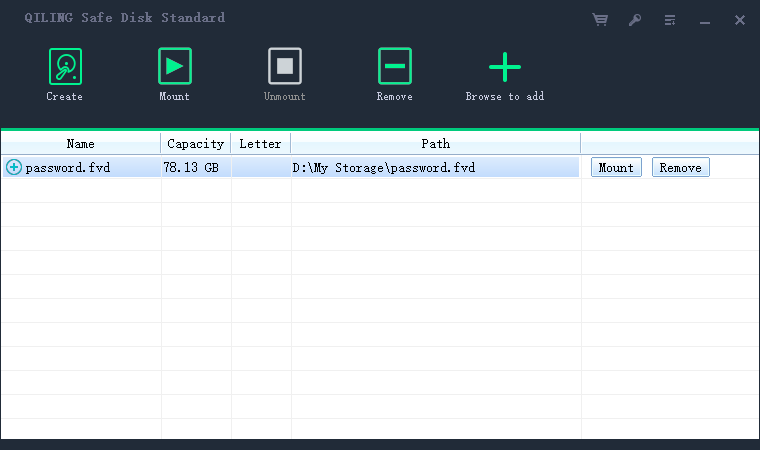
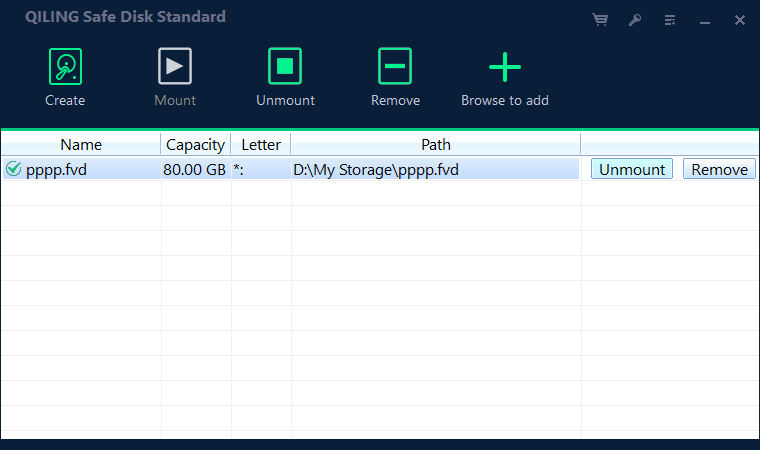
Step 2. Mount the container only when you need it, and enter your password.
Step 3. Copy travel documents and other sensitive files inside while it is open.
Step 4. Unmount the container whenever you leave the laptop, even for a few minutes.
Reduce What You Carry
- Take only what you need. Fewer files on the device means less to lose.
- Leave a clean backup. Keep a full copy at home or in encrypted cloud storage.
- Trim the drive. Move rarely used data off the laptop before the trip.
- Separate the secrets. Put sensitive files in the container and keep the rest ordinary.
- Mind the peripherals. USB sticks and portable drives need protection too.
The smaller the footprint of sensitive data, the easier it is to protect and the less it matters if the laptop disappears.
Habits That Keep Data Safe
- Lock the screen. Set a short automatic lock so an open session cannot be reused.
- Shut down, do not sleep. A fully powered-off laptop is safer than a suspended one.
- Avoid public networks for secrets. Do not enter passwords on untrusted Wi-Fi.
- Keep the laptop with you. Do not leave it in a checked bag or a visible car seat.
- Know your recovery path. If the laptop is lost, a backup and a spare password are your safety net.
If the worst does happen, acting quickly limits the damage. See What to Do If You Lose an Encrypted Drive.
FAQs About Traveling with a Laptop
Should I encrypt my whole laptop or just files?
Either helps. A container is quick and portable, while full-disk encryption covers everything on the drive.
Is it safe to leave a laptop in a hotel room?
It is a risk. If you must, lock it in a safe and keep the drive encrypted and unmounted.
Can border staff see my files?
If the container is unmounted, they see only encrypted data. You alone hold the password that opens it.
Do I need a VPN?
A VPN protects traffic on untrusted networks, but it does not encrypt files stored on the laptop. Use both.
What is the single most important step?
Encrypt before you leave and keep the container unmounted whenever the laptop is not in your hands.
Back Up Windows Before You Change Settings
Before installing security software or changing storage, create a full Windows backup. Qiling Disk Master creates a system image you can restore from.
Step 1. Open Qiling Disk Master and select System Backup to include Windows and the boot partitions.
Step 2. Save the image to a drive other than the Windows disk and start the backup.
Step 3. If a change causes issues, restore from the image to return Windows to its working state.
Conclusion
Protecting a laptop while traveling comes down to planning before you leave. Encrypt your sensitive files inside a container, keep a full backup at home, carry only what you need, and unmount the container whenever the laptop leaves your hands. Lock the screen, avoid entering passwords on public Wi-Fi, and know exactly how you would recover if the device were stolen. Qiling Safe Disk turns a single stolen laptop into a locked box that is useless without your password. Set it up at home, test it once, and travel with confidence.
For more on keeping data safe away from home, see How to Encrypt Files for Cloud Storage, How to Protect Data on a Shared Computer, How to Encrypt a Portable SSD, and How to Share Encrypted Files Securely.
Related Articles
- How to Encrypt a Drive for a Journalist
Reporters carry notes and source contacts everywhere. Learn how to encrypt a drive without disrupting field work. - How to Encrypt a Drive for a Translator
Translation work crosses two languages and one NDA. Learn how to encrypt the files a translator handles every day. - How to Encrypt a Drive Against Theft
Lock a drive so a thief cannot read it when it is stolen. - How to Back Up an Encrypted Drive
Keep a safe copy before you leave on a trip. - How to Encrypt a Drive for a Consultant
Consultants carry client strategies and board decks between sites. Learn how to encrypt the drives that hold them.
Products
Articles & Tutorials
- Data Recovery
- Data Backup
- File Recovery
- File Backup
- System Backup and Restore
- Disk and Partition Clone
- Technical articles
- Mobile articles
- Disk Master Help
- Windows Data Recovery Tutorials
- Windows Secure Delete Tutorials
- Windows Partition Management Tutorials
- Windows File Backup and Restore Tutorials
- Windows System Backup and Restore Tutorials
- Windows Disk Backup and Restore Tutorials
- Windows Clone Tutorials