How to Fix PS4 Safe Mode Loop Without Losing Data
Can't get PS4 out of Safe Mode, it's looping there.
"Hi, PS4 stuck on a Safe Mode loop, with several options available to proceed, such as restart, update system software, rebuild database or initialize PS4... Unfortunately, I have no idea which one I should choose to go. Would you kindly explain those functions? I need to fix PS4 Safe Mode loop without losing data."
About PS4 Safe Mode
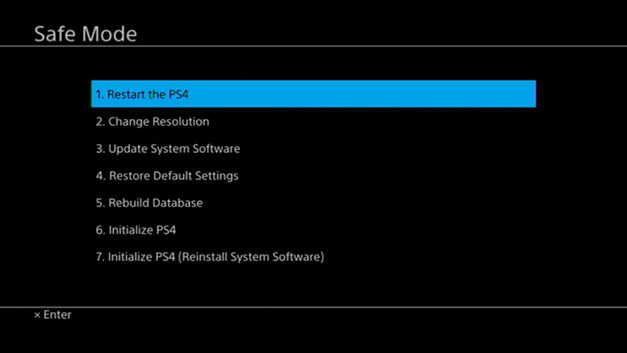
The PS4's Safe Mode allows players to troubleshoot and resolve issues with the console, providing 7 basic functions to restart, update software, restore settings, rebuild the database, and more, helping to correct problems and get the PS4 running normally. For instance, rebuilding the database can fix corrupted data errors.
About PS4 Safe Mode Loop
When your PS4 suddenly powers off and can't be turned back on, try booting it in Safe Mode. To do this, follow the standard procedures to enter Safe Mode, which may involve pressing and holding the power button for a few seconds, then releasing it and pressing it again. This can sometimes help resolve the issue and get your PS4 up and running again.
- Completely turned off the PS4 console.
- Press and hold down the power button for approximately 8 seconds until you hear 2 beeps. This will force the system to shut down.
- Now you're welcomed by the PS4 Safe Mode screen.
In the coming hours or so, accessing PS4 system storage from Safe Mode may become stuck on an endless loop.
How to Fix PS4 Safe Mode Loop Without Losing Data
Troubleshooting options to fix PS4 Safe Mode loop error
Update System Software - You can download and install any new updates that are available, which may get rid of the Safe Mode loop if the problem resulted from outdated system software.
Restore Default Settings - The PS4 factory reset process restores the console to its default settings, erasing all user data, settings, and downloads. After the reset, you'll need to reconfigure the time zone, date, and other settings.
Initialize PS4 - This step will completely erase all data and settings from the PS4, restoring it to its factory settings. It's essential to have backed up your data before proceeding, as all user data will be lost.
Initializing PS4 (reinstalling system software) will permanently erase user data, after which a reinstallation version of PS4 system software will be installed.
Also read: How to recover PS4 game files?
How to Fix PS4 Safe Mode Loop with Error Code E-8200002E
Some users who experienced Safe Mode loop issues discovered that having insufficient funds in a linked credit card on their PS4 account could trigger a Safe Mode loop. They found that resolving this issue involved adding funds to the associated card or removing the card from the account, which ultimately resolved the Safe Mode loop.
Bonus Tip: Back Up PS4 Game Screenshots and Videos
If you've taken numerous game screenshots and recorded videos while playing games on your PS4, it's a good idea to back up and save those files to an external hard drive or computer. This will help prevent loss of your gaming memories in case your PS4's hard drive fails or you need to reset your console.
To free up space on your PS4 hard drive, remove the drive and connect it to your PC, then manually copy or use a reliable backup software to transfer your favorite game screenshots and videos to your computer or an external hard drive.
Qiling Backup is a backup software that can assist you in backing up your data.
Related Articles
- How to Recover Deleted Chrome Bookmarks on Mac
- Fix Windows 10 Computer Keeps Freezing Randomly
- How to Upload Files to Google Drive Automatically
- How to Backup OneNote in Windows 10 and How to Restore OneNote from Backup
- Qiling Disk Drives Stats 1 (Size/Brands/Type) for 2024
Choosing hard drive type, brand, and capacity has always been a dilemma for users. To better answer these questions for you, we surveyed 207,797 users and 754,142 hard drives over the past three months, including 346,477 SSDs, 200,818 HDDs, and 206,847 USB drives. - Qiling Disk Drives Stats 2 (Disk Number/Disk Types/C Drive Size) for 2024
Qiling conducted user research in 2024 to summarize the hard drive usage habits of users, including the number and capacity of hard drives, type of disk, size of the C partition, and status of their hard drive operating system.
Products
Articles & Tutorials
- Data Recovery
- Data Backup
- File Recovery
- File Backup
- System Backup and Restore
- Disk and Partition Clone
- Technical articles
- Mobile articles
- Disk Master Help
- Windows Data Recovery Tutorials
- Windows Secure Delete Tutorials
- Windows Partition Management Tutorials
- Windows File Backup and Restore Tutorials
- Windows System Backup and Restore Tutorials
- Windows Disk Backup and Restore Tutorials
- Windows Clone Tutorials