Qiling Disk Drives Stats 1 (Size/Brands/Type) for 2024
We surveyed 207,797 users and 754,142 hard drives over three months, including 346,477 SSDs, 200,818 HDDs, and 206,847 USB drives, to better understand user preferences and hard drive specifications.
Based on the survey results, we have conducted a detailed analysis of the usage, type, capacity, brand, and speed of hard drives, which is available in a report from Qiling that provides users with all the details. The report can be downloaded by clicking on the link provided.
Share this disk statistic report online to help your friends, colleagues, and business partners choose the right disk for their new computer or to upgrade their current disk drives, ensuring better computer performance.
What Kind of Hard Disk Do People Like to Use?
The number of SSD users is increasing significantly, surpassing the number of HDD and USB drive users based on the survey findings.
754,142 hard drives were surveyed, with 45.94% using SSDs, 26.63% using HDDs, and 27.43% using USB drives. This analysis led to the following key conclusions about user preferences.
- 1. The number of SSD users is increasing, surpassing the number of HDD and USB drive users.
- 2. Compared to HDDs, smaller SSDs are often preferred by users, with more than half of SSD users opting for capacities ranging from 128GB to 512 GB.
- 3. The most popular USB drives typically range from 256GB to 1TB, making them ideal for storing large files, high-definition videos, photos, and more, which is why users often prefer them for their larger capacities.
Choosing the right capacity for a USB drive, HDD, and SSD can be a bit overwhelming, but here is a brief guide. The ideal capacity depends on individual needs, but generally, a 1TB SSD is a good starting point, offering a balance between storage and affordability.
For HDDs, 2TB or 4TB capacities are often sufficient for most users, providing ample space for storing files and programs. USB drives, on the other hand, can range from 128GB to 1TB, with 512GB or 1TB capacities being a good compromise between portability and storage.
Which Bus Type Has the Largest Number of Followers?
Our survey confirms that SATA and NVMe are the two most popular disk interface types in the market, as previously discovered through statistical analysis.
Our survey shows:
- 36.59% of users prefer SATA, followed by NVMe at 17.64%.
- 5.34% of professional users choose to create and use a RAID disk matrix.
- Also, 2.95% of users choose IDE.
- In addition, 0.78% of users choose hard drives with dual NVMe interfaces.
- 0.2% choose hard drives with three SATA interfaces.
People prefer SATA and NVMe interface types due to their high speeds, with NVMe being significantly faster than SATA. Since its release, NVMe has gained many supporters, with NVMe PCIe 3.0 SSDs reaching speeds of up to 3,500MB per second and NVMe PCIe 4.0 SSDs reaching speeds of up to 7,500MB per second.
While SATA is slower than NVMe, it has the advantage of mature technology and widespread compatibility, making it a more affordable option. As a result, the number of SATA users currently surpasses that of NVMe.

How Much Capacity Do People Prefer to Use?
The software conducted a survey and analysis of disk usage for disks of different capacities, providing usage details to determine how much disk space meets current usage.
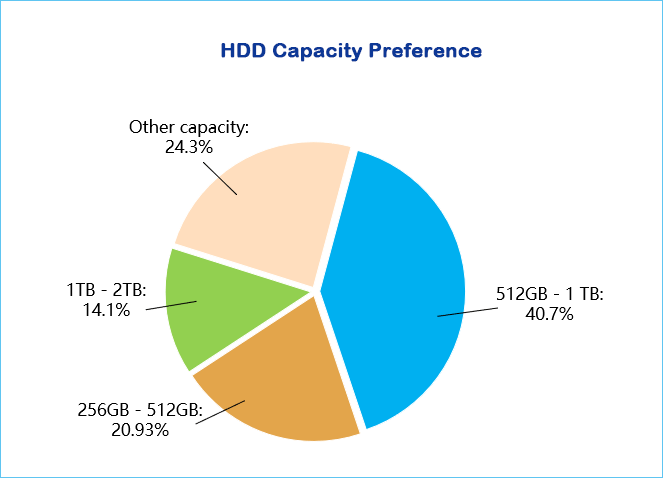
- 40.67% of HDD users choose a capacity of 512 GB - 1 TB.
- 20.93% of users choose 256 GB - 512 GB.
- Only 14.1% of users choose a capacity of 1 TB to 2 TB.
- The number of HDD users who choose other capacities is relatively small.
Among SSD users, the details are different:
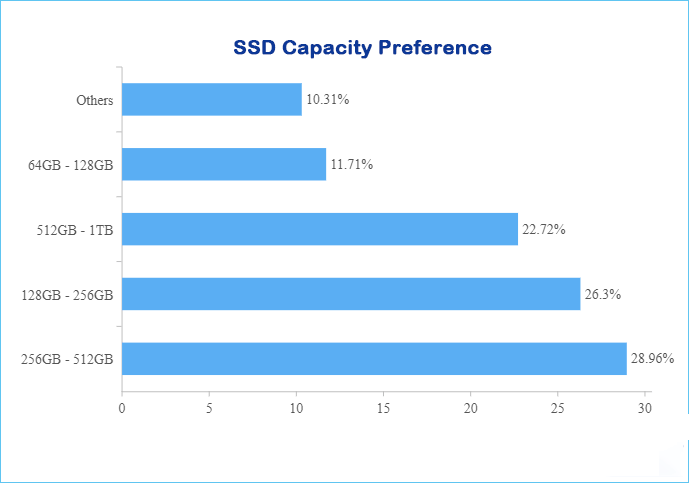
- 256GB - 512GB is the more common choice, making up about 29% of total storage capacity.
- 26.3% of users have chosen SSDs with a capacity of 128 GB - 256 GB.
- 22.72% of users have chosen SSDs with a capacity of 512 GB - 1 TB.
- 11.71% of users use solid state drives (SSDs) with capacities ranging from 64 GB to 128 GB.
- The number of users who choose hard drives with either capacities that are too large or too small is very low.
The number of HDD and USB drive users is similar, but HDD users tend to choose larger capacities, while USB drive users prefer smaller capacities.
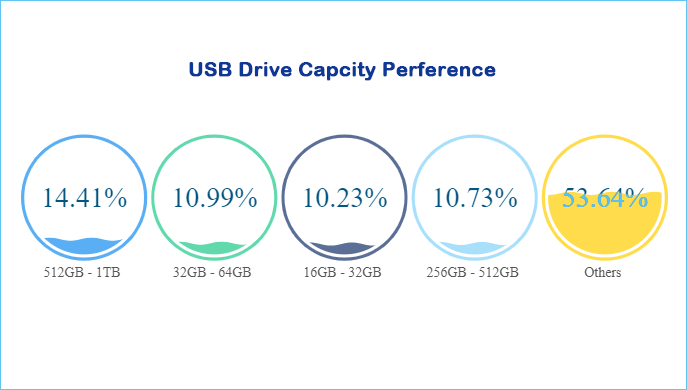
- 14.41% of USB drive users have chosen a capacity of 512 GB to 1 TB.
- Users who have chosen 32 GB - 64 GB account for 10.99%.
- 14929 users (10.23%) have chosen 16 GB - 32 GB, while 14683 users (10.73%) have chosen 256 GB - 512 GB, with a relatively small difference between the two.
The speed of a USB disk is lower than HDD, but they have similar user numbers. Both options have advantages and are relatively affordable compared to SSD. HDD offers sufficient basic storage capacity and non-volatile memory, allowing for data retention in case of power loss and ensuring safety and protection for valuable computer data.
The popularity of USB drives is comparable to that of HDDs, with many users favoring their portability and wide compatibility, making them a staple in various devices such as notebooks, desktops, and game consoles.
256GB is a common capacity for many storage devices, but whether it is enough depends on individual needs and usage. Some users may find 256GB sufficient, while others may require more storage space.
The ideal capacity depends on factors such as the type of device, intended use, and personal preferences. 256GB can be a good starting point, but users should consider their specific needs before deciding on a storage capacity.
- 256 GB is sufficient for storing data that does not require large files, applications, or systems, and cloud storage can be used for other data.
- 256 GB is insufficient for storing systems, games, large videos, and other files. Upgrading to a hard drive or SSD with larger capacities, such as 512 GB - 1 TB, is a more suitable option.
If you are unsure about which capacity to choose, feel free to share this report with others by clicking the provided buttons. This will help them make an informed decision.
What Are the Most Popular Hard Disk Brands and Models?
Qiling's survey results reveal that users have distinct preferences for different types of storage devices, with specific brands emerging as favorites for SSDs, HDDs, and USB drives.
- The top three SSD brands include: Kingston, Samsung, and Crucial.
- The top three HDD brands are Seagate, Toshiba, and WD.
- The top three USB disk brands are Kingston, Sandisk, and Cruzer.
🔴The most popular models of these SSD brands are as follows:
Kingston is the most popular SSD brand, and its two most popular models are the A2000 and the FURY.
- KINGSTON SA400S37240G
- KINGSTON SA400S37480G
Samsung is the second most popular SSD brand, with its four most popular models being the 970 EVO, 970 EVO Plus, 980 PRO, and 870 EVO.
- Samsung SSD 980 PRO 1TB,
- Samsung SSD 860 EVO 500GB
- Samsung SSD 970 EVO Plus 1TB
- Samsung SSD 980 PRO 2TB
🔴Crucial is also a well-known SSD brand among users, with the CT500MX500SSD1 model being quite popular.
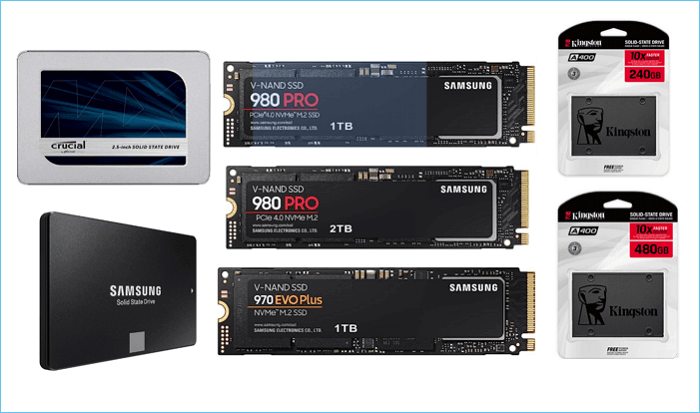
✔️Popular SSD brands like Samsung, WD, and Crucial offer reliable and feature-rich storage solutions. They provide a wide range of models to choose from, making them suitable for various user needs.
These SSDs can significantly enhance system responsiveness, resulting in faster boot, load, and transfer times, making them a popular choice among users.
🔴The most popular models of these HDD brands are as follows:
Seagate is the most popular HDD brand, particularly with its various models that are widely used.
- ST1000DM010-2EP102
- ST1000LM035-1RK172
Toshiba's TOSHIBA DT01ACA100 model is a popular choice among users.
Western Digital's WDC WD10EZEX-08WN4A0 is a popular model among hard drive users.
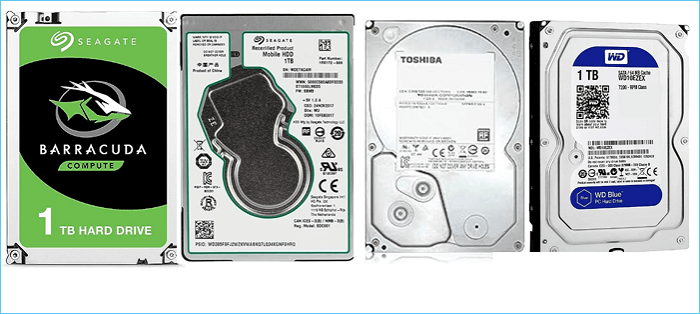
✔️These hard disk drives offer high value for money, with good read-write speeds, large storage capacity, quiet operation, and easy setup, making them a popular choice among users.
🔴The most popular models of these USB brands are as follows:
Kingston is the top choice among users for USB disk brands, with the DataTraveler 3.0 model being a standout favorite.
Many users choose Sandisk brand, with the SanDisk 3.2Gen1 model being the most popular.
🔴Sandisk Cruzer USB drives are also popular among users.
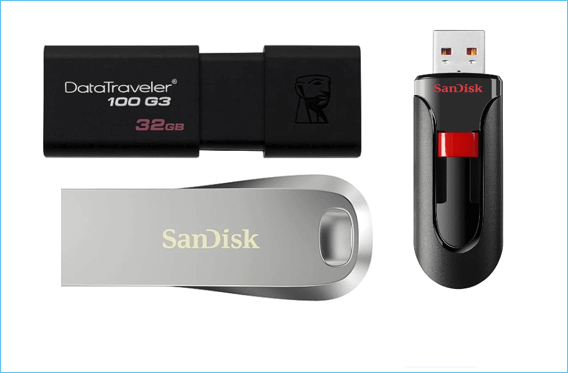
✔️USB drives are popular due to their small size and affordability, offering high value for money compared to SSDs and HDDs, and providing a durable and practical way to save files.
The following content compares the fastest storage devices. Kindly share this report to let more people know the details.
Which Is the Fastest Hard Disk?
Qiling conducted read-write speed tests on various storage devices and identified the top 10 models with the fastest read-write speeds. However, the devices with the fastest read speeds are not necessarily the fastest for writing data, highlighting a difference between read and write performance.
| Vender-ModelName | SEQ_R | Vender-ModelName | RND_R |
|
Crucial-CT2000T700SSD3 |
12318.68 |
TOSHIBA-KXG6AZNV1T02 |
12430.9 |
|
Crucial-CT2000T700SSD5 |
10126.49 |
Crucial-CT2000T700SSD3 |
11616.61 |
|
SOLIDIGM-SSDPFKKW010X7 |
7917.37 |
Crucial-CT2000T700SSD5 |
9072.08 |
|
GIGABYTE GP-ASM2NE6100TTTD |
7882.12 |
SOLIDATA-SOLIDIGM SSDPFKKW010X7 |
8260.14 |
|
Netac-NVMe SSD 2TB |
7722.23 |
Netac-NVMe SSD 2TB |
7949.4 |
|
TOSHIBA- KXG6AZNV1T02 |
7485.43 |
GIGABYTE-GP-ASM2NE6100TTTD |
7736.87 |
|
Monster Storage-MS950G70PCIe4-04TB |
7401.29 |
Monster Storage-MS950G70PCIe4-04TB |
7133.73 |
|
MiWhole-CT300 1TGB |
7113.16 |
MiWhole-CT300 1TGB |
7041.17 |
|
SK hynix-MiWhole CT300 1TGB |
7071.96 |
Transcend-TS1TMTE250H |
6967.56 |
|
SK Hynix-PC801 NVMe SK hynix 2TB |
7068.77 |
WD-PC SN810 NVMe WDC 512GB |
6907.86 |
The table above highlights the top storage devices for sequential and random read speeds. The Crucial CT2000T700SSD3 leads in sequential read at 12318.68, while the TOSHIBA KXG6AZNV1T02 tops random read at 12430.9.
|
Vender-ModelName |
SEQ_W |
Vender-ModelName |
RND_W |
|
TOSHIBA-KXG6AZNV1T02 |
10743.65 |
INTEL-HBRPEKNX0202AH |
14909.99 |
|
Crucial-CT2000T700SSD3 |
9782.19 |
TOSHIBA-KXG6AZNV1T02 |
9922.2 |
|
WD-WDC WDS480G2G0C- |
8935.62 |
Netac-NVMe SSD 2TB |
9420.14 |
|
Crucial-CT2000T700SSD5 |
8458.28 |
WD-WDC WDS480G2G0C- |
8954.86 |
|
Netac-NVMe SSD 2TB |
8413.23 |
Crucial-CT2000T700SSD3 |
8408.95 |
|
GIGABYTE-GP-ASM2NE6100TTTD |
8338.01 |
GIGABYTE-GP-ASM2NE6100TTTD |
8161.43 |
|
MiWhole-CT300 1TGB |
6470.4 |
CT2000T700SSD5 |
7867.02 |
|
Monster Storage-MS950G70PCIe4-04TB |
6397.82 |
Fanxiang S770 2TB |
6277.03 |
|
INTEL-HBRPEKNX0202AH |
6388.9 |
PC801 NVMe SK hynix 2TB |
6254.81 |
|
Fanxiang-S770 2TB |
6276.39 |
SABRENT-SSD NVME 4.0 4TB |
6134.41 |
When choosing a storage device for daily office use, consider the type of tasks you will be performing. If you frequently transfer or copy large files, sequential read-write speed is a key factor.
However, if you are doing tasks that involve fragmented files, such as virus scanning or booting programs, random read-write speed is more important.
When copying images, starting the computer, or loading games, we use random read-write performance. This can be tested using Task Manager or other software, comparing the speeds of SSDs, HDDs, and USB drives.
- Tip
- When choosing a storage device, consider both sequential and random read-write capabilities as they both have their advantages in daily use, making them both important and not mutually exclusive.
Based on the table, if you are looking for a balance between read-write speed, consider brands like Samsung (970 EVO Plus), Western Digital (Black SN750), and Crucial (P1), which all offer relatively high read and write speeds.
- 🔴TOSHIBA - KXG6AZNV1T02 - $199(1TB)
- 🟠Crucial - CT2000T700SSD3 - $235(1TB)
- 🟡Crucial - CT2000T700SSD5 - $246(1TB)
- 🟢Netac - NVMe SSD 2TB - $150.99
We will summarize this report and provide suggestions on choosing a hard disk to store different files in the next part. Feel free to share this report with others and help spread the word.
2024 Qiling Drive Stats 1- Summary and Suggestion
Qiling software analyzed the hard drives of 207,797 users, deriving relatively accurate usage data for the second quarter, with 754,142 drives being examined. This analysis revealed some interesting findings.
The popular brands of HDD, SSD, and USB drives differ, with various details such as storage capacity, speed, and compatibility.
- The most popular SSD brands are Kingston and Samsung.
- The most popular HDD brands are Seagate and Toshiba.
- The most popular USB disk brands are Kingston and Sandisk.
The fastest hard drive type is SSD, with some models standing out for their exceptional performance.
- KXG6AZNV1T02 TOSHIBA
- Netac NVMe SSD 2TB
- INTEL HBRPEKNX0202AH
Compared to SSDs, HDDs' read and write speeds are relatively slower, with the fastest HDD models reaching speeds of up to 200-300 MB/s.
- WDC WDS480G2G0C
- WD80EFZZ-68BTXN0
Among the three mainstream hard drive types, the USB disk is the slowest, with Transcend 8GB USB being the fastest in this study.
Users often prefer different capacities when choosing between SSD, HDD, and USB disk, with SSDs generally being preferred for their high speed, HDDs for their high storage capacity, and USB disks for their small size and portability.
However, the capacity of each type of storage device can vary greatly depending on the specific model and brand, and users should consider their specific needs and budget when making a decision.
- 🔵The most commonly chosen capacity by HDD users is: 256GB-1TB
- 🔵128GB - 512GB is the most commonly chosen capacity by SSD users.
- 🔵256GB - 1TB is the most commonly chosen capacity by USB drive users, catering to the needs of those who require a balance between storage space and portability. This range offers ample room for storing files, documents, and multimedia content, making it an ideal choice for both personal and professional use.
Based on this survey, we recommend that you determine the type and capacity of your storage device according to your needs. Take into account the amount of data you need to store and the type of data you will be storing.
This will ensure that you choose a device that is suitable for your specific requirements and can handle the demands of your data storage needs.
|
Items |
File to Store |
Reason |
Capacity Suggested |
| SSD | OS, games, apps |
More reliable, with no moving parts Fast |
No less than 256GB |
| HDD | Data | High Capacity | No less than 512GB |
| USB Disk | Data backup | Portable | 32-64GB, 512GB-1TB, depending on your needs |
If you only need to store data and do not require high-speed transfers, a Hard Disk Drive (HDD) is a better choice. This is because HDDs are optimized for storing large amounts of data, making them a more suitable option for users who prioritize storage capacity over transfer speed.
When it comes to storing systems or games, an SSD (Solid-State Drive) is a better choice than a traditional hard drive. This is because SSDs are much faster and more efficient, allowing for quicker loading times and smoother performance. They also consume less power and generate less heat, making them a more reliable and durable option.
Generally, read and write speeds between 200 MB/s to 550 MB/s are considered normal. For a more premium experience, NVMe SSDs can reach speeds of up to 7,500 MB/s with NVMe PCIe 4.0 technology.
A USB disk is a suitable option for data backup due to its compact size and high storage capacity, making it an ideal choice for storing and transporting large amounts of data.
When using a USB disk for gaming, it is essential to note that different devices, such as Windows systems, Mac, and other game devices, have varying file systems. Ensure your USB disk is compatible with your device. Additionally, always safely remove your USB disk to prevent potential data loss.
Related Articles
- What Is SDRAM? Synchronous Dynamic Random-Access Memory Explained
- Windows Recovery Environment [How to Access with Video]
- Ways to Delete Windows 7 Backup [Updated 2024]
- CMR vs. SMR Hard Drive: Which One is Better to be Choosen?
- How to Fix PC Black Screen While Gaming in 6 Ways
Fix a PC black screen while gaming by checking graphics drivers, hardware, power, display settings, and other common causes. - My PC Randomly Restarts! How to Solve It? [Fixed in 8 Ways]
Fix a PC that randomly restarts on Windows 10 or 11. Check power, overheating, drivers, hardware, and system settings.
Products
Articles & Tutorials
- Data Recovery
- Data Backup
- File Recovery
- File Backup
- System Backup and Restore
- Disk and Partition Clone
- Technical articles
- Mobile articles
- Disk Master Help
- Windows Data Recovery Tutorials
- Windows Secure Delete Tutorials
- Windows Partition Management Tutorials
- Windows File Backup and Restore Tutorials
- Windows System Backup and Restore Tutorials
- Windows Disk Backup and Restore Tutorials
- Windows Clone Tutorials