Qiling Disk Drives Stats 2 (Disk Number/Disk Types/C Drive Size) for 2024
A recent user survey by Qiling Software has concluded the hard drive storage data research for the second quarter of 2023. The three-month study examined 336,058 hard drives from 207,797 users, including 205,889 Solid State Drives (SSDs) and 130,169 Hard Disk Drives (HDDs).
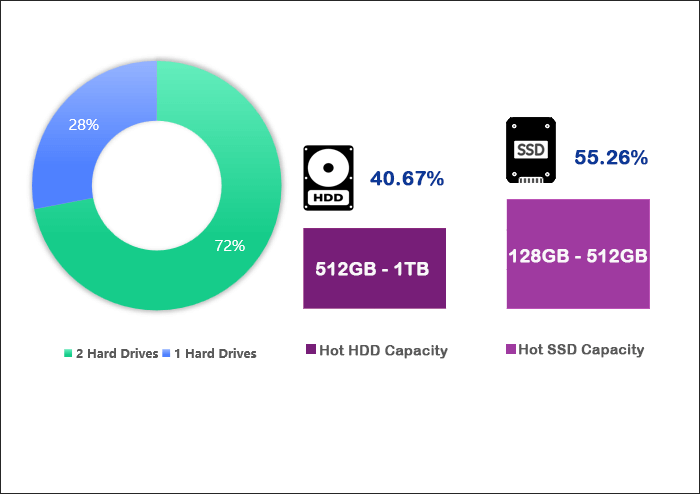
71.97% of users have more than two hard drives, while 28.02% have just one. Additionally, 40.67% of hard drive users have disks with capacities between 512GB and 1TB, whereas 55.26% of solid state drive users use disks with capacities between 128GB and 512GB.
Share this disk status report online to help friends and colleagues choose the right disk size for their computers. With various disk sizes available, it can be overwhelming to determine the ideal size.
We have analyzed the data to understand the trends behind the shift in hard drive storage and will continue to monitor usage patterns, including when HDDs and SSDs are used as system drives and the size of the C partition.
Our observations and insights will be shared, and we will offer recommendations to address potential issues that may arise, with the full report available for download by clicking the link provided.
How Many Hard Drives Do People Have for Their PC?
According to our user survey, most users use multiple hard drives, with 36.81% using two and 19.90% using three, suggesting they may segregate data and systems to different disks, using additional drives for data storage or performance enhancement.
A segment of users own either more or fewer hard drives, with a graph showing the distribution of hard drive ownership among users.
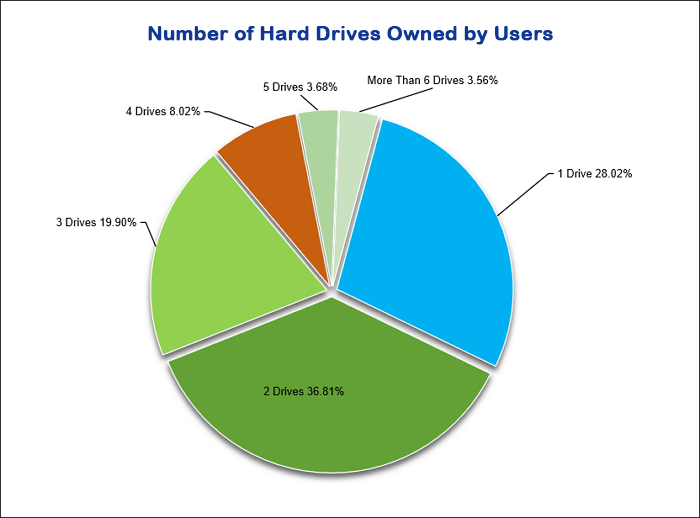
28.02% of users have only one hard drive, so it is crucial for them to regularly check their hard drive's health and back up their essential data to prevent data loss in case of disk failure.
15.26% of users have 4 or more hard drives, with a higher number of users having 4 hard disks than 5.
- 8.02% of users have four hard drives.
- 3.68% of users have five hard drives.
Users with numerous hard drives are likely professionals, such as IT specialists or data analysts, who need extra storage for testing, data backup, or storing large datasets.
The ideal number of hard drives for a computer depends on several factors, including the user's needs, budget, and the type of computer. For a general user, one hard drive is sufficient, but for those who need more storage or want to separate their operating system and data, having multiple hard drives can be beneficial. A common setup is to have one hard drive for the operating system and programs, and another for data storage.
What Size of Disk Capacity Is Sufficient?
256GB is sufficient for most users, but it depends on the type of user. HDD users use an average of 43GB, while SSD users use an average of 124GB. Therefore, 256GB is enough for HDD users, but may be insufficient for SSD users.
Analysis of HDD Capacity Utilized by Users
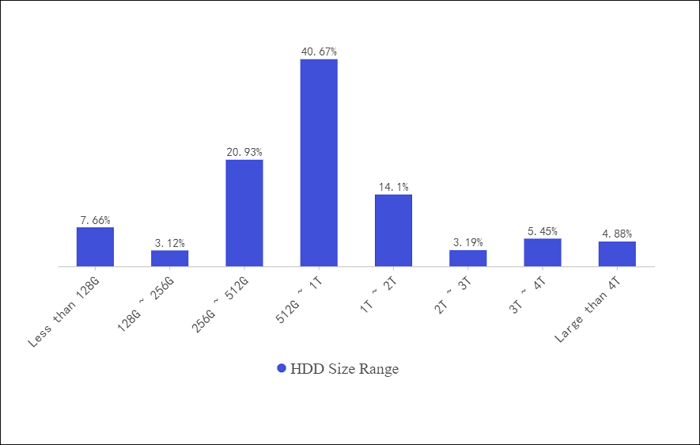
Most HDD users prefer capacities between 256GB and 1TB, with 40.67% opting for 512GB to 1TB, likely due to the affordability of HDDs, with a cost per GB of only 0.03 to 0.06 dollars, making them a cost-effective choice for data storage or backup.
26.17% of users also choose capacities from 1TB to 8TB.
A distribution chart shows the various hard drive capacities owned by HDD users, with the majority holding capacities ranging from 500 GB to 1 TB, followed by 2 TB and 4 TB capacities, and then smaller capacities of 250 GB and 500 GB, while the least common capacity is 16 TB.
Analysis of SSD Capacity Utilized by Users
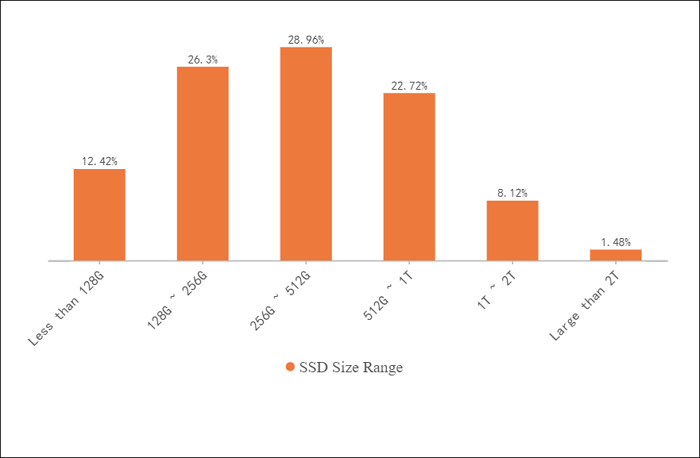
Qiling software found that most SSD users opt for capacities between 128GB and 512GB, using 55.26% of the market, likely due to price considerations, despite their fast speeds and superior performance.
However, this can lead to issues like low disk space, prompting users to expand or resize partitions.
With the advancement of technology, SSD prices have dropped annually, making large-capacity SSDs more affordable. Users who need high-performance devices for work or new system users are advised to consider larger SSDs like 512GB-1TB. Interestingly, 9.60% of users opt for SSDs with capacities over 1TB.
The two proportion charts show the hard drive capacity utilized by users. Approximately 80% of users use less than 50% of their hard drive capacity, while 20% use more than 50%.
Additionally, the charts indicate that 70% of users use less than 25% of their hard drive capacity, and 30% use more than 25% but less than 50%.
- 89.22% of hard disk drive users utilize hard drives with capacities greater than 256GB.
- Among SSD users, 61.28% utilize SSDs with capacities exceeding 256GB.
- Only 10.78% of HDD users and 38.72% of SSD users chose hard drives with 256GB or less capacities, indicating that most users prefer larger storage capacities.
Here are the conclusions drawn from the Qiling hard disk usage survey in one paragraph:
- 256GB is sufficient for a system disk, but not enough for gaming, development, or data storage needs.
- 256GB may still be sufficient for some users, particularly those with multiple storage devices or who use their computer primarily for office tasks, as it provides ample space for their needs.
- 256GB is not enough for large storage needs, such as gaming or data backup, due to its limited capacity.
256GB is often not enough for most users, as it is usually used for the operating system, software downloads, and various files like cache, virtual, and configuration files, making a larger hard drive necessary.
- For everyday office use, 500GB-1TB hard drives are sufficient.
- A 2TB or larger hard drive may be more suitable for professional applications or large data storage due to its increased storage capacity.
256GB is not enough for daily office work, at least 500GB is recommended.
What Is the System Disk Type and What Is the Size of C Partition
A computer disk typically consists of a system boot disk and a C drive for software downloads and installations, with 74.19% of users opting for an SSD system disk, while 25.81% choose a non-SSD disk.
Most C partition capacities, whether on SSDs or HDDs, range between 64GB and 512 GB. The following is a detailed analysis of these findings.
More SSDs are used as system disks and fewer HDDs
The number of people using SSDs as system disks is about three times that of those using HDDs, likely due to the reliability and performance advantages of SSDs, which have become the mainstream for system disks.
| Comparison | HDD | SATA SSD | NVMe/M.2 SSD |
|---|---|---|---|
| Read Speed | 80 MB/s-160MB/s | 500MB/s-550MB/s | 1500MB/s-7500MB/s |
| Write Speed | 80 MB/s-160MB/s | 400 MB/s-520MB/s | 1000 MB/s to 7000MB/s |
| Boot Time | 45s-4 Minutes | 20s | 10s |
| Components | A platter, spindle, and the read/write arm | No moving parts | No moving parts |
NVMe m.2 drives have read and write speeds of up to 7500MB/sec, making them significantly faster than hard disk drives. They are also more reliable and less prone to damage due to their solid-state design, making them a great option for system disks that can enhance computer performance and speed up boot times.
The advantages of SSDs, including faster read and write speeds, higher fault tolerance, and lower power consumption, have made them the primary choice for system disks in new equipment.
The Space of C Partition Generally Between 64GB-512GB
The C partition is typically used for system operations such as software downloads, system restores, and file updates. Its capacity usually ranges from 64GB to 512GB, but there are differences in usage between SSDs and HDDs, according to Qiling's hard disk usage survey.
- 79.98% of SSDs range from 64GB to 512GB, with most (33.17%) falling between 128GB and 256GB.
- On HDDs, 64GB to 1TB capacity accounts for 91%, with the majority being between 256GB and 512GB, at 31.38%.
- Many users allocate less than 64GB to their C drive, which may not be sufficient for their needs.
The following graph depicts its specific distribution:

We recommend allocating at least 100GB of space for the C drive, which should occupy around 40% of the entire disk for enterprise users. This is because the C drive stores the operating system and personal files like documents and photos, and can become full if users do not segregate their data.
Insufficient C drive space can slow down the Windows operating system or prevent Windows updates from installing.
To maintain a good condition of the C drive, allocate sufficient usage space to it, increase storage space by about 10% more than anticipated, separate personal data from the C drive, extend the C drive, clean up regularly, or upgrade the system drive to resolve the issue of insufficient C drive space.
Make sure to keep your C drive in good condition, as it is a crucial part of your computer. Click the button below to share and remind your friends to check their C drive space issues.
Which Partition Type Do People Use on Their Disk Drives
The system partition typically uses a partition type that occupies a specific capacity, such as the C partition, which is usually used for the system files. Further investigation into the types of partitions used by the system partition will provide a better understanding of its capacity and functionality.
Most users (57.41%) use GPT as their system disk's partition type, while 42.59% prefer MBR, with disk partitioning mainly involving storing partition information on the disk in these two formats.
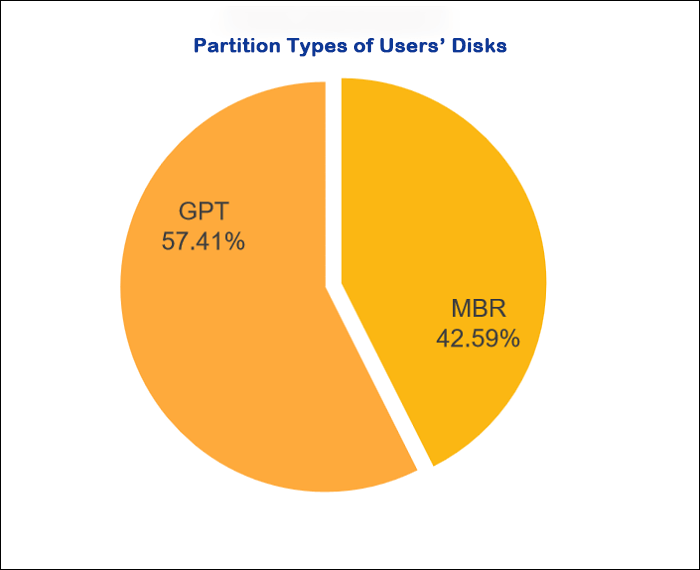
The traditional partition style, MBR, is being replaced by GPT due to its limitations, which include a maximum of 4 primary partitions per disk and a maximum disk size of 2TB. This makes GPT a more suitable option for modern storage needs.
MBR has limitations in terms of capacity and number of partitions, whereas GPT has no such limitations and is supported by UEFI, making it a suitable replacement for MBR in modern systems.
As the Windows 11 system will only support GPT and UEFI, upgrading to Windows 11 may require converting MBR to GPT, especially considering the advantages of GPT in terms of partition size and number of partitions.
When deciding between GPT (GUID Partition Table) and MBR (Master Boot Record) partitioning, it is essential to consider the specific situation. GPT is generally recommended for modern systems, especially those with large storage capacities, as it allows for more than four primary partitions and is more resilient to data corruption.
- If your hard disk capacity exceeds 2TB, choose the GUID Partition Table (GPT) partitioning scheme to utilize all storage space.
- If your computer's motherboard is relatively new and supports UEFI firmware, you can choose GPT, which is suitable for Windows 10 64-bit or Windows 11, especially when using hard drives larger than 3TB.
- If your motherboard is older and still uses the old BIOS system, choose MBR, especially for systems with 32-bit Windows 10 or older systems with hard drives below 2TB.
If your friend is deciding between choosing GPT or MBR partitions, you can share the key takeaways from this section. The main difference between GPT and MBR is that GPT supports larger disk sizes and more partitions, while MBR is more suitable for smaller disk sizes and simpler partition schemes. If your friend's disk size is larger or they need to create multiple partitions, GPT is the better choice.
Which Operating System People Prefer for Their Hard Drives
63.02% of users use Windows 10, which is the most popular version of Windows, followed by Windows 11, and then macOS and Linux.
- 51.31% of users are using Windows 10.
- 11.71% of users are using Windows 10 64-bit.
The use of Windows 7 and Windows 8 is gradually decreasing as newer systems become more popular.
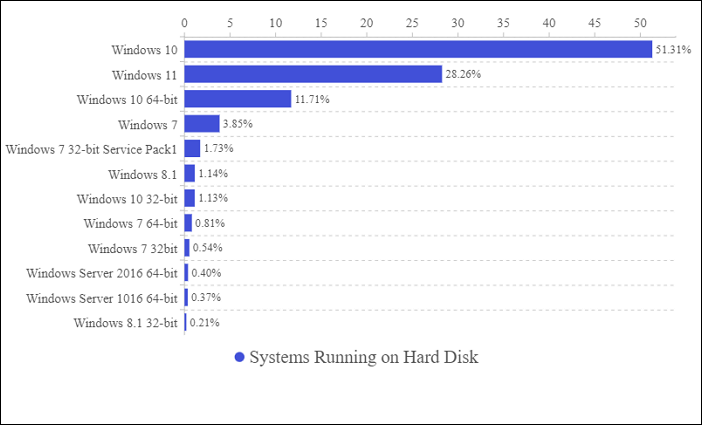
Windows 11, released in June 2021, still lags behind Windows 10 in terms of usage, with only 28.26% of users adopting it as their new system, suggesting a wait-and-see approach among many users.
The usage rate of Windows 11 has increased compared to the first quarter of 2023, with users opting to upgrade to experience improved performance.
As users increasingly adopt new systems, the demand for disk management, such as converting MBR to GPT, grows. However, not all systems can be upgraded to Windows 11, and users can check the system requirements to confirm compatibility. If a device no longer supports the new system, it is best not to attempt an upgrade to avoid system crashes or data loss.
If users cannot upgrade the system, they can optimize and enhance the current old system's performance by providing enough space to the C partition, regularly cleaning up system garbage, adding new disks, or extending partition capacity. It is also crucial to regularly check hard drive health.
Which Windows OS do you prefer? Click the buttons and share your idea with your friends.
Qiling Disk Usage Summary and Recommendations for 2023
60% of computer users have become accustomed to using two or more hard disks, indicating a preference for this setup based on user habits and preferences.
- Most users reserve a capacity of 64GB to 512GB for the C drive, with about 40-60% having less than 256GB.
- 70% of users prefer to install their system on an SSD, which is a solid state drive, rather than a traditional hard disk drive (HDD).
- Over 50% of users prefer using GPT for partitioning their system disk, as it offers various benefits, including support for larger disk sizes, improved performance, and enhanced security features.
- Windows 11 and 10 have become the mainstream systems, requiring faster and more reliable hard disks to ensure smooth performance and efficient operation.
Based on the data, we have identified some underlying reasons and potential issues, and have provided some reasonable suggestions to address them.
- Users often reserve too little space for the C drive, which can lead to it running out of space. To avoid this, users should allocate sufficient space to the C drive during partitioning, and consider expanding the partition or regularly cleaning the drive to ensure the system runs smoothly.
- Upgrading to an SSD can significantly improve system performance, making it advisable to use one as the system disk. Users can either reinstall the system or migrate the OS from the HDD to the SSD to enjoy faster boot speeds and overall computer performance.
- Due to the limitations of Master Boot Records (MBR) and the need to upgrade to Windows 11, many users are switching to GUID Partition Table (GPT). Fortunately, Windows provides various methods to help convert MBR to GPT.
- As older systems like Windows 7 and 8 are gradually phased out, the emergence of Windows 11 has become a reality. If you are looking to upgrade, ensure your computer is compatible first. By backing up your data, you can safely upgrade without losing any important files. Once upgraded, it is essential to promptly meet the new system's requirements, such as converting your disk, to ensure a smooth transition.
The Qiling disk drive statistics for 2023 provide valuable insights and efficient suggestions for managing disks. If you found this information helpful, consider sharing it with others who may benefit from it.
Related Articles
- Windows Recovery Environment [How to Access with Video]
- What Is Clipboard and How to Copy and Paste? [Full Guide]
- [Tracing IP Address] How to Trace An IP Address?
- Windows Command Line Cheat Sheet (Online Table and PDF)
- PC Stuck on BIOS Screen - How to Fix?🔥
Read this guide to learn PC Stuck on BIOS Screen - How to Fix?🔥 with clear steps, practical tips, and safer troubleshooting methods. - PC Turns On, but No Display or Power to Keyword [Fixed]
If your PC turns on but shows no display or power to the keyboard, try unplugging all peripherals, pressing the power button for 30 seconds, and then plugging everything back in.
Products
Articles & Tutorials
- Data Recovery
- Data Backup
- File Recovery
- File Backup
- System Backup and Restore
- Disk and Partition Clone
- Technical articles
- Mobile articles
- Disk Master Help
- Windows Data Recovery Tutorials
- Windows Secure Delete Tutorials
- Windows Partition Management Tutorials
- Windows File Backup and Restore Tutorials
- Windows System Backup and Restore Tutorials
- Windows Disk Backup and Restore Tutorials
- Windows Clone Tutorials