[Tracing IP Address] How to Trace An IP Address?
Tracing an IP address is a straightforward process that can be done using simple tracker tools. By following the step-by-step guides outlined in this article, you can learn how to trace your IP address using different methods. Understanding IPs is essential for navigating the internet, as they help determine routes and connections over the network.

In today's internet age, it's common to encounter unknown websites, emails, and router connections that seem suspicious. To verify the trustworthiness of these online connections, tracing an IP address can be helpful. By learning how to trace an IP address, you can check the authenticity of your connection and ensure that your online interactions are secure.
When a device connects to others on the Internet, the computer or server logs store the IP addresses of the websites you send and receive data packets from, acting as an identifier and carrying hop information. This helps trace the IP address, making it possible to track suspicious connections and identify their origin. To do this, you can use IP tracking tools to find information associated with an IP address.
What Is an IP Address
An IP address is a unique string of numbers that identifies a device on the internet. It allows devices to communicate with each other and helps websites and servers know where to send data.
IP stands for Internet Protocol, and it's a unique numerical address assigned to every device connected to the internet. This address allows data to be routed through multiple servers and routers before reaching your device, carrying information about the devices and their locations along the way.
IPs serve as unique identifiers for devices on the Internet, allowing them to be recognized and connected. When a server and another device exchange data, their IPs are exchanged and logged, creating a digital trail that facilitates the sharing of data packets. These logs can be used to retrieve information about the IPs involved.
Can an IP Address Identify Me?
The IP addresses stored in system logs while surfing the net are not personal information like names, social security numbers, or personal addresses. These numerical data are necessary for forming connections and are essential to maintaining the Internet, which is used by people to interact with millions of devices and connect with various devices over time. Therefore, there is no need to worry about your personal information being leaked.
Can I Trace Someone's IP Address?
You can't trace an IP address unless you've made a connection with the device online. When two devices try to connect, they exchange source and destination addresses, forming a connection and creating a route for packets. These addresses act as tokens, allowing you to trace an IP address if you have them.
When you access an online website or app, you share your IP address as the source address, and the website responds by sending its own IP address as the destination address to display the webpage. Similarly, emails carry the sender's IP address, following a similar mechanism.
To locate your IP address on Windows or Mac, you can read the article for more information. Your IP address can be used by various entities, including your internet service provider, websites you visit, and potentially malicious individuals who may attempt to use it for unauthorized activities.
Find My IP Address on Windows or Mac
This article explains what IP Addresses are and how to find them. It provides a detailed explanation of IP Addresses, covering all aspects of this topic.
Bonus Tips: How to Trace an IP Address
An IP address is a unique numerical label assigned to each device connected to a computer network. It's used to identify and communicate with devices on the internet. IP addresses are stored in system logs, which record network activity, including incoming and outgoing connections.
To trace an IP address, you can try various methods such as using the tracert command, email options, or websites like WolframAlpha. Alternatively, you can use online tools like IP address trackers or DNS lookup websites. These methods allow you to find the location and other details associated with an IP address, providing a more detailed understanding of the IP's origin.
- Method 1. Tracing an IP Address via the Command Prompt
- Method 2. Tracing an IP Address via Email
- Method 3. Tracing an IP Address via WolframAlpha
Method 1. Tracing an IP Address via the Command Prompt
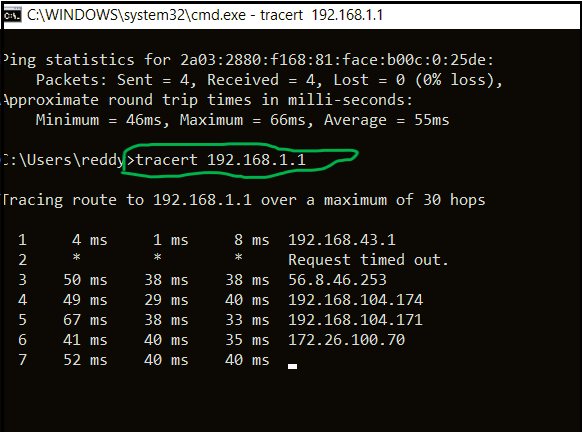
The "tracert" command in the command prompt can be used to find the IP address of any website. This command is typically used to troubleshoot network connectivity issues and can provide detailed information about the path a packet of data takes to reach its destination.
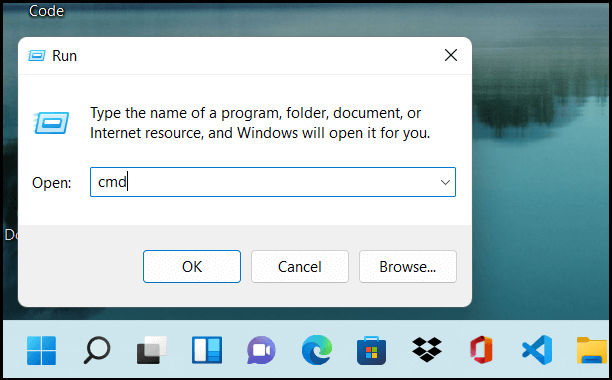
Step 1. To open the Command Prompt, click on the Windows icon, open the Run app, type 'cmd' in the text box, and click OK.
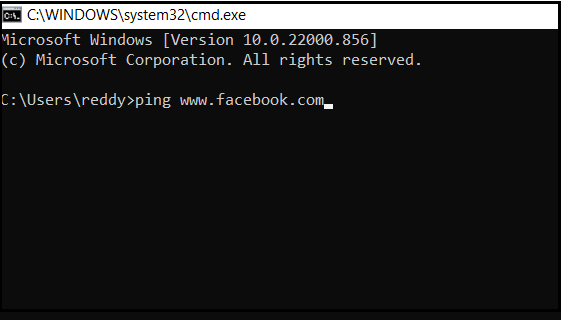
Step 2. To get a website's IP, type "Ping" in the command prompt followed by the website URL to get its IP.
Step 3. To locate the IP address of a website, you can use the "tracert" command. This command will show you the path your data takes to reach the website, including the locations of the routers it passes through.
Step 4. Use lookup tools to trace the IP address of the website, which can help determine the approximate location of the website.
Method 2. Tracing an IP Address via Email
To access the sender's IP address from an email, you can follow these steps: Check the email's raw data, which can be accessed by clicking on "View Raw Message" or "Show Original" in most email clients. Look for the "Received" header, which contains information about the email's journey to your inbox, including the sender's IP address. The IP address will be listed as part of the "Received" header, usually in the format "via IP address".
Step 1. Open the email you wish to know the IP address of and click on the three dots at the bottom or top of the email to open the "dropdown menu".
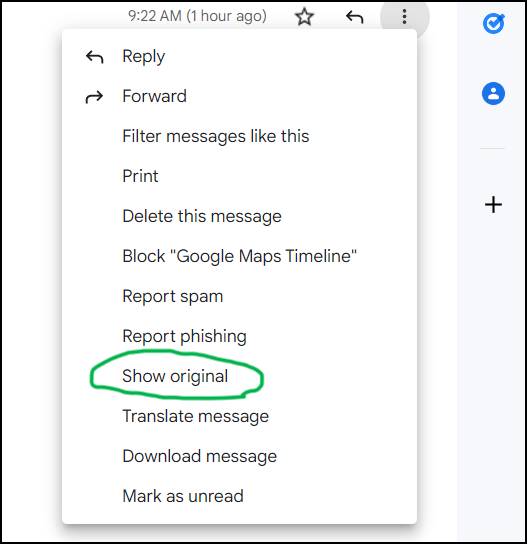
Step 2.To select the raw email data, click on the "open raw email" or "view original" option in the dropdown menu.
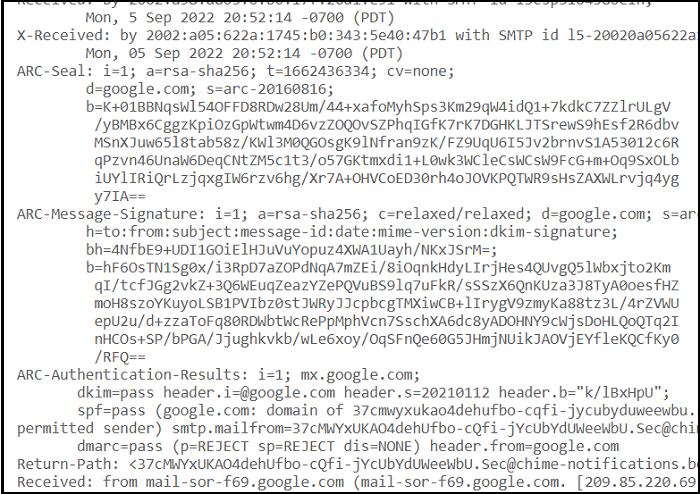
Step 3. The raw email data displays a set of associated IP addresses, which can be checked to know the location.
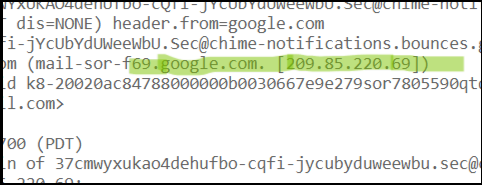
Step 4. Place these IP addresses in any lookup tool to approximate the sender's location from anywhere.
Method 3. Tracing an IP Address via WolframAlpha
You can use online lookup tools like WolframAlpha to find the geographical location of an IP address, rather than running commands. This free tool has a simple interface that allows you to trace an IP address.
Step 1. To find the IP address of a website or email location, secure the IP number, which can be obtained on various devices such as Mac, iPhone, Android, and Windows. This can be done using command prompt or by analyzing raw email data.
Step 2. Open the WolframAlpha Website: Click on "WolframAlpha" to open the website on your browser.

Step 3. Enter the IP address in the search bar, and click enter to get the location.

Step 4. View results: WolframAlpha uses software to fetch information about a given IP address, such as its type (IPv4 or IPv6), internet service provider, and the current city where it is active.
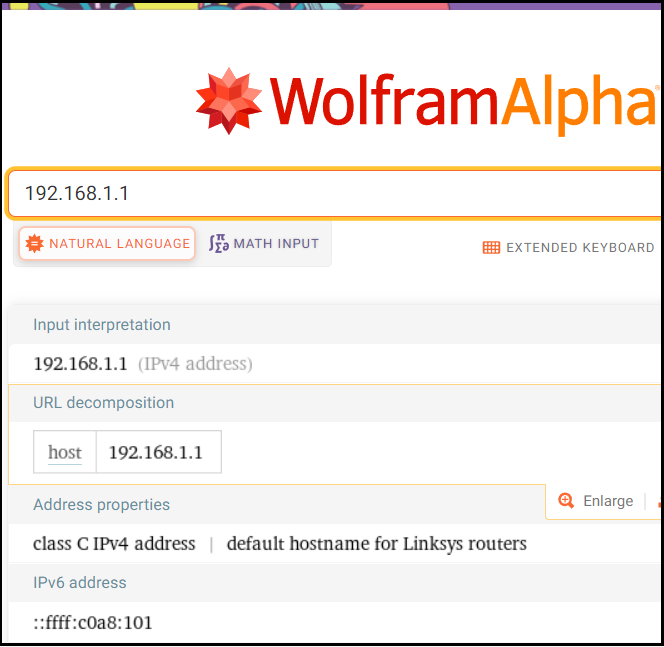
You can see more information by clicking on the "More" tab on the right, which will provide you with additional details.
Tracing IP Address by Best IP Address Tracker Tools
IP address tracker tools allow you to trace, detect, and track public IPs available around the Internet, with some advanced tools also providing information about the IPs. While not everyone needs these tools, businesses often find them useful. The advantages of tracker tools include their ability to provide valuable insights and information about public IPs, making them a useful resource for companies.
In many businesses, having a list of website viewers is crucial for generating customers and targeting potential clients. The viewer's list is stored in logs, allowing for personalized website experiences. Additionally, IP addresses help automate previous connections, such as Wi-Fi and websites, saving time and reducing downtime. This automation also eliminates manual labor costs, enabling businesses to pass the savings on to customers by reducing prices.
Different Types of Tracking Tools
There are various types of IP address tracker tools available, each offering different levels of data collection and results from IP addresses. These tools vary in their capabilities and the information they provide, catering to specific user needs and services.
General IP Address tracking tools: They generate essential information from public IP addresses using tools like WhatIsMyIPAddress and IP tracker, allowing users to access and view the data.
Website Analytics IP tracking tools: IP tracking tools are beneficial for businesses in both B2B and B2C sectors. Tools like Google Analytics provide detailed insights into website viewers and their behavior, enabling business owners to enhance the user experience and gain valuable information for future improvements.
Reverse IP lookup tools: Advanced tracking tools, such as Viewdns and Hacker Target, utilize DNS tracking to gather detailed data on IP addresses, providing precise information associated with them.
List of the Best IP Address Tracker Tools
There are many tracking tools available on the net. Here are some of the best IP tracking tools for every environment.
- Solarwinds IP Address Tracker
- WhatIsMyIPAddress
- GestioIP
- Viewdns
- Advanced IP Scanner
- IP Tracker
- BT Diamond IP
- Bopup Scanner
Comparison of the Tracker tools
The top IP address tracker tools are discussed, and a comparison of their features, prices, and trial periods is needed to understand their differences and similarities.
| Name of the Tracker | Known for/ Unique for | Free/ Paid | Prices |
|---|---|---|---|
| Solarwinds IP Address Tracker | Best for B2B and B2C businesses | Free trial of 30 days | It starts at $1,995 after a free trial |
| WhatIsMyIPAddress | Maps geographical location in the form of longitudes and latitudes | Free | Free |
| Viewdns | Reverse IP tracker | Free | Free |
| GestioIP | Web-based Interface | Free | Free |
| Advanced IP Scanner | Automated network discovery and flexible | Free | Free |
Final Verdict
Tracing IP addresses can be a useful tool when encountering suspicious online activity, but it may not always be possible, especially if the sender uses a Virtual Private Network (VPN).
If you're unsure about the connections you've made, there are simple ways to verify them. You can use the command prompt, emails, or online tools like WolframAlpha to trace the IP address, which can help you understand what you're getting into. These methods are generally straightforward and accurate in approximating public IP addresses.
Being aware of your online safety is crucial, and tools like IP logs can help you track all your internet connections. This can also help you understand what you're getting yourself into while online, making it easier to stay safe and secure.
I hope you have learned something valuable through this article, such as understanding what an IP address is, its role, how to trace an IP address, and the various tools available for doing so.
Related Articles
- JPG VS JPEG: What's the Difference
- What Is Malware & Tips to Avoid Malware on Your Computer
- Should I Get a NAS or External Hard Drive for Backup?
- How to Check Update to Windows 11 and Set Up Your PC to be Windows 11 Compatible
- How to Find Windows Server 2016 Product Key
Are you unable to find your Windows Server 2016 Key? Is your Server dead, and do you need to find the key? Follow this quick and easy guide on how you can find Windows Server 2016 product key using various methods and third-party tools. - How to Find Windows Server 2019 Product Key Using PowerShell Like an Expert
Locating the Windows Server 2019 product key can be challenging, but it's essential to have it active to ensure that some programs run smoothly and without limits. Fortunately, there are ways to find the product key using PowerShell, as discussed in the guide.
Products
Articles & Tutorials
- Data Recovery
- Data Backup
- File Recovery
- File Backup
- System Backup and Restore
- Disk and Partition Clone
- Technical articles
- Mobile articles
- Disk Master Help
- Windows Data Recovery Tutorials
- Windows Secure Delete Tutorials
- Windows Partition Management Tutorials
- Windows File Backup and Restore Tutorials
- Windows System Backup and Restore Tutorials
- Windows Disk Backup and Restore Tutorials
- Windows Clone Tutorials