Should I Get a NAS or External Hard Drive for Backup?
NAS or External Hard Drive for Backup: What Are They?
Storage is a crucial aspect of digital life, and users often need a lot of space to store their photos, documents, and other important files. Both Network Attached Storage (NAS) and external hard drives are popular options for expanding computer storage, but they cater to different needs. This page aims to help users make an informed decision about which one is best suited for their requirements.
Before deciding between a NAS (Network-Attached Storage) and an external hard drive, let's first understand what each is. A NAS is a dedicated storage device that connects to a network, allowing multiple devices to access its stored files. On the other hand, an external hard drive is a portable storage device that connects to a single computer via a cable. The choice ultimately depends on your specific needs and preferences, but understanding the fundamental differences between the two will help you make an informed decision.
What Is NAS?
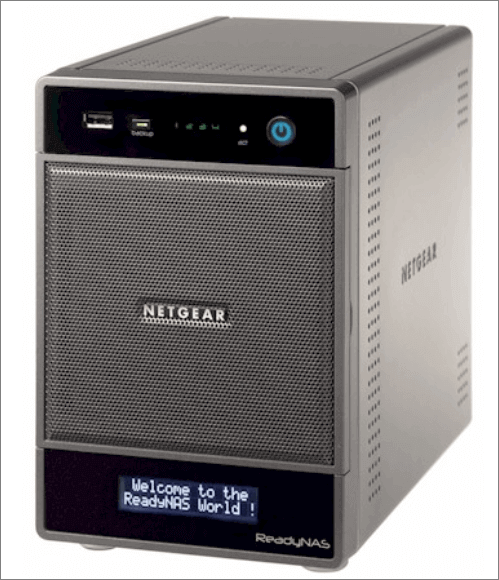
NAS provides good storage, allowing users to store any type of file. It also enables easy management and sharing of files, photos, videos, and documents, making it convenient to backup hard drive or transfer files at any time as long as the internet is connected.
What Is an External Hard Drive?
An external hard drive provides additional storage space for your data, offering a convenient solution to expand your computer's storage capacity when it's running low or filled up. By attaching it to your computer via a USB port using a compatible cable, you can instantly gain extra storage, allowing you to transfer, back up, and restore data to the external hard drive.

When it comes to storing and backing up data, both NAS (Network-Attached Storage) and external hard drives are popular options. However, the question remains: which one is better? A comparison of their features may hold the answer, and exploring the differences between these two storage solutions could provide the clarity needed to make an informed decision.
NAS or External Hard Drive for Backup: Which One Is Better?
Both NAS and external hard drives are good for backup and storage, but which one is more convenient and smarter? This part will tell you the answer.
Cost
- The prices of external hard drives differ for different capacities. An external hard drive of 4 TB usually costs $90.
- With its latest technology, advanced features, and more complex setup, NAS is more expensive compared to traditional data storage methods. A NAS of 4 TB usually costs $370.
Capacity
- External hard drives have a fixed capacity and cannot be expanded to increase storage space, so users must purchase a new drive if they need more storage.
- A NAS (Network-Attached Storage) device allows users to connect multiple hard drives to a network, providing more storage capacity than a single external hard drive.
Speed
- USB 1 has a speed of 12 MB/sec, while USB 4 can reach speeds of up to 40 Gbps.
- The speed of transferring data from a NAS device can vary, typically ranging from 3 megabytes per second (MB/s) to 20 MB/s for consumer-level devices.
Accessibility
- Users need to physically connect the external drive to a compatible port on a computer or other device to access the stored data.
- Most Network Attached Storage (NAS) devices provide cloud services, enabling users to access their files remotely without any physical contact, as long as they have an account set up.
Portability
- External hard drives are small, compact, and portable, not requiring internet connectivity or power backup.
- Nas devices typically come in boxes and require more space, and they need to be plugged into a power source and router to function.
Flexibility
- External hard drives can store files, media, and other documents just like other storage devices.
- NAS (Network-Attached Storage) is more flexible and comes with a fully functional operating system, RAM, and support for first and third-party applications, making it a more versatile option.
Data Backup and Recovery
- External hard drives do not have automatic backup features, so users need to use another hard drive to save the data while backing up the external hard drive.
- Some NAS devices automatically back up the data already stored in the NAS, making recovery easier.
Convenience
- Using an external hard drive requires users to physically move the drive from one computer to another in order to access files.
- A NAS (Network-Attached Storage) device allows users to access files on the network without the need for a computer to be present. This means users can access and share files from any device connected to the network, making it a convenient and flexible storage solution.
The comparison between NAS and external hard drives shows that NAS is generally slower due to the need for more components to function. This suggests that external hard drives might be a better option for users who prioritize speed, such as those who frequently transfer large files. On the other hand, NAS is still a good choice for users who value the benefits of centralized storage, such as ease of access and sharing, and are willing to compromise on speed.
If you're curious about the difference between a NAS and other storage devices, you may find the following links helpful in understanding the distinction.
When to Use NAS or External Hard Drive for Backup?
While external hard drives can store files, media, and other documents just as network-assisted storage can, NAS is more flexible and does much more, often referred to as a hard drive with a brain. However, users need to consider when to use a NAS or an external hard drive.
Personal Use
A Network Attached Storage (NAS) device allows multiple computers on the same network to access its data simultaneously, whereas an external hard drive typically requires a direct connection to a computer through its ports.
- Users with a single computer are best suited to choose an external hard drive.
- Users who own multiple computers can benefit from network-assisted storage, which allows them to share files and access them across all their devices.
Enterprise Use
While NAS (Network-Attached Storage) is a good option for enterprises with large data storage needs, its high cost can be a deterrent. On the other hand, external hard drives are more affordable, but managing multiple drives can be a complex task.
- Users on a limited budget can opt for either a network-attached storage (NAS) device or an external hard drive to store their files, both of which can be a viable option.
- A NAS (Network-Attached Storage) can help a group run efficiently, assuming users have a sufficient budget to implement and maintain it.
After learning about the uses of a NAS, let's consider whether it's suitable for backup purposes. The answer can be found in the next paragraph.
Is a NAS Good for Backup?
Yes, Network-Attached Storage, also known as NAS, allows computers to access storage over a local area network. While often used by enterprises for sensitive data, it's essential to set up a backup for NAS devices to prevent data loss. However, NAS devices are not just backup solutions, but rather storage devices that can be used for various purposes, such as managing smart TV storage, creating and testing personal websites, and more.
Yes, you can use a NAS as an external hard drive. A NAS (Network-Attached Storage) device can be used to store and share files, and it can also function as an external hard drive by connecting to a computer or other device via a network cable or wirelessly. This allows you to access and transfer files between the NAS and your device, just like you would with an external hard drive.
Can a NAS Drive Be Used as an External Hard Drive?
While both NAS devices and external hard drives serve as good storage options, they have distinct features. A NAS typically requires internet connectivity and is usually a stationary device, whereas external hard drives are portable and can be easily taken on the go. Therefore, they are not interchangeable and each has its own advantages, making them suitable for different needs and situations.
NAS or External Hard Drive for Backup: Verdict
The advantages and limitations of NAS and external hard drives are worth considering. NAS devices are more intelligent and feature-rich, but take up more space than external hard drives, which are portable and less vulnerable to attacks. By weighing these factors, users can make informed decisions about which type of storage to use.
Related Articles
- New Windows 11 Known Issues Keep Coming | How to Fix Known Issues in Windows 11
- What Is Verbose Mode Mac and How to Boot into It? [2022 Guide]
- Windows Recovery Environment [How to Access with Video]
- What Is the Mac Terminal? Introduction to the Command Line Interface on macOS
- When Is the Next Apple Event 2024: September Event [macOS Sonoma included]
The next Apple event after WWDC 2024 will take place in September, followed by a final event in October 2024. For more information on these upcoming events and the latest Apple products to be released, you can refer to this article. - [Fixed] No Boot Disk Has Been Detected or The Disk Has Failed
When booting the computer, you may encounter the error: 'No boot disk has been detected or the disk has failed.' In this article, Qiling provides some valuable solutions to fix this error, and you can follow this tutorial.
Products
Articles & Tutorials
- Data Recovery
- Data Backup
- File Recovery
- File Backup
- System Backup and Restore
- Disk and Partition Clone
- Technical articles
- Mobile articles
- Disk Master Help
- Windows Data Recovery Tutorials
- Windows Secure Delete Tutorials
- Windows Partition Management Tutorials
- Windows File Backup and Restore Tutorials
- Windows System Backup and Restore Tutorials
- Windows Disk Backup and Restore Tutorials
- Windows Clone Tutorials