Tape Backup VS NAS, Which One Is Better?
In today's digital age, data backup and protection are crucial. Both tape backup and NAS (Network-Attached Storage) are reliable storage devices, but choosing the right one is essential to ensure the safety of your data. This page provides a brief guide to help you understand the difference between tape backup and NAS, enabling you to make an informed decision and safeguard your valuable data.
Tape Backup VS NAS: Definition
A tape drive is a device used to read and write data on magnetic tapes, which are a type of removable storage media. On the other hand, a Network-Attached Storage (NAS) is a file-level data storage device that provides shared access to a pool of resources over a network. In essence, a tape drive is used for storing and retrieving data on a physical medium, while a NAS is a networked storage system that allows multiple devices to access and share files.
What Is Tape Drive?
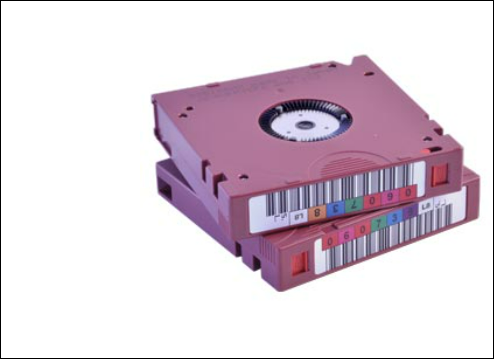
The tape drive stores data on magnetic tape, making it ideal for backup and archiving purposes. It records data on a flexible, looped material similar to a tape recorder, allowing for easy reading and erasing of information.
What Is NAS?
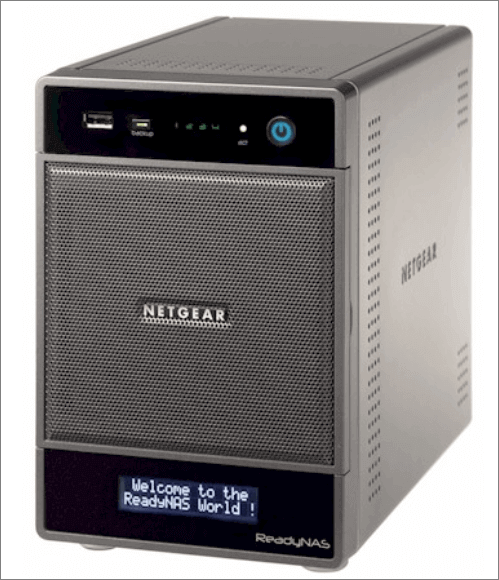
NAS can safely store large volumes of any type of data, similar to cloud services but with the added benefit of being a utility storage system where you can store, manage and share all your files, photos, videos, and other documents.
The NAS (Network-Attached Storage) and tape drive are both suitable for backup purposes, but they have distinct differences. A NAS is a dedicated storage device that provides a centralized location for data storage and sharing, offering advantages such as easy data access, scalability, and reliability. On the other hand, a tape drive is a traditional backup device that uses magnetic tapes to store data, providing benefits like high storage capacity and low cost. However, tape drives have limitations such as slow data transfer speeds and potential data loss risks. By understanding their features, users can choose the most suitable storage device for their specific needs.
Tape Backup VS NAS: What Are Their Main Disadvantages and Advantages?
Before making a choice, it's essential to know the advantages and disadvantages of each option. A table can be used to clearly show the pros and cons of each alternative, helping you make an informed decision.
| Features | NAS | Tape Backup |
|---|---|---|
| Advantages |
|
|
| Disadvantages |
|
|
The table clearly shows that tape backup and NAS have distinct features, making them suitable for different purposes, such as data storage and backup, respectively.
Tape backup is suitable for:
- Ideal for an offline backup
- Large amounts of rarely accessed data that need to be retained can be backed up using cloud storage or tape storage. Cloud storage offers scalability and flexibility, with options for cold storage and archive solutions that are designed for infrequently accessed data.
NAS is suitable for:
- Automatic backup
- Multiple devices need to access the same set of files easily, without the hassle of manual file transfer or synchronization.
- Transport and share videos among family members
People prefer NAS over tape backup now because of its specific usages. While tape backup is still useful for long-term data archiving and disaster recovery, NAS is more suitable for primary data storage and frequent access. With NAS, users can easily access and manage their data, whereas tape backup requires more effort to retrieve data. Additionally, NAS offers better performance, scalability, and reliability compared to traditional tape backup systems.
Besides, here are some other relevant comparisons, such as:
Tape Backup VS NAS, Why Choose NAS Storage over Tape?
The use of NAS (Network-Attached Storage) devices is on the rise, offering a more flexible and cost-effective alternative to traditional tape backups. With NAS, users can enjoy automatic backups, easily send rarely-used files to the Cloud, and protect and sync data from devices, ensuring a copy is always available. Additionally, NAS devices are designed to be disaster-proof, with redundancy features that create a second copy of data in case of hard disk failure, providing an added layer of security and peace of mind.
Many other storage devices have replaced tape backup, including NAS (network-attached storage) devices.
What Replaced Tape Backups?
Tape backup has become outdated with the emergence of newer storage devices like NAS, disk backup, and solid-state drives, which offer more specific features and automaticity that tape backups can't match. Users now rely on automatic backup, which tape backup still can't provide, and with the rise of cloud services and NAS, maintaining and cleaning storage devices is no longer necessary, making tape backup less appealing. However, people still use tape backup, indicating that it hasn't been completely replaced.
Do People Still Use Tape Backup?
Tape backups are still relevant, albeit in a more niche role. While they've largely been replaced by disk and cloud storage as primary backup mediums, they continue to be used in modern data centers. Migrating from tape can be a significant challenge due to its economical nature, and many enterprises still rely on it for storing rarely-used data that may be needed for audits or other purposes. Although tape backups may not be as automatic as other methods, they remain a viable option for storing large amounts of data, making it difficult to completely replace them in the near future.
Conclusion
Tape backup and NAS have their own strengths and weaknesses. Tape backup is a cost-effective option, but it requires time and effort to maintain and clean the tapes. In contrast, NAS is more convenient and makes backup easier, but its convenience may come at a higher cost. This comparison can help you decide which option is best for your needs.
Related Articles
- Highlights of SanDisk Extreme | Is it Worth Buying and How to Choose it
- What Is Power Automate? Everything You Need to Know about Microsoft Automation Tool
- All Information About WannaCry Virus [Updated 2022]
- What Is Cloud NAS (Network Attached Storage)? [Full Information]
- Download Windows 10 Builds 14393.67/14393.51 ISO Images
You can download Windows 10 Version 1607 with updates KB3176931 (OS Build 14393.67) and KB3176495 (OS Build 14393.51) either directly or as an ISO image for a clean install. - What Is DRAM Memory? Dynamic Random-Access Memory Explained
This article provides a comprehensive guide to DRAM, covering its basic operations and comparing it to SRAM.
Products
Articles & Tutorials
- Data Recovery
- Data Backup
- File Recovery
- File Backup
- System Backup and Restore
- Disk and Partition Clone
- Technical articles
- Mobile articles
- Disk Master Help
- Windows Data Recovery Tutorials
- Windows Secure Delete Tutorials
- Windows Partition Management Tutorials
- Windows File Backup and Restore Tutorials
- Windows System Backup and Restore Tutorials
- Windows Disk Backup and Restore Tutorials
- Windows Clone Tutorials