Discord Hardware Acceleration: Everything You Need to Know
Discord is a free, secure, and user-friendly voice and text chat app for gamers that works on both desktop and phone. One of its features is hardware acceleration, designed to improve performance on supported devices. However, some users wonder whether they should turn Discord hardware acceleration on or off, and this blog post aims to answer all their questions about this feature.
What is hardware acceleration in Discord?
Discord's hardware acceleration feature utilizes a computer's dedicated graphics processing unit (GPU) to enhance performance, especially when handling high-resolution images or videos, by offloading rendering tasks from the CPU.

There are some advantages to using hardware acceleration in Discord:
- Using a more powerful graphics card can improve performance, especially when working with high-resolution images or videos, allowing for smoother and more efficient rendering and playback.
- Using a GPU can reduce resource consumption on devices, as it is typically more efficient than the CPU when rendering images and video.
- Hardware acceleration can also improve image quality, as the GPU can apply certain image processing effects that the CPU cannot, enhancing overall visual performance.
There are some drawbacks to using hardware acceleration in Discord.
- The software may not be compatible with certain hardware or software configurations, which can lead to system crashes or other stability issues. This is especially true if the GPU drivers are not up to date, as this can cause instability on some systems.
- Using the app on your mobile device for an extended period can increase power consumption, potentially leading to a shorter battery life.
- It may not be available on all devices, particularly older ones.
Hardware acceleration in Discord can improve performance and image quality, but may cause stability issues, so it's best to experiment with this setting to find what works best for your system.
Should I turn Discord hardware acceleration on or off?
Some people are unsure about Discord's hardware acceleration, wondering if it's good or bad. Unfortunately, there's no one-size-fits-all answer, as its impact depends on individual setups and needs.
Hardware acceleration can improve Discord audio and video performance and quality, and also reduce processing power requirements, especially on lower-end devices.
Some users experience no difference or even performance issues when hardware acceleration is enabled in Discord, making it a matter of personal preference. Experimenting with enabling it for a short time may help determine if it improves or hinders performance.
How to enable and disable hardware acceleration in Discord?
To turn on or off Discord hardware acceleration, simply open Discord, go to settings, and look for the related options. It's a straightforward process that requires only a few clicks.
Step 1. To access Discord user settings, go to the Discord software interface, click on the right-side icon at your user name located in the bottom-left corner, and select "User Settings" from the dropdown menu.

Step 2. Find the APP SETTINGS section and click the Advanced option.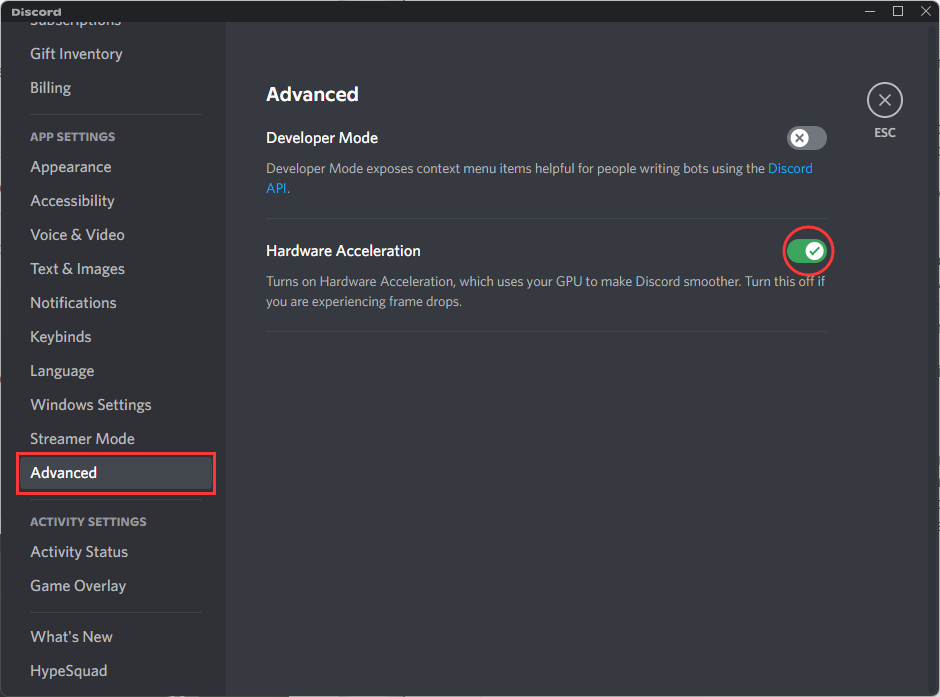
Step 3. To enable or disable Hardware Acceleration, go to the Advanced right screen panel and click on Hardware Acceleration.
Step 4. Click Okay in the prompted window
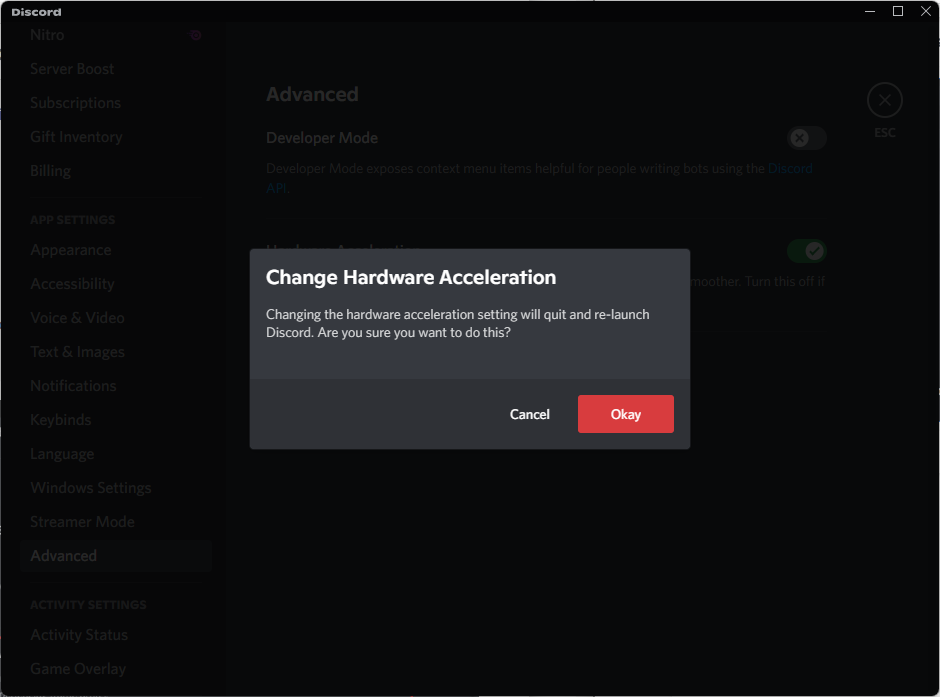
Once the update is done, Discord will quit and then re-launch to apply the changes.
How to fix Discord hardware acceleration crash?
Some Discord users have reported experiencing hardware acceleration crashes, but there are a few potential solutions to try and resolve this issue.
Method 1: Updating your graphics card drivers
If Discord crashes when hardware acceleration is enabled, try updating your graphics card driver. First, identify your graphics card's make and model, then visit the manufacturer's website to download the latest driver. Install the new driver and restart Discord, which should resolve the issue and allow you to use hardware acceleration without crashes.
Method 2: Make sure your Discord is up-to-date
You can check for Discord updates by right-clicking on the tiny Discord icon in your Windows taskbar and clicking on "Check for Updates...". If an update is available, Discord will automatically download and install it, helping to fix bugs and improve performance.
Method 3: Turn off hardware acceleration
If Discord is already up to date, disabling hardware acceleration is the next step to try. While hardware acceleration can help improve quality, it may also cause system crashes on certain configurations. The steps to disable hardware acceleration are the same as previously mentioned.
Final thoughts
Discord's hardware acceleration feature can be a significant improvement for those with slower computers, as it efficiently uses your computer's resources, freeing up processing power and making Discord run more smoothly. It is worth trying if you're looking to improve your Discord experience.
Related Articles
- What Is SSD TBW and How to Check TBW on SSD
- What is Windows PE and How to Use It
- What Is Power Automate? Everything You Need to Know about Microsoft Automation Tool
- Windows 11 Free Upgrade from Windows 10 [How-to] Step by Step
- How to Find Windows Server 2019 Product Key Using PowerShell Like an Expert
Locating the Windows Server 2019 product key can be challenging, but it's essential to have it active to ensure that some programs run smoothly and without limits. Fortunately, there are ways to find the product key using PowerShell, as discussed in the guide. - How Do I Find Windows Server 2019 Product Key [3 Methods]
If you're having trouble finding the Windows Server 2019 Product key, you can try using one of three methods: PowerShell, Command Prompt, or registry. However, the easiest approach is to use the Qiling Key Finder, which has a Product Key feature that allows for an instant find.
Products
Articles & Tutorials
- Data Recovery
- Data Backup
- File Recovery
- File Backup
- System Backup and Restore
- Disk and Partition Clone
- Technical articles
- Mobile articles
- Disk Master Help
- Windows Data Recovery Tutorials
- Windows Secure Delete Tutorials
- Windows Partition Management Tutorials
- Windows File Backup and Restore Tutorials
- Windows System Backup and Restore Tutorials
- Windows Disk Backup and Restore Tutorials
- Windows Clone Tutorials