What Is IOPS (Input/Output Operations Per Second) and How Do You Measure It?
IOPS is a performance measurement. So, how exactly do you figure it out?
IOPS, or Input/Output Operations Per Second, is a measurement used to characterize storage devices and networks, providing insight into their performance and capacity. It can be applied to solid state drives, hard disk drives, and storage area networks, helping to assess their speed and efficiency. This metric is widely used in the tech industry to evaluate the performance of various storage solutions.
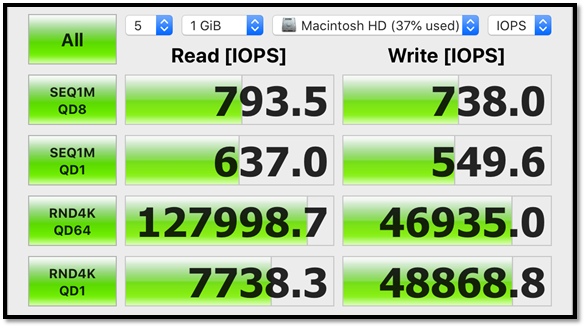
IOPS (Input/Output Operations Per Second) is a measure of a storage device's speed, representing the number of read and write operations it can handle in one second. To calculate IOPS, one must consider the time it takes for a device to complete a read or write operation, and then divide that time by the number of operations performed in a second. This metric is crucial in understanding the performance of storage devices, such as hard disk drives, solid-state drives, and flash storage, and is often used to compare the speed of different devices.
What IOPS Means?
IOPS stands for Input/Output operations per second, a measure of a storage device's read and write speed. In the tech world, it's pronounced as "eye-ops" and helps users understand a storage device's performance.
The usual storages checked by this measurement unit include:
- SSD – What Is SSD and How Do I Set Up and Make Use of SSD
- HDD – What Is HDD? See The Ultimate Guide of Hard Disk Drive
- SAN – Storage Area Networks
A benchmarking unit ensures your device's storage speeds match the manufacturer's claims. However, there are often discrepancies in IOPS readings, as manufacturers test in ideal environments, which may not reflect real-world performance.
The performance of a storage device, as measured by IOPS, often doesn't translate to real-world scenarios, resulting in discrepancies between manufacturer claims and actual performance in applications, gaming, and file copying. This means that IOPS readings in real-time may differ from those published by manufacturers. For instance, a device might claim 500 IOPS, but in actual use, it might only achieve 300 IOPS. This discrepancy occurs because IOPS is typically measured in a controlled environment, which doesn't reflect the complexities of real-world usage.
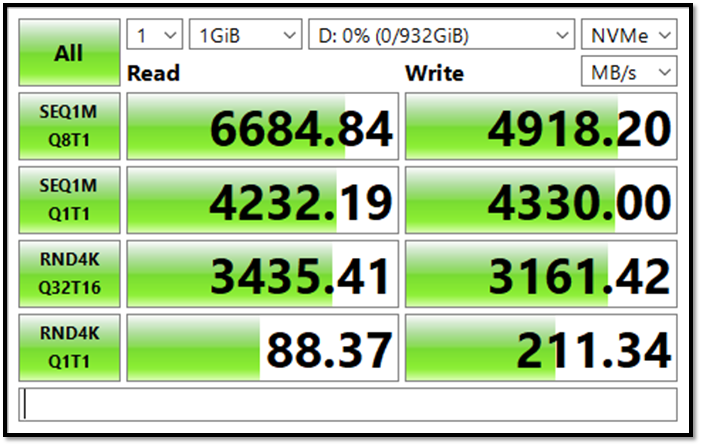
The manufacturer claims a writing speed of around 7000MBPS and a read speed of 5000MBPS, but the actual speeds are 6684 and 4918, respectively, resulting in a discrepancy in IOPS.
In ideal conditions, an SSD may reach speeds of up to 7000MBPS write and 5000MBPS read, as claimed by the manufacturer, but in real-world scenarios, the IOPS (Input/Output Operations Per Second) are a more accurate measure of its performance.
IOPS Performance Characteristics
IOPS characteristics are straightforward and easy to understand. They can be broken down by simply reading out what they mean. Common IOPS measurement types in storage devices include metrics like sequential read and write, random read and write, and mixed workload IOPS, which measure the device's performance in various scenarios. These measurements help determine a storage device's ability to handle different types of data access and usage patterns.
| Measurement | What It Means |
| Total IOPS | Performance in all aspects, i.e., read/write |
| Random Write IOPS | The average performance of writing I/O operations of the storage |
| Random Read IOPS | The average performance of reading I/O operations of the storage |
| Sequential Write IOPS | The average performance of sequential writing I/O operations of the storage |
| Sequential Read IOPS | The average performance of sequential reading I/O operations of the storage |
A typical disk-benchmarking tool would be a program that uses a common tool to measure the characteristics of a storage device, such as its read and write speeds, IOPS, and latency. It would typically display a graphical representation of the results, showing the performance of the device in different scenarios, such as sequential reads and writes, random reads and writes, and mixed workloads. The tool might also provide additional information, such as the device's capacity, interface type, and other relevant details.
Measuring IOPS (Input/Output Operations Per Second) requires understanding the characteristics of a disk drive in a computer, allowing you to comprehend the measurements made by IOPS tools to determine the overall speed of a physical drive.
How Do You Measure IOPS?
You can easily measure IOPS using an Iometer tool, which is a significant I/O subsystem measurement tool that allows users to characterize storage drives in single and clustered computers.
IOPS can be measured using testing tools like Iometer, but it's essential to note that IOPS values vary significantly across different storage devices, such as solid-state drives (SSDs), hard disk drives (HDDs), and storage area networks (SANs). For example, an SSD might deliver 500 IOPS, while an HDD might only provide 50-100 IOPS, and a SAN could offer 10,000 IOPS or more, depending on its configuration and technology. Therefore, when comparing IOPS values, it's crucial to consider the specific storage device being measured and the type of workload it's handling.
- HDDs use the standard equation, i.e., read/write per second
- SSDs The performance of a system depends on the internal controller, which can be either a DRAM cache or a NAND controller, as the type of controller used can significantly impact the overall speed and efficiency of the system.
- HDDs have higher latencies and slower read/writer times
- SSDs SSDs are much quicker in sequential read/write time; therefore, their performance in real-time applications is much better too.
To measure the IOPS of your storage, you'll need to download a disk measurement tool like Iometer.ORG or CrystalDiskMark. Once you have the tool, you can run a test to determine your storage's IOPS. The test will give you a reading of the number of input/output operations per second, which is the IOPS measurement. This will help you understand how well your storage is performing in terms of read and write operations.
Step 1:Download and install the program
Step 2: Run it
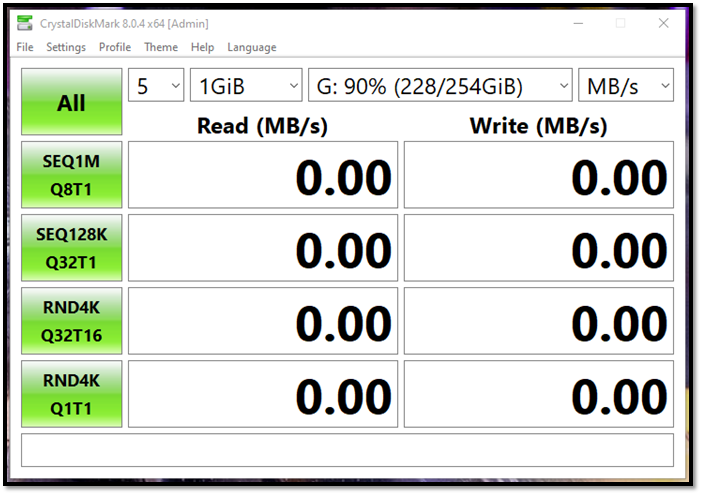
Step 3: Pick the disk on which you wish to measure IOPS
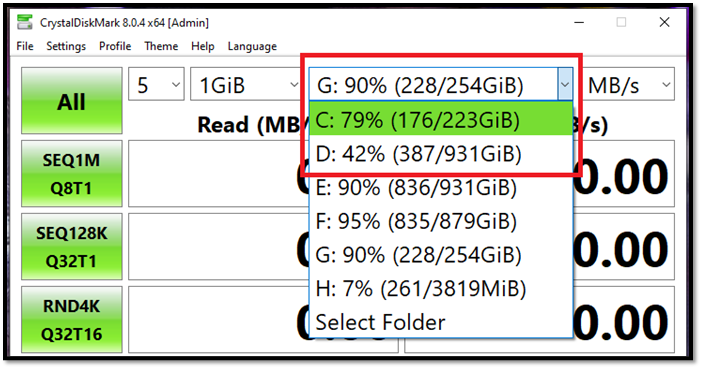
Step 4: Let the tool measure it
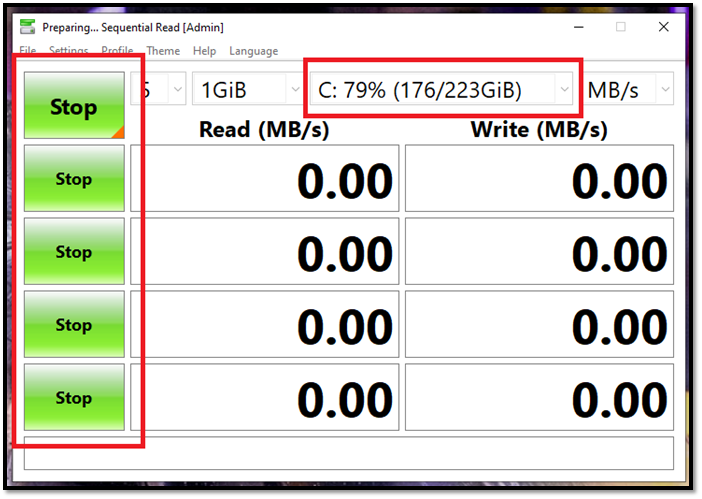
Step 5: Analyze the final reading
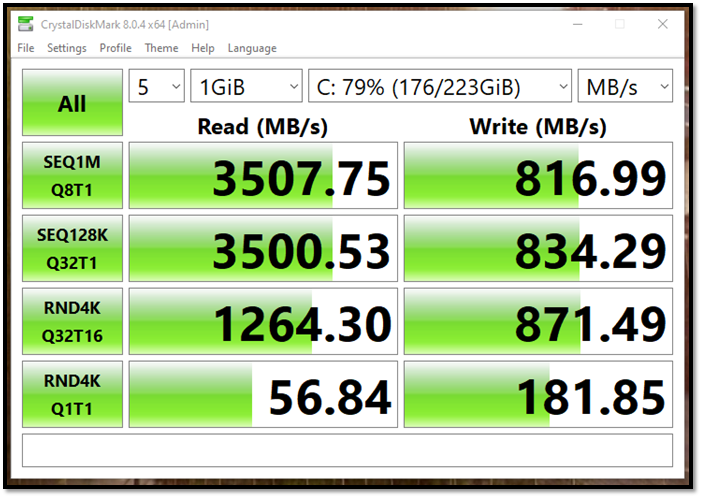
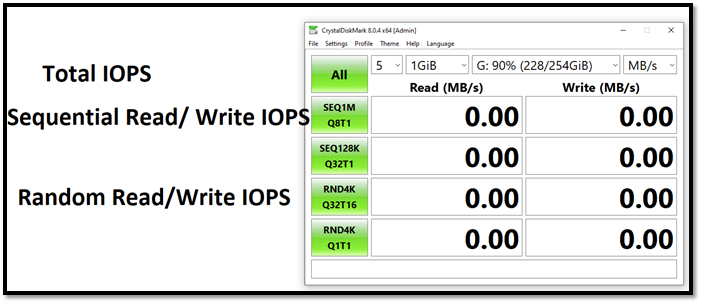
To recap, the scanned measurements show a variety of IOPS readings, which we've discussed before. The bottom of the scan reveals these IOPS values, providing a clear summary of the data.
- All = Total IOPS
- SEQQ1M & SEQ12K = Sequential read and write
- RND4k = Random read and write
This tool allows you to check in MB/s, but you can switch to IOPS with a simple step.
Step 1: Tap the top-right menu
Step 2: Pick IOPS instead of MB/s
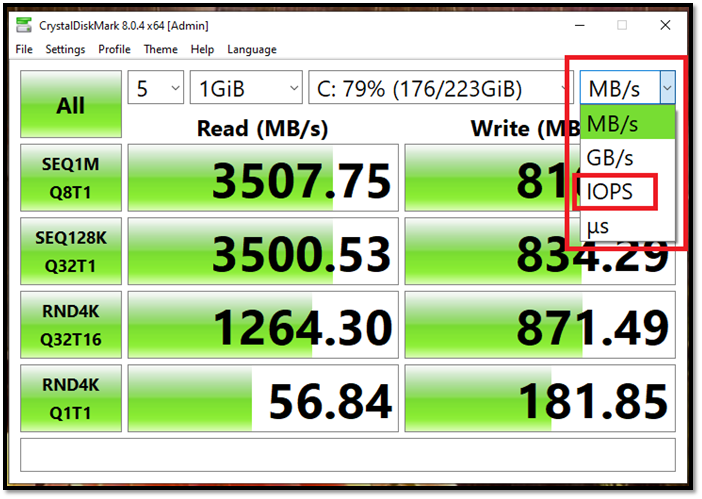
And now, it'll show you the measurements in IOPS:
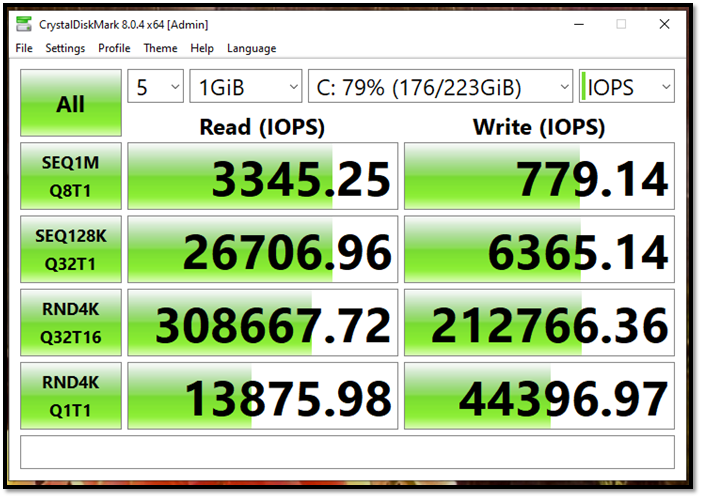
To find the IOPS and the MB and GB per second of your storage device, you can use any Iometer tool, making it easy to determine these metrics.
IOPS vs. Throughput
Throughput is a metric used to measure the performance of storage devices, indicating the amount of data a drive can handle. Unlike IOPS, which is often used for applications with many small transactions, throughput is more relevant for streaming services, such as image hosting websites and video files, where large amounts of data are transferred at once.
Since it's a storage metric that flows through continuously, it makes it ideal for streaming and videos.
IOPS measures the number of input/output operations a storage device can handle per second, while throughput measures the total amount of data transferred over a period of time. In other words, IOPS is about how many requests a device can handle, while throughput is about how much data is actually being moved. These two metrics are related but distinct, and both are important for evaluating storage performance.
| IOPS | Throughput |
| Uses read/write operations per second | Uses transferred bits per second |
| Employs sequential data read/write | Uses megabytes per second to measure the speed |
| Ideal for physical storage | Ideal for network-based storage |
| Mainly employed in single or clustered computers | Used in high-data transfer such as big data, streaming, image hosting, etc. |
While both IOPS and Throughput are common measurements, IOPS provides a more accurate account of physical storage speed. Throughput, on the other hand, is mainly used in industrial settings by major corporations, streaming services, and data centers.
Bottom Line
This article highlights the significance of IOPS and how to measure it. It not only explains the importance of IOPS but also its counterpart, Throughput. The tools suggested can be used to measure IOPS, furthering one's knowledge on the subject.
Related Articles
- Go Back to Previous Version of Windows in Windows 11 Even After 10 Days
- EFS (Encrypting File System): Good Helper to Protect Confidential Data
- How to Open Task Manager on Windows 10/11
- What is AMD CPU fTPM? Everything You Need to Know
- Does BitLocker Slow Down SSD? Yes, up to 45%
Many users wonder if BitLocker slows down SSDs, and if there's a way to disable it to enhance performance. If you're curious about this, keep reading for comprehensive answers to your questions. - How to Downgrade from Monterey to Big Sur [macOS 12 to 11]
To downgrade from Monterey to Big Sur, follow these three proven methods. Downgrading macOS Monterey becomes straightforward with these steps. If you lost some of your critical data while downgrading the macOS, Deep Data Recovery could be your great helper.
Products
Articles & Tutorials
- Data Recovery
- Data Backup
- File Recovery
- File Backup
- System Backup and Restore
- Disk and Partition Clone
- Technical articles
- Mobile articles
- Disk Master Help
- Windows Data Recovery Tutorials
- Windows Secure Delete Tutorials
- Windows Partition Management Tutorials
- Windows File Backup and Restore Tutorials
- Windows System Backup and Restore Tutorials
- Windows Disk Backup and Restore Tutorials
- Windows Clone Tutorials