What Is M3U8 File? How to Open and Convert M3U8 File?
This guide helps users find the locations of their favorite media files, which can be a challenge for some. Read on to learn how to open and convert M3U8 files.
PAGE CONTENT:
What Is an M3U8 File?
M3U8 files are used by video and audio players to store the location of media files, with the information stored in plain text, allowing for quick playback of media files using URLs or absolute paths to refer to specific files or folders.
M3U8 files, which contain stored information of online media files, are compatible with major media players like iTunes, VLC Media Player, and Windows Media Player. They can also be opened with a text editor like Microsoft Notepad or Apple TextEdit due to their plain text format.
How to Open and View M3U8 File?
To read M3U8 files, you can simply open them with a reliable text editor like Notepad on Windows. However, keep in mind that text editors are not capable of playing the media files listed in the M3U8 file, as they don't function like media players or management software. They can only be used to open and read the file itself.
There are various media players available for Windows, Mac, and Linux that can help play media files stored in an M3U8 file. These media players can easily open and view M3U8 files, making it convenient to access and play your media content.
Windows
- VideoLAN VLC Media Player
- Vidmore Player
- KMPlayer
- Windows Media Player
- GOM Media Player
- MediaMonkey
Mac
- Apple iTunes
- RealNetworks RealPlayer
- Songbird
- Vidmore Player
- VideoLAN VLC Media Player
- Clementine
Linux
- XMMS
- Clementine
- VideoLAN VLC Media Player
Steps to Open M3U8 File Through VLC Media Player
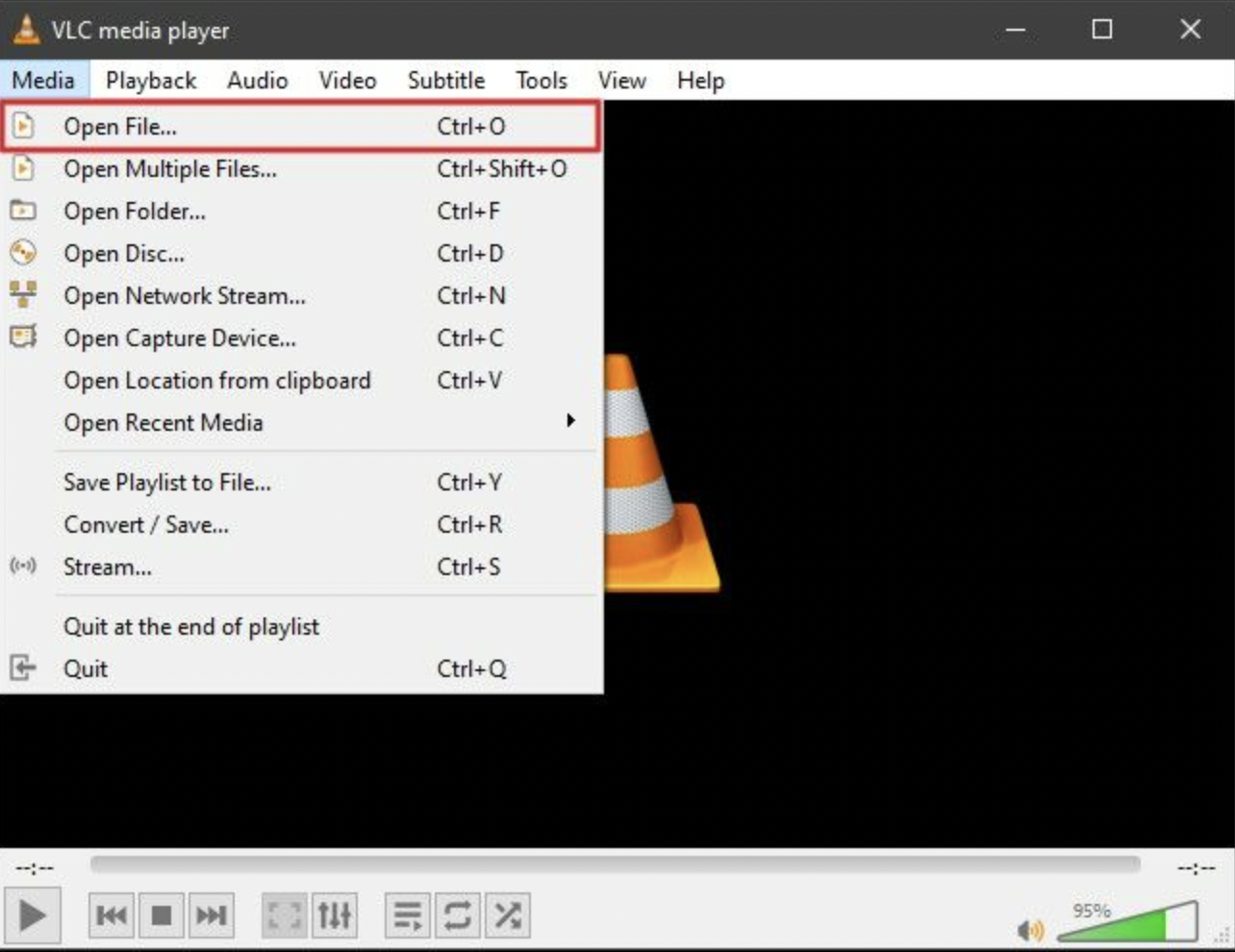
Step 1. To open a file in VLC media player, open the VLC media player on your PC and go to the "Media" tab displayed on top. From there, tap on the "Open File" option.
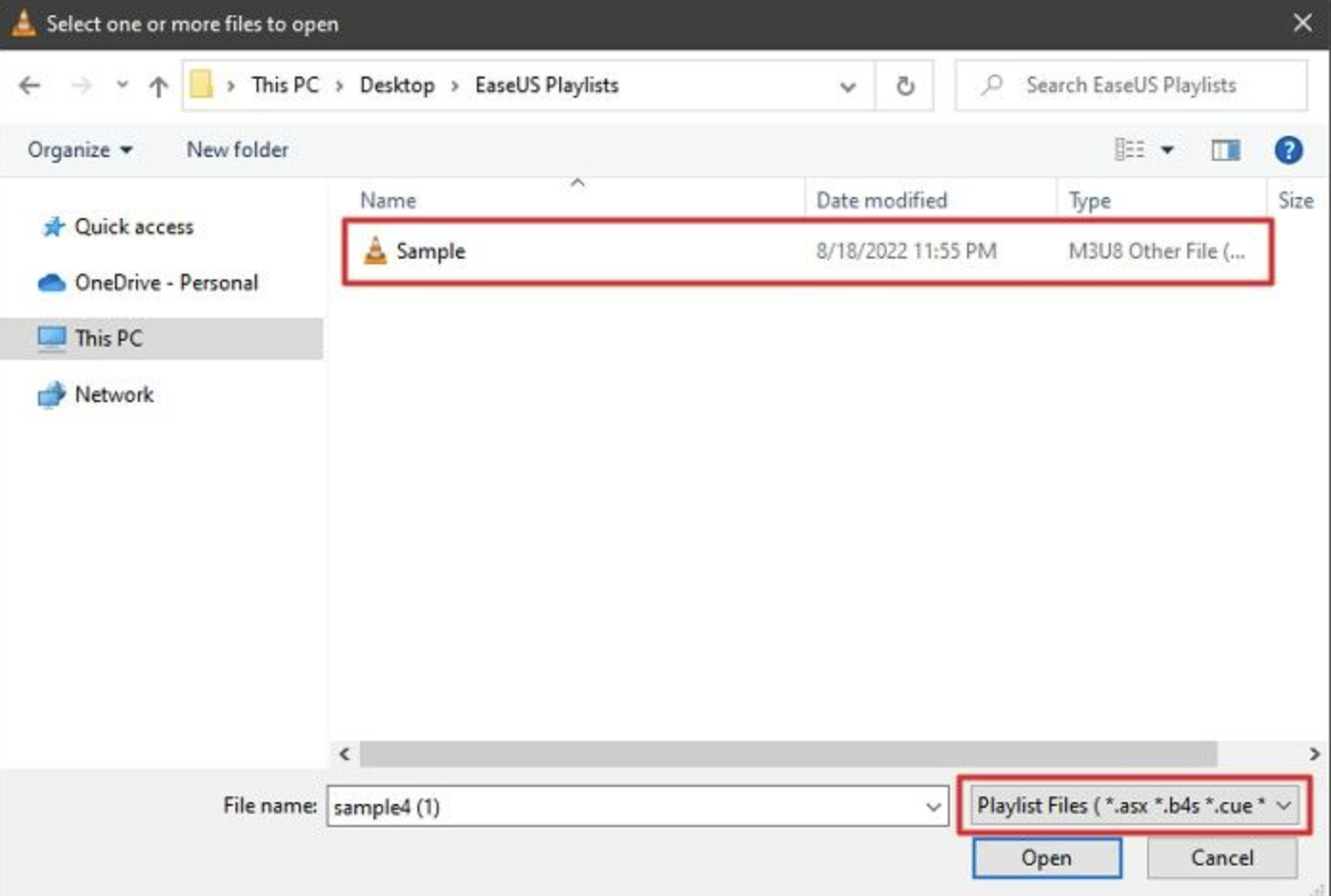
Step 2. In the VLC media player, change the "File Type" to "Playlist Files" and select the M3U8 file to upload it successfully.
How to Convert M3U8 to MP4 or Other File Formats?
You can't directly convert M3U8 files to other formats as they are plain text files. A reliable file converter tool is required to convert M3U8 files to other formats. To convert M3U8 files, you would need to use a file converter tool that can instantly convert M3U8 files to other formats.
The problem with M3U8 files is that they contain links to media files stored in different locations, making it difficult to convert them. To overcome this, you can use a tool like M3UExportTool to gather all the media files from various locations and store them in one place, making it easier to convert the M3U8 file.
Once this tool copies all the media files in a single location, you can use any appropriate converter tool to convert them into a suitable format for your desired device or player.
Final Thoughts
M3U8 files store playlists in plain text, allowing users to locate and play media files through a compatible media player. These files are significant and can be converted to any format instantly using Qiling Video Converter for efficient results.
Related Articles
- What Is SFC Scannow Command? How to Fix Corrupted Files Using This System File Checker
- What Is A Modem and How Does It Work?
- How to Change Font Size on Windows 11/10/8/7? [Full Guide 2022]
- How to Use Device Encryption on Windows 11
- How to fix the error DNS PROBE FINISHED NO INTERNET? [A Complete Guide]
Fix DNS_PROBE_FINISHED_NO_INTERNET by clearing browser data, checking DNS settings, resetting network options, and troubleshooting connectivity. - How to Fix Dying Light 2 Multiplayer Not Working
If you're experiencing issues with Dying Light 2's multiplayer, the problem may be serious, but the solutions are endless! This guide has the perfect solution to fix the issue, so you can get back to gaming with friends.
Products
Articles & Tutorials
- Data Recovery
- Data Backup
- File Recovery
- File Backup
- System Backup and Restore
- Disk and Partition Clone
- Technical articles
- Mobile articles
- Disk Master Help
- Windows Data Recovery Tutorials
- Windows Secure Delete Tutorials
- Windows Partition Management Tutorials
- Windows File Backup and Restore Tutorials
- Windows System Backup and Restore Tutorials
- Windows Disk Backup and Restore Tutorials
- Windows Clone Tutorials