Incremental vs Differential Backup: What's the Difference?
Incremental and differential backups share one idea: instead of copying the whole drive every time, they copy only the data that changed. That saves hours of copy time and a great deal of disk space. The two types behave very differently, however, on the day you actually have to restore, and picking the wrong one can turn a short recovery into an hour of swapping backup files.
This guide explains how each type works, compares their speed, storage, and restore cost with a worked example, and shows how to set up either one in Qiling Backup.
PAGE CONTENT
- How Incremental and Differential Backups Work
- Side-by-Side Comparison
- The Restore Chain Problem
- Which Backup Type Should You Choose
- How to Set Up Either Type in Qiling Backup
- FAQs About Incremental and Differential Backup
How Incremental and Differential Backups Work
All three main backup types start from the same baseline, a full backup that copies everything you selected. What differs is what happens on the days after that.
- Differential backup - copies every file that changed since the last full backup. Monday copies Monday's changes, Tuesday copies Monday and Tuesday's changes, Wednesday copies all three days, and the backup keeps growing until the next full backup resets the count.
- Incremental backup - copies only what changed since the last backup of any type. Monday copies Monday's changes, Tuesday copies only Tuesday's changes, Wednesday only Wednesday's. Each run stays small.
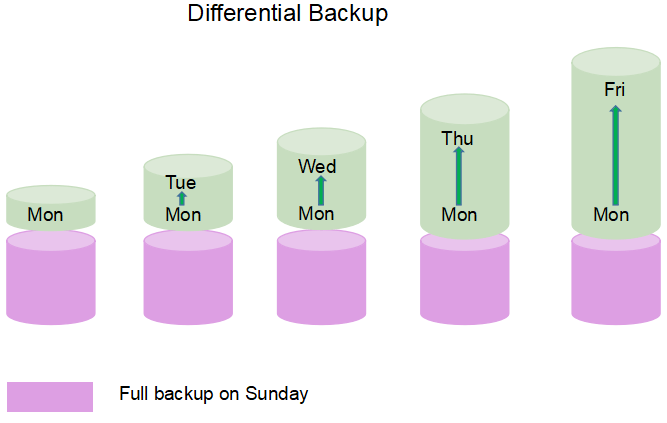
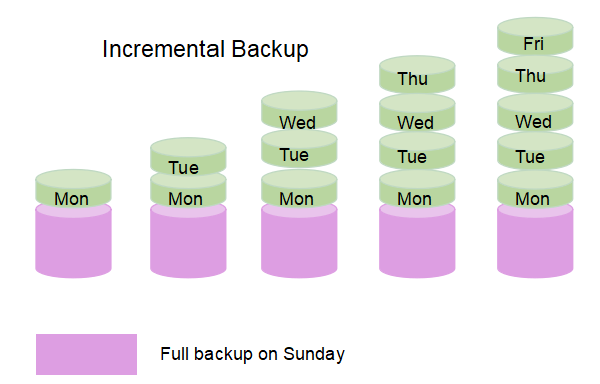
A worked week makes the difference obvious. Assume a full backup runs every Sunday, and about 2 GB changes each day:
- Sunday - full backup, 500 GB.
- Monday - differential 2 GB, or incremental 2 GB. Identical so far.
- Tuesday - differential 4 GB, or incremental 2 GB.
- Wednesday - differential 6 GB, or incremental 2 GB.
- Saturday - differential 12 GB, or incremental 2 GB. By now the differential job takes roughly six times longer than the incremental one.
That is the whole trade-off in one week: the incremental method is cheaper to run, and the differential method is simpler to recover from. Some tools, including Qiling Backup, let you combine the types in a single schedule so the two strengths work together.
Side-by-Side Comparison
The table below summarizes how the three backup types behave:
| Item | Full Backup | Differential Backup | Incremental Backup |
|---|---|---|---|
| Data copied | Everything selected | Changes since the last full backup | Changes since the last backup of any type |
| Backup speed | Slowest | Slower each day until the next full backup | Fastest and consistent |
| Space used | Largest | Grows through the week | Smallest |
| Files needed to restore | The full backup alone | The last full backup plus the latest differential | The last full backup plus every incremental in order |
| Restore speed | Fast | Fast, two files | Slowest, because each file is applied in sequence |
| Risk if one file is lost | Total loss of that set | Lose only the newest differential | The chain breaks at that point and later changes are lost |
Read the last two rows together, because they are the part most guides skip. Incremental backups are the most efficient to create and the most fragile to restore: a single missing or damaged incremental file can make everything after it unusable. Differential backups are heavier to create and much more forgiving to restore.
The Restore Chain Problem
An incremental set is a chain: the full backup, then every incremental in the order it was created. Restoration tools read that chain from the oldest file to the newest, applying changes as they go. The chain therefore has one rule you cannot break - no gaps.
- Never delete a file in the middle of the chain. Removing Wednesday's incremental makes Thursday and Friday unusable, even if those files are perfectly healthy.
- Keep the whole chain together. If you move some incrementals to another drive to save space, an automatic restore will fail when it cannot find them.
- Verify before you rely on it. Run a test restore of a few files, or use your tool's image verification, so you learn about corruption before an emergency rather than during one.
- Prefer fewer, larger restore points when storage allows. A weekly differential set has two files to restore; a weekly incremental set may have seven.
Differential backups trade that fragility for size. A differential set always needs just two files - the last full backup and the most recent differential - so a damaged differential costs you one day of changes instead of a broken chain. Neither approach replaces a full system image if your goal is to rebuild Windows after a failed drive, because image and file backups answer different questions.
Which Backup Type Should You Choose
There is no single winner, so match the type to your data and your patience:
- Choose incremental when backups must finish fast and space is tight. Personal laptops, creative projects with daily edits, and any job that runs several times a day all suit incremental backups.
- Choose differential when recovery speed matters more than backup speed. Servers, shared workstations, and any machine where you need to be back online in minutes are better served by differential backups.
- Choose both when the data is valuable. A common pattern is a weekly full backup, daily incremental backups for quick runs, and a differential backup every few days as a simpler fallback.
- Always keep the full backup. Neither type works without a baseline, and a schedule that only refreshes incrementals for months becomes slow and risky to restore.
Then protect the result with the 3-2-1 rule: three copies of important data, on two different types of media, with one copy stored offsite. A backup chain kept on a single drive disappears together if that drive fails.
How to Set Up Either Type in Qiling Backup
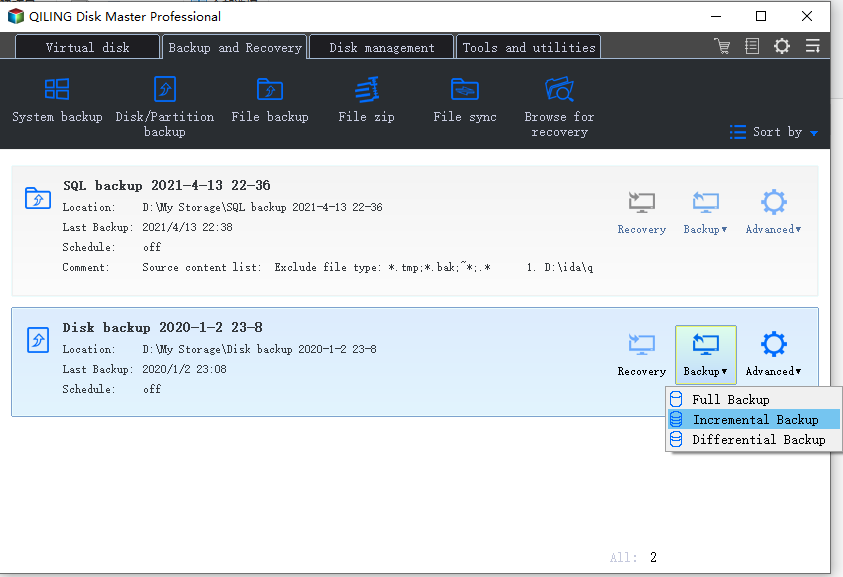
Qiling Backup supports full, incremental, and differential backups in the same task, so you can switch method without rebuilding the job.
Step 1. Open Qiling Backup, go to "Backup and Recovery", and start a "File Backup" task (or a System Backup if you want to protect Windows itself).
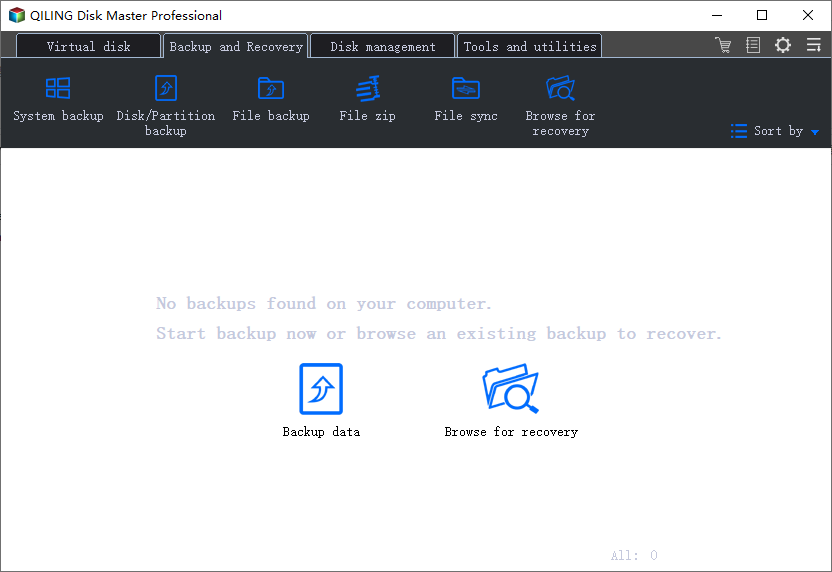
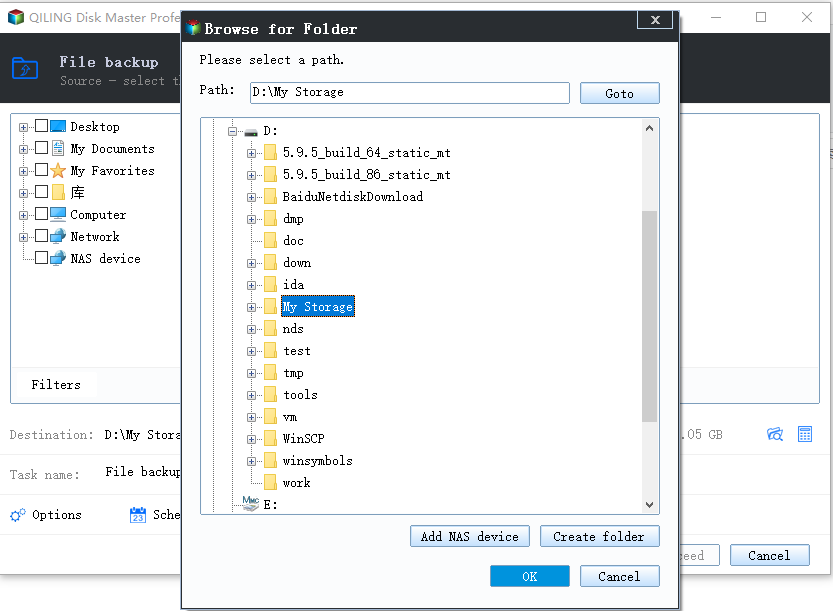
Step 2. Select the folders you want to protect and choose a destination on a different drive.
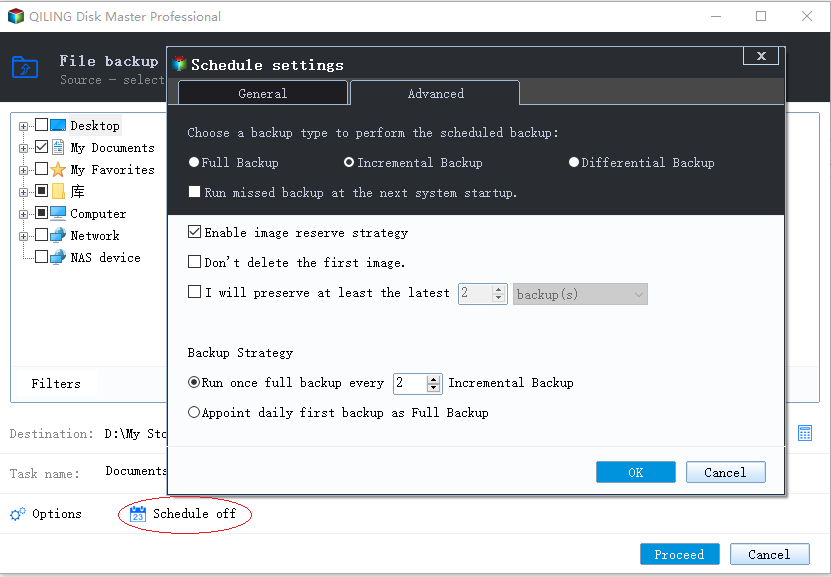
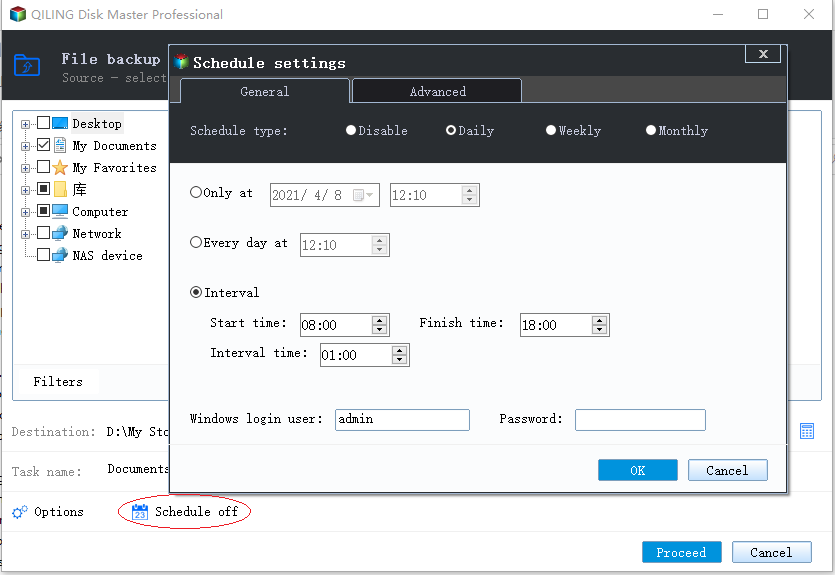
Step 3. Open "Schedule", pick a daily or weekly trigger, and set the backup method to Incremental or Differential. Set a separate full backup interval so the chain is periodically reset.
Step 4. Click "Proceed". The first run is always a full backup, and later runs follow the method you chose.
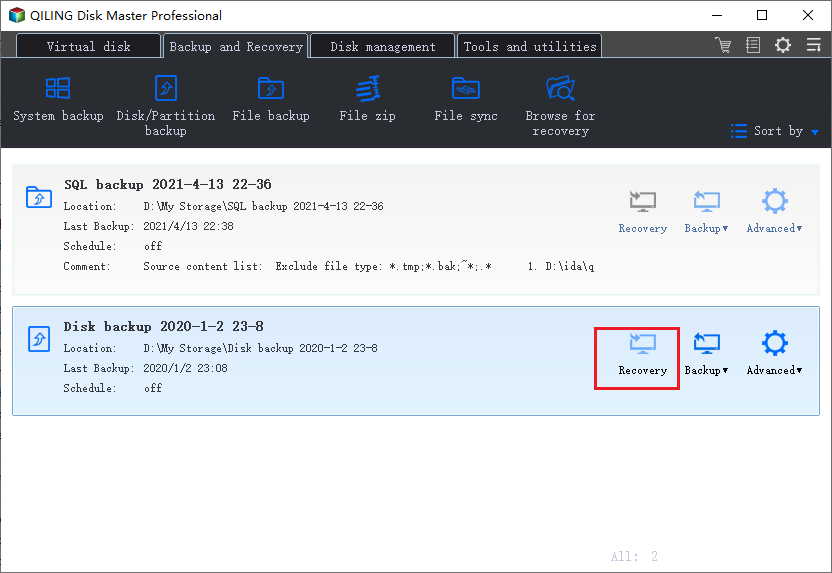
Note: The first execution of any schedule creates a full backup, so it takes noticeably longer than the runs that follow. Let it finish before you test the schedule.
FAQs About Incremental and Differential Backup
Is differential backup faster than incremental backup?
No - the opposite. A differential backup copies everything changed since the last full backup, so it grows larger and slower each day. Incremental backups stay small because they copy only the latest changes. The advantage of differential is a faster, simpler restore.
Can I mix incremental and differential backups in one schedule?
Yes, and many tools encourage it. A typical plan runs a full backup weekly, incremental backups daily, and a differential backup before the weekend, so you always have a quick two-file recovery option.
What happens if one incremental backup file is damaged?
The chain breaks at that point. You can restore up to the last good incremental, but changes made afterwards are lost, because every later file depends on the ones before it. Differential sets only lose the newest file.
Do I still need full backups if I use incremental ones?
Yes. Incrementals record changes only, so there must be a full backup underneath them to define the original state. How often you refresh it is a balance between restore time and backup time.
Which type is better for a Windows system image?
For the system itself, a scheduled image plus incremental updates keeps your rollback point current without copying Windows in full every time. Read the system backup image guide for the setup.
Conclusion
Incremental and differential backups both avoid copying unchanged data, but they make opposite trade-offs. Incremental backups are faster to run and use the least space, at the cost of a longer chain that must stay intact. Differential backups are heavier to create yet need only two files to restore, which makes them the safer choice when recovery time matters. For most people the best answer is a mixed schedule: a weekly full backup, daily incremental runs, and an occasional differential as insurance. Qiling Backup supports all three types in one task, so you can adjust the balance as your data grows.
Next, set up automatic backups so the schedule runs itself, or compare tools in our guide to the best Windows 11 backup software.
Related Articles
- What's the Difference between Differential and Incremental Backups
- File Backup: How to Back Up Files & Folders with Qiling Backup
- How to Create a Scheduled Backup in Windows 10
- How to Create a Windows 10 System Backup Image
Create a restorable system image and bring Windows back after a disk failure or a broken update. - Best Windows 11 Backup Software (Free & Paid)
Compare free and paid backup tools for system images, file backup, scheduling, and recovery on Windows 11.
Products
Articles & Tutorials
- Data Recovery
- Data Backup
- File Recovery
- File Backup
- System Backup and Restore
- Disk and Partition Clone
- Technical articles
- Mobile articles
- Disk Master Help
- Windows Data Recovery Tutorials
- Windows Secure Delete Tutorials
- Windows Partition Management Tutorials
- Windows File Backup and Restore Tutorials
- Windows System Backup and Restore Tutorials
- Windows Disk Backup and Restore Tutorials
- Windows Clone Tutorials