USB Clone Tool to Copy a USB Drive Safely
📖What you'll learn in this passage
Importance of USB Stick Cloning
Cloning a USB thumb drive is a convenient way to protect your data by creating a duplicate copy of the original drive, allowing for easy data recovery in case the original drive is lost or damaged.
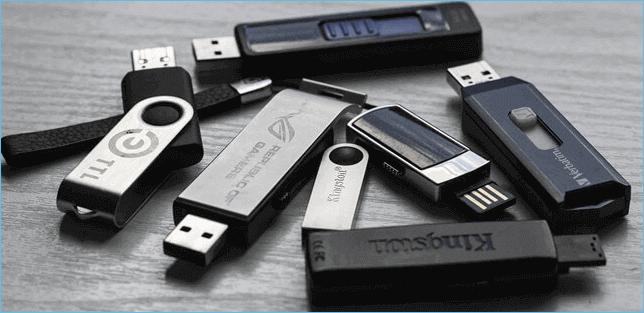
Cloning a USB flash drive can be done using professional USB cloning software or by copying and pasting files with Windows Explorer. However, for new users or those unfamiliar with the process, using professional software is recommended to avoid any accidental damage during the cloning process.
Benefits of Using a USB Clone Tool
You might need to clone USB drives for various reasons, such as upgrade to a bigger hard disk and keeping all your data intact, creating an exact copy for backup or archival purposes, or duplicating a drive for multiple copies of the same data.
Using a reliable USB cloning tool can easily fulfill professional-sounding needs, and you may also enjoy various benefits, such as:
- A reliable USB cloning tool saves you time and money compared to traditional manual methods, streamlining the entire cloning process.
- With a reliable cloning tool, you can clone USB drives at any time and location without any downtime, ensuring your data is always up-to-date and secure.
- Easy to transfer files and documents between computers.
- The cloning process ensures the security of the data as there is no risk of data corruption during the cloning process.
- Meet the requirements for both personal and business use.
Use The Simplest USB Clone Tool - Qiling Disk Copy - to Clone USB
📌Key Takeaways:
Qiling Disk Copy is a user-friendly tool that allows you to clone a USB drive to another destination drive with minimal effort, requiring only a few clicks to complete the process.
- Connect both the source and target USB flash drives to the computer.
- Launch Qiling Disk Copy, and select Disk Mode.
- Select the old USB that you want to clone, and click Next.
- To select the new USB as the target disk, choose it from the list, and click Proceed to start the cloning process.
As a new user, you may want to consider using a USB cloning tool that's easy to use and has a user-friendly interface, while others may need a more feature-rich and versatile option. Qiling Disk Copy stands out as the simplest and most efficient USB clone program, making it a great choice for various needs.
Qiling Disk Copy offers a variety of features, making it perfect for both personal and business use, with a reasonable price. It allows for easy cloning of USB flash drives, as well as helping to migrate OS, upgrade hard drives, and replace an HDD with an SSD without reinstalling Windows or losing data.
Advantages of Qiling Disk Copy
- Simple to set up and use
- Purchase once and use for the rest of your life
- Clone a hard drive to a USB flash drive
- Windows 11/10/8/8.1/7/Vista/XP compatible
- Hard disk cloning performance is excellent and consistent
- This software enables the cloning of sector levels, which can be particularly helpful in situations where a hard drive contains faulty sectors. By using this tool, you can create a duplicate of the drive, effectively preserving the data and potentially avoiding data loss.
- You can fully replicate a resource disk and restore data from a corrupted hard drive in minutes, making it possible to quickly recover your important files and get back to work.
Now, follow the detailed steps below with screenshots to clone USB stick with Qiling Disk Copy:
📌To ensure a successful transfer, make sure the destination USB drive has more unused space than the source USB drive. This means that the destination drive should have at least as much free space as the source drive.
Connect the external devices to your computer in advance.
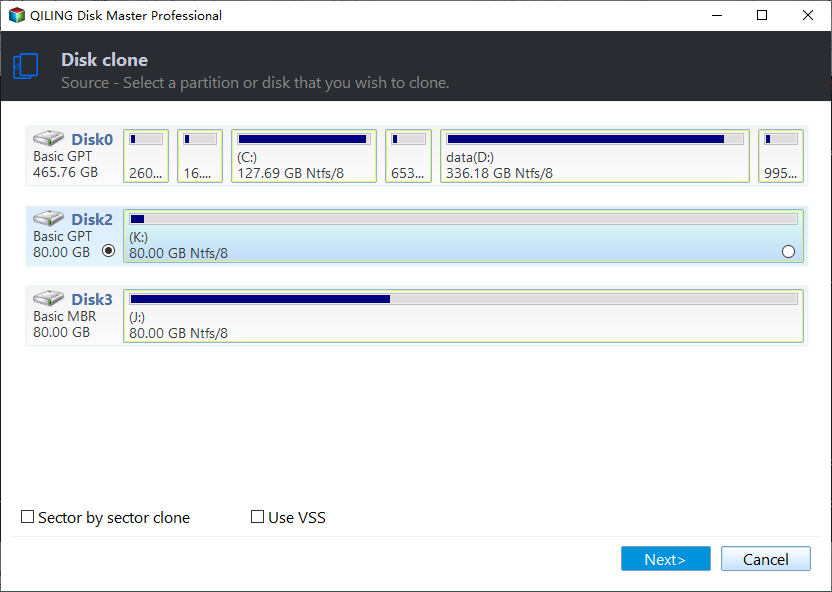
Step 1: Choose "Disk mode" and select a source disk, then click "Next".
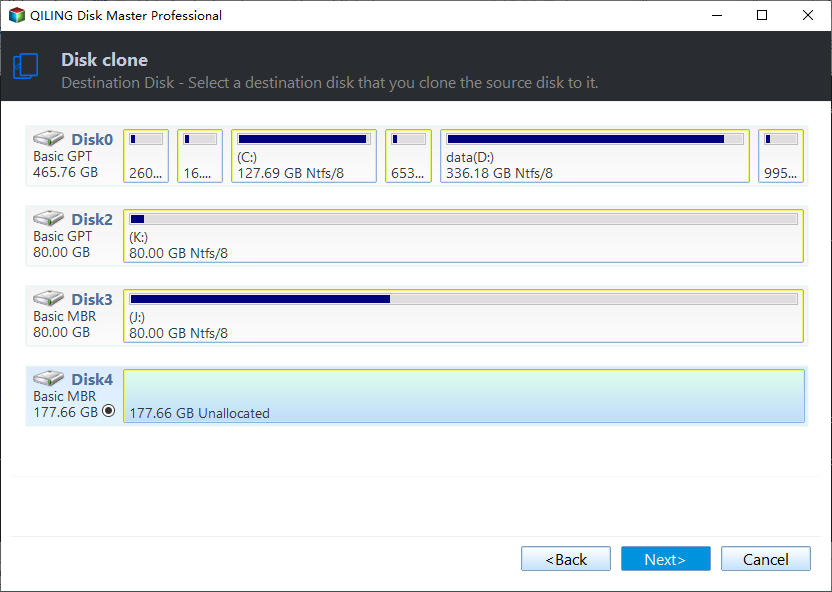
Step 2: Select the external hard drive as the destination disk.
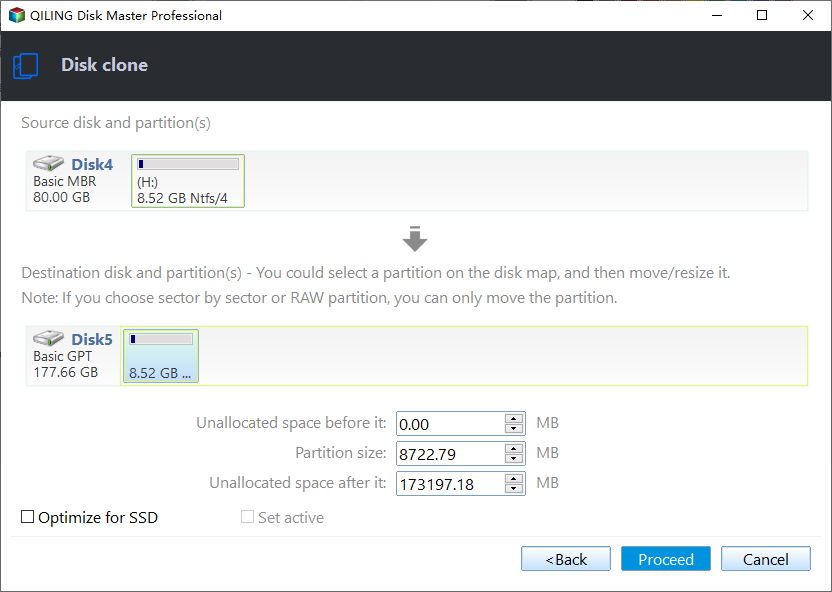
Step 3: Edit the disk layout and then click "Proceed" to continue.
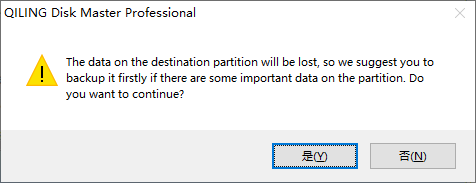
Step 4: A warning message informs you that the data on the destination disk will be erased. If you don't have important data on the destination disk, click "OK" to proceed.
Step 5: Wait for the process to complete.
If you have any concerns about using this tool or resolving issues that come up during the cloning process, please get in touch with us right away and we'll provide technical support as soon as possible.
5 Criteria for Choosing a USB Clone Tool
Choosing the right USB clone software can be a valuable asset for anyone who needs to clone USB drives. When selecting a tool, consider the specific needs of your project, such as whether you need to clone a single drive or multiple drives at once, and whether you require any additional features like data encryption or password protection. Additionally, think about the compatibility of the software with your operating system and the types of USB drives you need to clone. By taking these factors into account, you can find a USB flash drive cloning tool that meets your needs and makes the cloning process efficient and effective.
🎗️Ease of use
Many people choose to use a USB cloner because they want to be able to clone a USB drive on their own, even if they're not familiar with the process. In this case, it's best to choose a USB tool that is easy to use and has a user-friendly interface, making it simple for anyone to clone a USB drive without any technical expertise.
💻Compatibility
Make sure the cloning tool you choose is compatible with your operating system, as some tools only work with certain operating systems.
🎯Functionality
When deciding on a cloning tool for your USB drive, consider how you plan to use it. If for personal use, a basic tool may suffice. However, if for business, a more feature-rich and versatile tool may be necessary, allowing you to clone not just USB drives but also other storage devices like SD cards and SSDs.
🧩Price
The cost of a cloning tool can vary depending on the specific product and brand, but finding one that fits your budget is possible.
🎨Users' Reviews
Read online reviews of the cloning tool you're considering to get an idea of how well it works and if it's worth the money.
Hopefully, these tips will help you choose the right USB clone tools for your needs, allowing you to easily and quickly clone your USB drive.
If you're looking for a free and easy way to clone a USB drive, there are options available. However, tools like Clonezilla, which are free, can be complex to use and are more suitable for tech-savvy individuals. For a simpler and more user-friendly solution, Qiling Disk Copy is a good choice, saving you time and effort.
📖Related Reading: Free USB Cloning Software
Additional Guide: Copy Windows 11/10/8/7 to USB
You can clone Windows 7 operating system using various methods. One option is to use the built-in Copy tool in Windows, which allows you to directly copy installation files to the USB drive and create a bootable drive from scratch. Alternatively, you can use a third-party tool like Qiling Disk Copy to clone or transfer your existing Windows installation onto the USB drive.
Method 1️⃣ Copy Windows to a USB drive with Windows To Go
If you have a strong computing experience, you can use the Windows To Go Creator tool to transfer an operating system to a USB drive, but this functionality is limited to Windows 10 Education and Windows 8/8.1/10 Enterprise.
Method 2️⃣ Copy Windows to a Bootable USB drive with Qiling Disk Copy
If you're looking to migrate your Windows operating system to a USB flash drive, we suggest using Qiling Disk Copy instead of Windows To Go, which has limited functionality. Qiling Disk Copy can help you transfer your Windows 11/10/8/7 to a USB drive, and you can find instructions on how to do this in the article below.

Best Microsoft Cloning Software for Windows 11/10/8/7
A Microsoft cloning software is a tool that helps create copy versions of your computer's operating system, hard drives, essential applications, and system configurations.
Bottom line
The USB clone tool is a convenient way to quickly and easily clone USB flash drives. Qiling Disk Copy is a simple and efficient tool that can make the process seamless. With its high efficiency, it's definitely worth trying out. If you have any questions or suggestions, feel free to leave a comment below. You can also share this article with your friends if you found it helpful!
Was this page helpful? Your support is truly important to us!
Qiling Disk Copy
Qiling Disk Copy is a user-friendly tool that makes it easy to clone and migrate existing system disks to new ones, requiring minimal configuration.
For copying an entire USB drive to an SSD, read How to Clone a USB Drive to an SSD in Windows.
Related Articles
- Migrate Windows 10 from SSD to NVME and M.2 Without Reinstalling
- How to Clone Hard Drive with Bootable USB | Full Guide
- How-to Guide | Clone NVMe SSD to NVMe SSD
- Stepwise Guide | How to Clone 500GB HDD to 250GB SSD🔥
Learn how to clone a 500GB HDD to a 250GB SSD with our step-by-step guide. Discover the perfect tool to easily migrate your data and operating system to the new SSD, maximizing its performance despite the smaller size. - How to Clone Samsung SSD to Another SSD on Windows 11/10/8/7
Compare Qiling Disk Copy with Samsung Data Migration for moving data from one Samsung SSD to another. - Hard Drive Making Clicking Noise Every Few Seconds - Why & What to Do
If your hard drive is making clicking noises every few seconds, it may be a sign of hardware issues on your computer. Fortunately, there are steps you can take to address the problem and potentially save your data from a hard drive failure.
Products
Articles & Tutorials
- Data Recovery
- Data Backup
- File Recovery
- File Backup
- System Backup and Restore
- Disk and Partition Clone
- Technical articles
- Mobile articles
- Disk Master Help
- Windows Data Recovery Tutorials
- Windows Secure Delete Tutorials
- Windows Partition Management Tutorials
- Windows File Backup and Restore Tutorials
- Windows System Backup and Restore Tutorials
- Windows Disk Backup and Restore Tutorials
- Windows Clone Tutorials