Can SSD Overheat? Full Explanation and Reasons Here!
Many people are concerned about the lifespan and health of their SSDs, and one factor that can affect their performance is temperature. A typical example from a forum illustrates this point.
This article will address all the issues related to SSD overheating, providing a clear understanding of SSD temperatures.
Can SSD OverHeat?
Quick answer: yes, SSDs will overheat.
SSDs should be kept between 0°C and 70°C (32°F and 158°F), which is a safe operating range.
- If the SSD's temperature exceeds 70°C, it's overheating.
- 2 SSDs will overheat more quickly than the ideal temperature, so you may need a heat sink for M. 2 SSD.
- While SATA SSDs have cases that already act as heat sinks, they still have fewer heat problems than their predecessors, making them a reliable storage option.
Why SSD Overheats
SSDs can overheat due to various reasons, leading to potential damage. Common causes of SSD overheats include high ambient temperatures, inadequate airflow, and excessive usage, which can cause the drive to consume more power and generate heat. As a result, overheating can lead to reduced performance, data corruption, and even permanent damage to the SSD, making it essential to monitor and manage the drive's temperature to prevent such issues.
- 1. Higher data density: Solid-state drives (SSDs) operate without moving parts, which enables them to perform read and write processes more efficiently. However, this also means that more frequent crashes can generate more heat, potentially affecting the drive's performance and lifespan.
- 2. Excessive workload: Solid State Drives (SSDs) rely on continuous read and write processes, which can lead to overworking and elevated temperatures if not managed properly.
- 3. Cooling system failure: SSDs can overheat due to various factors, including a lack of a cooling system, dust accumulation on the cooling system, and poor ventilation.
- 4. Irregular power supply: Faulty components or poorly designed circuits can cause electrical problems.
- 5. Firmware problems: Outdated or corrupted firmware can cause SSDs to lose performance and power-saving features. This can result in reduced storage capacity, slower data transfer speeds, and decreased overall system performance.
- 6. Drive failure: An SSD can fail immediately due to bad sectors or physical damage, rendering it unusable.
- 7. Malware attacks: Malware can cause the system and SSD to heat up by consuming excessive resources and providing unnecessary workloads to the system.
Knowing the causes of SSD overheating and its effects can be helpful in understanding the importance of monitoring SSD temperatures. Different factors can contribute to SSD overheating, and the consequences are consistent, so being aware of SSD temperatures can be beneficial. If you find this information useful, you can share it with others by clicking the social buttons below.
What Happens If SSD Overheats?
An overheated SSD can cause data loss, system crashes, and even physical damage to the drive. This is because the heat can cause the flash memory cells to degrade, leading to data corruption and loss. Furthermore, an overheated SSD can also cause the drive's controller to malfunction, leading to system crashes and freezes. In extreme cases, the heat can even cause the drive's physical components to fail, resulting in a complete loss of data and the need for a new drive.
- An overheated SSD can cause a system to slow down due to throttling, which is a safety mechanism to prevent damage.
- An SSD (solid-state drive) overheating can lead to a decline in its performance, and may also impact its read and write speeds.
- Overheating can cause SSDs to deform and physically deteriorate, impacting their lifespan and reliability.
- An overheated SSD can cause byte corruption, resulting in potential data loss due to the degradation of the drive's components.
SSD overheating is a concern as it can impair data retention and endurance. If your SSD is overheating, it's essential to check its temperature range. The following section will provide guidance on addressing this issue.
How to Know If The SSD Is OverHeat
Paying no attention to the temperature of your SSD may cause its life and performance to fail, as the hotter it runs, the faster it consumes. To monitor SSD temperature, consider using a temperature tester like Qiling Disk Master Free.
This tool quickly checks SSD temperature and sounds an alarm if it's too high, and also offers a Disk Health feature that checks SSD health, boot times, bad sectors, and more, making it a helpful tool for troubleshooting hardware problems.
Download the Qiling Disk Master and discover the convenience it offers.
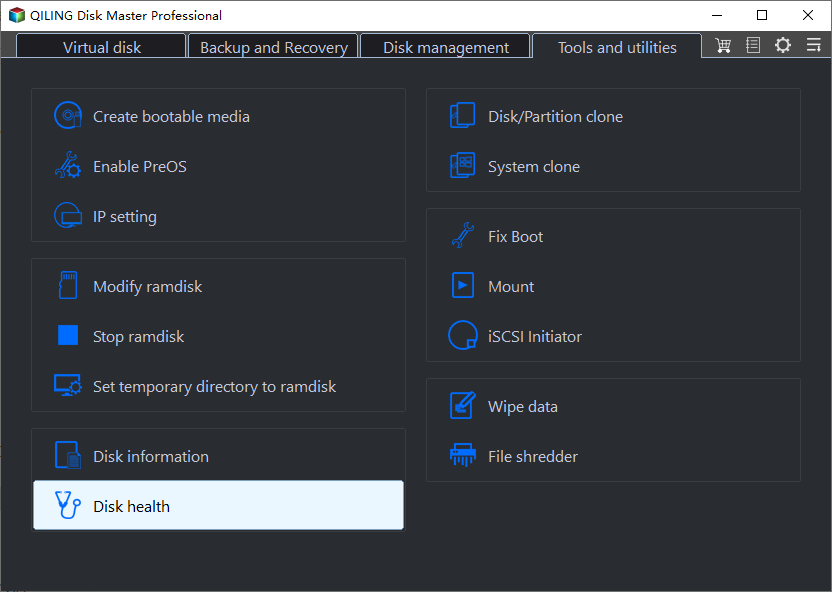
Step 1. Launch Qiling Disk Master and click the blue arrow to activate the "Disk Health" feature under the "Discovery" section.
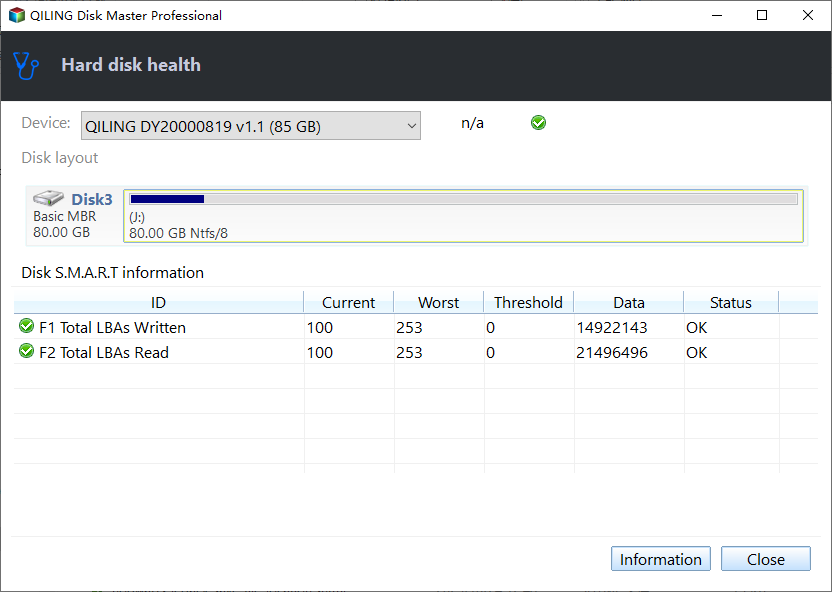
Step 2. Select the target disk and click the "Refresh" button to view its health condition.
If you've confirmed that your SSD is overheating, there are several steps you can take to address the issue. Firstly, ensure that your computer is in a well-ventilated environment, as overheating can be caused by poor airflow. Next, check your SSD's firmware for any updates, as newer versions may include thermal management improvements.
SSD Overheating Fix - 7 Ways to Cool
The optimal temperature range for an SSD is typically between 40°C to 60°C. If the SSD is within this range, cooling is not necessary. However, if it overheats, the SSD has built-in mechanisms to reduce its temperature. But frequent heat fluctuations can be detrimental to the SSD's lifespan. Therefore, finding a balance to keep the SSD within the optimal temperature range is still necessary to ensure its longevity.
The following are ways to fix overheated SSD temperatures:
1. Install more fans: To improve airflow and allow cool air to blow through the SSD, you can place it on a metal bracket or a heat sink, or even just place it on a metal surface. This will help to dissipate heat from the SSD and keep it running at its best.
2. Make sure the SSD is well-ventilated: Avoid placing the SSD near other heat sources, such as power supply units or heat sinks, to prevent overheating.
3. Don't overuse the SSD: Stressing the SSD may occur when transferring large amounts of data to the drive at the same time, potentially causing it to slow down or even fail.
4. Use anti-malware tools: Anti-virus programs scan your computer to find and remove malware.
5. Use a professional cooler: A cooler helps prevent the SSD from overheating under heavy loads, ensuring its longevity and performance.
6. Keep the SSD's firmware up to date: Firmware updates for SSDs can improve their performance and reduce overheating.
7. Keep the SSD clean: If the SSD has dust buildup, it can block airflow, causing the server to overheat.
If your SSD is overheating, you can't use it. However, if it's been damaged, you can clone it using Qiling Disk Master and replace it with a new one.
Further reading about temperature:
Conclusion
SSDs can indeed overheat due to heavy use, inadequate cooling systems, or internal drive issues, and monitoring their temperature can help prevent damage. Software like Qiling Disk Master can track SSD temperatures and alert you when an SSD is overheating, allowing you to take action to prevent data loss and extend the lifespan of your drive.
If your SSD is overheating, this article provides ways to fix the issue and prevent damage to your storage device. Monitoring your SSD temperature promptly is key, and by doing so, you can take steps to prevent overheating and protect your SSD.
FAQs About Can SSD Overheat
What are some potential causes of SSD overheating, and are there any specific scenarios where it's more likely to occur?
1. What temperature caused the SSD shutdown?
If the SSD temperature exceeds 70 degrees Celsius, the computer may start up slower or not at all. Prolonged overheating can cause system crashes and unexpected shutdowns.
2. How do I know if my SSD is damaged?
To check for bad sectors on a Windows computer, use the built-in ChkDsk function, which has been improved by Windows, to report the number of bad sectors. Alternatively, you can use a third-party tool like Qiling Disk Master to check the SSD's bad sectors, health, and temperature.
3. Will M.2 SSDs overheat?
M.2 SSDs are faster and have higher storage density, but this can lead to overheating, especially for NVMe SSDs, which can reach temperatures over 80 degrees Celsius, making a heat sink a necessary component.
Related Articles
- How to Fix Raw Drive Without Format Using CMD [Quick & Safe]
- Why Is My Chromebook So Slow and How Do I Speed It Up? [Complete Guide]
- Fix Error 1327 Invalid Drive When Installing Programs Windows 10
- How to Restore Files from OneDrive to PC [A Full Guide]
- REFS Volume Showing as RAW: How to Fix Without Lossing Data
Is your REFS partition showing as RAW? Are you unable to access the data? Then follow this easy guide where we share the reasons and solutions that can help you fix the problem where REFS Volume Shows as RAW and without any data loss. - How to Remove Active Flag From Partition [Efficient Solution]
If you're looking to remove the active flag from a partition on your PC, you can do so by using the built-in Disk Management tool in Windows. To access this tool, press the Windows key + R to open the Run dialog, type “diskmgmt.msc,” and press Enter.
Products
Articles & Tutorials
- Data Recovery
- Data Backup
- File Recovery
- File Backup
- System Backup and Restore
- Disk and Partition Clone
- Technical articles
- Mobile articles
- Disk Master Help
- Windows Data Recovery Tutorials
- Windows Secure Delete Tutorials
- Windows Partition Management Tutorials
- Windows File Backup and Restore Tutorials
- Windows System Backup and Restore Tutorials
- Windows Disk Backup and Restore Tutorials
- Windows Clone Tutorials