PS5 SSD Temperature Test: Do You Need A Heatsink?
To check the temperature of your PS5 SSD, you can use the built-in system monitor, which can be accessed by pressing the PS button on your controller and navigating to the system settings. From there, select "Storage" and then "SSD" to view its temperature. This provides you an idea of whether your SSD is running hot and if a heatsink is needed to prevent overheating.
The PS5 SSD temperature can be checked by going to Settings > System > Storage > SSD. The temperature will be displayed in Celsius. If the temperature is consistently above 80°C, it may be a sign that the SSD is overheating, and a PS5 heatsink may be necessary.
What Is the PS5 SSD Temperature
The PS5 SSD temperature range is between 0°C to 60°C (32°F to 140°F). Maintaining the SSD within this temperature range can help ensure its longevity and prevent potential issues.
- The normal SSD temperature range is between 86°F to 149°F or 30°C to 65°C.
- When running games, an SSD's performance is significantly boosted. Many gaming SSDs are designed with this in mind and can operate at higher temperatures, some even rated to function at up to 70°C (158°F).
- Some PS5 SSDs can reach extremely high temperatures, exceeding 71°C, without a heatsink and even with a cover on. However, prolonged exposure to such high temperatures can potentially damage the SSD over time.
- If the PS5 SSD is not in use, its normal temperature should not exceed 40-50 degrees Celsius.
The temperature range of SSDs is likely to be similar in both PS5 and PC environments, with only minor differences. We'll test the PS5 SSD temperature on a PC and assess if a PS5 cooler is necessary.
How to Run PS5 SSD Temperature Test
We already know the normal PS5 SSD temperature range. The next step is to understand how to test the PS5 SSD temperature, which involves demonstrating how to test the PS5 SSD temperature on the computer side to more accurately measure the temperature of the SSD with and without operation.
Qiling Disk Master Free provides a comprehensive SSD temperature testing tool, allowing users to check the health, temperature, performance, lifetime, and SMART statuses of their SSD. It also alerts users when the SSD temperature is out of the normal range, helping to prevent potential SSD failure.
Download this tool and follow these steps to check the temperature of your PS5 SSD:
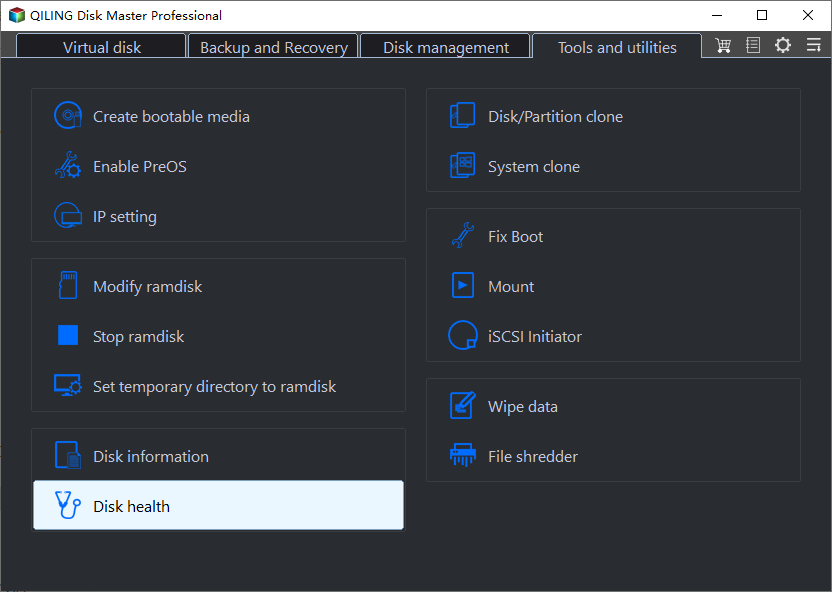
Step 1. Launch Qiling Disk Master, click the blue arrow to activate the "Disk Health" feature under the "Tools and utilities" tab page.
Step 2. To check the health condition of your disk, select the target disk and click the "Refresh" button. This will display the current status of your disk.
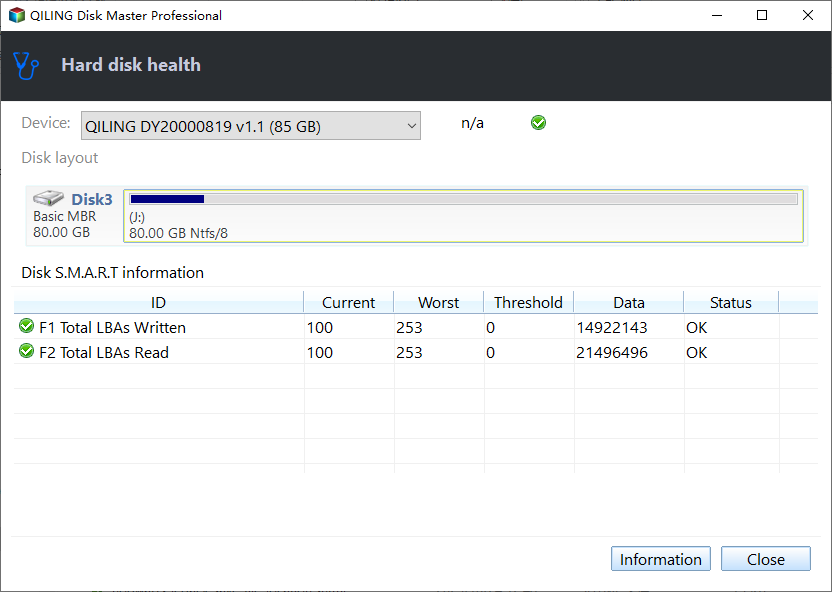
Moreover, this powerful tool is one of the best tools to run SSD performance tests. You can click the following link for more information if you need your PS console.
After testing the temperature of the PS SSD, we can check if its operating and non-operating temperatures are within a normal range. This involves comparing the temperatures against a provided list. Next, we'll analyze whether a PS5 SSD temperature heatsink is needed, and provide more information on this topic.
Bonus Tip: Does PS5 SSD Need Heatsink
The quick answer is: Yes, PS5 SSD need a heatsink.
The PS5 SSD's temperature is likely to fluctuate, making a heatsink necessary to prevent overheating and maintain optimal performance.
TweakTown tested fast travel and saved loading sequences for 10 specific PS games and temperatures with and without an installed heatsink. They used a K-type thermocouple and FLIR thermal imaging to record temperatures at various times, noting the following approximate data scenarios.
Heatsink Installed:
| Game | 15 minutes | 30 minutes | 45 minutes |
| Far Cry 6 | 38.1°C | 40.5°C | 38.7°C |
| Miles Morales | 30.3°C | 32.7°C | 33.9°C |
| Control | 30.3°C | 31.4°C | 32.2°C |
Without a Heatsink Installed:
| Game | 15 minutes | 30 minutes | 45 minutes |
| Far Cry 6 | 47.4°C | 51.8°C | 54.6°C |
| Miles Morales | 48.6°C | 48.1°C | 52.2°C |
| Control | 43.5°C | 48.7°C | 49.3°C |
The PS5's SSD temperature can be reduced by 10-15 degrees Celsius with the addition of a heatsink, which can transfer heat to a fluid medium and dissipate it, improving the overall performance and lifespan of the device.
While the PS5's expansion bracket shroud needs to be closed if you don't have a heat sink, it won't dissipate heat through it. Instead, it traps the heat as it enters.
Heatsinks for M.2 SSDs are not always necessary, but they can be beneficial in certain situations. If you're using a high-performance M.
Conclusion
The PS5's SSD temperature range is between 30°C to 65°C, but temperatures above 70°C require special precautions. While the PS5 has a built-in cooling strategy, it may still benefit from a heatsink to operate effectively. Options include purchasing an SSD with a built-in heatsink or adding a separate one manually.
We need to monitor the temperature and health of the PS5 SSD at all times. The effect of the SSD on the PC and PS side is roughly the same. To get a more accurate picture of the PS5 SSD, we recommend using Qiling Disk Master to perform a PS5 SSD temperature test on the PC.
You May Also Like:
FAQs About PS5 SSD Temperature
There are concerns about the PS5's SSD temperature, with some users reporting high temperatures and potential overheating issues. This has led to discussions about the impact on the console's performance and lifespan, as well as potential solutions such as using a heatsink or modifying the console to improve airflow. Some users have also reported issues with the SSD's performance and reliability, which may be related to the temperature concerns.
1. How to fix PS5 SSD overheating?
If your PS5 SSD is overheating, you may receive a temperature alert. To fix the issue, you can try various methods, such as ensuring good airflow around the console, cleaning dust from the vents and SSD, and checking for any blockages that may be restricting air circulation. Additionally, you can also try updating the SSD firmware, resetting the SSD, or even replacing it if necessary.
- Clean up the console.
- Close the game and PS5, uninstall the metal cover of the docking station, and wait for the temperature to drop.
- Install a PS5-friendly cooler, such as a Sabrent M.2 NVMe cooler.
- The PS5 console should be placed on a flat surface with sufficient open space around it to allow for proper airflow and heat dissipation. This will help prevent overheating and ensure optimal performance.
2. How hot is too hot for PS5 SSD?
The normal temperature for SSDs is between 30-65 degrees Celsius, and excessive temperatures can affect the life of the SSD. In the worst-case scenario, the PS5 SSD can reach temperatures of up to 71 degrees Celsius without a heat sink, so having one on hand is recommended.
3. Should the SSD be cooled?
SSDs require cooling to prevent overheating, which can impact their performance and durability. Excessive temperatures can compromise the integrity and data stored on the SSD, making it essential to keep it within a normal temperature range to preserve its functionality.
Related Articles
- How to Format a Hard Drive Partition for Free
- Samsung Data Migration Download for Windows 11/10🔥
- Top 6: HP USB Disk Storage Format Tool Alternative Windows
- The Local Device Name Is Already in Use
- What is GPT (GUID Partition Table) Disk and Advantage of It?
The GPT (GUID Partition Table) is a newer disk layout and partition style that offers several advantages over the traditional MBR (Master Boot Record) format. One of the key benefits of GPT is its ability to support larger disk sizes and more partitions, making it ideal for modern computing needs. - How to Check If It's UEFI or BIOS on Your PC?
How to check if it's UEFI or BIOS that your PC is running on? Here, 2 ways will be provided to help find it out.
Products
Articles & Tutorials
- Data Recovery
- Data Backup
- File Recovery
- File Backup
- System Backup and Restore
- Disk and Partition Clone
- Technical articles
- Mobile articles
- Disk Master Help
- Windows Data Recovery Tutorials
- Windows Secure Delete Tutorials
- Windows Partition Management Tutorials
- Windows File Backup and Restore Tutorials
- Windows System Backup and Restore Tutorials
- Windows Disk Backup and Restore Tutorials
- Windows Clone Tutorials