External Hard Drive Temperature Range [Full Guide in 2023]
External hard drives can be prone to overheating when used in environments outside the recommended temperature range, despite proper insulation, extreme temperatures can still cause issues.
The ideal external hard drive temperature range is between 59°F and 95°F (15°C and 35°C), and temperatures outside this range can affect the drive's performance and lifespan. To monitor external hard drive temperature, you can use software like CrystalDiskInfo or SpeedFan, which can provide real-time temperature readings and alert you to potential overheating issues.
What Is the External Hard Drive Temperature Range
The normal external hard drive temperature range is 0 to 60 degrees Celsius (32 to 140 degrees Fahrenheit). This temperature range has a moderate effect on the drive, with temperatures above 40 degrees Celsius (104 degrees Fahrenheit) potentially causing data corruption or drive failure. Prolonged exposure to temperatures above 50 degrees Celsius (122 degrees Fahrenheit) can lead to more severe damage.
- The optimal temperature for an external hard drive is between 40 and 50 degrees Celsius.
- Temperatures lower than 40 degrees can cause a hard drive to become sluggish and less reliable.
- Temperatures above 50 degrees Celsius can cause the hard drive to overheat and potentially fail.
In different temperature environments, the hard drive needs to be positioned correctly to allow it to cool or fix the overheating issue. The hard drive should be positioned in a well-ventilated area to allow it to cool down, or in a spot where it can be easily accessed to fix any overheating issues.
- In a hot environment, ensure fans cooling the hard drive are working properly and keep the drive in a well-ventilated area with enough space around it, away from other components.
- To prevent damage, it's essential to keep the hard drive away from extreme cold temperatures and locations where condensation may form.
To check the temperature of an external hard drive, you can use a tool like CrystalDiskInfo, which is a free and professional software that can monitor the temperature of your hard drive. This tool can be downloaded from the official website and installed on your computer. Once installed, it can be used to check the temperature of the external hard drive, as well as other information such as the drive's model, size, and serial number. By regularly checking the temperature of your external hard drive, you can help ensure its optimal performance and detect any potential problems early on.
Further Reading: SSD Temperature Range: Everything You Should Know
How to Check External Hard Drive Temperature
In Qiling Disk Master, the Disk Health feature allows users to monitor the temperature of their external hard drives, as well as internal disks, enabling them to track their hard drive health and detect potential issues.
The feature alerts users when their hard drive's temperature is reaching an unhealthy level, allowing them to take steps to protect their data. It also warns users when their hard drive is experiencing high usage, enabling them to take preventive measures to avoid data loss or corruption.
It also provides an easy-A user-friendly interface allows users to quickly and easily check the temperature of their hard drive. This interface enables users to monitor their hard drive's temperature in real-time, providing them with valuable information to prevent overheating and potential data loss.
Step 1. Launch Qiling Disk Master and click the blue arrow to activate the "Disk Health" feature, located under the "Discovery" section.
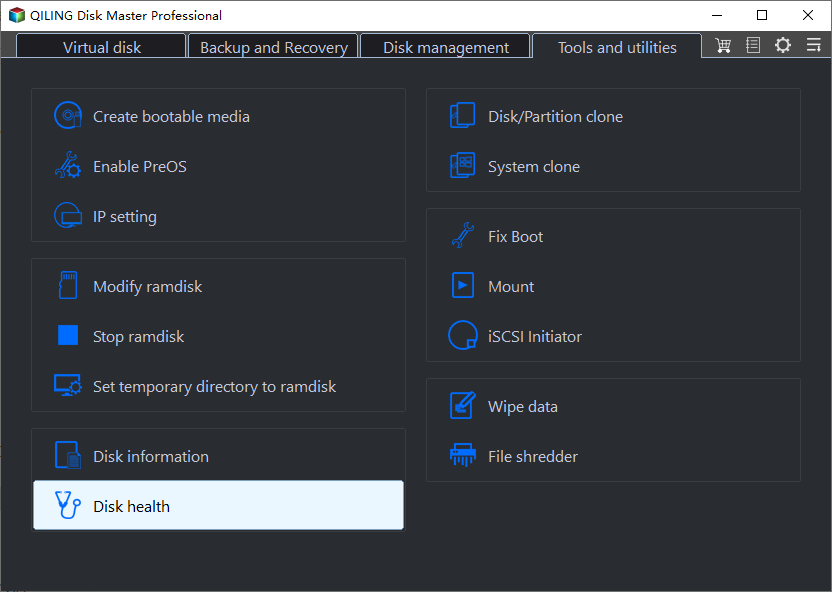
Step 2. To check the health condition of your disk, select the target disk and click the "Refresh" button, which will display the current status of your disk.
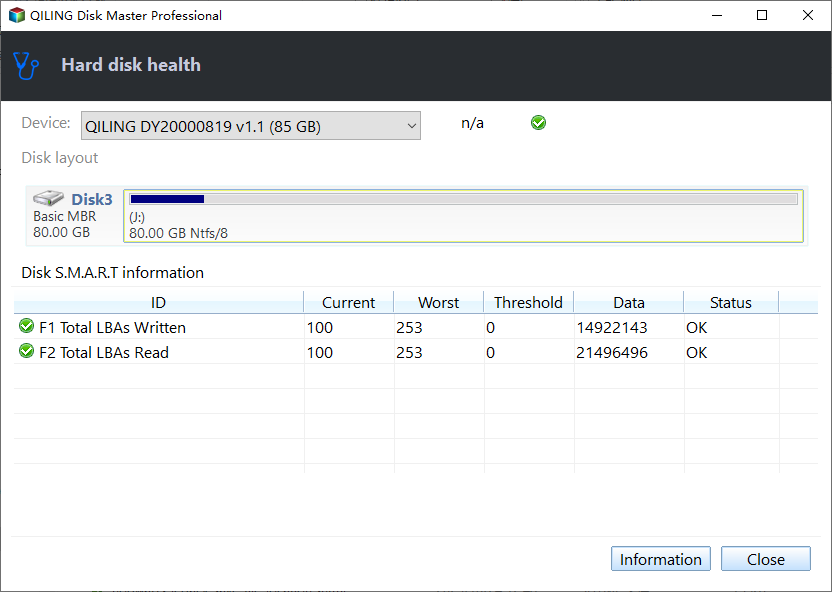
Qiling Disk Master is a free disk partitioning software for Windows that allows you to check hard drive temperature and optimize your hard drive's performance by easily managing your disk partitions.
- Check hard drive health
- Run disk surface test to detect bad sectors
- Speed up hard drive by partitioning it
- Test hard drive speed
Qiling Disk Master helps users safeguard their data from disk failure and boost disk performance, providing a reliable solution for protecting important files.
Conclusion
External hard drives should be kept in a cool, dry place with a temperature range of 41°F (5°C) to 95°F (35°C) to prevent overheating and ensure reliability and longevity.
If you're looking for an easy-Looking for a reliable and powerful Windows temperature monitor? Qiling Disk Master is the perfect choice! This user-friendly and secure software offers the most comprehensive features to make partition operations easier and faster, making it the ideal tool for any user. So why wait? Download Qiling Disk Master now and get the most out of your partitions!
FAQs About External Hard Drive Temperature Range
Here are the FAQs about external hard drive temperature range:
1. Can heat ruin an external hard drive?
Heat can damage external hard drives by harming mechanical and electronic components, and causing data loss due to platter expansion, so it's best to store them in a cool, dry place.
2. How do I cool my external hard drive?
To cool down an external hard drive, it's best to shut down the PC and let it sit in that state for a while. If Windows isn't installed on the drive, you can safely disconnect it and keep it separate for a bit.
3. What temperature is bad for a hard drive?
A hard drive's optimal temperature range is between 32-140°F (0-60°C), with temperatures outside this range potentially reducing its lifespan and performance. Temperatures below freezing can cause condensation and corrosion, while temperatures above 140°F can cause overheating and damage to internal components.
Related Articles
- macOS Sonoma Issues, Problems, Bugs | Top 6
- Full Guide on GPT Max Size | What Is GPT Max Size?
- How to Recover Browser/Internet History?
- Linux File Backup - 5 Best Software for Linux Desktop and Server
- Best External SSD for Steam Deck [2024 New List]
If you're looking for information on the best external SSD for your Steam Deck, this guide has some relevant details. You might find it helpful. - Check Out the Best Portable SSD | 2024 List🔥
Are you looking for the best portable SSD in 2024? You can read this guide, and it shows you 5 best portable SSD in terms of their different specifications.
Products
Articles & Tutorials
- Data Recovery
- Data Backup
- File Recovery
- File Backup
- System Backup and Restore
- Disk and Partition Clone
- Technical articles
- Mobile articles
- Disk Master Help
- Windows Data Recovery Tutorials
- Windows Secure Delete Tutorials
- Windows Partition Management Tutorials
- Windows File Backup and Restore Tutorials
- Windows System Backup and Restore Tutorials
- Windows Disk Backup and Restore Tutorials
- Windows Clone Tutorials