GPT Max Size Explained: Disk and Partition Limits
GPT, or GUID Partition Table, is a modern partition table used by both Apple and Microsoft to store operating systems and data on hard disks.
GPT has no maximum size limit, making it a better choice for larger hard drives or SSDs, unlike MBR which has a significantly lower maximum size limit.
In this article, you are going to see what the actual GPT's max size is and learn more about it. Stick through because you don't want to miss this one!
What Is the GPT Max Size
When installing a disk on your computer, you need to format it with a partition table, which allows you to save the OS and data. The two most popular partition tables are MBR and GPT.
The GPT disk is superior to the MBR, supporting 128 primary partitions and a maximum size of 18 EB, making it a more efficient and larger-capacity storage option.
With the latest Windows OS, such as Windows 10 or 11, it's possible to install an 18 EB hard drive, although no such drive exists. This demonstrates the advantage of the GPT partition table, which has a much larger volume size limit than the traditional MBR, allowing for capacities beyond 2 TB.
Let's clarify if GPT is always better than MBR. Our next section provides the answer, so scroll down to learn more.
MBR VS GPT Max Size: Is GPT Always Better Than MBR
While GPT (GUID Partition Table) is not always superior to MBR (Master Boot Record), there are specific situations where MBR is preferred over GPT for a hard drive.
When to prefer an MBR partition table over a GPT: If you're dealing with older systems, such as Windows XP or earlier, or if you're working with a system that was created before 1998, a MBR partition table is likely the way to go. This is because MBR is the older, more traditional partitioning scheme that was widely used in the past. However, if you're working with a modern system, such as Windows 10 or later, or if you're creating a new system, a GPT partition table is generally preferred due to its ability to support larger disk sizes and more partitions.
- If you want to install an older version of Windows, such as Windows XP (32-bit version), Windows Vista, Windows 2000, or earlier, you should choose MBR as the partition table.
- When selecting a 32-bit version of the OS, MBR is preferred over GPT due to incompatibility issues.
You should prefer the GPT partition table over the MBR when you need to support more than 4 primary partitions, or when you need to support partitions larger than 2 TB. This is because the GPT partition table can handle up to 128 partitions and supports larger partition sizes, making it a more flexible and modern choice for disk management.
- If you're installing a hard drive over 2 TB on your PC, use the GPT partition table, as it can handle larger storage capacities than the traditional MBR partition table.
- GPT supports 128 primary partitions, whereas MBR only supports 4, making GPT a better option for those who need to create many partitions.
- If you're using the latest version of Windows, such as Windows 8, Windows 10, or Windows 11, you should pick GPT over MBR, as the latest versions of Windows support GPT.
The Master Boot Record (MBR) and GUID Partition Table (GPT) are two different types of disk partitioning schemes used to organize and manage data on a hard drive. The main difference between the two is that MBR uses a 512-byte sector to store the partition table, whereas GPT uses a 16-byte sector, making it more efficient and flexible.

The age-old debate between MBR (Master Boot Record) and GPT (GUID Partition Table) has led to confusion among users. While both are used for partitioning a hard drive, the key difference lies in their capacity and compatibility.
The choice of partitioning method depends on your understanding of what MBR (Master Boot Record) and GPT (GUID Partition Table) are. Both MBR and GPT are used to manage disk partitions, but they differ in their approach and capabilities.
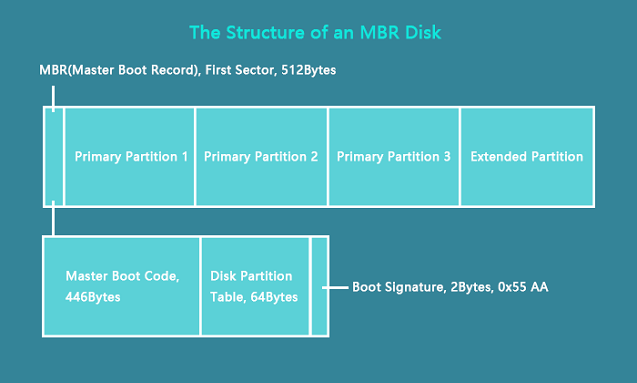
To convert an MBR disk to GPT, you'll need to back up your data, boot from a live Linux environment or a Windows installation media, and then use a tool like GPT fdisk (also known as gdisk) or the built-in Windows feature to convert the disk to GPT. This process will erase all data on the disk, so be sure to back up your files first.
A Professional Tool to Help You Convert to GPT
When upgrading to Windows 10 or Windows 11, it's also necessary to change the partition table, especially if it's currently MBR. Fortunately, converting MBR to GPT is a straightforward process, even for those who find it complicated, thanks to tools like Qiling Partition Master Professional, which can convert a drive's partition table from MBR to GPT in just a few clicks.
The software not only helps in converting the partition table from MBR to GPT in a few clicks but also offers various other features, including creating, deleting, extending, merging, and resizing partitions, among others.
Other Features of Qiling Partition Master:
- Rebuild MBR
- Convert MBR to GPT
- Convert NTFS to FAT32
- Select partition as active
- Examine file system errors
- Convert primary partition to logical ones, and vice versa
Conclusion
The GPT (GUID Partition Table) supports larger volume sizes and multiple primary partitions, unlike the traditional MBR (Master Boot Record) partition table, which has limitations on volume size and primary partitions.
While the GPT (GUID Partition Table) has several advantages over the MBR (Master Boot Record), it also has its own strengths in specific areas where the GPT is lacking.
If you're updating to the latest Windows version and your disk uses the MBR partition table, you'll need to convert it to GPT to use the latest version of Windows.
You can convert a Master Boot Record (MBR) to a GUID Partition Table (GPT) using the Command Prompt, but a more straightforward approach is to use Qiling Partition Master to perform the conversion.
You may also like:
FAQs About GPT Max Size
The current maximum size of a GPT model is around 1.5 billion parameters, a significant increase from the initial 117 million parameters, allowing it to process and generate more complex and nuanced text, but requiring more computational resources and data to train.
1. Does GPT have a limit?
GPT (GUID Partition Table) has a theoretical limit, just like MBR (Master Boot Record), but its limit is significantly higher, and currently, there are no hard drives that approach that limit.
2. Can GPT support disks larger than 2 TB?
GPT supports larger disks, including those over 2 TB, for both hard disk drives and solid-state drives.
3. Is GPT better than MBR for SSDs?
MBR is incompatible with drives over 2 TB, making GPT a better choice for larger storage needs.
Related Articles
- How to Fix Windows 7 Backup Error 0x80041321 [Four Ways]
- Should You Compress Backups or Not [Pros & Cons]
- Fix 'Startup Repair cannot repair this computer automatically' in Windows 10/8/7/Vista
- (Quick Solutions!) How to Backup SD Card Without Computer
- Sticky Notes Not Available Error in Windows 11, 10, 8, 7 Without Losing Data
Fix Windows 7 backup error 0x80041321 with clear troubleshooting steps. Check backup settings, system files, disk errors, and restore backup tasks. - Fix 'The Disk Structure Is Corrupted and Unreadable' Without Losing Data
Are you having 'drive not accessible, the disk structure is corrupted and unreadable' in Windows 10/8.1/7? On this page, you will learn 5 efficient fixes to get rid of this error from your SD, USB, external/internal hard drive without losing any data.
Products
Articles & Tutorials
- Data Recovery
- Data Backup
- File Recovery
- File Backup
- System Backup and Restore
- Disk and Partition Clone
- Technical articles
- Mobile articles
- Disk Master Help
- Windows Data Recovery Tutorials
- Windows Secure Delete Tutorials
- Windows Partition Management Tutorials
- Windows File Backup and Restore Tutorials
- Windows System Backup and Restore Tutorials
- Windows Disk Backup and Restore Tutorials
- Windows Clone Tutorials