Should You Compress Backups or Not [Pros & Cons]
Introduction
Many users consider compressing their backup data to save drive space, but should you compress backups? This question raises a debate among users, and in this passage, we'll delve into the pros and cons of backup compression in detail. First, let's clarify what backup compression is, which involves reducing the size of backup data to save storage space. However, the decision to compress backups depends on various factors, and we'll explore the advantages and disadvantages of doing so.
What Is Backup Compression?
Compression is a way to reduce the size of backup copies by using special encoding, resulting in a smaller file size. There are two types: lossless compression, which doesn't change the file's content, and lossy compression, which reduces quality while compressing.
Lossless compression is a data compression technique that reduces the size of data without altering or losing any of its original content. It works by identifying and representing repeated patterns or sequences in the data more efficiently, using techniques such as Huffman coding, LZW compression, or arithmetic coding. This process allows the compressed data to be decompressed back to its original form, retaining its original integrity.
How Does Backup Compression Work?
Backup compression is a process that reduces the size of files by re-encoding them to use fewer storage bits, allowing the original files to be transferred, stored, and recreated. However, compression has its limits, and files cannot be compressed to nothing.
If you compress your backups, they'll still be backed up, but they'll be smaller in size, making them easier to store and transfer. This compression won't affect their integrity or the ability to restore them.
What Happens If You Compress Backups?
This compressing process reduces the size of the backup file, saving disk space and making transmission faster. However, it may consume CPU and RAM, so it's best to let it run uninterrupted.
Compressing backups can be beneficial as it reduces the storage space required, making it easier to store and manage large amounts of data. However, compressing backups can also introduce some drawbacks, such as increased processing time during the backup and restore process, potential data corruption if the compression algorithm is not reliable, and the need for decompression during the restore process, which can add to the overall time and complexity. Therefore, the decision to compress backups should be made based on the specific needs and requirements of the organization, weighing the benefits of space savings against the potential drawbacks.
Should You Compress Backups or Not [Detailed Guide]
The use of backups compression is necessary to save disk space, but it may also put some burden on the device.
The specific pros and cons of backup compression can be summarized as follows: Backup compression can reduce the storage space required for backups, making it easier to store and manage them. However, it can also increase the processing time and CPU usage during the backup and restore process. Additionally, compressed backups may be more difficult to verify and validate, and some backup software may not support compression.
| Features | Lossless Compression |
|---|---|
| Pros |
|
| Cons |
|
Compression provides convenience by saving space and speeding up backups, making it a vital tool for data protection and storage space management.
Choosing a backup plan with compression can save users from the hassle of manual backup and compression work, and also help reduce the cost of backup storage. It's a necessary consideration!
To compress backups, you can utilize professional backup software that offers a compression option, allowing you to store your backups more efficiently.
Bonus Tip: 2 Ways of Compressing Backups
Compressing backups is crucial, but how to actually do it? Fortunately, there are tools that can help. In this section, you'll learn about two useful tools that can assist you with compressing your backups.
Way 1. Compress Backups with Qiling Backup Home
Qiling Backup Home offers a compression feature that enables faster backup completion and reduces storage space requirements by compressing data before backing up.

Users can perform an automatic backup of data with Qiling Backup Home, freeing their hands, and it can back up files in safe mode.
- 250GB of free Cloud storage (30 days of trial)
- File, system, and disk backup available
- System clone and move OS to SDD
- Disk clone and clone hard drive to SDD
- Security Zone to protect data from ransomware
If you're looking for backup software with a compression option or facing other backup issues, you can try using the software mentioned, which offers this feature and may help resolve your problems.
Way 2. Compress Backups with Compress 2 Go
Compress 2 Go is a good option for compressing files if you have already backed them up, as it is a free online file compressor.
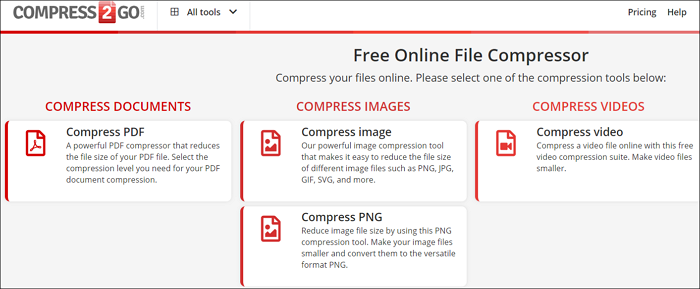
The online file compressor allows users to compress files online, providing a convenient and accessible way to reduce file sizes.
- Compress PDF files
- Compress videos
- Compress images of various types, including PNG, JPG, GIF, and SVG, to reduce their file size and improve loading speed, making them suitable for web use.
This online compression tool allows users to compress their backups, saving space, but Qiling Backup Home is a more efficient option for compressing backups while backing up, saving time.
FAQs About Should You Compress Backups
If you're experiencing issues with compressing backups, don't worry, this section can help. It addresses three common questions about backups compression, providing a straightforward solution to your problem. By understanding these questions and their answers, you'll be able to overcome any challenges you're facing with compressing backups.
1. What type of data can be compressed?
Compression is a process that takes an input data set, such as files, audio, video, or pictures, and encodes it using fewer bits than the original file, making all data types compressible.
2. Should you compress SQL backups?
The use of compressed backups in SQL Server can have both positive and negative effects. On the one hand, it can significantly increase backup speed, making the process more efficient. On the other hand, previous versions of SQL Server may not be able to read compressed backups, which could be a limitation depending on the current demands and requirements.
3. Do backup files get compressed?
Compression is an additional step in a backup process, and if you don't click the compression option, you cannot compress your backup files.
Related Articles
- How to Fix "No Root File System Is Defined" [Efficient & Easy Solutions]
- (Solved!) How to Backup Gmail Emails to Another Gmail Account
- Windows 10 Internet Explorer Has Stopped Working
- Does exFAT Work on Mac and PC? Learning the Usage of exFAT
- Windows File and Folder Permissions Guarantee Your File and Folder Security [You Must Know]
Learn how Windows file and folder permissions work, how they protect data, and how to manage access for users and groups safely. - What Is Windows Hyper V? [Detailed Description]
Don't know what is Windows Hyper-V? Windows launched a virtualization software in 2008 called Hyper-V. With Windows Hyper-V, you can create multiple virtual machines with different operating systems. Continue reading to learn more about Hyper-V!
Products
Articles & Tutorials
- Data Recovery
- Data Backup
- File Recovery
- File Backup
- System Backup and Restore
- Disk and Partition Clone
- Technical articles
- Mobile articles
- Disk Master Help
- Windows Data Recovery Tutorials
- Windows Secure Delete Tutorials
- Windows Partition Management Tutorials
- Windows File Backup and Restore Tutorials
- Windows System Backup and Restore Tutorials
- Windows Disk Backup and Restore Tutorials
- Windows Clone Tutorials