How to Fix "Disk Showing as Raw Instead of NTFS" [2 Methods]
A disk showing as RAW means it's no longer recognized by Windows as a formatted NTFS drive, likely due to a configuration issue or a disk failure. To fix this, you can try using the built-in Windows feature, "Check Disk" (chkdsk), or a third-party tool like Qiling Partition Manager or MiniTool Partition Wizard. These tools can scan and repair the disk, potentially recovering the original NTFS format.
If your disk is showing as RAW instead of "NTFS" on your computer, it typically indicates that your computer is unable to read the hard disk, likely due to a corrupted file system or other issues. This can be caused by a variety of factors, including power outages, software or hardware failures, or other system crashes.
We'll explore why it happens, how you can fix it, and more in this article, so continue reading for all the information.
Why Is My Disk Showing as RAW Instead of NTFS
If a drive isn't formatted properly, it will appear as "RAW" instead of "NTFS" because it's become unreadable, and Windows can't access any files, labeling it as "RAW" instead of a file system type like "NTFS".
1. If you don't format the drive properly, the drive may not be recognized by your computer or other devices.
- Bad sector
- Corrupted partitions
- Structural damage to the file system
- When your PC doesn't shut down properly
- PC shuts down abruptly due to power failure
Thankfully, you can fix this! Our next section shows you how you can prevent your drive from showing as RAW. Continue reading to fix your broken drive!
Fix "Disk Showing as Raw Instead of NTFS" via Qiling Disk Master
Qiling Disk Master Free is a tool that can fix a drive showing as RAW instead of its original file system, such as NTFS.
You can perform various partition operations with Qiling Partition Master, including creating, deleting, merging, extending, formatting, or wiping a partition, and much more. Additionally, the software allows you to clone system partitions, convert MBR to GPT without losing data, check for file system errors, and other advanced features.
Everything can be done with just a few clicks, and you can easily fix your disk so it shows as RAW with minimal effort.
Download Qiling Disk Master today to experience its capabilities in fixing corrupted drives, managing disk partitions, and addressing other disk-related needs.
Here are some additional features of Qiling Disk Master:
- Rebuild MBR
- Adjust the cluster size
- Convert NTFS to FAT32
- Convert FAT32 to NTFS
- Copy OS to another drive
- Change the active partition
- Convert MBR to GPT without losing data
Follow the steps below to help you operate better:
Step 1. Launch Qiling Disk Master.
Right-click on the RAW partition or RAW external hard drive/USB/SD card that you need to format and choose "Format".
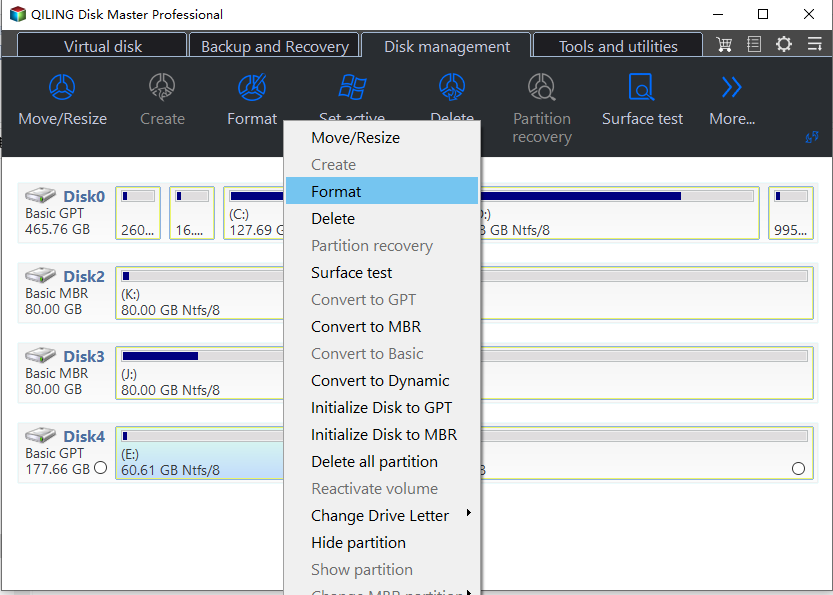
Step 2. Format RAW Partition and reset the file system.
Assign a new partition label, set the file system to NTFS, FAT32, EXT2, EXT3, EXT4, or exFAT, and cluster size to the chosen partition.
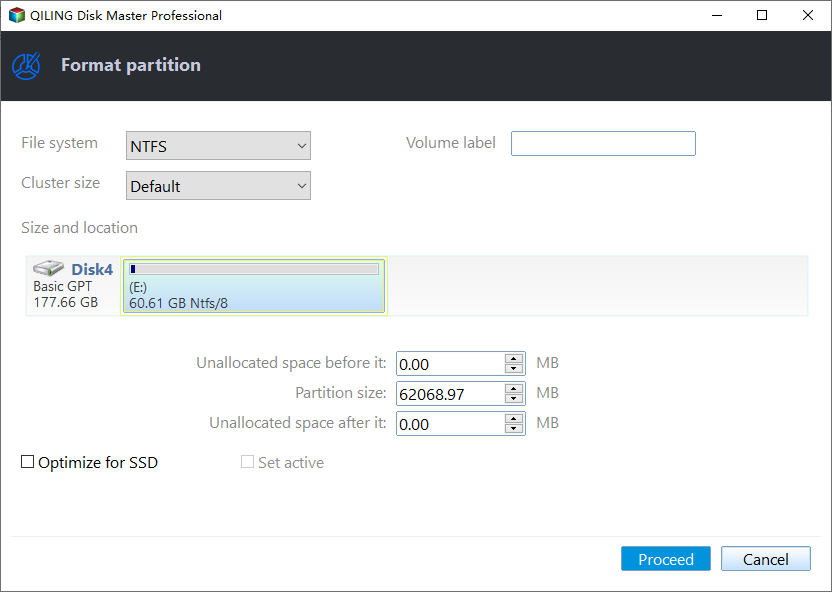
Step 3. Execute the operations.
To start formatting your RAW partition/USB/SD/external hard drive, click the "Proceed" button. This will initiate the formatting process, which will erase all data on the device.
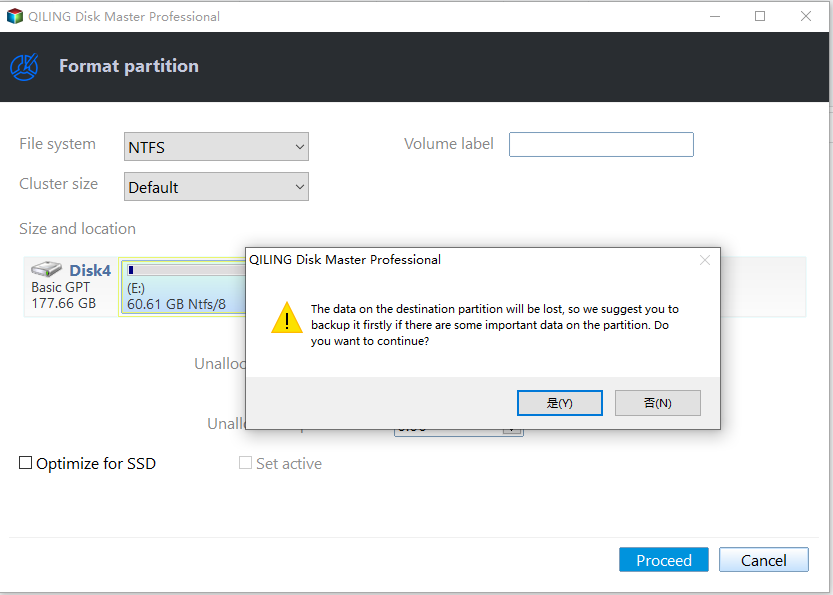
Step 4. In the Warning window, click "Yes" to continue.
By clicking Yes to allow this program to format the target RAW partition to the selected file system format on your drive.
Fix "Disk Showing as Raw Instead of NTFS" via CMD
To fix "disk showing as raw instead of NTFS" using the Command Prompt, you can use the `chkdsk` command to check and repair the disk. First, open the Command Prompt as an administrator, then type `chkdsk /f /x C:` (replace "C:" with the actual drive letter of the disk showing as raw). Press Enter to execute the command.
Step 1. Click on the "Start" button and then type "cmd."
Step 2. Now click on "Run as administrator."
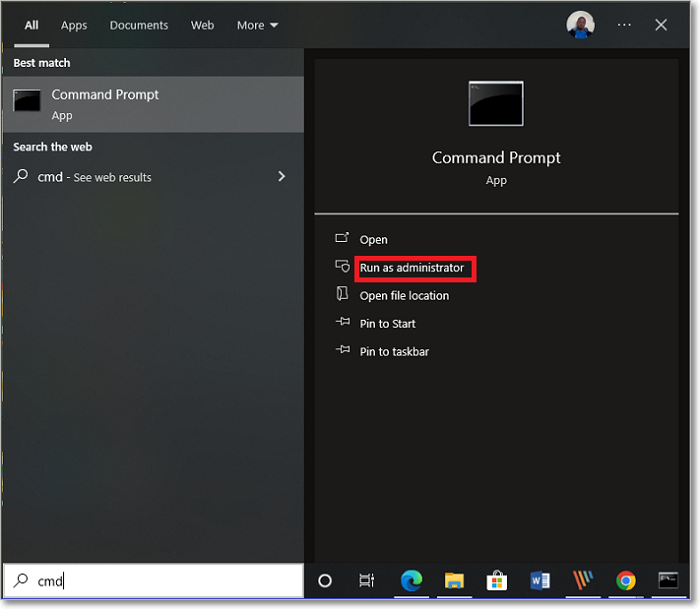
Step 3. In the command prompt, type "diskpart" and press "Enter."
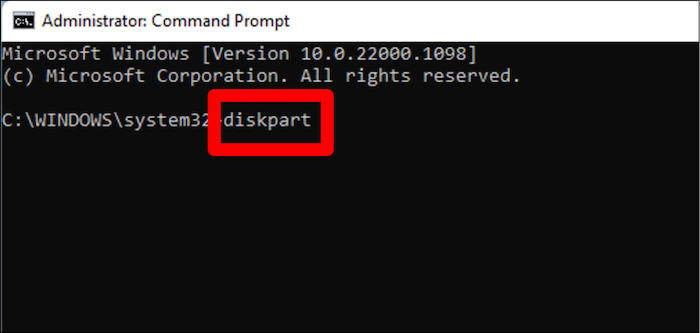
Step 4. Now, enter the following commands and press "Enter."
- list disk
- select disk n (replace the "n" with the corresponding hard drive number that is corrupted)
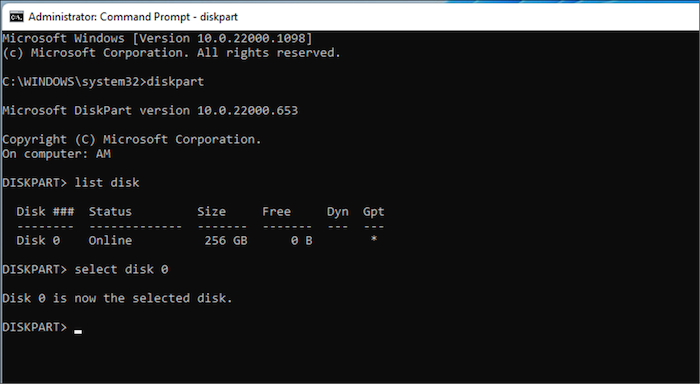
- attributes disk clear readonly
- clean
- create partition primary
- select part 1
- active (if the drive is the boot drive)
- format fs=ntfs quick (give a name to the drive)
- Assign
The drive will change from RAW to NTFS, and it will start working again, but be cautious of data loss when using diskpart commands.
Conclusion
A disk showing as RAW is often due to corruption, making it inaccessible and preventing you from accessing your files.
You can convert the drive again from RAW to NTFS or FAT32.
To make the process even easier, you can use Qiling Disk Master to convert your drive from RAW to NTFS/FAT32.
FAQs About Disk Showing as Raw Instead of NTFS
We have discussed fixing the disk showing as raw instead of NTFS. Here are a few questions to which we think you are looking for answers. Continue to read.
1. How do I fix the RAW hard drive to NTFS Diskpart?
If your hard drive is showing as RAW and you want to change it to NTFS using Diskpart, you can follow the solutions provided above to successfully make that change.
2. Can chkdsk fix a RAW drive?
A tool called Qiling Disk Master can be used to fix a drive that is showing as RAW, which cannot be fixed by CHDSK.
3. Why is my drive showing up as RAW?
If your drive is showing as RAW, it's likely because the drive wasn't formatted and no file system was assigned to it, resulting in the RAW status.
If a drive is corrupted or not formatted, it may appear as RAW, possibly due to a sudden PC shutdown or drive crash.
Related Articles
- [PS4 USB Format] How to Format USB for PS4
- How to Format SD Card for Switch [Everything You Need]
- Automatically Copy Files When USB Drive Connected
- Samsung TV USB Format: Best Choice and Efficient Tutorial
- Solve Zsh: Command Not Found: Pip on Mac | 4 Fixes
If you're encountering the zsh: command not found: pip error, this issue can be resolved using one of the top 4 methods outlined in this article. - How to Fix Zsh: Command Not Found: Python [with Video]
The zsh: command not found: python issue has been addressed in this article, with the top four solutions discussed. If data is lost while resolving this problem, Deep Data Recovery for Mac can recover the lost data.
Products
Articles & Tutorials
- Data Recovery
- Data Backup
- File Recovery
- File Backup
- System Backup and Restore
- Disk and Partition Clone
- Technical articles
- Mobile articles
- Disk Master Help
- Windows Data Recovery Tutorials
- Windows Secure Delete Tutorials
- Windows Partition Management Tutorials
- Windows File Backup and Restore Tutorials
- Windows System Backup and Restore Tutorials
- Windows Disk Backup and Restore Tutorials
- Windows Clone Tutorials