How Much Storage Do I Need on My Laptop [Windows/Mac]
Upgrading to a brand-new laptop can be a costly affair, but it also offers the opportunity to enjoy cutting-edge specifications that may have been lacking in your older Windows or Mac laptop.
When buying a laptop, one of the key factors to consider is storage capacity. While higher storage options can be more expensive, it's also unnecessary to opt for the lowest storage model. The ideal storage capacity depends on your specific needs, so it's worth considering how much storage you actually need on your laptop.
Buyers often wonder about laptop storage, as new laptops come with varying storage capacities. To check your laptop's storage, you can look for the information in the device's specifications or check the storage capacity in the system settings. When choosing a laptop, consider how you plan to use it - if you'll be storing large files, videos, or games, you'll need more storage. A general rule of thumb is to have at least 256GB of storage for basic tasks like browsing and office work, but if you need to store more, consider a laptop with 512GB or more.
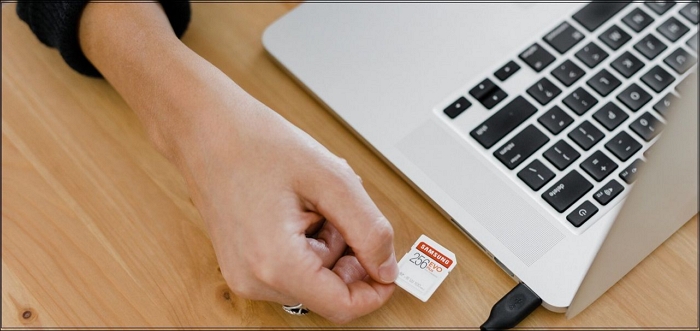
How to Check My Laptop's Storage
To check your laptop's storage, start by verifying how much storage is left on your device. A 256GB internal storage is considered sufficient for those who don't have large local collections of videos, photos, games, and music that can't be easily backed up to an external drive or cloud.
For Windows
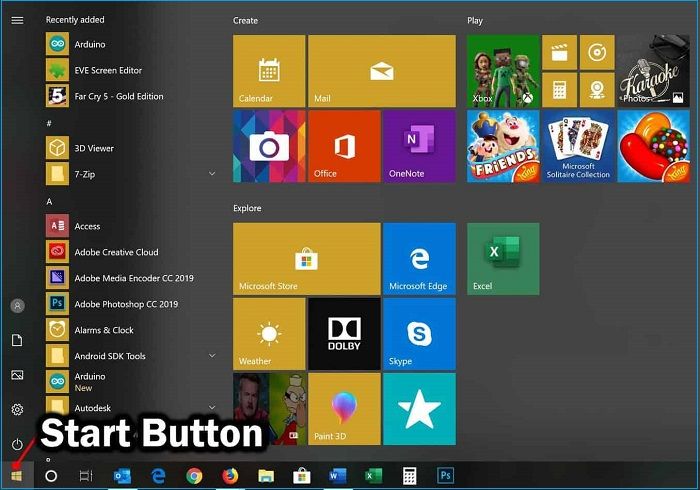
Step 1. For your Windows PC, hit the "Start Button".
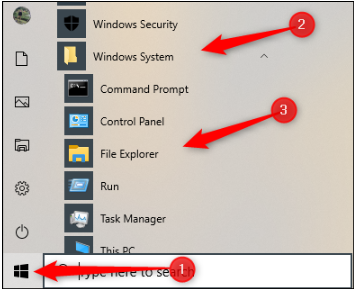
Step 2. Choose "File Explorer".
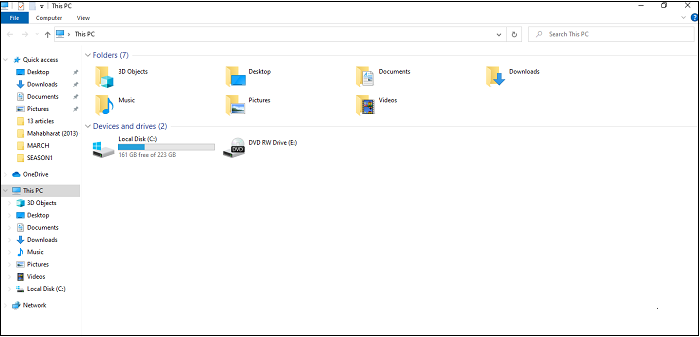
Step 3. Select "This PC".
For Mac
Step 1. Select the "Apple logo" from the top-left side.
Step 2. Choose "About this Mac".
Step 3. Opt for "Storage".
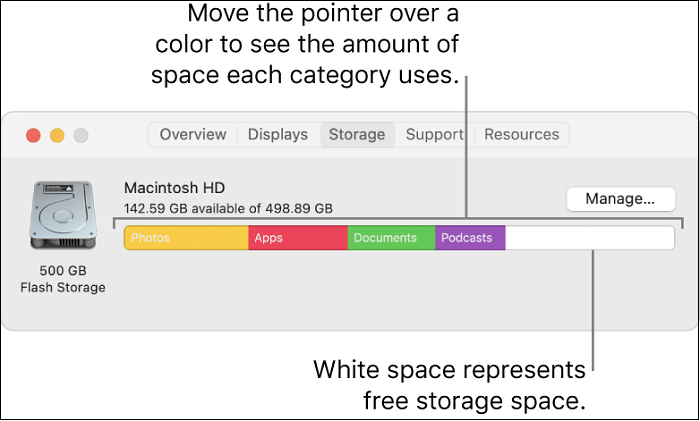
If you're still struggling to tell memory and storage apart on your Mac, you're not alone. To clarify, memory (RAM) is what your computer uses to run applications and multitask, while storage (hard drive or SSD) is where your files, programs, and operating system are saved.

Memory vs. Storage on Mac: What Are The Differences?
Computer users, especially the green hand for Mac, may get confused about Memory and Storage. To clarify, Memory (RAM) is used for temporary storage of data and applications, while Storage (Hard Drive or SSD) is used for permanent storage of files and data. Choosing the right one depends on the user's needs, with more RAM recommended for multitasking and demanding applications, and a larger storage for storing files and data.
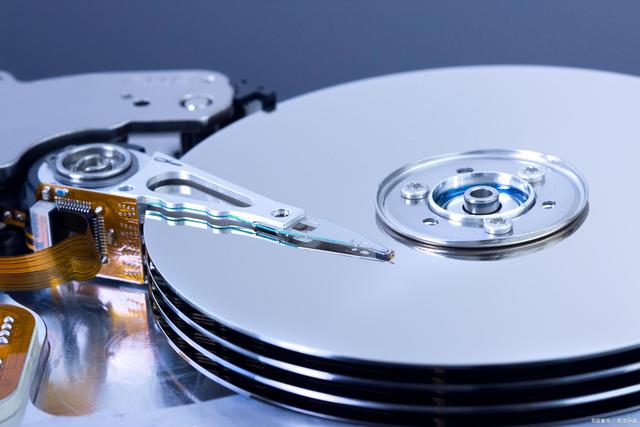
Things to Consider when Choosing Laptop's Storage
When buying a new laptop, storage is often the first consideration. However, people often overestimate their storage needs, leading to unnecessary overspending. To avoid this, consider the following three key factors when choosing a laptop's storage:
Your Budget
Considering budget, storage upgrades can be pricey, with HDDs being a more affordable option at around $0.04 per GB, compared to SSDs which cost around $0.25 per GB. However, HDDs are slower and may take hours to retrieve files.
The File Type You Store
A regular laptop user can rely on cloud-based storage for daily offline backups of crucial files, but with a fast internet connection, cloud storage can meet all their needs. Using services like iCloud for Mac or Google Drive for Windows is a budget-friendly option for storing videos and images, requiring minimal space on the PC.
A heavy laptop user requires a significant amount of physical storage, such as over 250GB, to accommodate their large files, like documentaries they're working on.
The Way Your Laptop Use
Moderate laptop users mainly use their device for basic tasks such as browsing the internet, sending emails, and watching streaming videos. They often opt for web-based applications like Google Docs and cloud storage services like iCloud, while also using streaming platforms like Spotify, Amazon Prime, YouTube, and Netflix for entertainment.
They need a high-performance laptop with ample storage space, possibly in the range of several TBs, to accommodate their large files and projects, such as documentaries and video editing.
How Much Storage Do I Need on My Laptop
The amount of storage needed on a laptop varies greatly from person to person, as individual needs and purposes for using a laptop differ. Users can be categorized into different groups based on their storage requirements, such as those who need storage for work, gaming, video editing, music production, or general use, each requiring a different level of storage capacity.
Professional Use
A professional laptop user may have varying storage needs, ranging from 512GB to 1TB, depending on their specific requirements. For instance, someone who only uses their laptop for daily office work may not need extensive storage, making 512GB a sufficient capacity. However, others who require more storage for documents and files may opt for the maximum capacity of 1TB.
Professionals such as professors, architects, and engineers often use laptops with larger storage capacities, up to 1TB, to run specialized software.
Students
512GB laptops are sufficient for school or university students, offering ample storage for presentations, documents, and multimedia files. While 1TB storage is available, it's not necessary for most students, making 512GB a suitable option.
Students with technical and science backgrounds are required to purchase a laptop with a 1TB storage-based laptop to allow for additional external storage in case of urgent needs.
FAQs about How Much Storage Do I Need on My Laptop
If you're still worried about how much storage you need on your laptop, see the FAQs below:
1. Is 256GB enough for a laptop?
The internal storage of 256GB is sufficient for most people who don't have several photos and videos stored on their laptops, and having 256GB is better than 128GB as it performs better.
2. Which is better 1TB SSD or 512GB SSD?
1TB SSD may be more powerful and larger than 512GB, but the latter is still a better choice due to its smaller size and lower capacity, making it more suitable for specific needs. The decision ultimately depends on individual requirements.
3. What are the storage types for laptops?
Laptops have two main storage types: SSD (Solid State Drive) and HDD (mechanical Hard Disk Drive). SSDs are smaller, faster, and quieter than HDDs, making laptops more lightweight and efficient.
Conclusion
If you're a daily user and student, it's recommended to choose a laptop with the minimum storage capacity, which is 256GB, to be cost-efficient on a tight budget.
If you're not concerned about money and want the best laptops, you may consider those with 512GB to 1TB storage, allowing for more personal documents to be stored. However, the decision ultimately comes down to your personal preference for storage space.
Related Articles
- How to Repair Damaged SD Card in Android
- How to Install Windows 10 on New PC [Step-by-Step Guide]
- Fix Windows 10 Stuck on Loading Screen Error
- How to Restore Backup From Google Drive to Every Device You Want
- What Are Fsck Commands and How to Use It in Linux? [2023 Guide]
Learn what fsck commands are and how to use them in Linux to check and repair file system errors. Covers common fsck options, syntax, and step-by-step repair instructions. - Full Backup vs. Incremental Backup: Definition, Pros and Cons
Full backup vs Incremental backup — which one is for you!? No more confusion about what backup you should choose. Click here to read this article to know what backup method you should use.
Products
Articles & Tutorials
- Data Recovery
- Data Backup
- File Recovery
- File Backup
- System Backup and Restore
- Disk and Partition Clone
- Technical articles
- Mobile articles
- Disk Master Help
- Windows Data Recovery Tutorials
- Windows Secure Delete Tutorials
- Windows Partition Management Tutorials
- Windows File Backup and Restore Tutorials
- Windows System Backup and Restore Tutorials
- Windows Disk Backup and Restore Tutorials
- Windows Clone Tutorials