How to Recover Lost Genshin Impact Data and Account in 2023
Data loss can be a nightmare, especially for avid Genshin Impact players. Accidentally reformatting your PC or losing access to an account can jeopardize all the hard work invested in the game. Fortunately, there are techniques available to recover lost data and accounts with ease, especially on Windows 11/10/8/7 devices. This blog post will guide you through a step-by-step process for Genshin Impact data recovery and account recovery, prioritizing convenience, safety, and precision.
Everything About Genshin Impact (Overview)
Genshin Impact is an open-world action role-playing game developed by miHoYo, set in the world of Teyvat where adventure and discovery await exploration. The game combines elements from traditional Gatcha games, open-world RPGs, and action games.
Players can explore a vast world with their custom characters, solving puzzles or engaging in combat to discover its secrets and legendary bosses. Genshin Impact offers an immersive experience with unique customization options like weapons, artifacts, and Talent Levels, providing something enjoyable for everyone.

Genshin Impact is a highly popular game with millions of players worldwide, and losing data can be distressing for its dedicated player base, which may occur due to various reasons.
- Server issues or software conflicts
- Technical bugs and human error while saving or transferring data
- While organizing files you accidentally delete an entire folder
- In Genshin Impact, failing to take proper backup measures can lead to data loss and frustration. It's essential to regularly save your progress and consider using cloud saves or external storage devices to ensure your game data is secure.
How to Recover Lost Genshin Impact Game Data (Recommended)
To prevent data loss in Genshin Impact, regular backups of saved files are essential, and keeping them secure from potential threats is crucial. However, if a backup is not available, a PC game recovery tool like Qiling Data Recovery Wizard can be used to recover lost data, offering a reliable solution for users.
Qiling Game Data Recovery Software
- Recover lost game data on PC/Steam/PS4/PS5 in a few simple steps
- This software supports almost all game save recovery, including popular titles like It Takes Two, Elden Ring, and Red Dead Redemption, among others.
- You can recover deleted files from various storage devices, including hard drives, solid-state drives (SSDs), USB flash drives, pen drives, SD cards, and cameras.
Download Qiling hard drive recovery software and retrieve lost Genshin Impact data.
Step 1. Select a location and start scanning
Launch Qiling Data Recovery Wizard, choose the partition where you lost data, and click "Scan".

Step 2. Filter and preview files
To find the files you need, use the file format filter on the left or upper right corner, and then click the "Preview" button or double-click a file to preview its content.

Step 3. Recover lost data or files
To recover lost data, select the file, check the box next to it, and click "Recover" to restore the lost data to a secure location.

After recovering your Genshin Impact data, you'll need to copy the game data to a specific folder on your Windows computer. To do this, simply navigate to the folder where your game data is saved, which is typically located on your computer, and copy the data to the designated folder.
HKEY_CURRENT_USER\SOFTWARE\miHoYo\Genshin Impact (In Registry)
How to Recover Genshin Impact Account (with Video)
Recovering a Genshin Impact account is easy and can be done in a few simple steps. To do this, you simply need to email Genshin Impact and follow the steps they provide.
If you prefer a step-by-step guide, follow the steps below:
Step 1. Send an email to Genshin Impact
To recover your account, send an email to support@idiskhome.com with the subject "Account Recovery" and you will receive a link to retrieve your account.
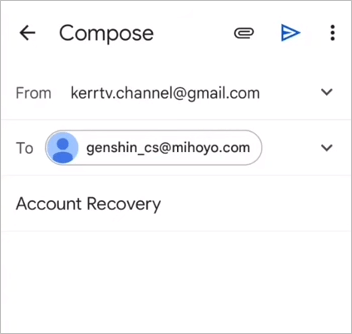
Step 2. Open the account retrieval link
Provide your ID, username, a registration email, country, city, platform, etc.
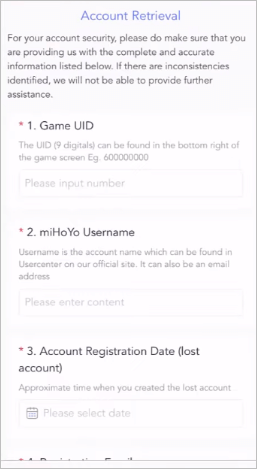
After submitting the form, you'll need to wait a few days for Genshin Impact support to review your request.
Conclusion
Genshin Impact is an impressive open-world adventure game filled with captivating characters, stories, and activities. If you're experiencing issues with lost game data or account recovery, we recommend using Qiling data recovery software, which boasts 18 years of experience in this field and can help restore lost game data.
To avoid any issues in the future, remember to regularly back up your Genshin Impact game data. If you do encounter problems, such as losing your account or data, take a deep breath and know that you can recover it with Qiling data recovery software and the account retrieval link. Don't let setbacks hold you back - download the software and start recovering what's been taken from you.
Genshin Impact Data Recovery FAQs
Read the questions and answers below to get additional help for Genshin Impact data recovery and account recovery.
1. Does Genshin delete inactive accounts?
Your Genshin account won't be deleted, but you won't be able to access it. You can unlink and relink to a new email if you'd like.
2. Will I lose my progress if I uninstall Genshin Impact mobile?
If you uninstall and reinstall the app, your game statistics, which are linked to your email address, will remain intact, so you won't lose your progress as long as you log in with the same email address.
3. How do I restore lost game data on Xbox One?
To recover saved game data on Xbox One, follow these steps:
- Use Qiling Data Recovery Wizard
- Re-Download Xbox One Game
4. How long does it take for MiHoyo to delete an account?
The Genshin Impact support team should perform the Mihoyo account deletion within 30-60 days.
5. How do I email miHoYo?
You can email miHoYo at support@idiskhome.com for assistance, regardless of whether you have an account, can log into your account, or are able to run the game.
Related Articles
- 2023 Solutions| How to Recover Deleted GoPro Files [Videos & Photos]
- Call of Duty Mobile Account & Data Recovery [2023 Troubleshooting]
- How to Recover Locked SD Card Pictures/Files
- How to Recover Data from 2TB External Hard Drive in Windows 11/10/8/7
- Genshin Impact Progress Lost : Restore Lost Genshin Data [Quick & Easy]
if you encounter the Genshin Impact progress lost. We will introduce two methods to recover lost Genshin Impact game progress. You can recover game data with Deep Data Recovery or recover the lost account. - Genshin Impact Screenshot Folder Missing? Get It Back Now!
Your Genshin Impact Screenshot folder is missing without any signal. How to fix this error and restore lost Genshin Impact pictures? This post gives you the best solutions to find the missing Genshin Impact screenshot folders and restore lost Genshin Impact screenshots.
Products
Articles & Tutorials
- Data Recovery
- Data Backup
- File Recovery
- File Backup
- System Backup and Restore
- Disk and Partition Clone
- Technical articles
- Mobile articles
- Disk Master Help
- Windows Data Recovery Tutorials
- Windows Secure Delete Tutorials
- Windows Partition Management Tutorials
- Windows File Backup and Restore Tutorials
- Windows System Backup and Restore Tutorials
- Windows Disk Backup and Restore Tutorials
- Windows Clone Tutorials