Genshin Impact Progress Lost : Restore Lost Genshin Data [Quick & Easy]
Why Did I Lose My Progress in Genshin Impact
Genshin Impact is a popular open-world action RPG game where players embark on a single-player campaign as a visitor from another planet searching for their long-lost sister and solving mysteries in Teyvat. The game offers a vast, open world to explore, where players can fly, swim, and climb through diverse landscapes, from oceans to mountains.

In Genshin Impact, progress can be lost due to server maintenance, game updates, or other technical issues. This can result in the loss of in-game progress, including character levels, equipment, and resources. Players may also experience progress loss if they reinstall the game or switch between different save slots.
- Logging in with the wrong account in Genshin Impact can cause you to lose your progress, especially if you have multiple accounts. This can happen when you accidentally log in to the wrong account, resulting in the loss of your game data.
- Pick the wrong server. You may have chosen the right account but the wrong server.
- If your Genshin Impact account has been hacked, you may lose progress and access to your in-game data, which can be frustrating and time-consuming to recover. To prevent this, it's essential to keep your account information secure and up-to-date, and to be cautious when using public computers or networks to play the game. If you suspect your account has been compromised, contact the game's customer support team immediately to report the issue and seek assistance in recovering your account.
- Resetting a Genshin Impact account will result in the loss of all progress, including characters, weapons, and other data.
- Accidentally deleted the whole game folder. You may have moved the Genshin Impact game folder to recycle bin folder and emptied it.
- Genshin Impact crashes on PC may result in data loss due to the game's inability to save progress when it crashes.
In situations where the game is stuck in an endless loop, you can try restarting the game or checking for any updates. If you're experiencing progress loss due to a corrupted save file, you can try deleting the save file and then restarting the game. If you're experiencing progress loss due to a corrupted save file, you can try deleting the save file and then restarting the game.
Fix 1. How to Fix Genshin Impact Progress Lost with Software
When Genshin Impact or Atomic Heart keeps crashing on your PC, your game progress may be lost. If you've deleted the game folder, you might lose progress too. To fix this, you can use a game data recovery program to recover your lost progress.
Choosing the right free download data recovery software can be overwhelming, but it's worth considering options that can recover lost progress in specific games like Genshin Impact. Deep Data Recovery is one such software that can help recover lost data, making it a viable choice for users who need to recover their progress in this game.
- To fix the Genshin Impact screenshots folder missing issue, you can use a recovery tool to restore lost screenshots. This tool can help you recover deleted or missing screenshots from your Genshin Impact game. It's a straightforward process that can be completed in a few steps.
- Restore Hogwarts Legacy missing save, Genshin Impact lost progress, and support game recovery of other games.
- Data recovery involves recovering data from various storage devices, including the local PC, USB flash drives, external hard drives, and other devices, to retrieve lost or deleted files and information.
Step 1. Select a location and start scanning
Launch Deep Data Recovery, select the partition where the lost data is located, and click "Search for Lost Data".

Step 2. Filter and preview files
Use the file format filter on the left or upper right corner to find the files you need, or search for the file name in the search box, which is the fastest way. Once you find the file, click the "Preview" button or double-click it to view its content.

Step 3. Recover lost data or files
Click the checkbox next to the file and click "Recover" to restore the lost data to your local storage or Cloud drive.

Fix 2. Solve Genshin Impact Progress Lost with Account
If you've lost your Genshin Impact progress due to losing your account, it's best to recover your account as soon as possible.
If you need to recover your Genshin Impact account, send an email to their support team. They will send you a link to confirm your ownership of the account. Once they confirm, they'll send another email. To complete the process, follow the detailed tutorial provided to recover your account.
Step 1. Send an email to Genshin Impact support at support@idiskhome.com. You must mention that you can no longer access your Genshin Impact account in the email and add some descriptions of your issue.
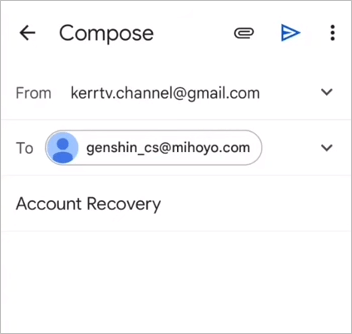
Step 2. After sending the email, you will receive an account retrieval link from Genshin Impact support within 24 hours. Fill in all the required information in the link to recover your account.
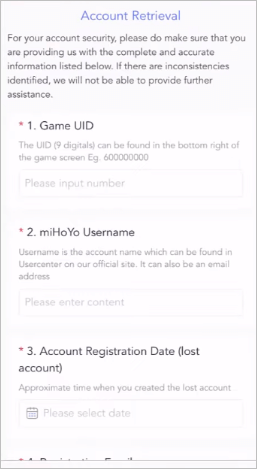
Step 3. To confirm your account, you'll need a new email address that's never been used for a Genshin Impact account. Click "Submit" to finalize the form.

Note: If you've lost your Genshin Impact progress, you can recover your account and potentially recover your lost progress. However, please note that it may take a few days to get a response from the Genshin Impact team.
Does Genshin Impact Auto Save Progress
Genshin Impact is an online RPG game that uploads data to the cloud. As long as you don't experience system or app crashes, the game will automatically save your progress.
Your game progress will automatically be saved whenever you make a decision or take an action in the game. This saved progress is stored on a miHoYo server in your area, allowing you to pick up where you left off at any time.
Your Genshin Impact progress will likely not be lost when you uninstall the game and redownload it, as long as you haven't removed all account information from the game's server. This means you can uninstall and reinstall the game without worrying about losing your progress. However, if you've deleted all account-related data, you'll have to start from scratch.

Conclusion
When you experience progress loss in Genshin Impact on your PC, you can recover lost progress using Deep Data Recovery. This software helps locate the lost game folder and recover screenshots, allowing you to restore your game progress.
If you've lost progress due to a hacked or lost game account, it's best to recover your lost Genshin Impact account using the method we'll outline.
Genshin Impact Progress Lost FAQs
Have you fixed the Genshin Impact progress lost after reading the guide? Here are four additional questions about the Genshin Impact progress lost:
1. Where is the Genshin Impact file located?
To find the Genshin Impact file location, open the 'Program Files' on your computer and navigate to the Genshin Impact folder. The game data is stored in the 'Genshin Impact Game' folder. For PS4 or PS5 users, go to 'Saved Data and Game/App Settings' in settings to access your Genshin Impact data.
2. Will Genshin Impact keep your progress if you uninstall it?
Your Genshin Impact game progress will be saved in your account, and you can restore it when you reinstall the game, even if you uninstall it. Just ensure your account is secure and you haven't reset your progress before.
3. Can I recover the Genshin Impact account?
If your account gets lost, you'll need to recover it by sending an account recovery email to the Genshin Impact support team, filling in a form with your personal info, and then waiting for their confirmation before receiving an email to restore access.
4. How to recover the lost Genshin Impact folder?
With Deep Data Recovery, you can quickly recover the lost Genshin Impact folder.
- 1. Scan the C drive with this software, and all the lost files will appear.
- 2. Search the Genshin Impact game folder with the search box.
- 3. After selecting the game folder, recover it by clicking the button.
Related Articles
- How to Recover Files from Fdisked Hard Drives in Windows 10/11
Deep Data Recovery is a powerful data recovery software that can recover data from fdisked drives. It can automatically run partition recovery and quickly recover files! - How to Recover Deleted Files from Recycle Bin After Empty Windows 11/10
Is it possible to recover deleted files from Recycle Bin after empty? We provide you with three ways to recover deleted files from Recycle Bin after empty. You can restore permanently deleted files from Recycle Bin with ultimate data recovery software. - How to Recover Lost Save Data in the Star Wars Jedi: Survivor
if you lose your Star Wars Jedi: Survivor game save. Four efficient methods are provided on this page to recover deleted saved data in the Star Wars Jedi: Survivor. Qiling Data Recovery Wizard is the best program for recovering lost saved data. - How to Recover Permanently Deleted Videos [Top 5 Methods]
When you think the videos are permanently deleted on your PC, they may still remain. In This guide, we'll introduce five simple methods to help you learn how to recover permanently deleted videos on Windows. - Acer Iconia Recovery: How to Recover Files from Acer Iconia Tablet
Want to recover data from your Acer Iconia tablet? This article will guide you through the process of recovering deleted files from your Acer tablet, helping you get your important data back. - 4 Ways for How to Recover Deleted Photos from Camera Memory/SD Card [2023]
4 ways to recover deleted photos from a camera memory SD card are: restoring from the "recently deleted" section, checking the "trash can" for recoverable photos, accessing a backup of the deleted photos, or using digital camera SD card recovery software to retrieve the lost images.
Products
Articles & Tutorials
- Data Recovery
- Data Backup
- File Recovery
- File Backup
- System Backup and Restore
- Disk and Partition Clone
- Technical articles
- Mobile articles
- Disk Master Help
- Windows Data Recovery Tutorials
- Windows Secure Delete Tutorials
- Windows Partition Management Tutorials
- Windows File Backup and Restore Tutorials
- Windows System Backup and Restore Tutorials
- Windows Disk Backup and Restore Tutorials
- Windows Clone Tutorials