Disk Clone vs Entire Machine Backup: Every Detail You Want to Know
Microsoft Windows does not have a built-in disk cloning utility. However, third-party backup software like Qiling Backup can provide comprehensive data protection, including cloning features for Windows computer backup and hard drive/partition clone.
Why Do People Get Confused by Clone or Backup?
People often struggle to distinguish between two seemingly unrelated concepts when they are combined. We believe this confusion stems from the fact that the two terms, which have distinct technological and application scenarios, become indistinguishable when paired together.
- Lack of basic knowledge because we're not all IT professionals
- Both can make a full copy of your data and operating system, but a clone is a bit more involved and requires more technical expertise. Cloning involves creating an exact replica of your entire system, including the operating system, applications, and all data, whereas a backup just copies your data.
- Both require an additional drive to save the data on the selected drive.
- Either a backup image or a cloned drive can be used for the purpose of recovery.
What's Disk Clone?
* Disk Clone vs System Clone: What's the Difference?
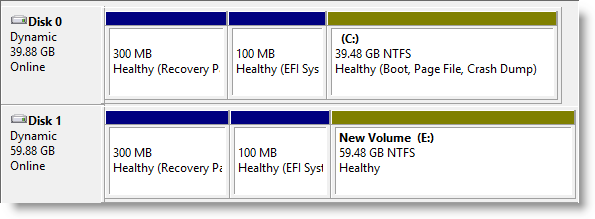
Cloning a disk creates an exact copy of the original hard drive's contents, including data, programs, partition style, and configurations, resulting in a new identical drive with the same layout.
Important: Some users prefer to take a clone as a backup solution, which allows them to access their backed-up files at any time without restoring them.
What's Backup?
*Find out what is a system backup image.
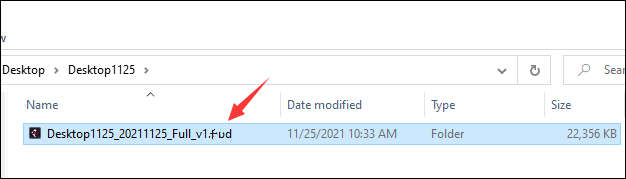
Backup can be applied to separate files/folders, operating systems, or the entire computer hard drive contents by saving an image file that contains the selected items on the current drive. When using Qiling Backup, for example, creating a backup of individual files, OS, or a hard drive results in a .pbd image file that can be restored to the current hard drive or a new one.
Important: Backup image files cannot be directly accessed. Instead, they must be restored to access the backed-up content.
5 Differences: Disk Clone vs. Entire Machine Backup
The differences between cloning and backing up a computer are significant, with cloning creating an exact replica of the original hard drive, while backing up creates a copy of the data. Cloning involves copying the entire hard drive, including the operating system, programs, and data, whereas backing up only saves the data, leaving the original hard drive intact. This distinction is crucial, as cloning can be time-consuming and may require a similar hardware setup, whereas backing up is generally faster and more flexible.
- 1. Clone and backup are two separate processes. Clone creates an exact duplicate of a hard drive, resulting in two identical drives.
- 2. Cloning a hard drive involves copying everything on it, whereas backing up is a more targeted process that can be applied to specific files, the operating system, or even the entire hard drive.
- 3. Cloning a hard drive requires a physical, empty hard drive that is larger than the used space of the source drive, whereas a backup file is much smaller and can be saved to a local drive, network drive, NAS, or cloud.
- 4. A cloned hard drive with an operating system is bootable, but you can only use a backup image by performing recovery. This means that the cloned hard drive can start up and run like a normal computer, but to utilize the backup image, you need to initiate the recovery process.
- 5. Clone is a one-time behavior and backup is continuous.
When to Use Clone
If you're unsure whether to make a clone or a backup, consider the following common clone cases: cloning a hard drive can save you the hassle of rebuilding a computer by downloading programs or reinstalling the operating system. To start cloning a hard drive, make sure you've downloaded Qiling Backup, which can help you navigate the process and understand when cloning is the best option.
- Upgrade a small HDD to a large HDD
- Change an old hard drive to a new hard drive
- Migrate Windows 11/10 to HDD/SSD
- Replace a failing hard drive without losing data
- Swap a slow HDD with a fast SSD
Clone Hard Drive in Windows 11
Clone your Windows 11 hard drive effortlessly with this step-by-step guide. Click now to learn how to clone a hard drive in Windows 11.
When to Use Backup
Data backup is a long-Maintaining data security is a daily routine that everyone should follow, especially business owners who should pay more attention to cyber security and database safety. Qiling Backup offers a solution for businesses with rich-featured backup solutions and flexible backup schedules, making it a great addition to your daily routine. Whether you have specific demands or not, incorporating a backup into your daily job can provide peace of mind and protect your valuable data.
- Yes, many people have experienced data loss due to accidental deletion, formatting, hard drive corruption, or sudden power off, which can be frustrating and stressful. It's a common issue that can happen to anyone, regardless of their technical expertise.
- Lack of the system installation skill or experience
- Prevent system crash or data loss from virus/malware attack
Qiling Backup: A Companion of Backup and Clone
Qiling Backup, a globally renowned Windows backup utility, also offers a clone feature. Clone and backup are distinct methods used in different situations, each with their own advantages and disadvantages.
As a backup tool, it allows users to create backups of files, folders, operating systems, and entire computer hard drives. After a first full backup, users can set a backup schedule to execute the next backup automatically, either by differential or incremental backup. Additionally, it enables the creation of a bootable rescue media to access a dead computer and perform a system restore.
Qiling Disk Master is a powerful cloning tool that has earned a spot in the top 5 hard drive cloning software in 2022. Its user-friendly interface features a simple wizard guide, making it easy to use.
This post guide clarifies the difference between clone and backup, and explores their respective application scenarios. By understanding the distinction between these two terms, users can now make informed decisions when coordinating with Qiling Backup to either backup or clone their data with ease.
Related Articles
- cloud backup vs. Local Backup - Which One Is Better? Or Both?
- Know All: Qiling Backup Security Zone
- Top 3 Reasons to Download Qiling Cloning Software for HDD SSD Clone/OS Migration
- Execute Bootable Clones on Windows 11 Without Losing Data
- 2 Ways to Unpack Windows Backup File and Restore Individual Files
This tutorial offers you two solutions to unpack Windows backup file and restore individual files. You'll find an advanced backup tool to help you with individual file recovery. - Fix Volumes Larger Than 2088958 Megabytes Cannot Be Protected
Learn the workaround to fix the error that volumes larger than 2088958 megabytes cannot be protected when uing Windows Server Backup in Windows Server 2008 or 2008 R2.
Products
Articles & Tutorials
- Data Recovery
- Data Backup
- File Recovery
- File Backup
- System Backup and Restore
- Disk and Partition Clone
- Technical articles
- Mobile articles
- Disk Master Help
- Windows Data Recovery Tutorials
- Windows Secure Delete Tutorials
- Windows Partition Management Tutorials
- Windows File Backup and Restore Tutorials
- Windows System Backup and Restore Tutorials
- Windows Disk Backup and Restore Tutorials
- Windows Clone Tutorials