[microsoft edge vs internet explorer 11] Internet Explorer End of Life! Is Microsoft Edge the Future?
Hi, latest news to concern about:
- Internet Explorer will be retired and end of support on June 15, 2022, marking the end of its life cycle.
- Microsoft Edge, another still-functioning website, will address your needs.
While it's technically possible to use Internet Explorer after 2022, Microsoft no longer supports the browser and recommends using Microsoft Edge instead. The main difference between the two is that Edge is a more modern and secure browser, while IE is an outdated browser that is no longer receiving updates or security patches. If you're looking for a reliable browsing experience, using Microsoft Edge is the recommended choice.
Page Content:
What Is Microsoft Edge, and Why Do I Need It?
Microsoft Edge VS Internet Explorer 11: Which is Better?
Microsoft Edge Download
Troubleshooting: Microsoft Edge Won't Open in Windows 10/11
Extra Tip: How to Transfer Microsoft Edge to Another Computer
What Is Microsoft Edge, and Why Do I Need It?
Microsoft Edge is a web browser developed by Microsoft, first released in 2015, and included with Windows 10 as a replacement for Internet Explorer.
Microsoft Edge offers better security, faster performance, and support for newer web standards, making it a decent browser, especially for Windows 10 or macOS users.
The Microsoft Edge browser offers various features to enhance user productivity, including.
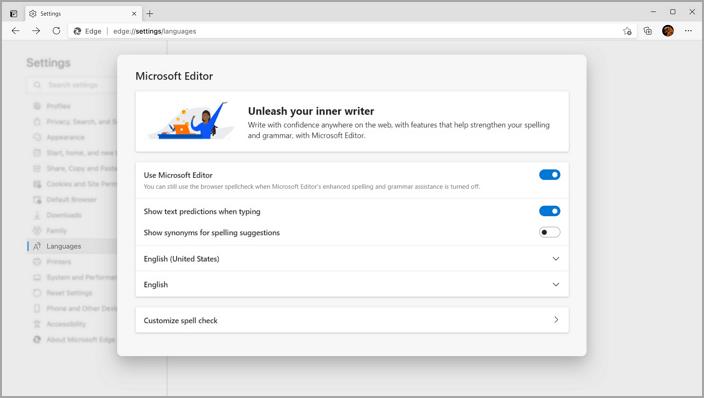
New Features - Edit Help, Travel Recommendation, Result Preview
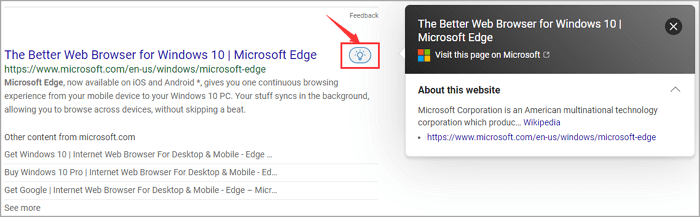
The new features enable users to write confidently on web pages from the browser, ideal for note-taking or filling out online forms. It also allows users to preview search results before clicking on a link, saving time by scanning results and quickly finding what they need.
Access Editor Settings: Go to edge://settings/languages
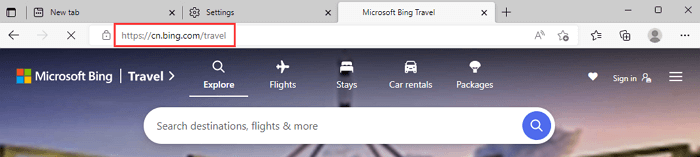
Get inspiration for your next travel destination by visiting the Bing website and searching for the ideal place to visit.
Click the icon to review the result:
Other Useful Functions
The Microsoft Edge browser is packed with features that can improve productivity and safety while browsing the web, including features to save money while shopping and protect privacy and security online.
Microsoft Edge VS Internet Explorer 11: Which is Better?
Microsoft Edge is Microsoft's new web browser, designed to replace Internet Explorer, with key differences in rendering web pages.
Microsoft Edge is designed to be more HTML5 compliant than Internet Explorer, with a faster and more efficient rendering engine called EdgeHTML.
Microsoft Edge has features not found in Internet Explorer, including a note-taking tool and support for Cortana.
Microsoft Edge is generally considered a better browser than Internet Explorer 11 due to its differences in performance, security, and compatibility.
Microsoft Edge Download
If you're looking to download Microsoft Edge, the process is pretty simple.
1. Just head to the Microsoft website and download the Edge installer.
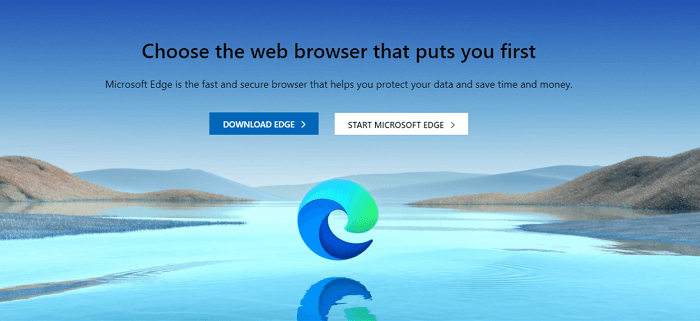
Microsoft Edge is available on multiple platforms, including Windows, Android, macOS, and iOS.
2. Once the download is complete, run the installer and follow the on-screen instructions to complete the installation.
Microsoft Edge is installed on your computer, allowing you to start using it immediately. The entire process should take just a few minutes, making it quick and easy to get started with browsing.
Troubleshooting: Microsoft Edge Won't Open in Windows 10/11
If Microsoft Edge won't open, there are several solutions that may help fix the issue.
Solution - Repair or reinstall Microsoft Edge
If Microsoft Edge won't open or opens briefly then closes, you may need to repair or reinstall it. To do this, you can try the following:
1. To open the Programs and Features window, type "appwiz.cpl" in the search box on the taskbar, and then select Appwiz.cpl from the results list.
2. To uninstall a program, go to the "Programs" section in the Control Panel, select "Uninstall a program", and if prompted, enter an administrator password or confirm the action.
3. Select Microsoft Edge from the list of programs and then click on Uninstall.
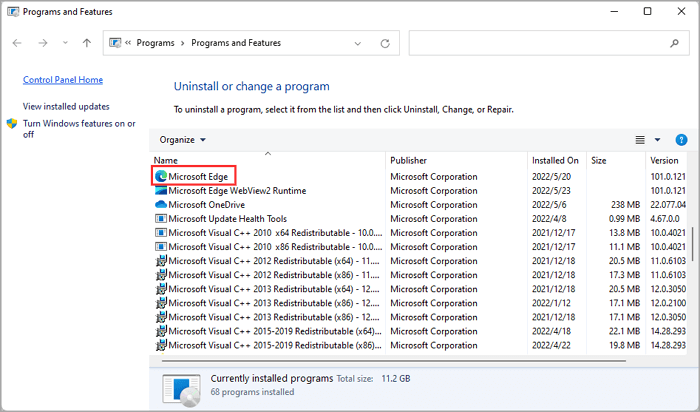
Go back to re-download the browser.
Final Words
Microsoft is urging users to switch to Microsoft Edge, a modern browser released in 2015, designed for speed and security, supporting the latest web standards and features not available in Internet Explorer. With Microsoft's commitment to continuing support for Edge, it is clear that Edge is the future of its web browser offerings. For users looking for a new browser, Microsoft Edge is the obvious choice.
Extra Tip: How to Transfer Microsoft Edge to Another Computer
If you're trying to move Microsoft Edge to another PC without reinstallation, Qiling Disk Master can help. This software enables the transfer of installed programs from one computer to another, making it a useful tool for migrating Microsoft Edge and other programs to a new PC. Additionally, Qiling Disk Master facilitates the transfer of files and settings between PCs or drives.
Related Articles
- How to Transfer Files from PC to PC Using OneDrive
- The Quickest Way to Transfer Data from One Windows Server to Another
- How Do I Move My Google Drive Folder to Another Location? [Step-by-Step Procedure]
- Windows 11/10 Won't Boot? Try 6 Fixes and Protect Your Data!
- Why can't you create an emergency disk in a domain environment computer?
This post tell you how to create an emergency disk in a domain environment computer. - How to Create A System Image Backup in Windows 10?
Making a complete system restore point is the best way to protect yourself from Windows 10 crashes. Please read this article for detail.
Products
Articles & Tutorials
- Data Recovery
- Data Backup
- File Recovery
- File Backup
- System Backup and Restore
- Disk and Partition Clone
- Technical articles
- Mobile articles
- Disk Master Help
- Windows Data Recovery Tutorials
- Windows Secure Delete Tutorials
- Windows Partition Management Tutorials
- Windows File Backup and Restore Tutorials
- Windows System Backup and Restore Tutorials
- Windows Disk Backup and Restore Tutorials
- Windows Clone Tutorials