VSS 0x80042324: Shadow Copy Not Supported on Volume
Quick Navigation:
- What 0x80042324 Means
- Confirm Why the Volume Is Refused
- Protect Data Without a Snapshot
- Image the Volume Instead
- Frequently Asked Questions
A backup that relies on a shadow copy ends with 0x80042324 and the explanation that the volume is not supported by the provider. The provider is the component that creates snapshots, and it has refused the volume before any data was read. The cause is usually the volume itself: a FAT32 or exFAT disk, a locked BitLocker drive, a dynamic or spanned volume, a Storage Spaces member, or a network location. The files are not damaged and the disk is not necessarily failing. This page explains which volumes can be copied, how to confirm the reason, and how to back up the data when a snapshot is impossible.
What 0x80042324 Means
Volume Shadow Copy Service works through a provider, and the provider must understand the volume it is asked to freeze. 0x80042324 is its refusal: the volume layout, the file system, or the current state of the drive is outside what it can snapshot. The backup job stops at the planning stage, so the destination receives nothing and the source is not modified.
File system is the first filter. Shadow copies are built on NTFS features, and a FAT32 or exFAT volume does not offer them. That includes most USB sticks, camera cards, and small external drives that shipped preformatted for compatibility with other devices. A volume formatted as exFAT still holds files perfectly well; it just cannot be the source of a snapshot.
Volume type is the second filter. A dynamic disk, a spanned or striped set, and some Storage Spaces configurations present a layout that the provider does not support. A BitLocker volume that is locked or waiting for activation also refuses the request, because the provider cannot read through the encryption until the volume is unlocked.
A mapped network drive is not a volume at all. It looks like a letter in File Explorer, but the data lives on another machine, and a local provider cannot take a snapshot of it. The same applies to a folder that points at a share through a mount point.
Confirm Why the Volume Is Refused
Read the file system and the disk type before changing anything. Open Disk Management, a Windows built-in console that belongs to Microsoft, and check the File System column and the disk description for the volume that failed. A volume marked FAT32, exFAT, Dynamic, or Storage Space matches the error immediately.
Check BitLocker next. A drive that shows a padlock in File Explorer is encrypted, and a drive that asks for a key at startup is locked. Unlock it with the recovery password and let the protection finish before you run the backup again. A drive whose protection is suspended is also a poor candidate until it is resumed.
Look at how the volume is reached. If the letter belongs to a mapped share, or the folder is a mount point for a VHD, the provider sees a redirect rather than a local disk. Back up the local volume that hosts the data, or image the VHD file itself instead of the mounted folder.
If the volume is a basic NTFS disk with BitLocker unlocked and it is still refused, read the VSS entry in Event Viewer for the provider name. A third-party provider registered by another backup product can take over and then reject volumes it does not support. Event Viewer is a Microsoft tool, not part of Qiling Disk Master, and is used here only to read that record.
Protect Data Without a Snapshot
Without a snapshot, open files cannot be captured in a consistent state. Close Outlook, database consoles, and any application that writes continuously before you copy folders by hand, and let the copy finish before those programs are opened again. A manual copy made while a file is being written can produce a document that will not open.
A sector-level image sidesteps the problem. It reads the blocks of the volume instead of asking applications to flush their files, so it works on FAT32, exFAT, and layouts that VSS refuses, and it records a state that is consistent enough to boot from. The trade-off is size: every allocated block is copied, including free space inside files.
Take a full copy of the important data before you convert a file system or rebuild a dynamic disk. A conversion writes to the volume, and a power loss in the middle can leave it unmountable. The error code is a reason to change the backup method, not a reason to change the disk layout in a hurry.
Image the Volume Instead
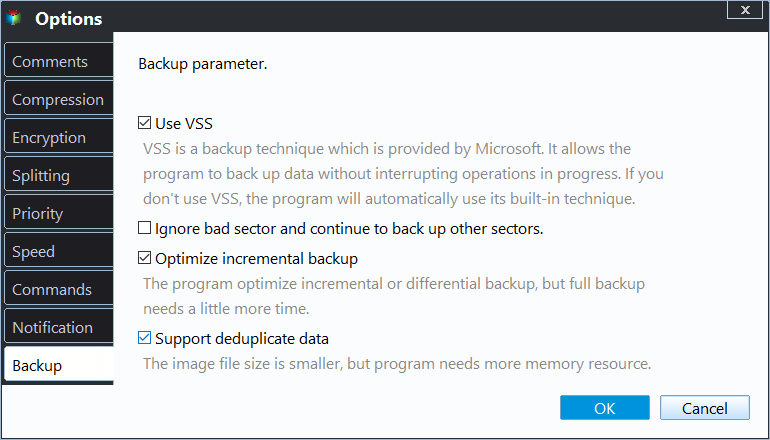
Qiling Disk Master can image a disk or partition block by block, so a volume that refuses a shadow copy is still protected. Open Options and clear Use VSS when the provider keeps rejecting the volume, and the program uses its built-in technique rather than waiting for a snapshot that will never be created.
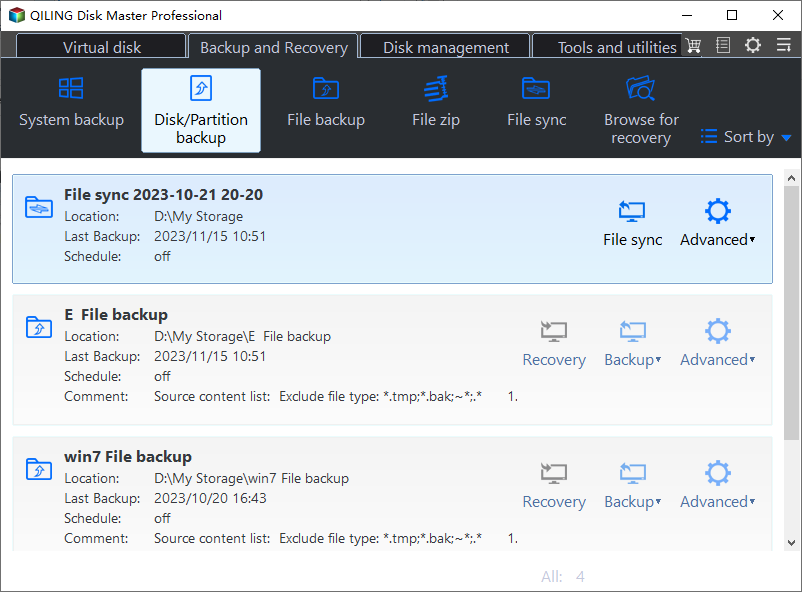
Step 1. Open Disk/Partition Backup
On the Backup and Recovery tab, click Disk/Partition Backup. The page lists every physical disk with its style, capacity, and partition count, including volumes that carry no drive letter.
Step 2. Select the Volume and a Destination
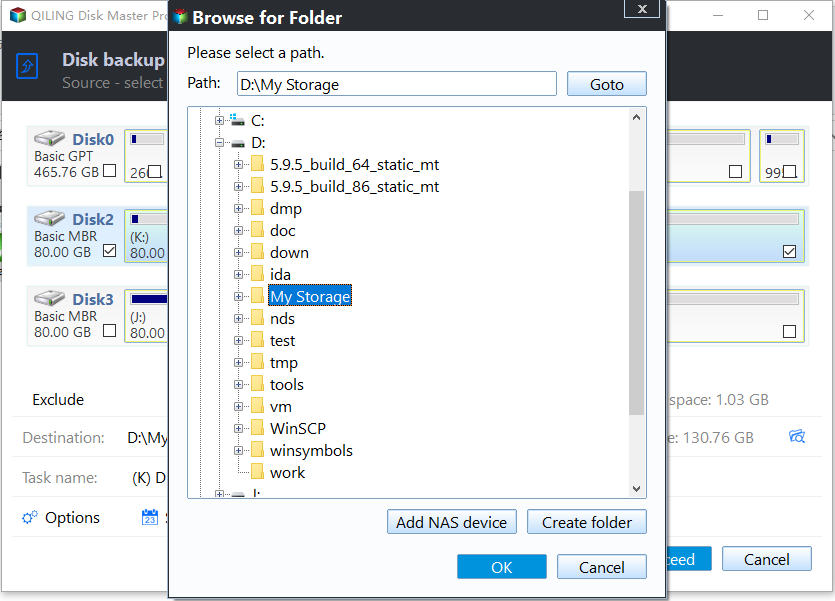
Tick the disk or partition you need, then browse to a destination with room for the full used size. A sector-level image copies every allocated block, so compare the required space with the free space before you continue.
Step 3. Clear Use VSS for the Refused Volume
Open Options and check the Backup tab. Clear Use VSS when 0x80042324 names the selected volume, and the program falls back to its built-in technique instead of asking the provider for a snapshot it will not create.
Step 4. Preview and Proceed
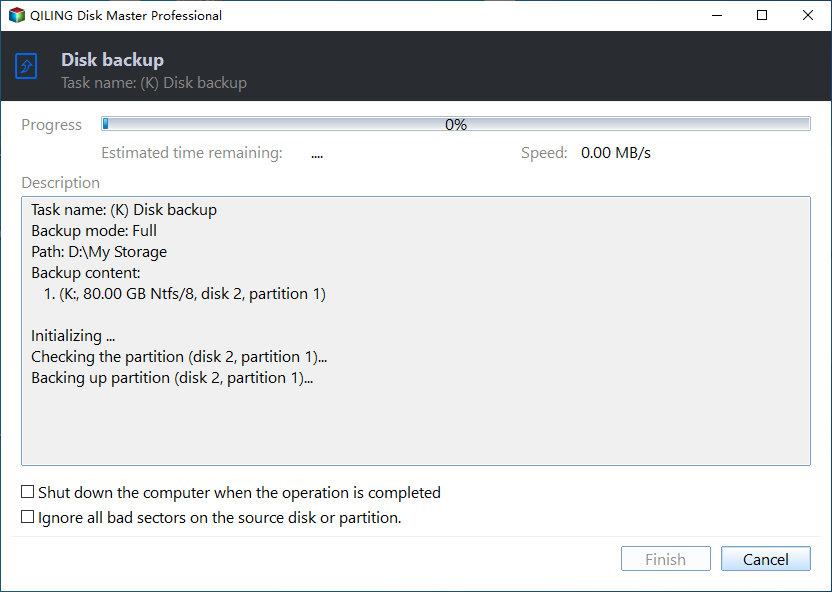
The summary above the buttons lists the disk, the mode, and the destination. Preview the pending operation and click Proceed; the progress log names each partition as it is read, and a sector-level job does not need the shadow copy service at all.
Frequently Asked Questions
Does 0x80042324 mean my disk is failing?
No. The provider rejects the volume type or its current state, not the health of the platters. A SMART check is still worth running, but the code itself points at configuration.
Can I convert the volume to NTFS and retry?
Yes, but only after the data has a second copy. A conversion writes to the file system, and a power loss in the middle can leave the volume unmountable.
Why does VSS work on my other drive?
The other drive is probably a basic NTFS volume with BitLocker unlocked. That layout can be snapshotted; FAT32, most dynamic volumes, and mapped network drives cannot.
Related Articles
- VSS Error 0x80042306: Shadow Copy Provider Veto
- VSS Error 0x8004231F: Shadow Storage Is Full
- Windows Backup Error 0x81000019: Shadow Copy Failed
- Backup Error 0x80070015: The Device Is Not Ready
- Windows Backup: No Usable Drives Found
Products
Articles & Tutorials
- Data Recovery
- Data Backup
- File Recovery
- File Backup
- System Backup and Restore
- Disk and Partition Clone
- Technical articles
- Mobile articles
- Disk Master Help
- Windows Data Recovery Tutorials
- Windows Secure Delete Tutorials
- Windows Partition Management Tutorials
- Windows File Backup and Restore Tutorials
- Windows System Backup and Restore Tutorials
- Windows Disk Backup and Restore Tutorials
- Windows Clone Tutorials