VSS Error 0x80042306: The Shadow Copy Provider Failed
Quick Navigation:
- What 0x80042306 Means
- Find the Provider in Use
- Storage, Filters, and Event 12289
- Image the Disk Instead
- Frequently Asked Questions
The backup stops with 0x80042306, and unlike a missing service this one usually arrives after the snapshot request was accepted. That means a shadow copy provider was found, was asked to create the snapshot, and then declined or failed partway through. The distinction matters, because the repair is aimed at the provider and at whatever sits between it and the volume, not at starting a service that already runs.
What 0x80042306 Means
Shadow copies are created by providers, which are small drivers registered with the service. Windows ships a software provider that writes the snapshot into a storage area on the volume, and storage vendors can register hardware providers that let the controller split a copy without reading every block.
The code says the provider vetoed the operation. A veto is a deliberate refusal rather than a crash: the provider looked at the volume, the free space, or the filter stack on top of the volume, decided it could not guarantee a consistent copy, and returned the failure instead of producing a snapshot that might be wrong.
That is why the message often appears instantly. A software provider that has no room to hold the difference data refuses before writing anything, while a hardware provider whose driver no longer matches the controller fails at the first command it sends.
A single failed attempt is worth retrying once, because a busy volume can veto a snapshot that would succeed a minute later. A failure that repeats at the same point is a configuration fault and needs the checks below.
Find the Provider in Use
List the registered providers and note which one is not the Microsoft software provider. A leftover hardware provider from an old RAID card, a storage enclosure, or a disk-imaging suite is the most common cause, especially on a machine where that hardware has since been removed.
A provider that stays registered after its driver is gone will veto every snapshot, and every backup product on the machine will fail with the same code. Removing or disabling that provider is the fix, and it is reversed easily if the hardware ever comes back.
On a machine with no vendor storage, the software provider is the only one that should be involved. If the provider list looks clean, the veto is coming from the volume itself, which leads to the storage and filter checks in the next section.
Storage, Filters, and Event 12289
The shadow storage area holds the blocks that change while the snapshot exists. When the area is small or already full, the provider cannot promise a usable copy and vetoes the request. Raising the limit, or removing old snapshots that still occupy it, clears this case.
Filter drivers sit between the file system and the disk, and antivirus, encryption, and disk-health tools all install one. A filter that holds writes for scanning can make the provider miss its window, so the veto appears only while that product is running. Pause the protection for one test run to confirm it.
Event 12289 is the entry to read next. It is written by the shadow copy service and carries the provider name together with a status value, so it separates a provider veto from a storage shortage or a timeout in a single line.
Event Viewer is a Windows built-in tool and is not part of Qiling Disk Master; it only supplies the evidence. The same applies to the provider list, which is read with a Windows command rather than with any backup feature.
Image the Disk Instead
A block-level image does not ask any provider for a snapshot. It reads the disk in order and writes the result to a file, so a provider that vetoes shadow copies cannot block it. Qiling Disk Master takes that image while Windows runs, which keeps the machine protected until the veto is resolved.
This is the right move when the failing machine is a server that cannot be rebooted during business hours. Finish the image first, then test provider changes on your own schedule, because a change that goes wrong after a good image costs nothing but time.
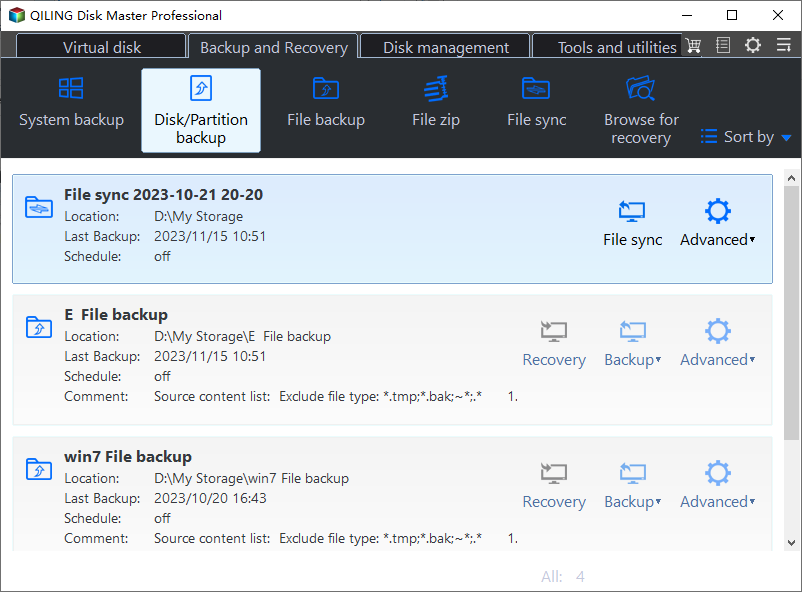
Step 1. Open Disk Backup
Go to the Backup and Recovery tab and click Disk Backup. The page lists every disk with its partitions, so the disk that carries the volume the snapshot kept rejecting is easy to identify.
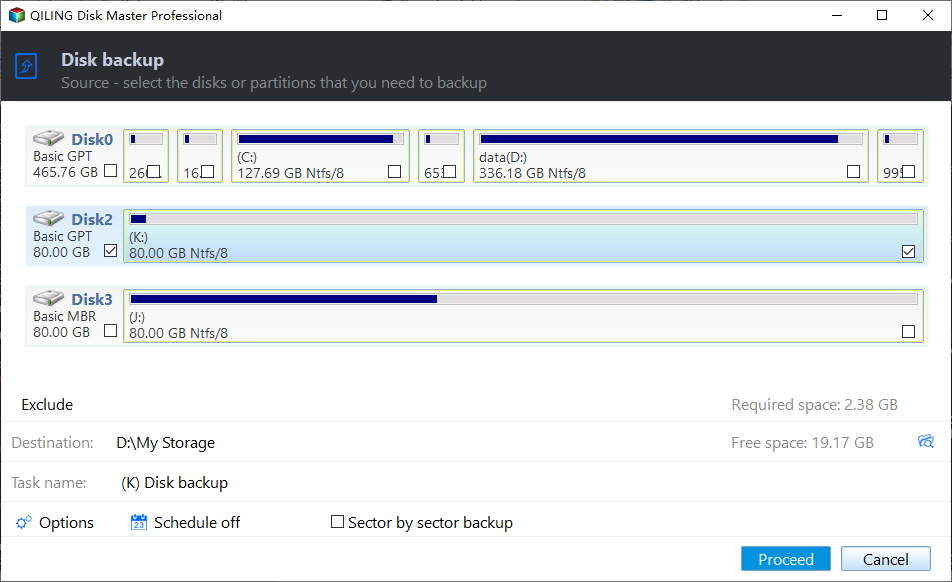
Step 2. Tick the Disk in the Source List
Tick the disk in the source list and confirm that the required space shown at the bottom matches the used space of that disk. Leave the sector by sector option clear unless the drive has read errors.
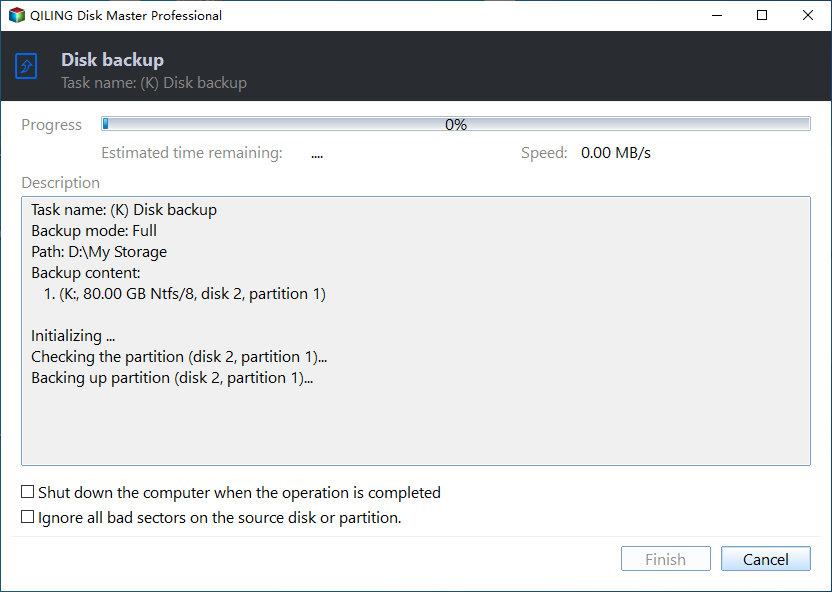
Step 3. Preview and Click Proceed
Set a destination on another disk, preview the pending operation and click Proceed. When the task reports completion, compare a few folders from the image with the live volume before you change any provider setting.
Frequently Asked Questions
Does 0x80042306 damage the existing backups?
No. The job stops before new data is committed, so earlier restore points and image files remain readable.
Can I disable the vendor provider permanently?
Yes, when the hardware it belongs to is gone. If the controller is still in use, update its driver instead, because the provider is what makes hardware snapshots fast.
Why does the error appear only on one volume?
The veto is decided per volume. Shadow storage, a filter driver, or a file system state on that one volume is enough, which is a useful hint when other drives back up normally.
When the provider reports success but an application writer still fails, the repair path in VSS error 0x800423F4 is the closer match for the symptoms.
Related Articles
- Backup Fails With VSS Error 0x800423F4
- Windows Backup No Usable Drives Found
- Backup Fails on a Dedup Volume in Server 2025
- What Is a Disk Image and How to Create One
- Backup Error 0x8007002F on the D: Drive
Products
Articles & Tutorials
- Data Recovery
- Data Backup
- File Recovery
- File Backup
- System Backup and Restore
- Disk and Partition Clone
- Technical articles
- Mobile articles
- Disk Master Help
- Windows Data Recovery Tutorials
- Windows Secure Delete Tutorials
- Windows Partition Management Tutorials
- Windows File Backup and Restore Tutorials
- Windows System Backup and Restore Tutorials
- Windows Disk Backup and Restore Tutorials
- Windows Clone Tutorials