VSS Error 0x8004231F: Not Enough Shadow Copy Storage
Quick Navigation:
- How Shadow Storage Works
- Old Snapshots Hold the Space
- Raise the Limit and Retry
- Keep the Backup Independent
- Frequently Asked Questions
The backup fails a few minutes in with 0x8004231F, and the drive still shows tens of gigabytes free. That contradiction is the point of this error: the space that ran out belongs to the shadow copy area, not to the volume as a whole. The snapshot could not be extended, so the service stopped it and handed the failure to the backup job.
How Shadow Storage Works
A snapshot does not copy the whole volume. It records the blocks that change while the snapshot exists, and those blocks are written into a hidden storage area on the same volume. The area has a maximum size, and the default is a modest share of the volume rather than all of the free space.
When the stored blocks reach that maximum, the service cannot keep the snapshot consistent. Depending on the age of the snapshot and the policy, it either deletes the oldest snapshot or fails the request, and a running backup sees the second outcome as 0x8004231F.
This is why the error arrives late rather than at the start. The backup itself is generating changes: log files, temp files, and metadata all differ from the moment the snapshot was taken, and the difference grows with the length of the job.
Long jobs and small limits fail first. A two-hour image of a busy system volume writes far more difference data than a ten-minute file backup, so the same machine can pass one task and fail another.
Old Snapshots Hold the Space
Restore points are snapshots too. A machine that has kept monthly restore points for a year may already be using most of the shadow area before the backup starts, so the new snapshot has almost nothing to grow into.
Check how much of the area is in use and how many snapshots exist. If older entries are no longer needed, remove them; a machine with a healthy backup routine does not need a year of restore points as well.
Deleting snapshots is done with vssadmin delete shadows, run from an elevated prompt. vssadmin is a Windows built-in tool and is not part of Qiling Disk Master; it only manages the shadow copies that Windows and other products created, so read the list before you delete anything.
Removing snapshots does not touch your files or your backup images. It only discards the ability to roll the volume back to those points, which is why the oldest entries are the right ones to remove.
Raise the Limit and Retry
If the snapshots are few and the volume is large, the limit itself is too small. Increase the maximum size for the volume that hosts the files being backed up, and leave enough headroom for the longest job in the schedule rather than for an average one.
Keep the area on the same volume. Moving shadow storage to another disk is supported in some configurations, but it adds a dependency that fails in its own way when that disk is slow or disconnected.
Retry the backup after the change and watch when it fails. A job that now runs to the end confirms the diagnosis; a job that fails at the same minute points at a filter driver or an application that writes far more than expected.
If the volume is simply too full, free space first. Shadow storage cannot grow into space that does not exist, so a volume at 97 percent will keep failing no matter how high the limit is set.
Keep the Backup Independent
The permanent fix is to stop letting the backup depend on the shadow area. A disk-level image reads blocks in order and needs no growing difference file, so it cannot run out of shadow storage halfway through. Qiling Disk Master writes that image to a separate disk, and the source volume keeps its snapshots for restore points instead of spending them on backups.
Keep file-level jobs for the folders that change daily, and use the image for the system volume. That split keeps each job short and keeps the shadow area out of the critical path.
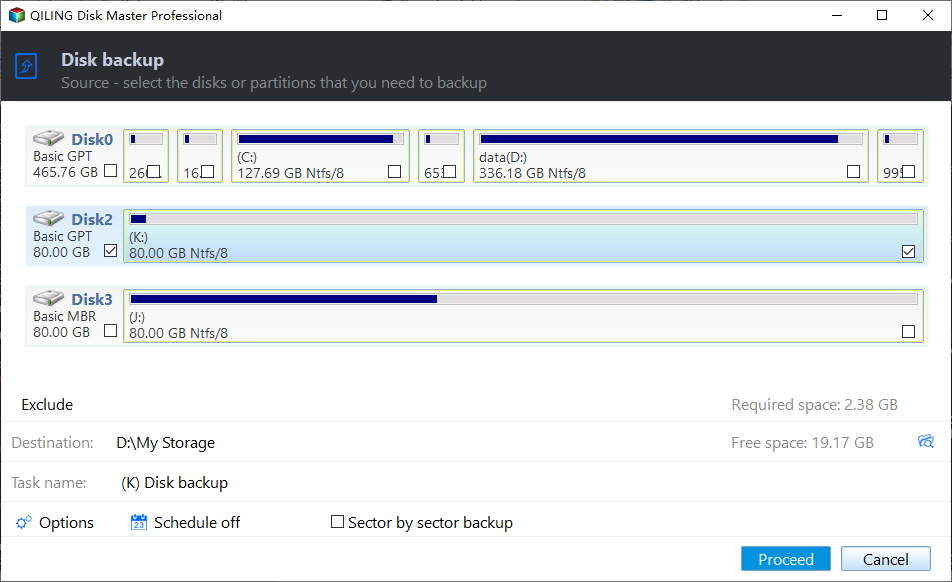
Step 1. Open Disk Backup and Tick the Disk
On the Backup and Recovery tab, click Disk Backup. Tick the disk in the source list and confirm that its partition layout matches what Disk Management reports for the same disk number.
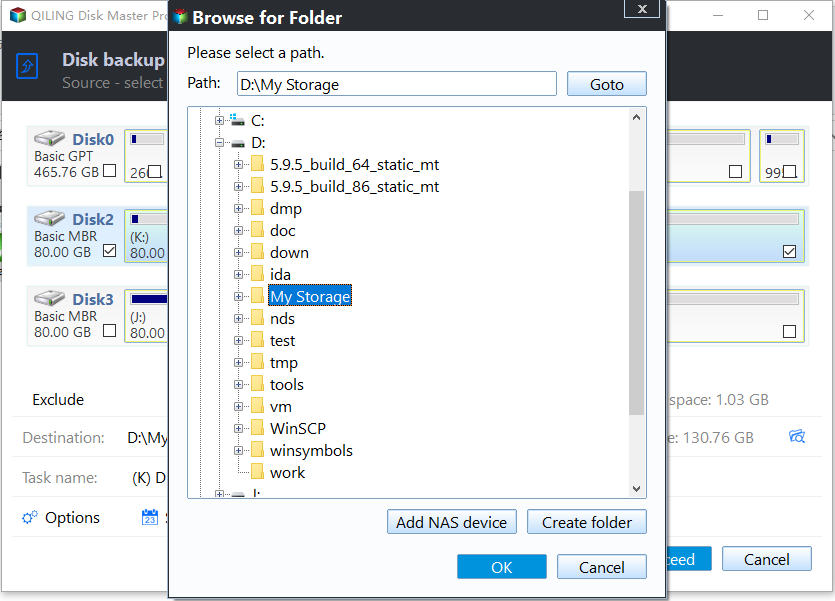
Step 2. Choose a Destination With Room
Select a folder on another physical disk and read the free space shown next to the path. Leave room for at least one more full image, because the next run will need it before the old one is rotated out.
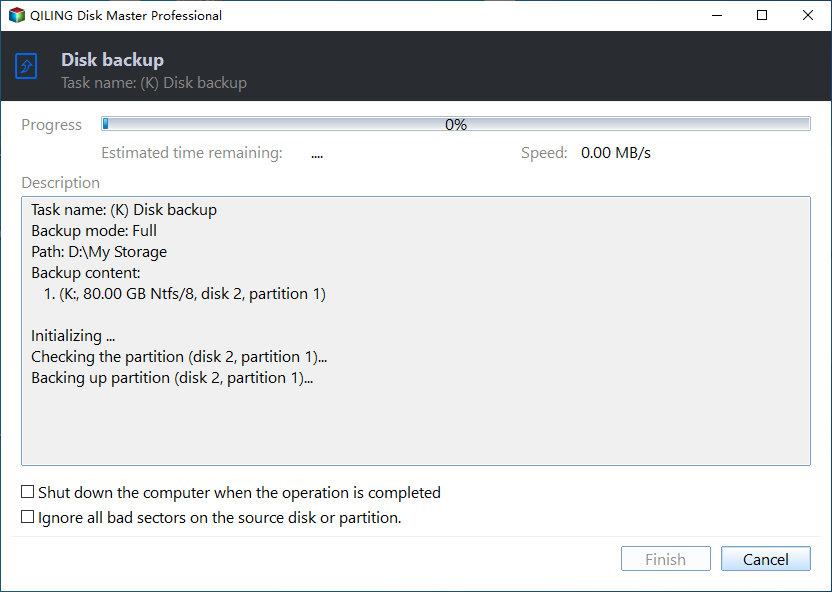
Step 3. Preview and Click Proceed
Preview the pending operation and click Proceed. The progress window reports the write rate and the remaining time, and a steady rate across the whole job is the sign that nothing is waiting on a full shadow area.
Frequently Asked Questions
Why does the drive show free space while the error says storage is full?
The space that ran out is the shadow area, which has its own limit inside the volume. Free space outside that area cannot be used by a snapshot.
Will deleting restore points break system restore?
It removes the older rollback targets. New restore points can still be created once the area has room again.
Does a larger limit slow the machine down?
Not by itself. The area only grows as blocks change, so a high maximum costs nothing until a snapshot actually needs the room.
If the code changes to a provider failure instead of a storage shortage, the steps in Windows backup error 0x81000019 cover that variant.
Related Articles
- Windows Backup Error 0x81000019: Shadow Copy Failed
- Backup Fails With VSS Error 0x800423F4
- Backup Stops When the PC Goes to Sleep
- How to Delete Backup Files in Windows 10
- The Best HDD for Backups
Products
Articles & Tutorials
- Data Recovery
- Data Backup
- File Recovery
- File Backup
- System Backup and Restore
- Disk and Partition Clone
- Technical articles
- Mobile articles
- Disk Master Help
- Windows Data Recovery Tutorials
- Windows Secure Delete Tutorials
- Windows Partition Management Tutorials
- Windows File Backup and Restore Tutorials
- Windows System Backup and Restore Tutorials
- Windows Disk Backup and Restore Tutorials
- Windows Clone Tutorials