[9 Solutions] Fix Kik not Working on iPhone
Summary
Kik stopped working on iPhones, but you can use Qiling MobiSaver for iPhone to recover your data. The issue may be due to various reasons, and using a third-party app like Qiling MobiSaver can help you access your Kik messages, contacts, and other data. This can be a useful solution if you're unable to access your Kik account on your iPhone.
Kik Messenger, also known as Kik, is a messaging app available for Android and iPhones that differs from other instant messaging platforms.
The platform allows users to engage in simple chats and share files, and also offers features for anonymous random chats and live streams.
Kik users may experience issues with the app not working, which can be frustrating when trying to chat or watch streams. To resolve this, users can try troubleshooting steps such as restarting the app, checking for updates, or reinstalling the app. This can help prevent future issues and get the app working again.
Why Is Kiknot Working on iPhone
There are many reasons why Kik may not be working on your iPhone, which may not necessarily be due to the app itself. Issues with your internet connection, phone storage, or operating system can also cause problems with Kik.
The reasons behind "not working" issues can be varied, including problems with your internet connection, excessive cache, small glitches or bugs, or even an update. It's often difficult to pinpoint the exact cause beforehand, but understanding the reason can often be revealed through the process of troubleshooting and finding solutions.
And just below, we have listed 9 solutions to help you work out this issue. Mostly these solutions will repair the problem; however, contacting the Kik support team should be your next choice if it still exists.
4 Ways to Recover Kik Messages After Logging Out
To recover old messages after logging out on your phone, you can use a tool like Qiling MobiSaver, which offers a simpler and easier way to do so.

9 Solutions to Fix Kik not Working on iPhone
No worries, because here we are, with the solutions to your Kik problem. Here we have listed the ways to be discussed, so if you have already tried some, you can move to the new ones. So let's get started.
- 1. Connect to Stable Wi-Fi
- 2. Restart Kik App
- 3. Switch to Mobile Data
- 4. Restart iPhone
- 5. Turn On and Off Airplane Mode
- 6. Clear Kik Cache
- 7. Update iOS on iPhone
- 8. Update Kik App
- 9. Reinstall App
Fix 1. Connect to Stable Wi-Fi
Kik requires a stable internet connection to work. If the internet is not stable, Kik will not be able to load data properly. Connecting to a stable Wi-Fi network might help, and the steps to do so include.
Step 1. To access Wi-Fi settings on your device, go to the Home Screen and open the "Settings" app, then select "Wi-Fi" from the list of options. Alternatively, you can also access Wi-Fi settings from your Control Center.
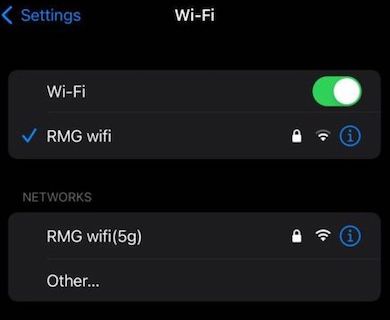
Step 2.To connect to Wi-Fi, tap on your "Wi-Fi Network" and enter the password if it's requested. This will allow you to connect to the internet.
Let's try restarting your router by unplugging it, waiting 15-20 seconds, and plugging it back in. Then, try reopening Kik to see if the issue has been resolved. If not, we can move on to the next troubleshooting step.
Fix 2. Restart Kik App
Closing Kik Messenger and removing it from the recent list can resolve issues caused by stuck app processes in memory. When the same process name is created multiple times, problems arise. To resolve this, simply close Kik Messenger and remove it from the recent list, following the detailed steps provided.
Step 1. Open Recent App List.
- In iPhone X and later, swipe up from the bottom of the screen and stop at the middle.
- In other versions, double-click on the home button.
Step 2.Swipe left or right and find Kik.

Step 3.Now Swipe up to remove Kik from the list and close the app.
Now try reopening Kik to see if it works, and again if it doesn't, move on to the next one.
Fix 3. Switch to Mobile Data
If you are on Wi-You've tried troubleshooting your Wi-Fi connection by switching to a different network and even restarting your router, but it's still not working. It might be more reliable to switch to mobile data for now.
To switch to Mobile Data, try turning off your device's Wi-Fi and tapping on the Mobile Data icon in the Control Center. Alternatively, you can also try adjusting some settings, but the exact steps may vary.
Step 1.Open "Settings" > "Cellular or Mobile Data" Option.
Step 2.Enable Cellular Data or Mobile Data. This will turn on your internet.
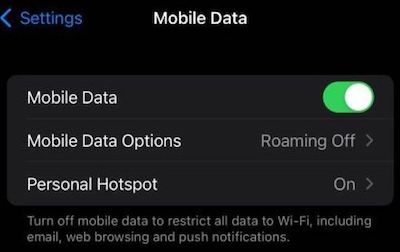
Step 3.To ensure your iPhone is set to the max allowed cellular setting, go to Settings > Cellular/Mobile Data, and select the highest available option, which is typically 5G, 4G, or 3G, depending on your carrier and iPhone model. This will allow your iPhone to take full advantage of the fastest available cellular network.
Fix 4. Restart iPhone
Sometimes, an issue with a program or system can be resolved by simply rebooting the device, as it can reset any processes that may be causing problems and give them a fresh start.
To restart your device, press the power button, hold it until you see options on the screen, drag the Power off slider, wait 30 seconds, and then turn it back on by long-pressing the power button.
Fix 5. Turn On and Off Airplane Mode
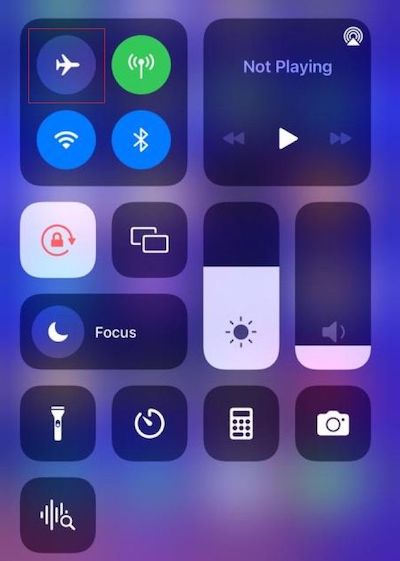
When your device's signal search isn't performing well, try turning Airplane Mode On and Off to improve the signal. This simple trick can help restart the signal search service. To do this, simply turn Airplane Mode off, which will shut down the signal search, and then turn it back on, which will restart the service. The steps to follow this process are listed below.
Step 1.Open Control Center.
- To access the Control Center on an iPhone X or later, swipe down from the top-right corner of the screen.
- Swipe up from the bottom of the screen.
Step 2.To turn airplane mode on and off, tap on Airplane Mode, wait for 15 seconds, then tap again.
Fix 6. Clear Kik Cache
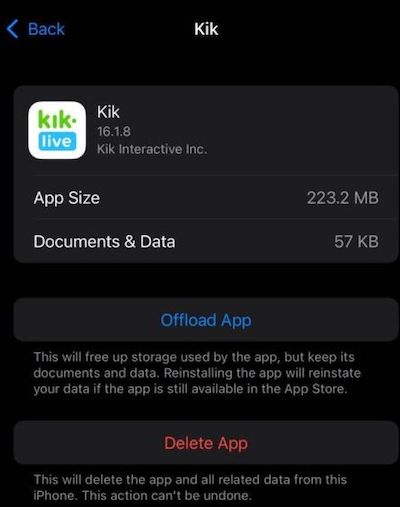
Clearing cache on iPhones is the same as deleting the app, entirely different from Androids, and deleting Kik from your iPhone involves the following steps.
Note: This process will delete all your Kik saved data, including saved contacts, chats, and login information, so it's recommended to try other methods first.
Step 1.Open "Settings" > "General" > "iPhone Storage".
Step 2.Find and delete the Kik app, and you are done. Now just install it back from the App Store.
Fix 7. Update iOS on iPhone
To resolve the issue of Kik "not working", it's essential to keep your device updated with the latest iOS developments. Regular updates improve the user experience, add new features, and remove problems causing bugs, including the Kik issue. By updating your device, you can erase many problems and ensure a smoother experience. Follow the steps to update your iOS device.
Step 1.Open "Settings" > "General".
Step 2.Now tap on "Software Update".
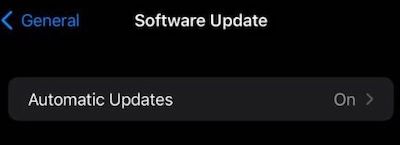
Step 3.Wait for some time and see if an update's available; if yes, update your device.
Well, if not, move on to the next Fix.
Fix 8. Update Kik App
Many apps, including Kik, require regular updates to function properly and prevent errors, which can be caused by server issues, device updates, or other problems.
Step 1.Open App Store.
Step 2.Tap on your Profile icon on the screen.
Step 3.To check for Kik updates, scroll down or click on the "Available Updates" section.
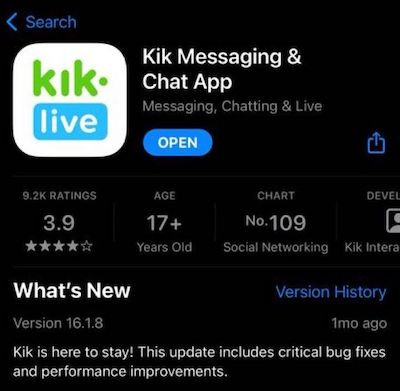
Step 4.If an update is available, tap on Update to install it.
Fix 9. Reinstall Kik App
Reinstalling Kik is the ultimate solution to try, as it rewrites new data files and can resolve issues. However, it's a last resort because this process also deletes all existing data, including any that might be causing the problem. If you're willing to take that risk, you can uninstall Kik, delete the app, and then reinstall it from scratch. This will give you a fresh start, but be aware that you'll lose any data that was stored in the app. If you're not comfortable with that, you may want to try other troubleshooting methods first.
Step 1.Open "Settings" > "General" > "iPhone Storage".
Step 2.To resolve the issue, uninstall the Kik app, delete it, and then reinstall it. This should resolve the issue.
Step 3.To get the Kik app on your device, open the App Store, search for "Kik" and tap the "Get" button to install it.
Now open Kik to see if it's working properly, login is necessary to test it for the best.
Bonus Tip: Recover Kik Data with Qiling MobiSaver
What if you had to delete Kik to remove the problem? Though your problem might be fixed, you will lose all your data. Serious, right! These are the kind of situations where QilingMobiSaver for iPhone comes to help.
MobiSaver is an iPhone data recovery tool available for Windows and Mac, allowing users to recover deleted data, not limited to Kik, from their iPhones.
You can recover deleted notes, contacts, call history, WhatsApp data (including attachments), messages, and more using MobiSaver. We'll guide you through a step-by-step process to recover your Kik data, but first, let's explore the special features to get a better understanding of what it can do.
Main Features
- Unlimited recovery each time:With each scan, you can recover unlimited data, such as photos, videos, contacts, and more, without any file quantity limits.
- Extensive file types:This software can recover deleted data from various file types, including calendars, reminders, Safari, timelines, memos, audio, and attachments, as well as data from third-party apps like WhatsApp, Kik, and LINE.
- Free technicalsupport and lifetime upgrades:With MobiSaver premium, you get free lifetime upgrades and professional technical support to clear your doubts and issues.
- Multiple recovery modes:The app provides three recovery modes, allowing users to recover data from iOS devices, recover from iTunes backup, or recover from iCloud backup.
MobiSaver offers both a Premium and a Free version, with the Premium version having more features, but the Free version still being useful for those with limited needs.
Steps to Recover Kik Data With Qiling MobiSaver
To recover Kik data with Qiling MobiSaver for iPhone, follow these steps. First, download and install Qiling MobiSaver on your computer.
Step 1. Select Device Storage
Connect your iPhone to your PC, launch Qiling MobiSaver, click the "Kik" button, and select "Device Storage" to recover Kik data from your iPhone.
Step 2. Make Sure Your Phone Has Kik
If the Kikis app is not installed on your device, it will not be detected.
Step 3. Scan iPhone to Find Kik Data
Qiling MobiSaver will automatically scan your iPhone 13/12/11/X/XR/XS/8/7/6/5/4, and find present Kik data and even some lost data, taking a few minutes to complete. Just be patient and wait.
Step 4. Preview and Restore Kik Chats/Attachments
After clicking the "Kik" button, the missing chats and Kik files will be displayed, allowing you to preview and select the data you want to recover. You can then choose to recover the selected data to your PC or device.
Final Verdict
The solutions provided earlier may have helped resolve the issue. However, if uninstalling Kik is required, Qiling MobiSaver can be a useful tool to help with the process.
MobiSaver allows for efficient recovery of deleted Kik data in a few simple steps, and its capabilities extend to recovering data from other deleted apps as well.
The software installation process is straightforward, requiring only a visit to its website, downloading it, and following the installation prompts, with no need for guides. It's a very simple process.
Related Articles
- How to Recover Missed Calls iPhone
- iPhone Keeps Asking for Apple ID Password (10 Ways)
- 10 Best iPhone Data Recovery Services and Software
- How to Put iPad in Recovery Mode [2022 Update]
- How to Recover Deleted Files After Upgrading to Windows 11
If you've recently upgraded to Windows 11 and are having problems finding files, read this tutorial and see how to recover deleted files after Windows 11 upgrade. You can recover lost files on Windows 11 with data recovery software, restore files from backups and previous versions. - Recover Deleted Files from GoPro [Files and Videos]
Do you want to recover deleted files from GoPro? If you permanently delete files, we will teach you how to recover deleted photos and videos from GoPro with professional recovery software. If you are a GoPro Plus member, you can recover deleted files from the GoPro Plus cloud backup.
Products
Articles & Tutorials
- Data Recovery
- Data Backup
- File Recovery
- File Backup
- System Backup and Restore
- Disk and Partition Clone
- Technical articles
- Mobile articles
- Disk Master Help
- Windows Data Recovery Tutorials
- Windows Secure Delete Tutorials
- Windows Partition Management Tutorials
- Windows File Backup and Restore Tutorials
- Windows System Backup and Restore Tutorials
- Windows Disk Backup and Restore Tutorials
- Windows Clone Tutorials