MacOS Comparison: Monterey vs Big Sur
Page Content:
- The macOS Big Sur
- The macOS Monterey
- Monterey vs. Big Sur – Should you upgrade?
- Bonus Tip: Prevent Data Loss after macOS Update
Apple's latest macOS version, Monterey, released in October 2021, is a significant update that replaces Big Sur. The question is, should you upgrade to Monterey? A comparison between the two versions can help you decide, weighing the new features and improvements against the potential benefits of sticking with Big Sur. This analysis will help you determine if it's the right time to update to Monterey or if you should wait.

The macOS Big Sur
The initial launch of macOS Big Sur was marred by stability issues, but these were soon resolved with optimization. Launched on November 12, 2020, it was the first update to support both Intel Macs and Apple Silicon Macs, offering a quick, stable, and visually appealing OS.
The Big Sur update brings significant improvements to macOS, with a major change being a revamped interface that is now more convenient and intuitive.
The improvements have been in the following realm:
- A neat and beautiful look.
- Apple has made several updates across its operating system, including new features in Safari, Messages, Maps, and other apps. The changes aim to improve user experience and functionality, although specific details were not provided.
- An improved Notification Center.
- A complete redesign of the operating system.
The update has some new features, but it also has some drawbacks. It lacks contrast and transparency controls, which is a notable absence. Additionally, while some improvements have been made to the touch screen, a touch screen option is still not available.
Foolproof Guidance: Get Old Versions of macOS
Here is how to get an old version of macOS so you can downgrade and run more than one version on your system! To install an old version of macOS, you can download an older version of the operating system from the App Store or from the official Apple website. You will need to create a bootable installer from the downloaded file, which will allow you to install the older version of macOS on your system.
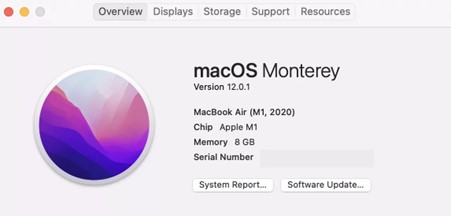
The macOS Monterey
macOS Monterey, launched in June 2021, is the current version for most Mac devices. Unlike the Big Sur update, which was relatively large, Monterey is a minor update in size, but it packs plenty of new features worth noting.
The Monterey update brings significant improvements, including Universal Control, which allows a single mouse, trackpad, and keyboard to be used across multiple Mac devices. Additionally, FaceTime now supports spatial audio, making the overall experience more streamlined and smoother. Overall, the update aims to deliver a seamless and interconnected experience, setting it apart as one of the most unique and perfect flows of options and features.
Some salient features can be summarised as:
- Facetime updates that cover SharePlay, spatial audio, and more.
- Universal control access functionality.
- A revamping of Safari browser.
- Privacy enhancements.
Monterey vs. Big Sur – Should you upgrade?
Now that we've learned about the performance improvement on Monterey and Big Sur updates, let's check if updating to Monterey is advisable or if you should wait. We'll compare the features of the two updates one by one.
Compatibility
| macOS Big Sur | macOS Monterey |
| Any Mac Pro or iMac Pro | MacBook 2016 or later |
| MacBook Pro and MacBook Air 2013 and later | MacBook Air and Pro 2015 or later |
| iMac and Mac mini 2014 and later | Mac mini 2014 or later |
| MacBook 2015 and later | The iMac models late 2015 or later, iMac Pro, and Mac Pro 2013 or later are compatible with the latest version of macOS. This includes the iMac models with a 4K or 5K display, and the iMac Pro and Mac Pro models with a 4K or 5K display. |
User Interface
The Monterey update brought significant visual changes, particularly in Big Sur. The Control Centre now displays when the microphone is in use, and a unique Focus mode is available, making the update relatively modest overall.
FaceTime
FaceTime has received a significant update on Big Sur, and in Monterey, it has taken a step further with a newer look and improved performance. The latest update focuses on enhancing the social experience, allowing users to invite people who don't have an Apple device to join in on the fun.
Notes App
The Notes app in Monterey has been upgraded with the ability to add notes from various applications and the option to add tags to notes.
Performance
There is little to no performance difference between Big Sur and Monterey updates, making upgrading for performance enhancement less of a priority.
MacOS Update VS. Clean Install: Which One to Choose?
Upgrading an operating system can lead to slowdowns over time, making a clean install a tempting option when an update is available. However, deciding between a macOS upgrade and a clean install can be a dilemma. This guide aims to clarify the difference between the two options and help you choose the best one for your needs.
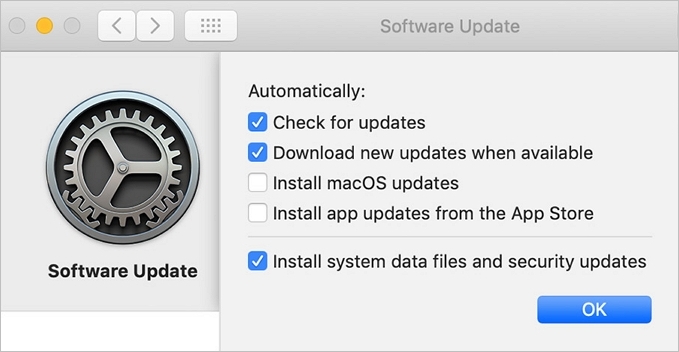
Bonus Tip: Prevent Data Loss after macOS Update
Updating your operating system can be a bit tricky, and if something goes wrong, you might face issues like data loss. To avoid this, it's a good idea to back up your important data before updating, so you don't lose any crucial information.
Time machine is a built-On your Mac, the backup tool automatically backs up your necessary data, including apps, music, photos, email, and documents.
You can back up the data using Time Machine by following steps:
- To pick Time Machine backup, go to the Apple menu and select System Preferences, then click on Time Machine.
- Select backup Disk.
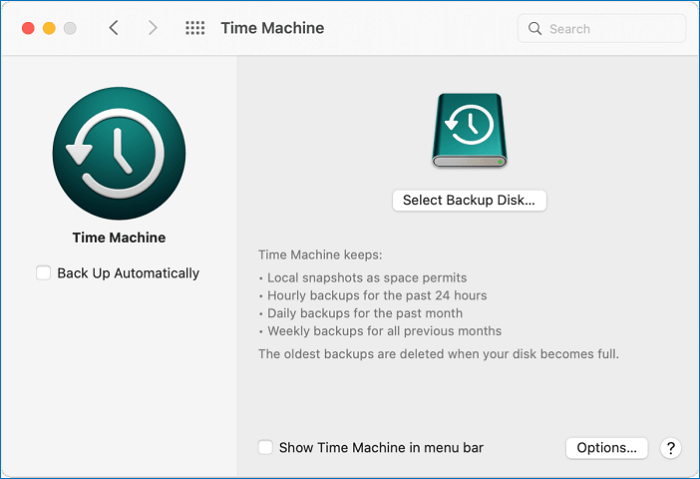
- The Time Machine begins backing up data at regular intervals after selecting the "Use Disk" option.
If you've lost data after updating your Mac and haven't backed it up, you can try using a tool like Deep Data Recovery to recover your lost data.
Step 1. Launch Deep Data Recovery, choose the desired file types, and click "Fast Scan" to initiate the recovery process.

Note: You can choose different search modes based on where and why the data was lost.
Step 2. Select the disk location where you lost data and files, then click the "Scan" button.

Step 3. Deep Data Recovery for Mac will immediately scan your selected disk volume and display the scanning results on the left pane, allowing you to quickly and easily locate the files you need to recover.

Step 4. To recover the selected file(s), simply select them in the scan results and click the "Recover" button. This will restore the files to their original state.
It is your one-A reliable and efficient solution for recovering deleted data is crucial, especially when dealing with emptied Trash Bins, accidental deletions, or other data loss scenarios. One prominent option that stands out as a helpful and important solution is a reliable data recovery tool, which can effectively retrieve lost data with minimal effort and expertise required.
Some impressive features can be included:
- Mac data recovery options are highly effective in resolving almost all data loss issues, providing a reliable solution for users who have lost important files or information.
- Data recovery software can handle a wide range of data loss issues, including deletion without a backup, format, virus attack, system crash, hardware failure, unexpected shutdown, or human error, making it a reliable solution for recovering lost data.
- It can work with every data recovery choice, including photo, video, and backup recovery.
- An effortless, quicker, and free choice for recovering your data.
- The software supports a wide variety of file formats, including Microsoft Office documents like DOC, XLS, and PPT, as well as image files like JPG, JPEG, and PNG, and multimedia files like AVI, MOV, MP4, and MP3.
Conclusion
If you're familiar with macOS, you'll likely find it a great choice for an enhanced experience. However, the question remains whether to update to Monterey or stick with Big Sur. The best course of action is to update to the latest version, which is Monterey.
In case you face data loss during the update process, consider using a reliable data recovery solution like Deep Data Recovery to efficiently recover your lost data.
Related Articles
- How to Find External Hard Drive on Mac In Case It's Working but Not Showing Up
- Help! Mac Trash Bin Won't Let Me Empty it, How to Fix?
- How Do I Fix Permission Denied on Mac
- How to Recover Deleted/ Corrupted DMG Files on Mac
- [Answered] Where Do Deleted Files Go on PC/Mac/Android/iPhone
Where do deleted files go on a computer, Mac, Android phone, or iPhone? You'll get the answers here. You can recover deleted files with Qiling data recovery software on Windows and Mac with simple steps. - BitLocker Data Recovery: Recover Data from BitLocker Encrypted Drives
Learn how to recover data from a BitLocker encrypted drive with a recovery key, password, or recovery software, and what to do before formatting.
Products
Articles & Tutorials
- Data Recovery
- Data Backup
- File Recovery
- File Backup
- System Backup and Restore
- Disk and Partition Clone
- Technical articles
- Mobile articles
- Disk Master Help
- Windows Data Recovery Tutorials
- Windows Secure Delete Tutorials
- Windows Partition Management Tutorials
- Windows File Backup and Restore Tutorials
- Windows System Backup and Restore Tutorials
- Windows Disk Backup and Restore Tutorials
- Windows Clone Tutorials